Short video and social
What size, length and frame rate do TikTok, Reels and Shorts need?
We read each platform’s own pages, made a NASA short and a landscape whale clip into 9:16 MP4s, and read the files back box by box.
By the Cutlia team · Updated · 16 min read
The short version
- Make one 9:16 file at 1080 × 1920 and 30 or 60 fps, under 3 minutes, as an MP4 with H.264 picture and AAC sound: as of November 2026 it falls inside every limit TikTok, Instagram and YouTube publish for short vertical video.
- Keep the frame rate you filmed at, and film at 30 or 60 if Reels matter: as of November 2026 Instagram asks for at least 30 fps, and raising a lower rate afterwards only repeats frames.
- Keep faces and text in the middle of the frame: none of the three publishes covered areas for ordinary posts, but laid over each other, the ones in their guides for vertical ads leave a third of a 1080 × 1920 frame clear, between 288 pixels at the top and 672 at the bottom.
- Convert once, from the original, and don’t compress before posting: our NASA short came out of its conversion 3.8 times bigger with the same picture, and the upload limits TikTok and YouTube publish are counted in gigabytes.
- Turn on each app’s quality switch when you post — as of November 2026, “Allow high-quality uploads” on TikTok, “Upload at highest quality” on Instagram — because TikTok says it otherwise uploads at standard quality.
TikTok, Instagram Reels and YouTube Shorts all play full-screen on a phone held upright, so one file can serve all three. Their limits, though, are scattered across help articles, developer documentation and advertising guides, and they don't say the same things: Instagram wants at least 30 frames a second where TikTok accepts 23, a reel may run 20 minutes where a Short stops at 3, and a Short is capped at 1080p where TikTok takes pictures up to 4,096 pixels a side.
We read every page ourselves in November 2026 and put the numbers side by side, quoting them as the platforms wrote them. Then we tested them on two real clips with Cutlia's Resize & Crop: an 85-second NASA short made for phones, already vertical but saved as a WebM file, and a 32-second drone shot of two humpback whales in landscape, which had to become 9:16. We read back what was inside each file we made, down to its keyframes and the boxes of its container, and compared it with every line the platforms publish. Our three exports, the NASA short and the whales two ways, ran in Chrome on a MacBook Air with an Apple M5 chip, and neither clip was uploaded anywhere.
The numbers, platform by platform
| As of November 2026 | TikTok | Instagram Reels | YouTube Shorts |
|---|---|---|---|
| Shape | Full-screen 9:16 (Creator Academy); 9:16 recommended for ads | Any ratio from 1.91:1 to 9:16 | Square or vertical |
| Picture size | 360 to 4,096 pixels each way; the academy says export at 1080p or higher | At least 720 pixels | Up to 1080p |
| Length | 3 minutes for every creator; 5 or 10 for some | Up to 20 minutes; over 3 isn't recommended to new audiences | Up to 3 minutes |
| Frame rate | 23 to 60 fps | At least 30 fps | The rate it was recorded at |
| File | MP4 and H.264 recommended; WebM, MOV, H.265, VP8 and VP9 accepted; up to 4 GB | No video file type named in the help; for Reels ads, MP4 or MOV, H.264 and stereo AAC, up to 4 GB | MP4, H.264, AAC-LC recommended; WebM and others accepted; up to 256 GB |
The numbers come from different kinds of pages, and that matters when they disagree. TikTok's help article on posting explains the buttons but gives no specs, so its picture sizes, frame rates, lengths and file types come from TikTok for Developers, which lists what apps may send to TikTok on a creator's behalf, and its advice on resolution from its Creator Academy. Instagram's help gives the shape, the minimum resolution and the minimum frame rate; file types and codec names appear only in Meta's guide for Reels ads. YouTube's Shorts pages give the shape, the length and the resolution cap, and its page of recommended upload encoding settings gives the rest.
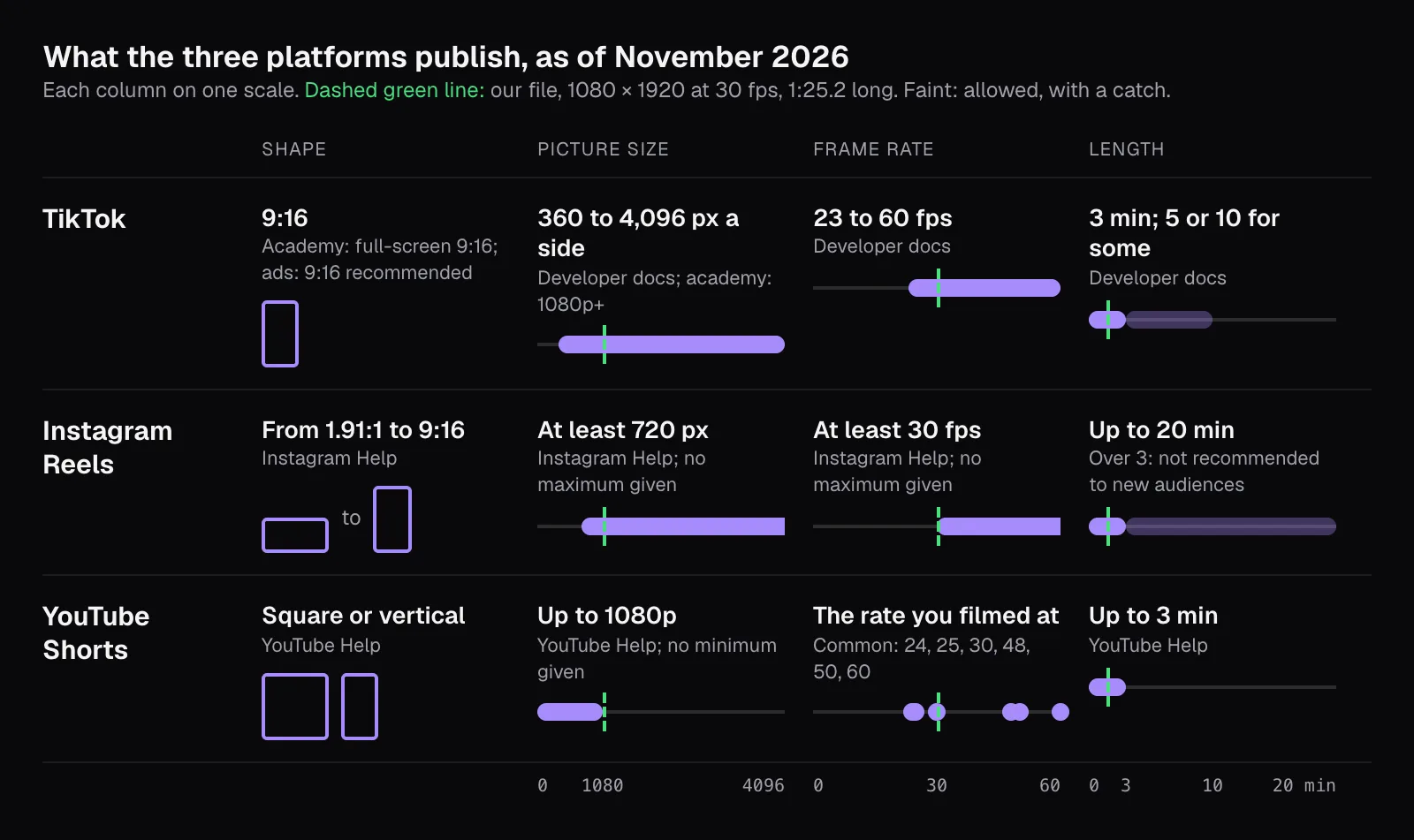
Limits like these change — YouTube's help dates its 3-minute Shorts to October 15, 2024 — so check the sources at the end before planning a series around one. What the platforms say about getting those videos seen is a different question, answered in what TikTok, Instagram and YouTube say helps reach.
Size and shape: why 1080 × 1920 is the file to make
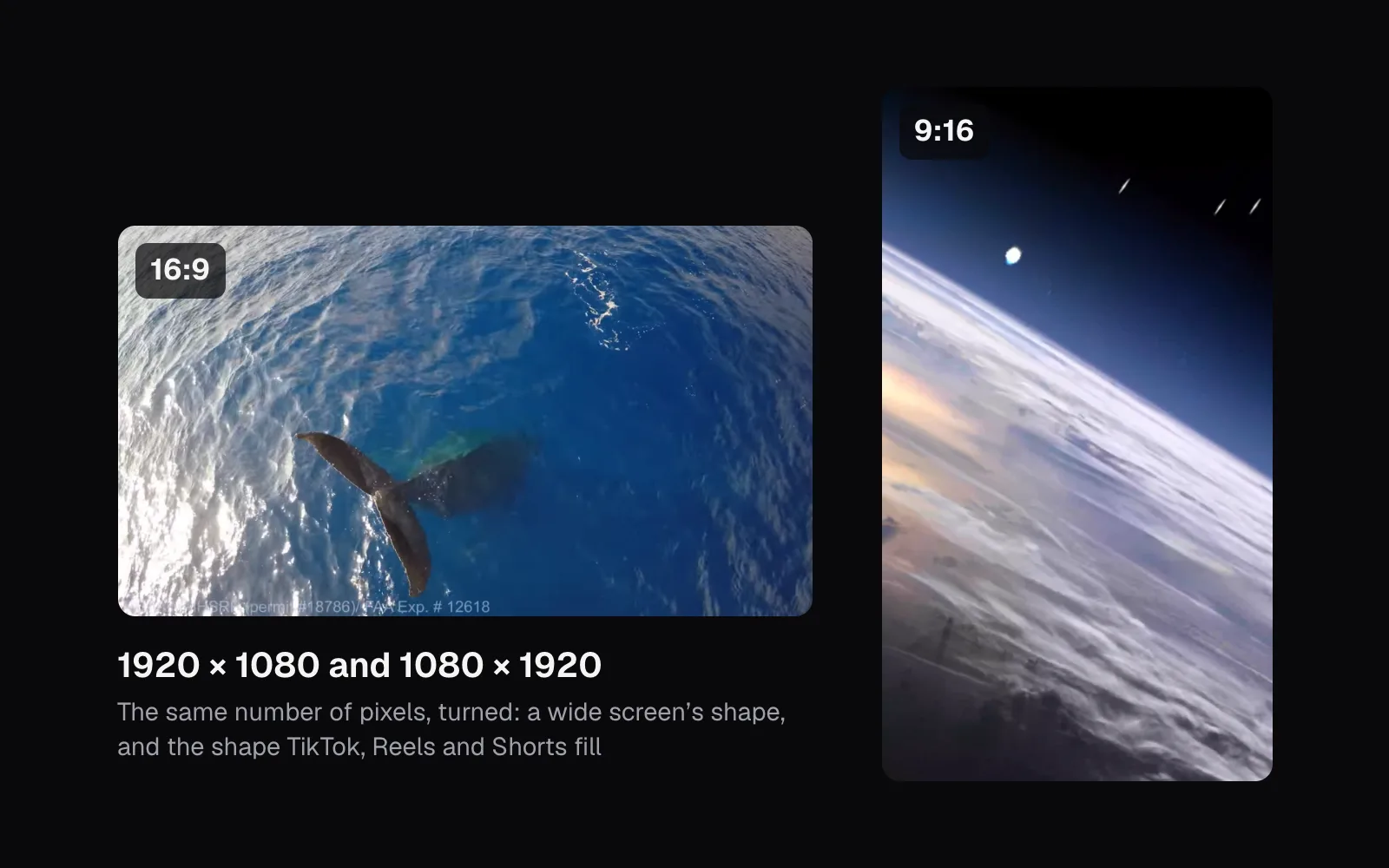
Two numbers describe a picture. Its aspect ratio is its shape: 9:16 means 9 units wide for every 16 tall, the shape of a phone held upright. Its resolution is how many pixels fill that shape. A 9:16 picture 1,080 pixels wide is 1,920 tall, and that size meets every line above at once: it is above Instagram's 720-pixel minimum, inside TikTok's 360 to 4,096, at TikTok's advice to export at 1080p or higher, and exactly at the limit YouTube states plainly: “You can upload Short videos with a maximum resolution of 1080p.”
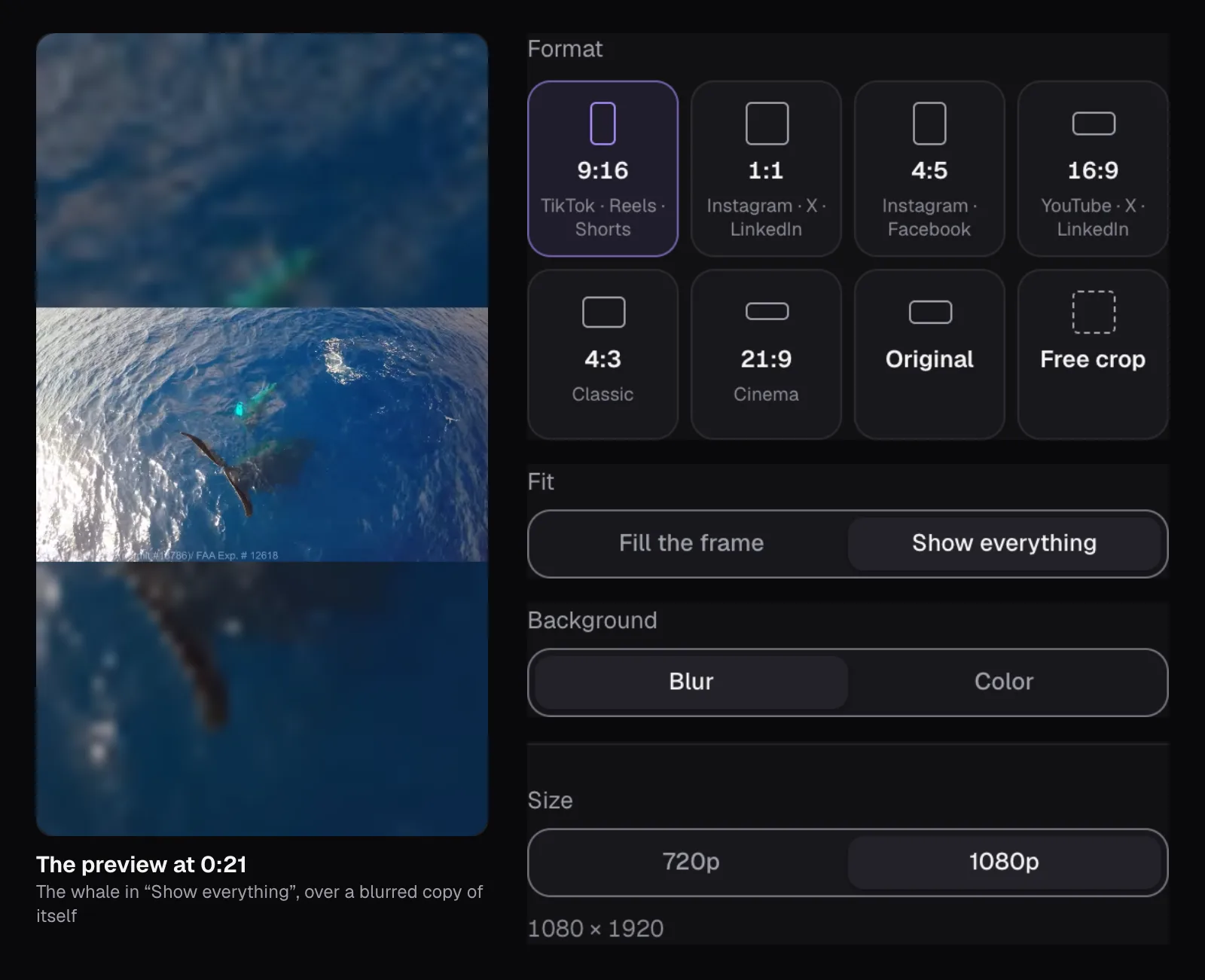
A larger picture isn't wrong for TikTok, and Meta's guide for Reels ads even recommends 1440 × 2560. But for Shorts, anything above 1080p is beyond what YouTube's help says you can upload, and a 4K export of footage that was filmed at 1080p contains no detail the camera didn't record. Resize & Crop follows the same logic: for both of our clips, whose short side is 1,080 pixels, it offered “720p” and “1080p” and had already chosen 1080p, which made 1080 × 1920. It offers 1440p and 4K only when the original has that many pixels to give.
The shape matters more than the size. Instagram accepts anything from 1.91:1 (wide) to 9:16, and YouTube treats a square video of up to 3 minutes as a Short, but a square or wide picture leaves much of a phone held upright empty; 9:16 is the shape that fills it. Our guide to aspect ratios shows what each shape keeps of the same picture.
Length: three minutes is the limit all three share
As of November 2026, YouTube's upload page asks for a file “up to 3 minutes” long with a square or vertical shape, and its help says that since October 15, 2024, videos that are both are treated as Shorts. TikTok's developer documentation puts it this way: “All TikTok creators can post 3-minute videos, while some have access to post 5-minute or 10-minute videos.” Instagram goes furthest — you can record and edit reels of up to 20 minutes — but adds a catch in the same article: “Reels over 3 minutes won't be recommended to new audiences.”
So 3:00 is the one length that works everywhere, for every account. Treat it as a hard ceiling, not a target: our NASA short, 85.18 seconds as published, came out of its conversion at 85.20 seconds, with one frame more. A video cut to end exactly at 3:00 can grow past it the same way. In Resize & Crop, the “Part” section under the settings keeps only the stretch you choose, so the trim and the new shape happen in one export.
Frame rate: keep the one you filmed at
A video is a series of still pictures, and the frame rate is how many of them play each second. The three platforms frame it differently. TikTok's developer pages accept 23 to 60 frames per second. Instagram's help says reels “should have a minimum frame rate of 30 FPS”. YouTube sets no range at all: “Content should be encoded and uploaded in the same frame rate it was recorded,” with 24, 25, 30, 48, 50 and 60 listed as common. A 30 or 60 fps video meets all three.
Resize & Crop keeps a video's own rate, up to 60 frames a second, rounded to the nearest standard one when it's within 2%. The NASA short was made at 30 frames per second, and our MP4 holds 2,556 frames at exactly 30, each on screen for one thirtieth of a second. The whale clip was less tidy: its frames come 29.82 a second on average. Resize & Crop rounded that to the nearest of the standard rates it knows, 29.97 (30000/1001 to be exact), and each of the 969 frames in our whale files lasts exactly 1001/30000 of a second: six more frames than the original had. Meta's guide for Reels ads asks for a “fixed frame rate”, and every file we made has one. Whether Instagram's minimum of 30 means 30.00 or also 29.97, its help doesn't say.
Footage filmed at 24 or 25 fps is fine for TikTok and Shorts, and below Instagram's stated minimum. Converting it to 30 doesn't make movement any smoother: going from 25 to 30 shows one frame in every five twice, because the frames in between were never filmed. If Reels matter to you, set the camera to 30 or 60 before you press record. Our guide to frame rates explains what higher rates are really for.
The file: MP4, H.264 and AAC, and what ours really held
A video file is a container holding a picture track and a sound track, each compressed by a codec. The safe combination is the same on all three: an MP4 container, H.264 picture and AAC sound. TikTok's developer pages mark MP4 and H.264 as recommended, Meta's guide for Reels ads asks for H.264 and stereo AAC at 128 kbps or more, and YouTube's settings page names MP4, H.264 and AAC-LC at 48 kHz. Our format comparison explains why MP4 plays almost everywhere.
All three of our files are MP4s with H.264 in its High profile, 1080 × 1920 pixels, progressive frames rather than interlaced ones, the 4:2:0 color sampling YouTube and Instagram list, and CABAC, the more compact of H.264's two ways of packing its data, which both list too. The whale files' sound is AAC-LC, stereo, 48 kHz, at 138 kbit/s on average. On those lines they match every platform. We read further, into the parts of a file few people ever look at, and found four places where they differ from the detailed lists YouTube, Instagram and Meta publish:
- Keyframes every 2 seconds. A keyframe is a complete picture; the frames between keyframes only store what changed. YouTube's and Instagram's lists both ask for a closed GOP, a group of pictures, “of half the frame rate”: a keyframe every half second. Ours come every 60 frames, 2 seconds.
- No B-frames. B-frames borrow from the frame after them as well as the one before; the same two lists ask for two in a row. Our files have none, so every frame is stored in the order it's shown.
- The index at the end. An MP4's index, the
moovbox, lists where every frame sits. YouTube asks for it at the front, “Fast Start”, which lets a file play while it's still downloading. Resize & Crop writes the file out as it goes and puts the index last, once every frame's place is known. - An edit list on the sound. It tells players to skip the first 44 milliseconds of sound, the warm-up samples an AAC encoder adds at the start. YouTube's settings say “No Edit Lists (or the video might not get processed correctly)”, and Meta's guide says Reels ads shouldn't contain them. Our guide to cutting without re-encoding explains what an edit list does.
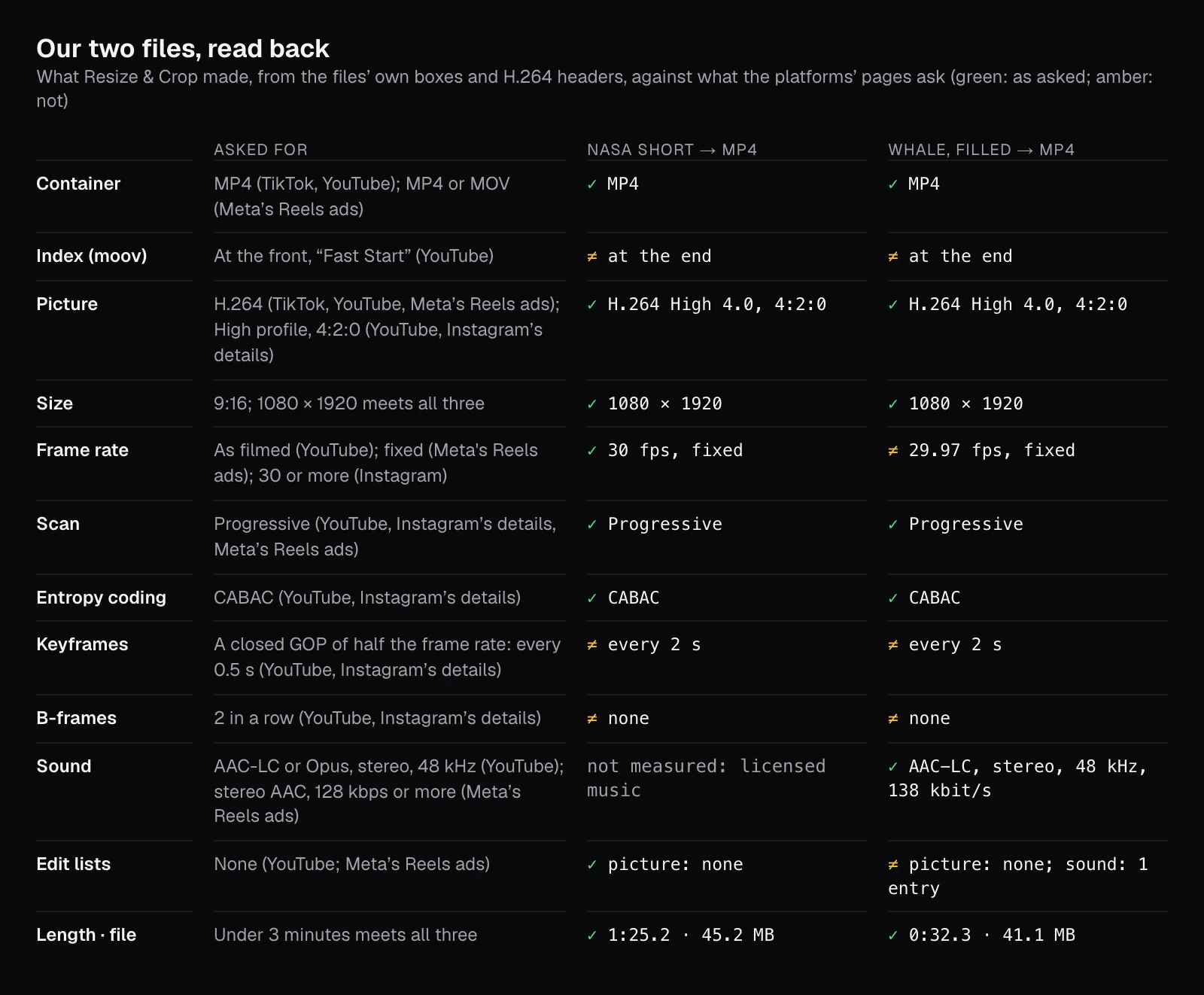
How much those four lines matter, the platforms don't say. Instagram introduces its list with “The requirements listed above should work for most people who are sharing a reel to Instagram”, and offers the detail only to those who need more help to upload. YouTube calls its settings recommendations, and as of November 2026 its page opens with a note: “These features are only available to partners who use YouTube Studio Content Manager.” We didn't post our files, so we can't tell you whether any platform treated them differently; if one ever processes a file of yours oddly, these lines are where to look.
Converting a WebM: a bigger file, the same picture
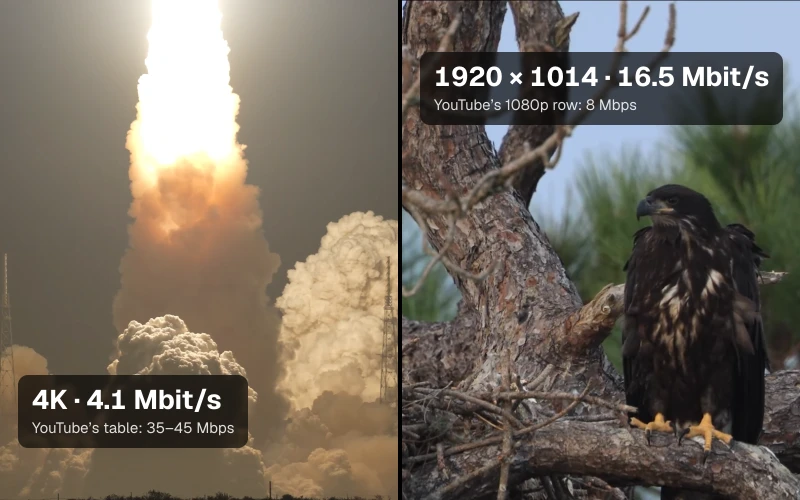
The NASA short shows a trap in “make it an MP4”. As published, it's a 12.0 MB WebM file whose picture is VP8 at 1.0 Mbit/s. After Resize & Crop, it was a 45.2 MB MP4 with H.264 at 4.1 Mbit/s: 3.8 times the size. We compared three frames of each file, pixel by pixel, and the new ones were on average 1.0 to 1.3 levels away from the old ones, out of 255, a peak signal-to-noise ratio of 41.8 to 44.5 dB. At actual pixels you can't tell them apart, block edges from the VP8 compression included.
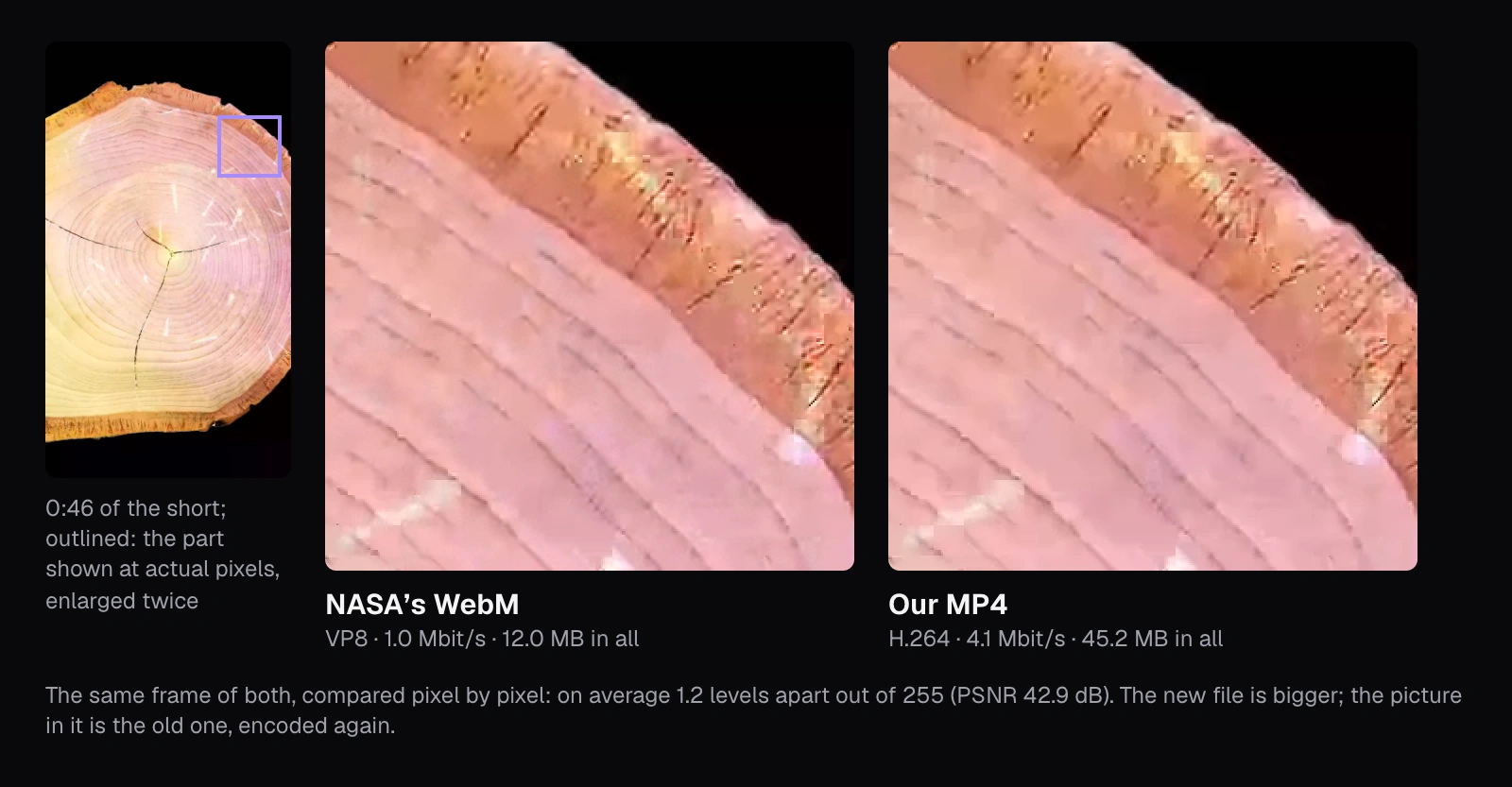
Every encode loses a little and none restores anything, which is why TikTok's Creator Academy says to “avoid re-encoding the file along the way”. A file the platform accepts as it is may be better posted untouched: TikTok's developer pages accept WebM and VP8, and YouTube's list of supported formats includes WebM. The Instagram help pages we read name no video file type, and Meta's guide for Reels ads lists only MP4 and MOV, so for Reels an MP4 is the safe choice. When you do convert, do it once, from the original, and make every other change in the same export.
The same reasoning says not to compress before posting. TikTok's developer pages and Meta's ad guide allow files up to 4 GB and YouTube up to 256 GB, against our 45.2 MB; a smaller file only gives the platform less to start from. Compress Video earns its place when the video has to pass through something with a limit first, such as a draft sent to someone in a chat app; our compression guide explains when a smaller file costs nothing you can see.
Landscape footage: fill the frame or show everything
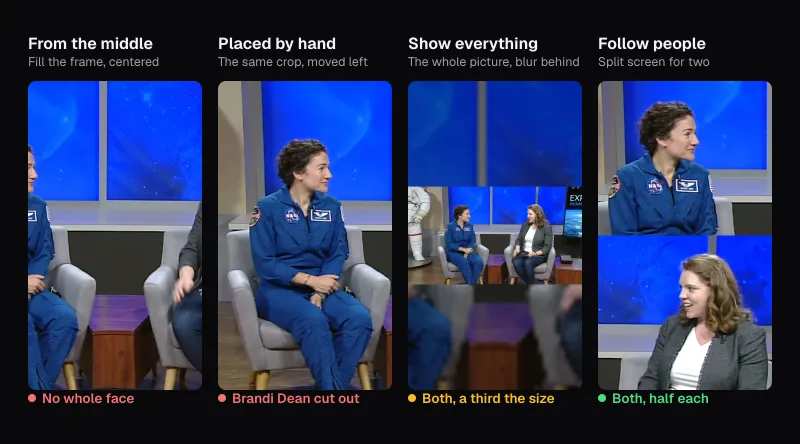
The whale clip is 1920 × 1080, and turning it into 1080 × 1920 means choosing what to give up. Resize & Crop opens on 9:16 with “Fill the frame” and “Manual” framing, centered. Filling keeps a strip from the middle of the picture, 607.5 of its 1,920 pixels across, 31.6% of its width, and enlarges it 1.78 times. “Show everything” keeps the whole picture but makes it 607.5 pixels tall, 31.6% of the frame, with a blurred copy of itself above and below.
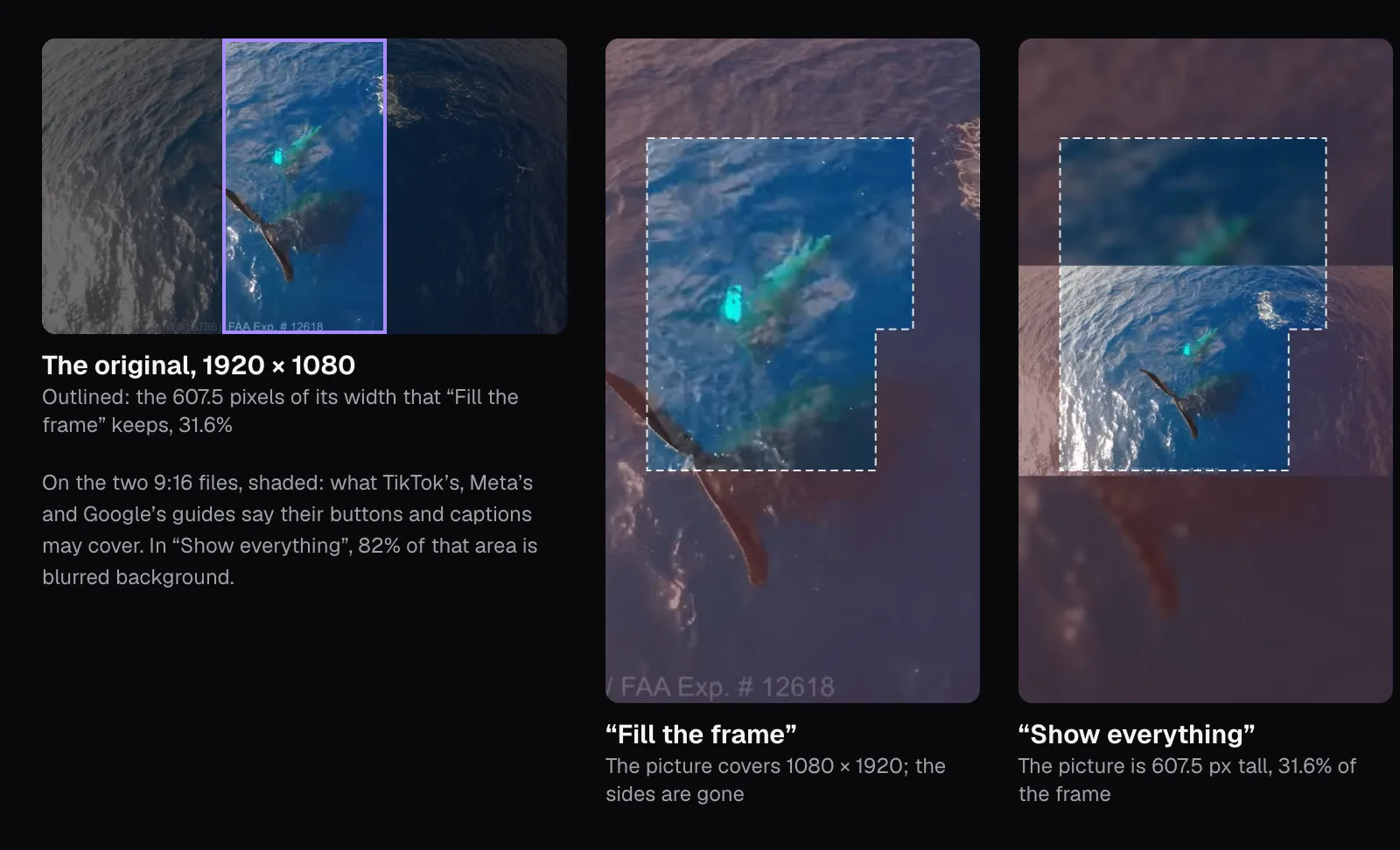
In our files the trade-off is easy to see. Filled, the second whale gliding under the water is large, but the raised tail, left of center in the original, ends up at the frame's left edge and loses its tip. The permit line burned into the bottom-left corner of the footage is cut to “/ FAA Exp. # 12618”. Fitted, everything is there, small. The two files differ in size too: the fitted one came out at 52.2 MB, the filled one at 41.1 MB.
TikTok's Creator Academy is blunt about the bands: “The blurry bars are the problem — not the shape of your video.” Showing everything does have one side effect worth knowing: in our fitted file, 82% of the area the three platforms' ad guides mark as covered was blurred background, not picture. For framing that moves with the people in each shot, or one position chosen by hand, see our guide to turning horizontal video vertical.
Where the apps’ buttons and captions cover the picture
Every vertical feed lays the account name, the caption, a profile picture and a column of buttons over your video. As of November 2026, we found no exact numbers for ordinary posts on any of the three platforms' pages. All three publish them for ads, which run in the same feeds:
- TikTok's ad help says the safe zone's size “is determined by the dimension (vertical, horizontal, or square), ad caption length, and any additional formats used”, and offers template files. Its standard in-feed template, drawn on 720 × 1280, marks 160 pixels at the top, 440 at the bottom, 80 down each side, and a column 120 pixels wide inside the right margin, 720 tall from the bottom: on 1080 × 1920, 240, 660, 120, and a column 180 by 1,080.
- Meta's guide for Reels ads says to consider leaving “at least 14% of the top, 35% of the bottom, and 6% on each side” free of text and logos: 269, 672 and 65 pixels. It gives the profile icon and the call to action as reasons, and phones taller than 9:16, on which, its help adds, an ad may be zoomed to fill the screen.
- Google's help for vertical video ads on YouTube, which may run in Shorts, draws a safe area on 1080 × 1920 and labels it: 288 pixels at the top, 672 at the bottom, 48 at the left and 192 at the right.
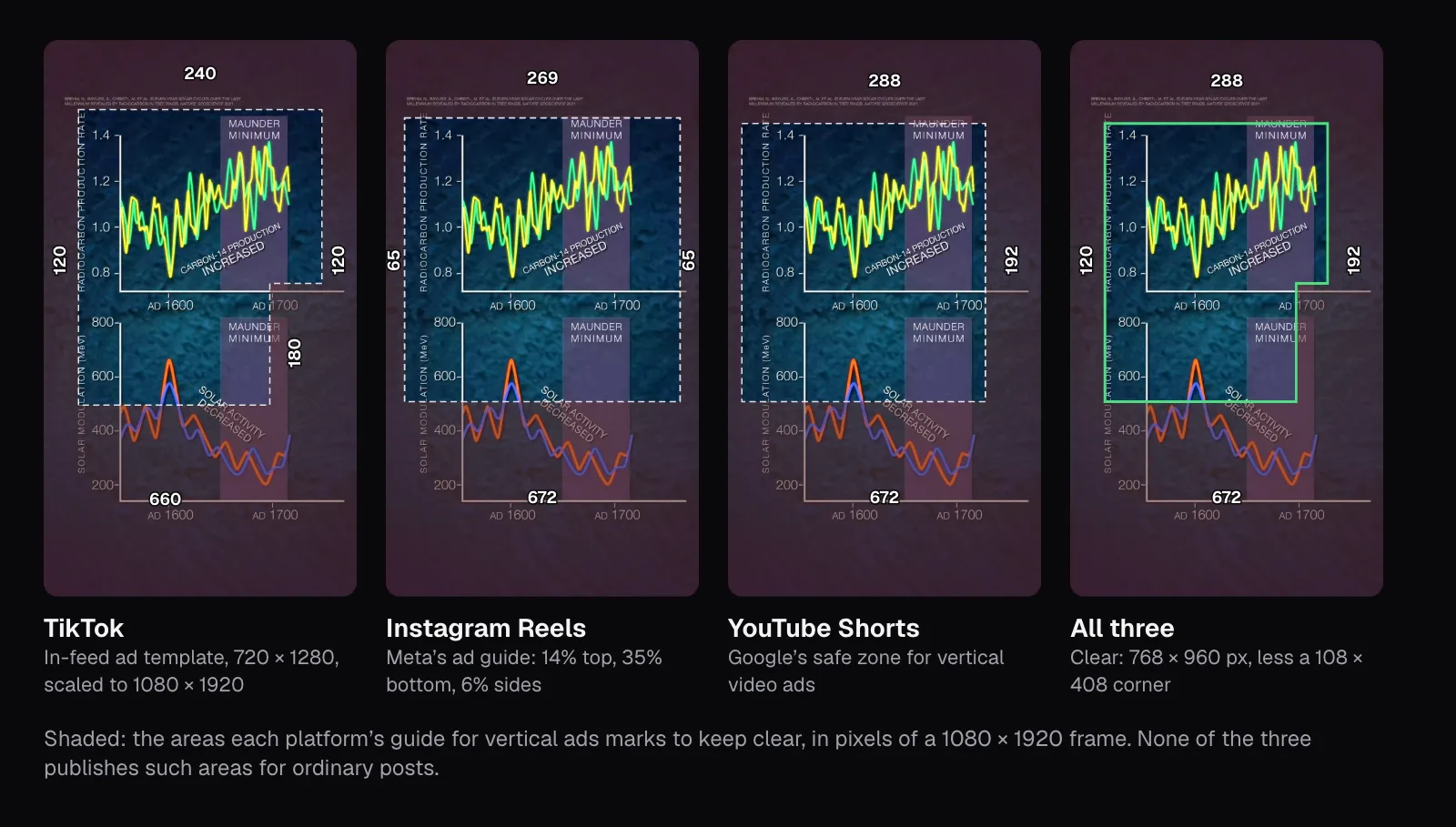
Laid over each other, the three leave a clear area from 288 to 1,248 pixels down and from 120 to 888 across, 768 × 960 pixels, minus a corner of 108 × 408 at the lower right, where TikTok's template marks its column. That's 33.4% of the frame. On their own, TikTok's template leaves 37.7% clear, YouTube's 38.9% and Meta's 44.9%. For ordinary posts, the only placement advice we found is in TikTok's Creator Academy: “keep your subject away from the right edge of the screen — TikTok's icons sit there and will overlap your content.”
The NASA short shows why it matters even for a clip made for phones. On its chart of the Maunder Minimum, the line naming the scientific paper behind it sits near the very top, inside every platform's top area, and the lower chart's years run along the bottom area all three mark.
One file for all three: the settings to use
Putting the strictest line of each row together gives one recipe:
- 9:16 at 1080 × 1920. In Resize & Crop: 9:16, “Fill the frame” or “Show everything”, and “1080p” under Size.
- Under 3 minutes, with a little to spare: set the “Part” to end a second or two before 3:00.
- 30 or 60 frames per second if you can choose, at the camera. Otherwise keep the rate you filmed at; Resize & Crop does, up to 60.
- MP4 with H.264 and AAC, which is what Resize & Crop made of both our clips, in one export from the original.
- Faces and text in the middle, between roughly 15% and 65% of the height, the band the three ad guides leave clear, and away from the right edge.
Then let the apps keep the quality you made. TikTok's Creator Academy warns that “TikTok defaults to standard quality on upload” and asks you to switch on “Allow high-quality uploads” under More Options before posting. Instagram has “Upload at highest quality” under Media quality in its settings, and notes that uploads may take longer with it on. If your source is a long talk or podcast rather than a short clip, Video to Shorts finds moments in it and makes 9:16 clips with captions; see turning long videos into short clips. And for YouTube's long videos, a different set of numbers applies, covered in the best export settings for YouTube.
Questions people ask
What resolution should a TikTok, Reel or Short be?
1080 × 1920 pixels, in the 9:16 shape. As of November 2026 it is above Instagram’s 720-pixel minimum, inside TikTok’s range of 360 to 4,096 pixels, at TikTok’s advice to export at 1080p or higher, and at YouTube’s stated maximum of 1080p for Shorts. A smaller video should be at least 720 × 1280.
How long can a TikTok, Reel or YouTube Short be?
Shorts can be up to 3 minutes. TikTok’s developer documentation says every creator can post 3-minute videos and some 5 or 10 minutes. Instagram lets you record and edit reels of up to 20 minutes but says reels over 3 minutes won’t be recommended to new audiences. A video under 3 minutes works on all three, as of November 2026.
Can I post a horizontal 16:9 video to Reels or Shorts?
Instagram accepts reels from 1.91:1 to 9:16, so a 16:9 video uploads, but it won’t fill the screen. YouTube’s upload page asks for a square or vertical video for a Short, so a 16:9 upload isn’t treated as one. Cropping to 9:16, or fitting the whole picture over a blurred copy of itself, makes a file all three accept as of November 2026, though TikTok’s Creator Academy calls blurred bars the problem.
Should I upload a vertical video in 4K?
Not for Shorts: YouTube’s help says Shorts can be uploaded at a maximum resolution of 1080p. TikTok’s developer pages allow up to 4,096 pixels a side, and Instagram’s help sets a minimum of 720 pixels but no maximum, so a sharper copy can go to those two if you filmed in 4K. One 1080 × 1920 file still meets all three, as of November 2026.
Where should I put text so the app’s buttons don’t cover it?
In the middle of the frame. None of the three publishes covered areas for ordinary posts, but laid over each other, the ones TikTok, Meta and Google publish for vertical ads leave 768 × 960 pixels of a 1080 × 1920 frame clear, less a corner at the lower right: below the top 288 pixels, above the bottom 672, at least 120 from the left and 192 from the right. TikTok’s Creator Academy also says to keep subjects away from the right edge.
Should I upload at 60 fps?
Only if you filmed at 60. As of November 2026, sixty is the most TikTok’s developer pages allow and meets Instagram’s minimum of 30, and YouTube asks for the rate you recorded at. Raising a 30 fps video to 60 by repeating frames adds no smoothness, since each frame is simply shown twice. For fast movement, set the camera to 60 before filming instead.
Sources
Where the facts in this guide come from, besides our own tests:
- Upload YouTube Shorts — YouTube Help
- Get started creating YouTube Shorts — YouTube Help
- Understand three-minute YouTube Shorts — YouTube Help
- YouTube recommended upload encoding settings — YouTube Help
- Supported YouTube file formats — YouTube Help
- Upload videos longer than 15 minutes — YouTube Help
- Use square and vertical video to engage mobile customers (safe zones for vertical video ads) — Google Ads Help
- Reel size & aspect ratios on Instagram — Instagram Help Center
- Record a reel on Instagram — Instagram Help Center
- Video ad specs on Instagram Reels — Meta Ads Guide
- About text overlays and the safe zone for ads on Facebook and Instagram — Meta Business Help Center
- Making a post — TikTok Help Center
- Content Posting API: Media Transfer Guide — TikTok for Developers
- TikTok Auction In-Feed Ads (safe zone files) — TikTok Business Help Center
- Filming high-quality videos that keep viewers watching — TikTok Creator Academy
- Create videos that fill the screen and look made for TikTok — TikTok Creator Academy
Footage in this guide
The pictures were made with Cutlia's tools from this openly licensed footage, found on Wikimedia Commons:
- Our Home In Space Series (SVS14898 - 2 YT) — NASA's Scientific Visualization Studio, Public domain
- Humpback whale Tail Sailing behaviour — NOAA Sanctuaries, CC BY 3.0