Editing
Why does slow motion look choppy, and what frame rate fixes it?
We slowed an eagle filmed at normal speed, sped up Apollo 11’s 500-frames-a-second film, slowed a slow-motion launch again, and counted the new pictures frame by frame.
By the Cutlia team · Published · 13 min read
The short version
- Smooth slow motion is filmed, not edited: the camera records more pictures per second than the video plays, and the slow-down is the recorded rate divided by the playing rate.
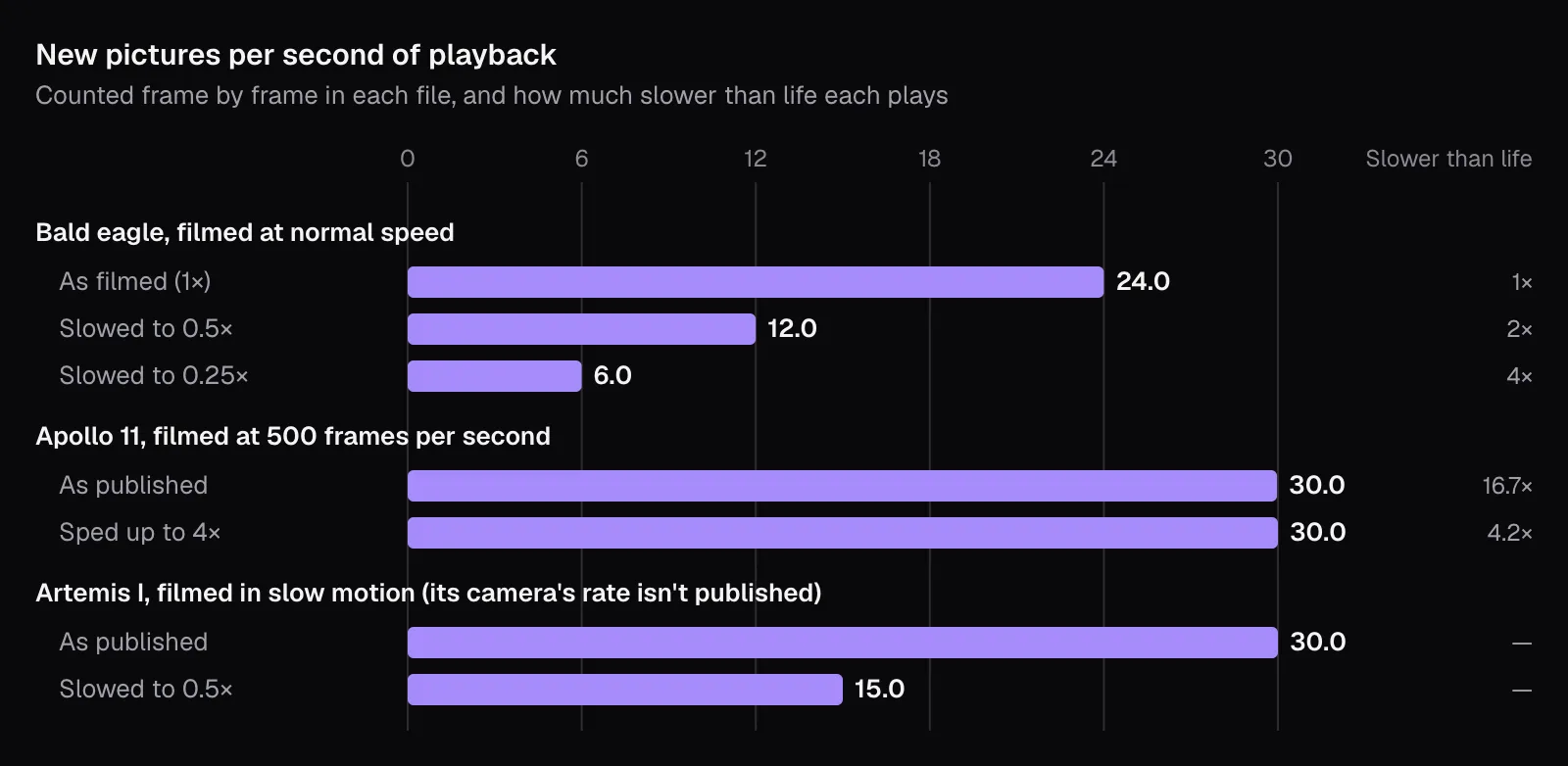
- Slowing ordinary video repeats its pictures: our eagle, filmed at 23.976 frames per second, showed 6 new pictures a second at 0.25×, each held for four frames.
- Footage filmed fast stays smooth even sped up: Apollo 11’s 500 fps film, at 4×, still had a new picture in every frame and played 4.2 times slower than life.
- Record at 60 fps for half speed and 120 fps for a quarter; an iPhone 17 films slow motion at 120 or 240 fps (as of November 2026).
- Slow only the moment that needs it and leave its sound out: Change Speed exports just the part you mark, with “No sound” one click away.
Slow a clip down and the motion either glides or moves in small jerks. Which one you get was settled when it was filmed, by how many pictures the camera took each second. An editor can stretch those pictures over more time, but it can't add real ones.
To show it frame by frame, we took three public-domain films that move at very different speeds from one frame to the next: Apollo 11's engines, filmed in 1969 on 16 mm film at 500 frames per second; NASA's slow-motion footage of the Artemis I launch at night; and a bald eagle in flight, filmed at normal speed by the U.S. Fish and Wildlife Service. We slowed them down and sped them up with Cutlia's Change Speed, cut one with Trim Video, then decoded the results frame by frame to count the new pictures in them. All of it ran in Chrome, on one MacBook Air with an Apple M5 chip.
Slow motion is two frame rates: the camera's and the screen's
A video's frame rate is how many still pictures it shows each second; YouTube's upload guide lists 24, 25, 30, 48, 50 and 60 as common ones (as of November 2026). Slow motion lives in the gap between two rates: how many pictures the camera took per second, and how many the video shows per second. Take 120 pictures in a second, show them 30 to the second, and that second lasts four on screen, with a different picture in every frame. That's what makes it fluid.
The Apollo 11 film is the extreme case. According to its record on Wikimedia Commons, camera E-8 sat at the base of the launch umbilical tower and shot 16 mm film at 500 frames per second, and the footage “takes place within approximately 30 seconds of real time”. The copy we used plays at 29.97 frames per second, so every second of the launch lasts 500 ÷ 29.97 = 16.7 seconds on screen. Its frames add up: the file holds 14,872 of them, which at 500 a second is 29.7 seconds of 1969, spread over 8 minutes 16 seconds.
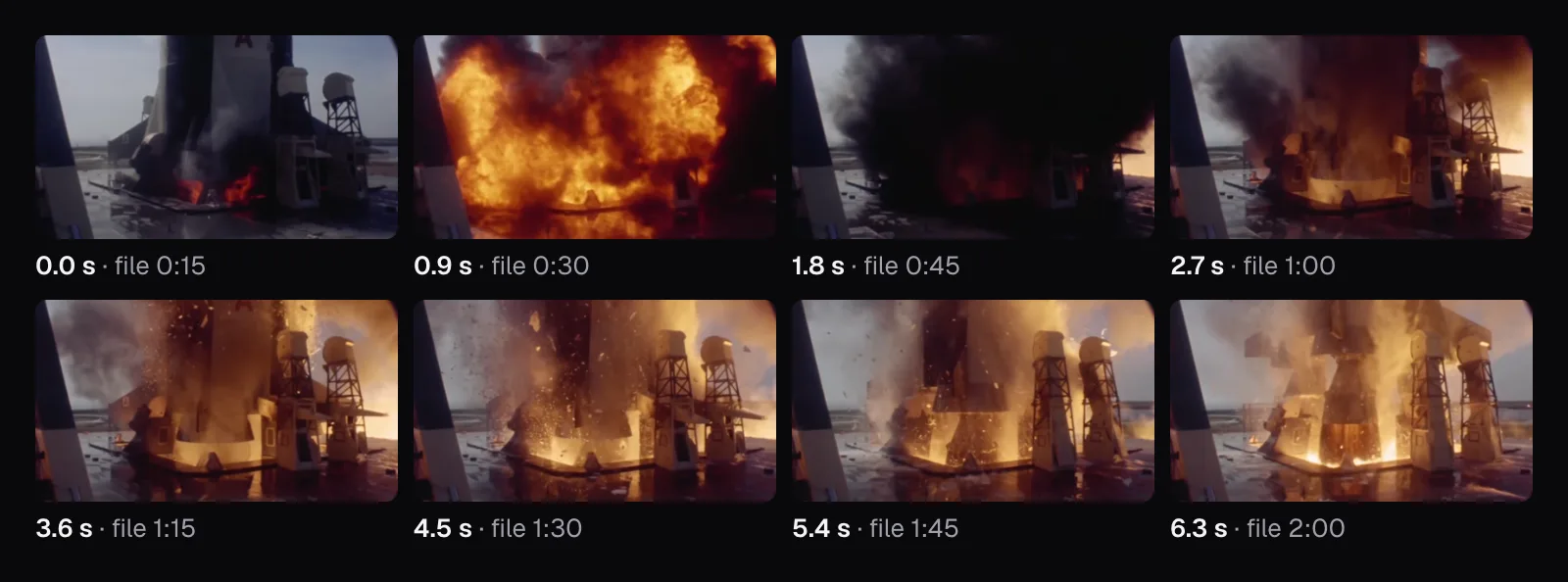
So the slow-down is a division, recorded rate ÷ playing rate, and it's fixed at the camera. Apple's iPhone guide puts it the same way: you “can slow down videos that were captured at a high frame rate”. An editor can choose how fast to play the pictures that exist, but the moments between them were never recorded.
What changes between two frames
Each frame of the Apollo film was taken 2 milliseconds after the one before it, 1/500 of a second. Each frame of the eagle, filmed at 23.976 frames per second, comes 42 milliseconds after the last: 21 times as long for things to move. We took two frames in a row from each film and measured how much of the picture changed visibly, by more than 12 of 255 brightness levels in any color.
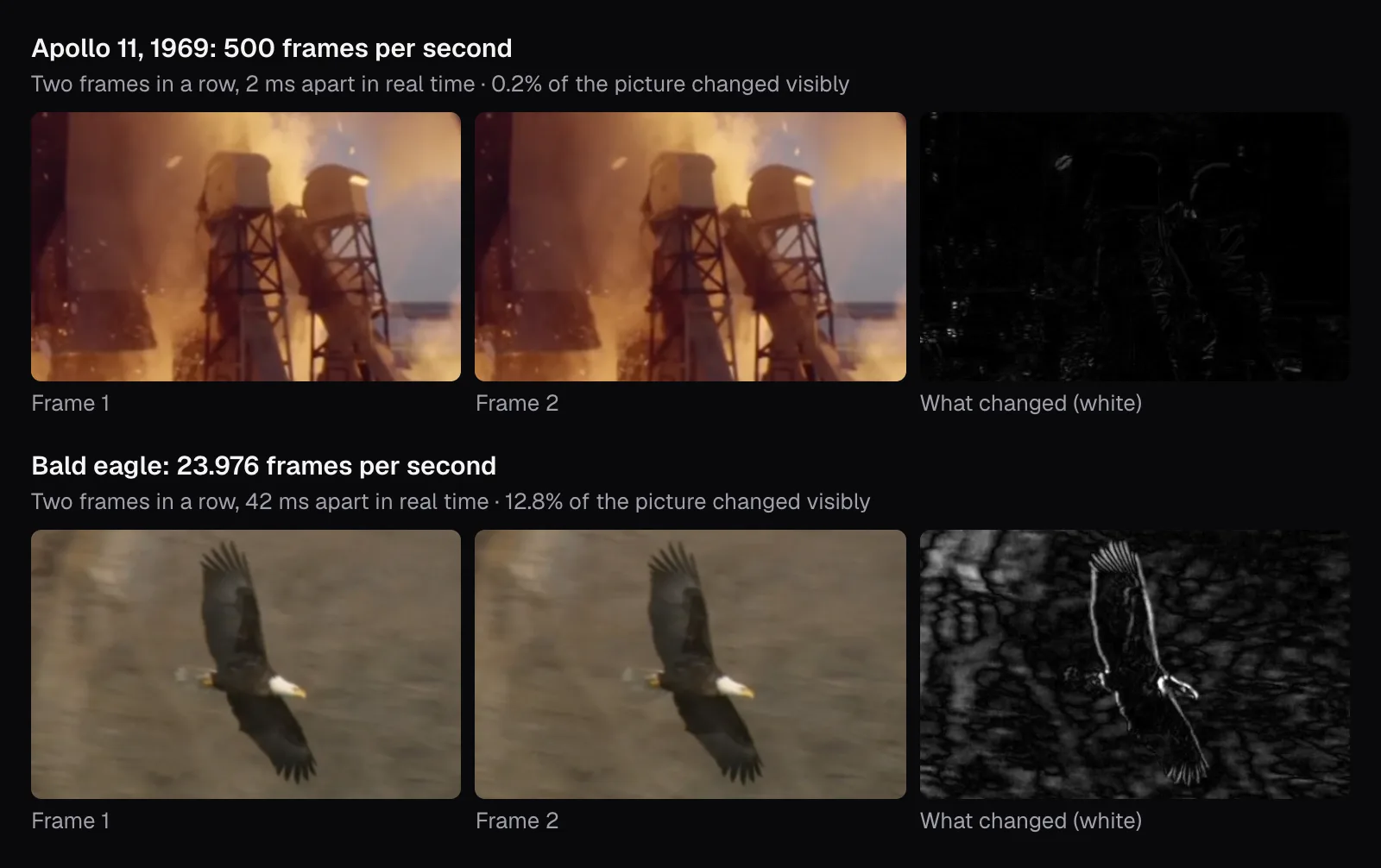
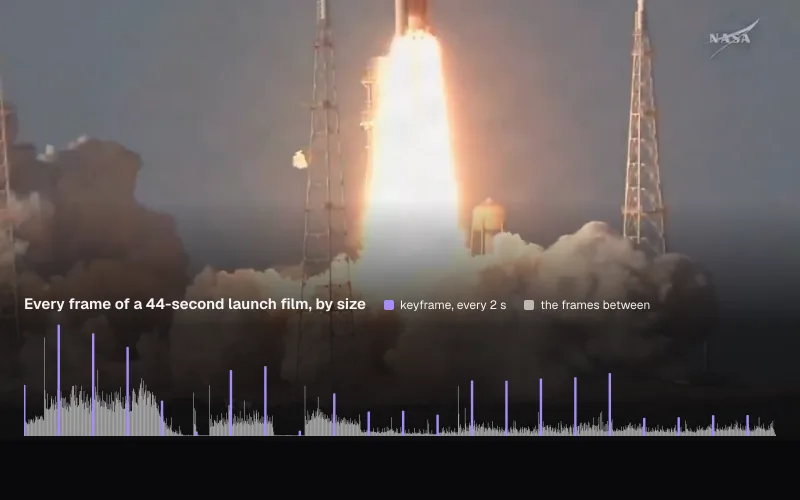
Over the whole stretches we used, the pattern held. From one Apollo frame to the next, a median of 0.26% of the picture changed visibly across two minutes of film; across five seconds of the eagle's flight, a median of 14.6%. The Artemis I launch, filmed in slow motion from the NASA Causeway, changed even less: in more than half of the frames we checked, under 0.01% of the picture changed visibly.
Those 42 milliseconds also explain the smear. A frame can't be exposed for longer than it lasts: at 500 frames per second the film saw each moment for 1/500 of a second at most, so the flakes of ice falling past the camera stay sharp. At 24 frames a second the shutter can stay open up to 21 times as long, and whatever moves while it's open blurs, as the trees behind the eagle do here, streaked by the camera's pan. Slowed down, those soft pictures stay on screen longer, which is why slowed normal video looks blurry as well as jerky.
Slowing normal video: one picture, four frames in a row
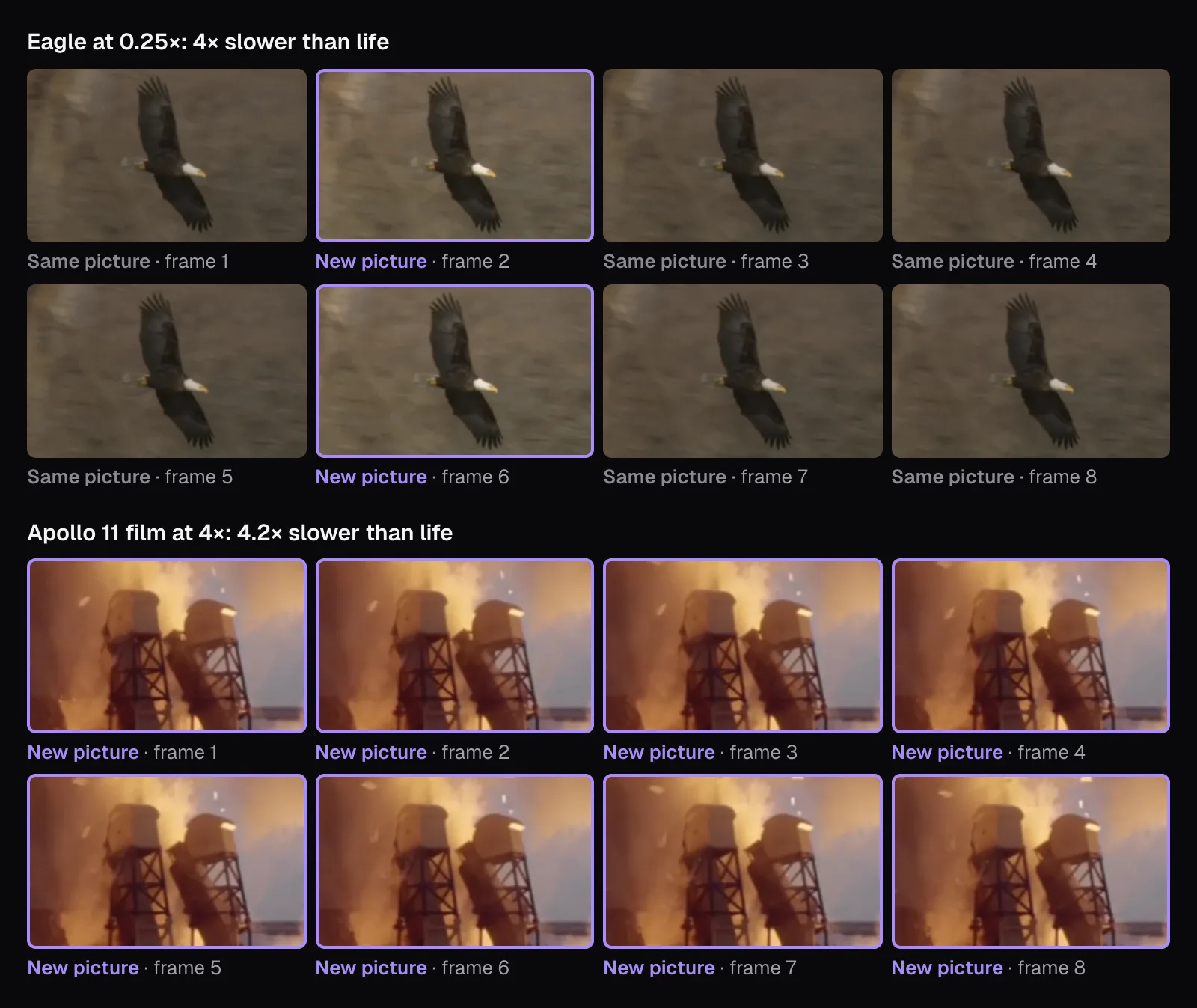
We marked the eagle's flight from 0:41 to 0:46 under “Part” in Change Speed and exported it at 0.5× and at 0.25×, with “No sound”. Both files kept the original's 23.976 frames per second. The 0.25× one lasted 20.0 seconds and held 480 frames, but most of them weren't new.
To count them, we matched the frames of each result, from a moment after its start to a moment before its end, with the frame of the original each one shows. (A frame's difference from the one before isn't enough on its own: encoded again, a repeated picture can come out slightly different from the frame before it.) The pattern was exact:
| The eagle's flight | New pictures per second | Frames per picture |
|---|---|---|
| Original (0:41–0:46) | 24.0 | 1 |
| Trimmed at normal speed | 24.0 | 1 |
| 0.5× | 12.0 | 2 |
| 0.25× | 6.0 | 4 |
Every frame we matched showed exactly the recorded picture the speed called for, and no recorded picture was skipped. That's how Change Speed slows video down: each picture stays on screen for as many frames as the new speed needs. It never draws pictures that weren't filmed. Some editors can: frame interpolation guesses how things moved between two frames and paints the pictures in between, which can look smooth and can also warp edges where the guess is wrong. Cutlia doesn't offer it.
Repeats are cheap to store, at least. The 0.25× file runs twice as long as the 0.5× one and weighed only 8% more, 2.3 MB against 2.2 MB, because an encoder stores a repeated picture as little more than “no change” (more on that in our guide to bitrate and file size).
High-speed film stays smooth, even sped up
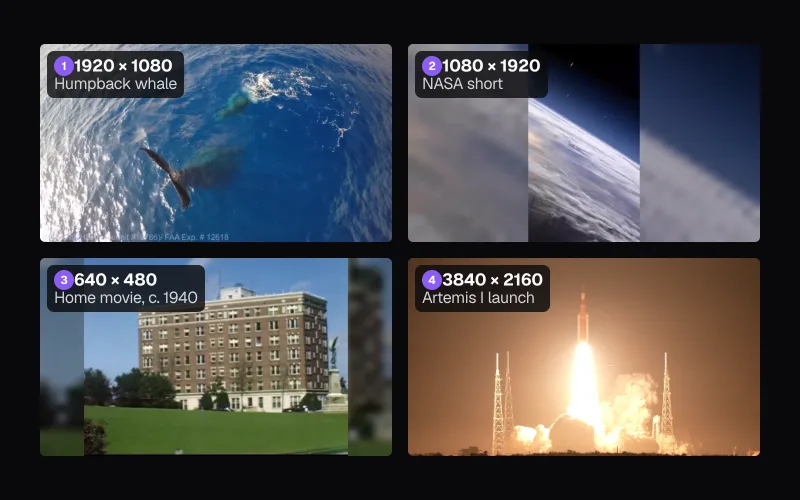
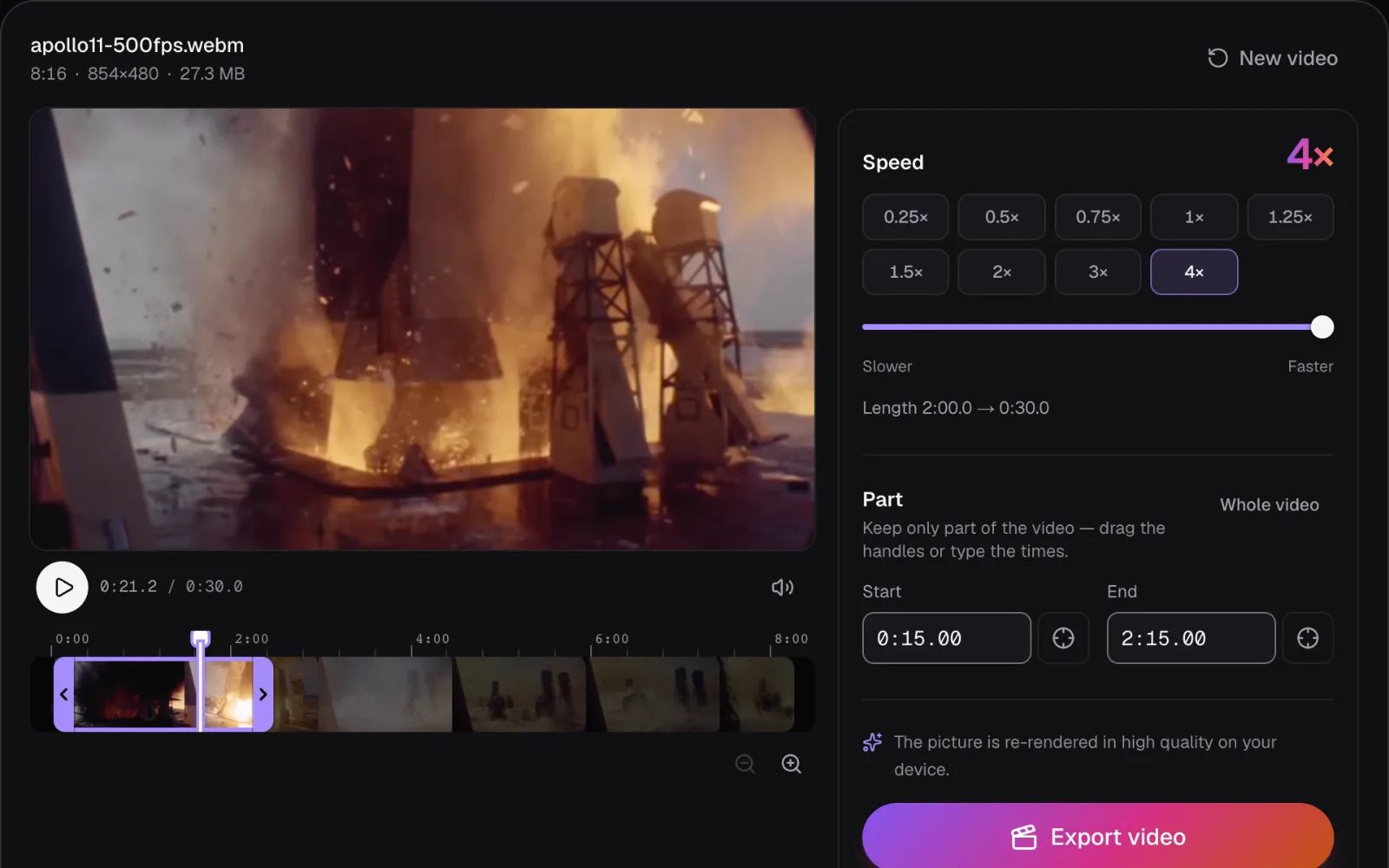
Then the other way round. We marked two minutes of the Apollo film, 0:15 to 2:15, from small flames at the base to the rocket rising past the camera, and exported it at 4×. The panel's length line read “Length 2:00.0 → 0:30.0”, and the file came out at 854 × 480 and 29.97 frames per second, 900 frames and 5.3 MB.
Speeding up skips frames: at 4×, Change Speed shows every fourth recorded picture. On ordinary video that makes movement jumpy. On a 500 fps film, each of those pictures is still only 8 milliseconds after the last. We matched 121 frames of the result to the film: all 121 showed different pictures, and in 116 of the 120 steps between them, exactly four film frames apart. The other four were one frame either side, where film frames 2 milliseconds apart are hard to tell apart.
The result plays 16.7 ÷ 4 = 4.2 times slower than life, close to the eagle at 0.25×, which plays 4 times slower. But the eagle shows 6 new pictures a second and the Apollo film 30. Nearly the same slow-down, with five times the pictures: that's the difference between filming slow motion and making it in an editor.
Slowing slow motion again brings the stutter back
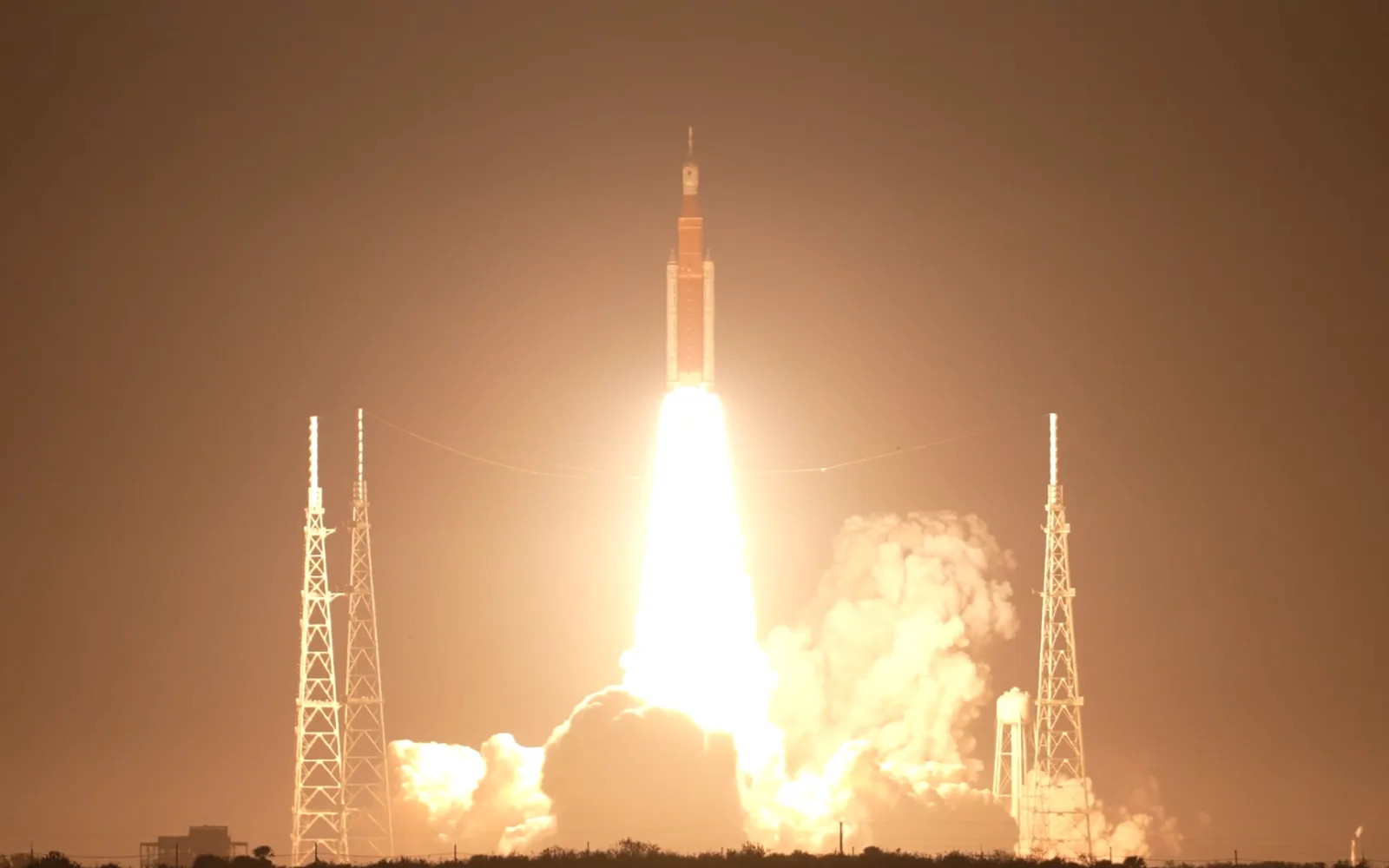
NASA's Artemis I clip arrives slowed already: a 4K file at 29.97 frames per second in which every one of the 360 frames we checked, 0:50 to 1:02, was a new picture. NASA's record of the clip gives no frame rate for the camera, so how much slower than life it plays isn't known. It has a sound track, but a silent one: we decoded all 1 minute 56 seconds of it and found nothing above digital silence.
Slowed to 0.5× in Change Speed, those 12 seconds became a 24-second 4K file at 29.97 frames per second, 12.6 MB, with 15 new pictures a second, each shown for two frames. Whatever the camera's rate was, it was spent making the original slow. To an editor this is a 29.97 fps file, and halving its speed halves its pictures.
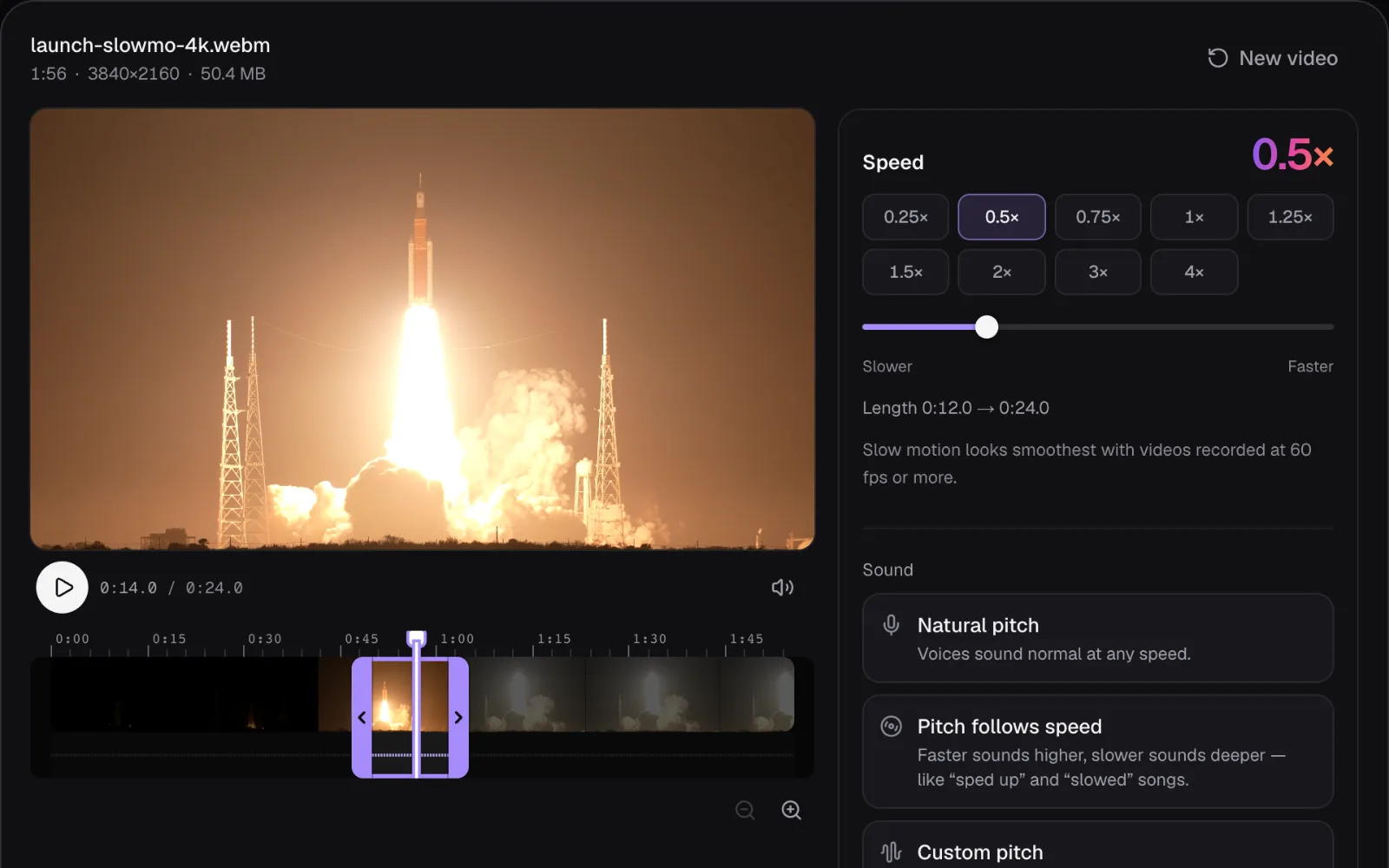
Change Speed says as much itself. Below 0.75×, for a file under 50 frames per second, it shows a tip under the length line: “Slow motion looks smoothest with videos recorded at 60 fps or more.” It appeared for Artemis I at 0.5×, for the eagle at 0.5× and 0.25×, and for the Apollo film at 0.25×, even though that one was filmed at 500. The tip can only read the file's frame rate; what happened at the camera is up to you to know.
How to film for slow motion
Every count above follows from one multiplication: new pictures per second = the file's frame rate × the speed, up to the result's own frame rate. Change Speed keeps the original's frame rate, up to 60, and its slowest speed is 0.25×. For 30 new pictures a second, as many as ordinary video shows, record at 30 divided by the speed you want:
| Recorded at | Slowest speed with 30 new pictures a second | New pictures a second at 0.25× in Change Speed |
|---|---|---|
| 24 or 30 fps | 1×, no slowing (24 fps never reaches 30) | 6 or 7.5 |
| 60 fps | 0.5× | 15 |
| 120 fps | 0.25× | 30, each picture shown twice in a 60 fps result |
| 240 fps | 0.125× | 60, a new picture in every frame |
- Set the rate before you press record. Apple's guide says the iPhone's Slo-mo mode “records your video as normal and then plays it back in slow motion”, and that, depending on the model, its frame rate is set in Settings > Camera > Record Slo-mo. Apple's specifications list slow motion at 1080p and 120 or 240 fps for the iPhone 17, and ordinary 4K video at 24, 25, 30 or 60 fps (as of November 2026).
- Use plenty of light. Each frame gets at most its own share of a second: at 240 fps, 1/240 of a second, an eighth of what a frame of 30 fps video can have. In a dim room, high-speed footage comes out dark or grainy.
- Film quick, short action. Slow motion shows what the eye can't follow: a splash, a jump, a wingbeat, an ignition. Something already slow only gets slower, and four times as long to watch.
- Keep the original file. The extra frames live in the file the camera wrote. A copy saved at 30 frames per second keeps 30 of them a second, and the rest are gone for good.
Cutting and slowing one moment in Cutlia
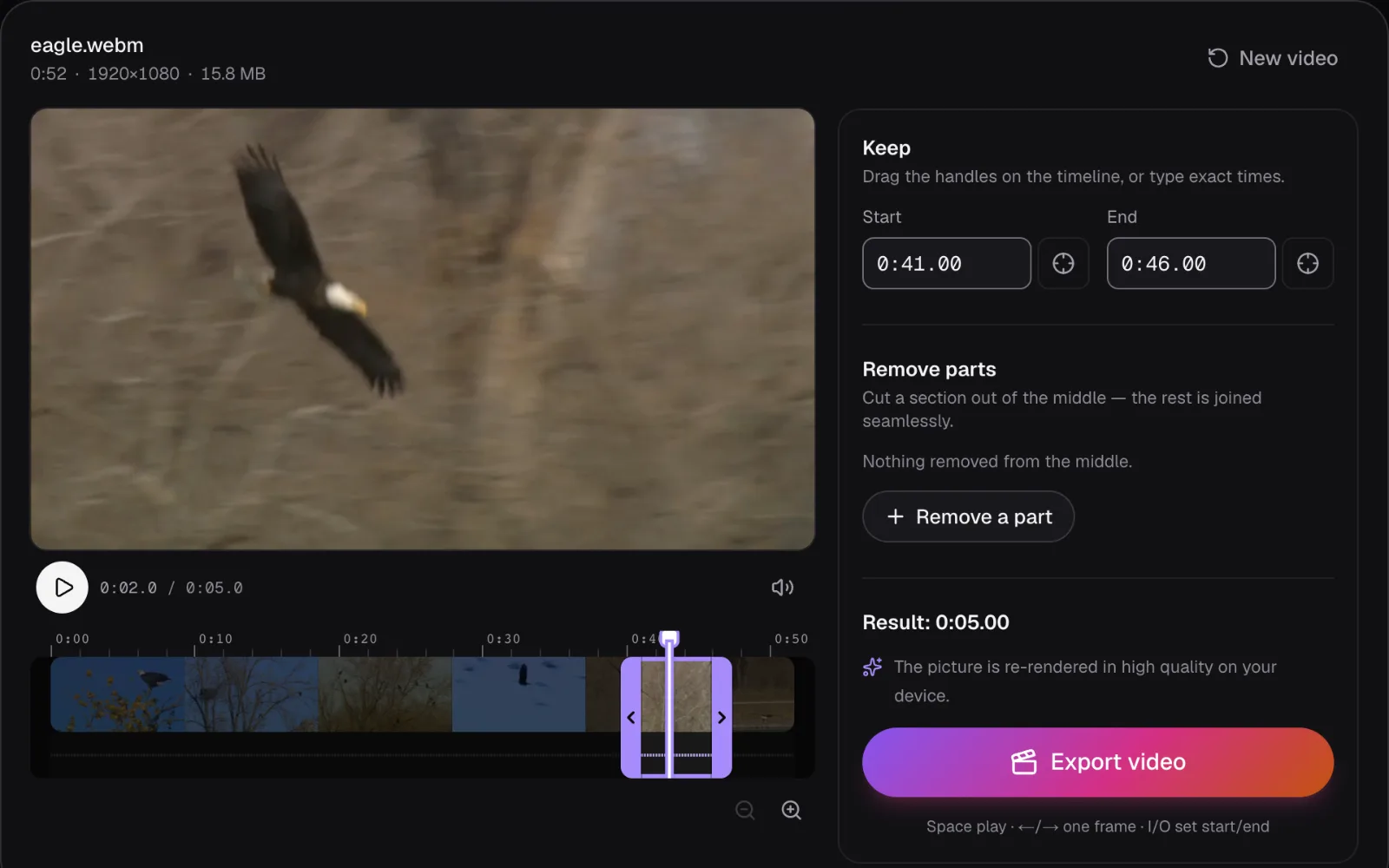
Slow motion works best in small doses: one moment, with normal speed around it. Change Speed exports only the stretch marked under “Part”: type the times, drag the handles on the timeline, or press I and O at the playhead. That's how we took the eagle's five seconds, the Apollo film's two minutes and the Artemis I liftoff out of longer files.
To cut a moment out without changing its speed, use Trim Video. For one kept part of an H.264 or HEVC file, the formats Apple lists for the iPhone 17's video, it copies the picture as it is instead of re-encoding it, and says “Lossless — the picture is copied as it is, so the export takes seconds.” A copied 240 fps clip keeps all 240 of its frames a second. Our eagle is a VP8 file, which Trim Video can't copy into an MP4, so it re-rendered the picture and said so. Its five seconds came out at 23.976 frames per second, 120 frames and 1.8 MB, and every frame we matched was the next frame of the original, none dropped or repeated.
To set the slowed moment back between normal-speed parts, open Merge Videos with the original, the slowed part and the original again, and trim each copy to stop and start around the moment. One speed applies to a whole export in Change Speed, so gradual speed changes (speed ramps) aren't possible there.
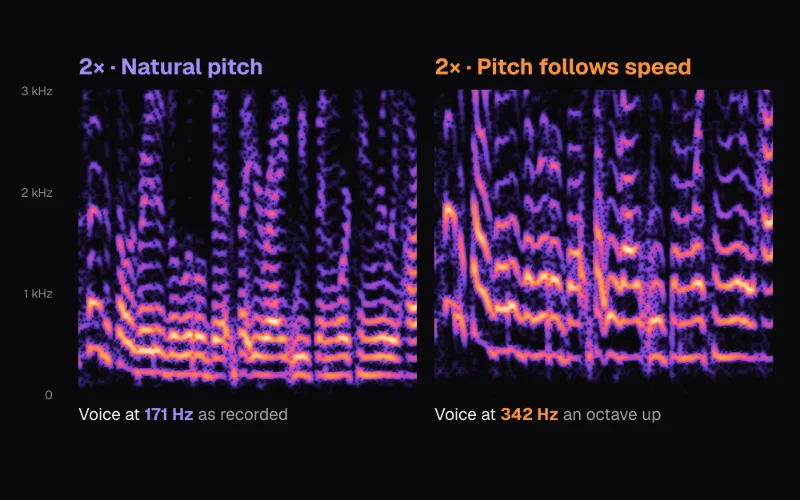
Then the sound. “Natural pitch” stretches it to the new length at its own pitch; “Pitch follows speed” plays it slower, like a record, so at 0.25× it drops two octaves. For our slow-motion exports we chose “No sound”, and music can go on afterwards with Add Music (see our guide to music without copyright claims).
Which speed to choose for your footage
| Your footage | Speed in Change Speed | What you get |
|---|---|---|
| Slow motion recorded at 240 fps | 0.25× | A new picture in every frame of a 60 fps result |
| Slow motion recorded at 120 fps | 0.25× | 30 new pictures a second, as many as ordinary video |
| Video recorded at 60 fps | 0.5× | 30 new pictures a second |
| Video recorded at 24 or 30 fps | 0.5× at most, on one short moment | 12 or 15 new pictures a second: visible steps, like our eagle at 0.5× |
| A file that is already slow motion at 30 fps | 1×, or faster | Every frame stays new; slowing it more repeats them, as with Artemis I |
| High-speed film that drags, like Apollo's | 2× to 4× | A new picture in every frame, still several times slower than life |
Whatever you choose, upload the result at the frame rate it comes out at instead of converting it again. YouTube's upload guide asks for content “encoded and uploaded in the same frame rate it was recorded” (as of November 2026). For the phone apps' own requirements, see our guide to TikTok, Reels and Shorts specs.
Questions people ask
What frame rate should I film at for slow motion?
Divide 30 by the speed you want: 60 fps for half speed, 120 fps for a quarter, 240 fps for an eighth. That leaves about 30 new pictures in every second of the slowed video, as many as ordinary video has. Higher is fine: in Cutlia's Change Speed, a 240 fps clip at 0.25× fills a 60 fps result with a new picture in every frame. Film in bright light, since each frame gets only a sliver of a second.
Why does my slowed-down video look choppy?
Because it was filmed at a normal frame rate. Slowing a 24 or 30 fps clip doesn't add pictures; it shows each one for longer. Our eagle, filmed at 23.976 frames per second, showed only 6 new pictures a second at 0.25×, each held for four frames, and its frames were already blurred by motion. Only footage filmed at a higher frame rate slows down smoothly without invented pictures.
Can Cutlia add in-between frames for smoother slow motion?
No. Change Speed shows each recorded picture for as many frames as the new speed needs and never draws pictures that weren't filmed. Frame interpolation, which some editors offer, guesses how things moved between two frames and paints the pictures in between; it can look smooth, and it can warp edges where the guess is wrong. Filming at a higher frame rate gives you real pictures instead.
Is 60 fps enough for slow motion?
For half speed, yes: a 60 fps clip at 0.5× keeps 30 new pictures a second, the same as ordinary 30 fps video. At a quarter speed it drops to 15, which shows as visible steps. For 0.25×, film at 120 fps, and for anything slower, at 240 fps. Apple lists 120 and 240 fps slow motion at 1080p for the iPhone 17 (as of November 2026).
Why does high-speed footage like the Apollo 11 launch film play so slowly?
Because it's shown far slower than it was filmed. The Apollo 11 engine camera ran at 500 frames per second; played at 29.97, every real second lasts 16.7 seconds, so about 30 seconds of the launch fill 8 minutes 16 seconds. Such film can be sped up and stay smooth: at 4×, ours still showed a new picture in every frame and played 4.2 times slower than life.
Does slowing a video down make the file bigger?
It makes it longer, and the picture is encoded again, but the repeats cost little. Our eagle's flight at 0.25× ran twice as long as at 0.5× and was only 8% bigger, 2.3 MB against 2.2 MB, because an encoder stores a repeated picture as little more than “no change”. Speeding up makes the video shorter, with a new picture in every frame.
Sources
Where the facts in this guide come from, besides our own tests:
- Apollo 11 launch, video of engines at 500 fps (camera E-8): the film's record — Wikimedia Commons (NASA/Kennedy Space Center)
- Artemis I Launch from NASA Causeway (Slo Mo) — NASA Image and Video Library
- Record a video with your iPhone camera — Apple Support (iPhone User Guide)
- Trim video length, adjust speed, and edit audio on iPhone — Apple Support (iPhone User Guide)
- iPhone 17: Technical Specifications — Apple
- YouTube recommended upload encoding settings — YouTube Help
Footage in this guide
The pictures were made with Cutlia's tools from this openly licensed footage, found on Wikimedia Commons:
- Apollo 11 launch, video of engines at 500 fps (camera E-8) — NASA/Kennedy Space Center, Public domain
- Artemis I Launch from NASA Causeway (Slo Mo) (GX010506) — NASA Marshall Space Flight Center, Public domain
- Bald Eagle (Haliaeetus leucocephalus) in USA — U.S. Fish and Wildlife Service, Public domain