Sound and music
How to add music to a video without a copyright claim
We put a public-domain Pachelbel recording under a reef and a Kevin MacLeod song under Old Faithful, measured both exports, and checked each license and claim rule we quote at its source.
By the Cutlia team · Published · 17 min read
The short version
- Use music that is public domain, CC0 or CC BY: putting a song under a video counts as adapting it, so NoDerivatives tracks are out, ShareAlike ones bind your whole video, and NonCommercial ones don’t fit a monetized channel or a business.
- Check the recording, not just the composer: Pachelbel’s Canon is centuries old, but only a recording that is itself public domain, CC0 or CC BY is free to put under your video.
- “Royalty free” is about payment, not ownership: YouTube says Content ID can flag music labeled free, and Kevin MacLeod’s free tracks are registered in advance, so a missing credit can bring a claim.
- For a CC BY song, paste the full credit into the description before you publish: Kevin MacLeod asks for it there, as YouTube’s Audio Library does for its Creative Commons tracks, and a credit shown only inside the video can’t be read automatically.
- Keep the page each song’s license comes from: if a claim arrives anyway, it is your evidence for a dispute.
Music gives a silent clip its mood in seconds, and the wrong song can cost you the video after it's posted. A song you have no right to use can get the video blocked, muted or set to private, or put its ad money in someone else's pocket. And music labeled “free” online comes under very different terms, some of which forbid exactly what a video does with a song.
We read the rules where they're written: YouTube's, TikTok's, Instagram's and Vimeo's help pages and terms, Creative Commons' licenses, and the FAQ of Kevin MacLeod, whose songs make up most of Cutlia's music library. Then we tested the practical part: two clips with no sound at all — a green sea turtle over a reef, filmed from a drone, and Old Faithful erupting in front of a crowd — each got a song from the library of Cutlia's Add Music tool, one public domain and one that needs a credit. We exported both in Chrome on a MacBook Air with an Apple M5 chip and decoded the files to measure what the music became.
What a copyright claim is, on YouTube and elsewhere
On YouTube, a copyright claim is generated automatically by Content ID, a matching system. Copyright owners who qualify — YouTube says they must own exclusive rights to “a substantial body of original material” that people upload often — give it reference files, and every uploaded video is scanned against them. The owner's settings decide what a match does: the video is blocked, ads run on it (sometimes sharing the money with the uploader), or its viewing statistics are tracked. The outcome can differ from one country to another.
A claim is not a strike. YouTube says claims affect videos but usually not the channel; a strike follows only a valid copyright removal request, a legal request the owner has to file. Short videos are treated more harshly, though. As of November 2026, a Short of one to three minutes with an active claim is blocked whatever the claimant's policy, while a claimed video longer than three minutes stays viewable if the claim only tracks or monetizes it — and YouTube names “Monetize” as the most common policy applied to music claims.
The other big platforms match sound the same way, with different results (as of November 2026):
- TikTok's U.S. Music Terms say its “audio recognition system may detect unauthorized uses of music and your content may be muted.” Add a song that isn't from TikTok's licensed library and you confirm you have the rights to it.
- Instagram and Facebook use Meta's Rights Manager, a matching tool rights holders feed with reference files. Meta notes it can “make matches, not legal determinations”. Instagram's help says its agreements with rights holders limit how much recorded music Live broadcasts and videos can include, and lists a rights holder blocking your content among the reasons its sound gets muted.
- Vimeo may scan uploads for material matching protected content, and a match sets the video to private unless you act. You can appeal if the music is public domain or if you can show a license.
In every case a machine compares sound with sound, and no route is certain: YouTube's copyright overview says none of the ones it lists — the public domain, a Creative Commons license, permission, its own Audio Library — guarantees a video won't be claimed. The practical defense is music whose license you can prove, credited where the platform and the owner look for it.
A recording has a copyright of its own, apart from the tune
Recorded music is protected twice. Creative Commons' attribution guide names both layers, “the underlying composition and the sound recordings”, and you need the right to use each. Copyright generally lasts for the life of the author plus 50 to 70 years, YouTube's overview says, so Johann Pachelbel, who died in 1706, is long out of copyright. A modern recording of his Canon is a new work, normally with a copyright of its own.
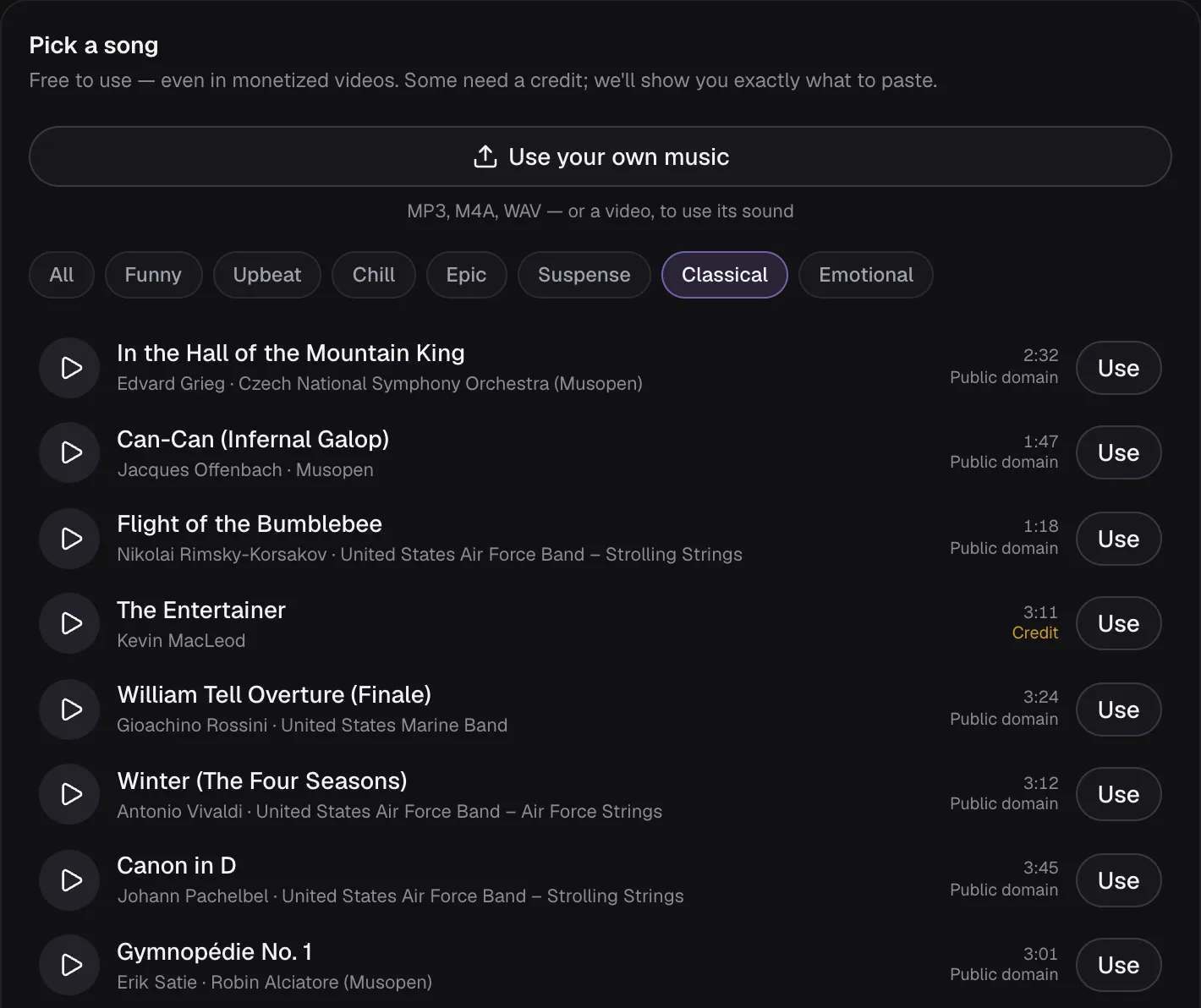
Kevin MacLeod's FAQ draws the line plainly: some of the baroque and classical compositions on his site are in the public domain, “these recordings are not.” The Classical list in Add Music shows it. Nine of its ten songs are tagged “Public domain” or “CC0”; “The Entertainer” is tagged “Credit”, because although incompetech's own listing calls it a Scott Joplin composition, the recording is MacLeod's, under his license.
The Canon we used shows how deep the layers go. Its page on Wikimedia Commons, where the library's copy comes from, lists four: the composition by Pachelbel, an arrangement by Frank Hudson, the performance by the U.S. Air Force Band's Strolling Strings and the recording by the Air Force. Each is marked public domain, the last three as work Air Force members did in their official duties: works of the federal government, public domain in the United States. Commons adds that it offers the file on the strength of the Air Force's own statement that it is public domain. YouTube's overview gives the same rule — works created by U.S. government agencies are automatically in the public domain — and adds that, with no official list of public-domain works, checking is your responsibility.
Public domain, CC0 and CC BY: what each one allows
| Marked as | What Creative Commons says | Credit | Under a monetized video |
|---|---|---|---|
| Public domain | “Free of known restrictions under copyright law” | Not required | Yes |
| CC0 | All rights waived “to the extent allowed by law” | Not required | Yes |
| CC BY | Use it “for any purpose, even commercially” | Required, with a link to the license | Yes |
| CC BY-SA | “Adaptations must be shared under the same terms” | Required | Only if your whole video is shared on the same terms |
| CC BY-NC | “Only noncommercial use of your work is permitted” | Required | Hard to square with ad money |
| CC BY-ND | “No derivatives or adaptations of your work are permitted” | Required | No |
The last three rows are where “free music” goes wrong, because of one word: adaptation. Creative Commons' attribution guide says that using a song as background music in a video makes an adaptation of it, and the CC BY 4.0 legal code settles it (CC BY-ND's says the same): when the material is music, adapted material “is always produced” where it is “synched in timed relation with a moving image.”
So a NoDerivatives track can't go under any video you share. A ShareAlike track can, but your finished video must then carry the same or a compatible license, which lets anyone reuse it. NonCommercial is defined as “not primarily intended for or directed towards commercial advantage or monetary compensation” — a poor fit for a channel that earns from ads, or for a company's promo.
The two public-domain tools carry their own fine print. The Public Domain Mark's deed warns that a work “may not be free of known copyright restrictions in all jurisdictions”, and CC0's waiver reaches only as far as each country's law allows. Commons, likewise, describes the Air Force's work on our Canon as public domain in the United States, and makes no claim for other countries.
Why “royalty free” doesn't mean free of claims
“Royalty free” describes how you pay: once, or not at all, rather than per use. It says nothing about who owns the music. Kevin MacLeod's incompetech is a royalty-free music site, and its FAQ answers the question “Is this music Copyright Free?” with “No. All of this music is copyrighted.” You may use it because he licenses it under CC BY, on the condition of a credit.
YouTube is blunt about labels. Its page of tips for finding safe music says that even music labeled “free” online can be flagged by Content ID, that Content ID doesn't take your written description of “free” music into account, and that it doesn't know whether you bought the rights somewhere else. Its fair use page adds that some royalty-free services “may not give rights to use or monetize the music on YouTube”. The only music YouTube itself knows to be copyright-safe is in its Audio Library; for royalty-free tracks from other channels and libraries, it says it is not responsible.
Even music you are fully licensed to use can be claimed. MacLeod's page on Content ID explains that when someone registered his music as theirs, the false claim could take months to undo, so his recordings are now registered in advance. The result: a claim on one of his tracks most likely means the credit is missing, or it was placed in the video itself, where it “could not be read automatically.”
How the songs in Cutlia's library are chosen and licensed
Add Music's library follows one rule: the recording, and the music in it, must be public domain, CC0 or CC BY. Nothing NonCommercial, NoDerivatives or ShareAlike, no custom “free with credit” terms, and nothing whose license is stated only in a video description or by someone who re-uploaded it. Each license was read on the page the recording comes from: incompetech's track pages, the file pages on Wikimedia Commons (not only Commons' API, which reports just the first license on a page) and Free Music Archive's track pages.
The picker lists 30 songs, and we counted them by tag and by source:
- 19 tagged “Credit”: CC BY 4.0, all by Kevin MacLeod, from incompetech.com.
- 7 tagged “Public domain”: classical pieces recorded by U.S. Air Force Band ensembles (three) and the U.S. Marine Band (one), and three Musopen recordings, all from Wikimedia Commons.
- 4 tagged “CC0”: two lofi tracks by HoliznaCC0 from Free Music Archive, and recordings of “Für Elise” and Chopin's “Funeral March” from Wikimedia Commons.
The library's research notes also list what the rule turned away: a “Ride of the Valkyries” whose CC BY 3.0 license appeared only in a YouTube description; a 1940s Decca recording of the Nutcracker, probably still protected in the U.S.; a U.S. Army Band “Pomp and Circumstance” taken from a commercial album; and a CC0 phonk track, because the genre often contains samples of other recordings that a CC0 dedication can't clear.
The files are served from Cutlia itself and were prepared for it: re-encoded as 128 kbps MP3 at 44.1 kHz, volume evened out, silence trimmed from the ends, very short fades added, and two classical pieces cut to one section. CC BY asks anyone who shares a work to say what was changed, so the site's Open-Source Licenses page lists every song with its source and license, and those changes. The notes keep one risk in view: public-domain and CC0 recordings occasionally attract false claims from third parties.
Our test: Pachelbel under a reef, MacLeod under a geyser
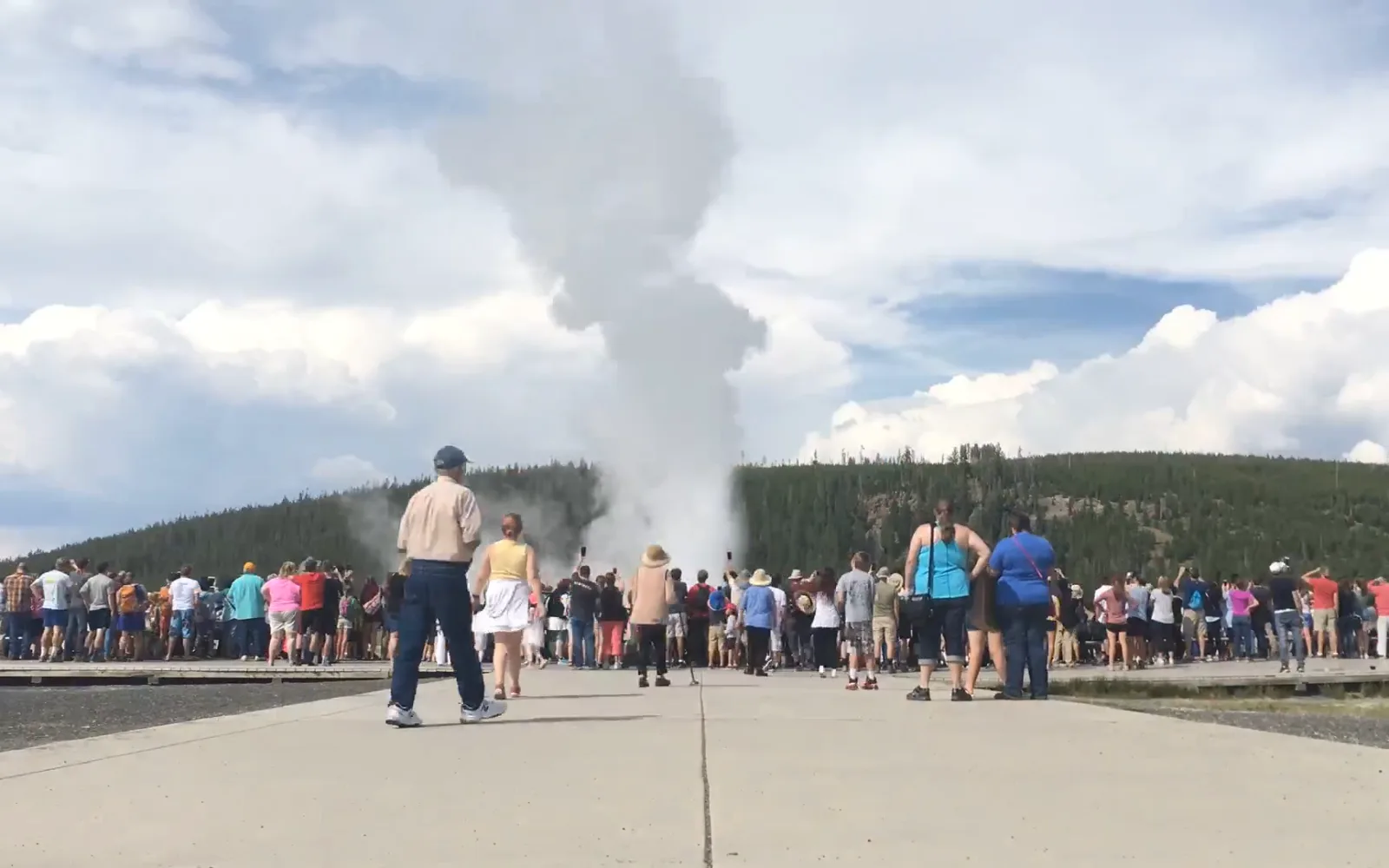
Both clips came without sound — not quiet, but with no sound track at all. The reef clip is 1:04 of a drone looking straight down at Lady Musgrave Island's reef in Queensland, a green sea turtle crossing the first seconds. The geyser is a 0:40 time-lapse by Yellowstone National Park of a crowd streaming along a path as Old Faithful erupts behind them. Both are 1920 × 1080 WebM files with VP9 picture. With nothing to mix against, Add Music showed only “Music volume” and the fades; the “Video's own sound” slider and the “Lower the music when people talk” switch appear only for a video with sound. How loud music should sit under a voice is the subject of our guide to background music volume.
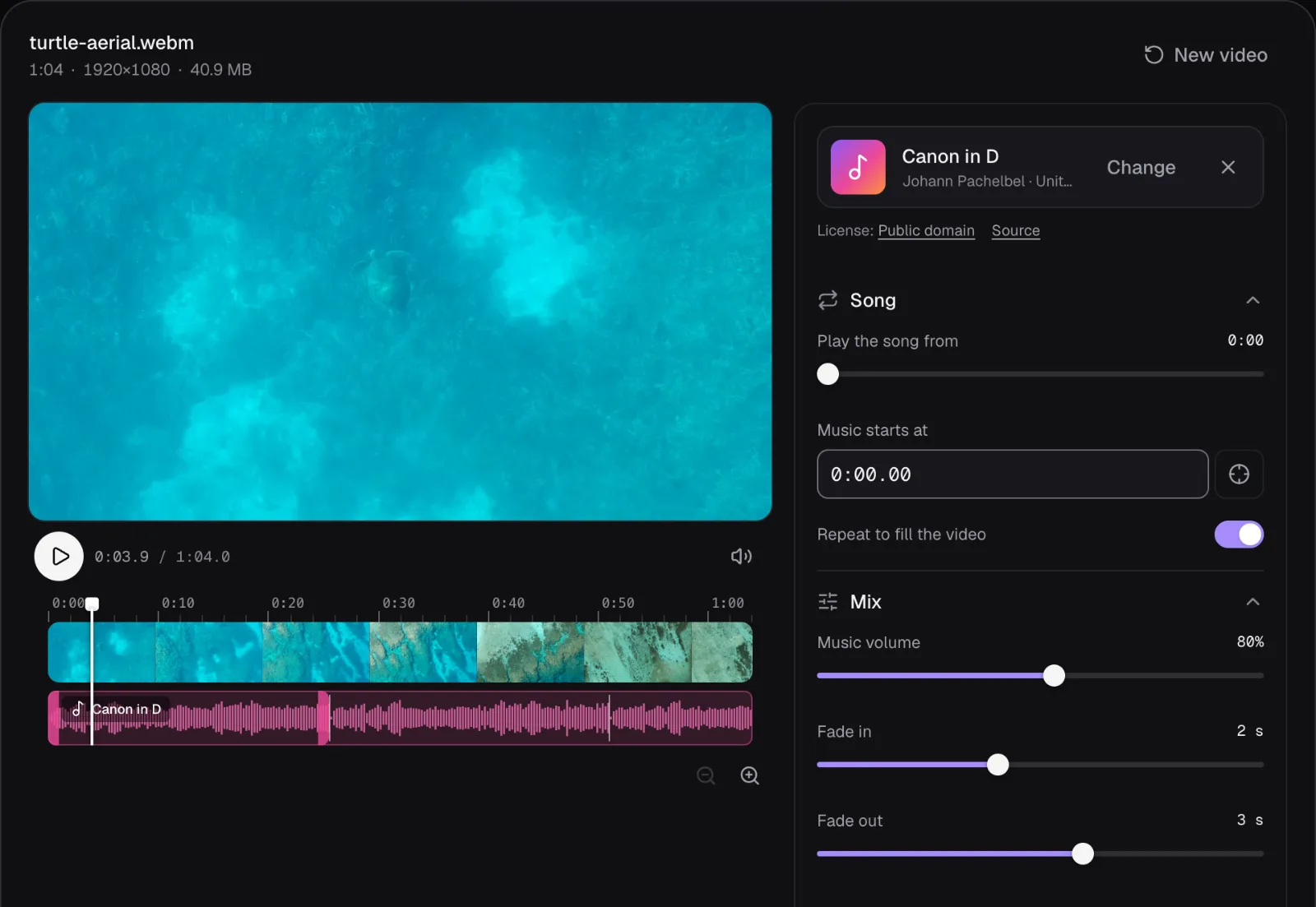
For the reef we chose “Canon in D” from the Classical list: 3:45 long, tagged “Public domain”. Its card linked the license name to Creative Commons' Public Domain Mark and “Source” to the recording's page on Wikimedia Commons.
We wanted only the calm opening, repeated under the whole clip, and a loop is only smooth if it ends where the music comes back round. So we measured where the recording repeats itself: comparing the energy in 32 frequency bands, moment by moment, with its own first ten seconds, it matched best 12.65 seconds in, and next 25.49 seconds in. We took the longer stretch and dragged the end of the pink music lane to 25.49 seconds. The “Repeat to fill the video” switch, absent while the song was longer than the clip, appeared and we turned it on. Then a 2-second fade-in and a 3-second fade-out.
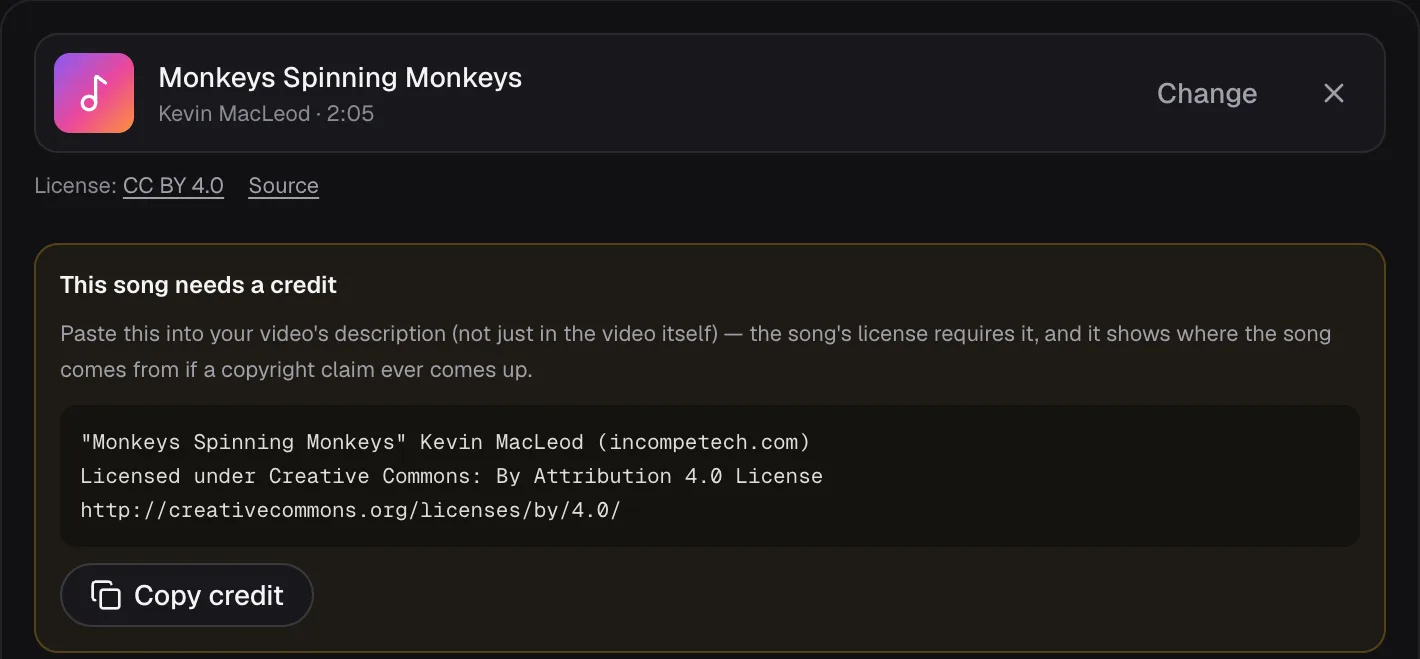
For the geyser we went to the Funny list for “Monkeys Spinning Monkeys”, MacLeod's 2:05 of pizzicato strings and flutes, tagged “Credit”. Its card linked “CC BY 4.0” to the license deed and “Source” to the track's page on incompetech, whose address carries the recording's ISRC, USUAN1400011. Under it appeared a box headed “This song needs a credit” with three lines to paste and a “Copy credit” button. We left the editor's starting mix as it was: the song from its start at 0:00, music at 80%, no fade-in, a 2-second fade-out at the clip's end.
What the finished files contain, measured
Both exports are MP4 files with H.264 picture and AAC sound, 44.1 kHz stereo, the song their only sound. The reef export runs 64.1 seconds and the geyser 39.6, like the clips: the music stops where the picture does. Both are bigger than the originals, though: 190.9 MB against 40.9 MB, and 65.5 MB against 57.1 MB. Add Music copies only H.264 and HEVC picture into its MP4 files, so for our VP9 clips the panel said “The picture is re-rendered in high quality on your device”, and the new H.264 picture costs more bytes. A phone's H.264 or HEVC video is copied untouched instead, which keeps the file close to the original's size and makes the export quick. Our guide to compressing without visible loss shows how to bring a file like ours back down.
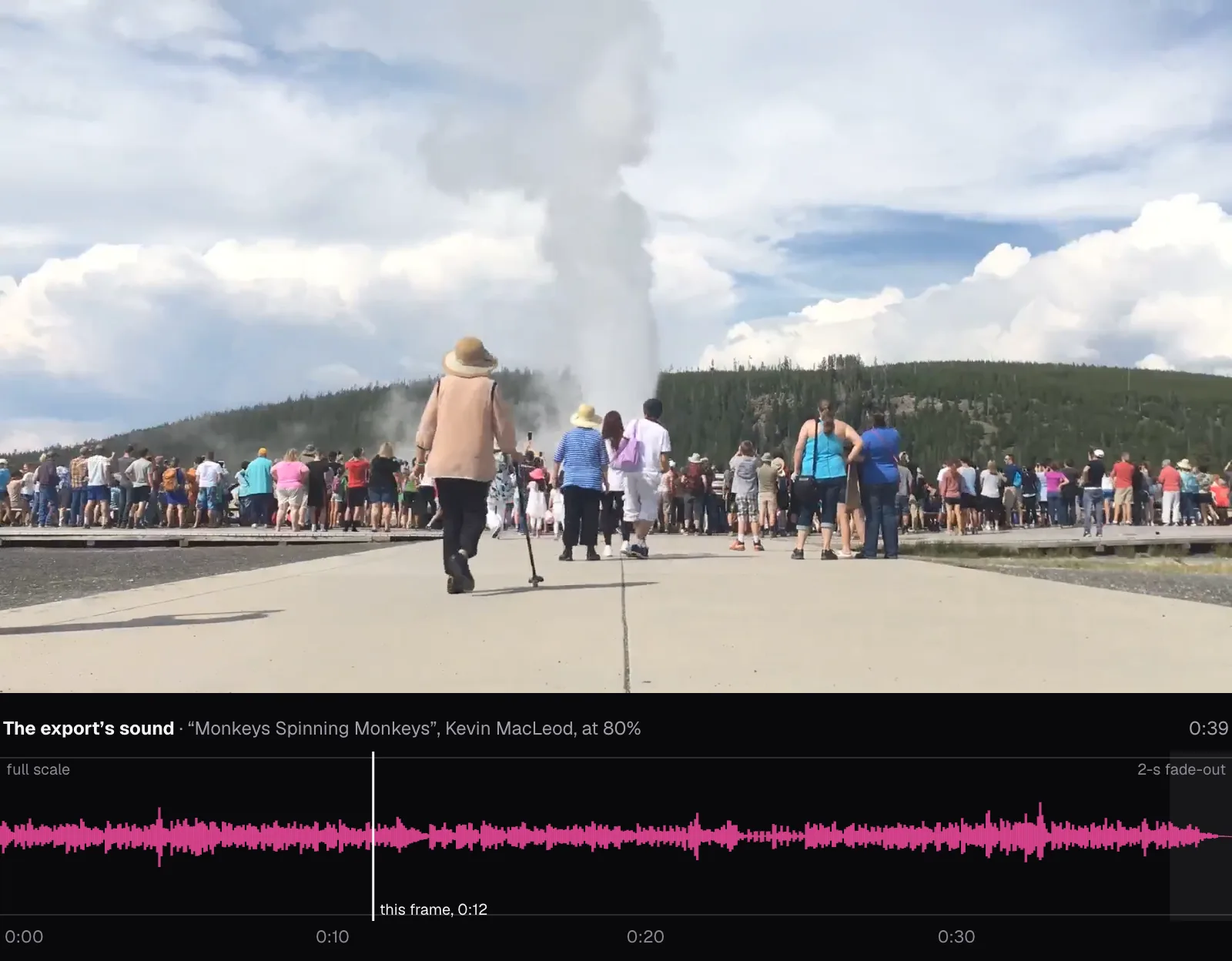
We decoded both exports and both library files in Chrome and compared their levels at the same moment of the song. In both videos the music sat 1.9 dB below the library file, which is what 80% means: twenty times the base-10 logarithm of 0.8 is −1.94 dB. In the reef's steady stretch, from 3 to 24 seconds, the Canon averaged −20.6 dBFS (RMS, decibels relative to full scale), and the export's loudest peak was −3.7 dBFS.
The fades follow an S-shaped curve, gentle at both ends. Measured against the library file in tenths of a second, the reef's music was at 0.15 of its level just after half a second, 0.43 just after one second and the full 0.80 at two; the 3-second fade-out took it to nothing in the clip's final frames. The geyser's 2-second fade-out did the same over its last two seconds.
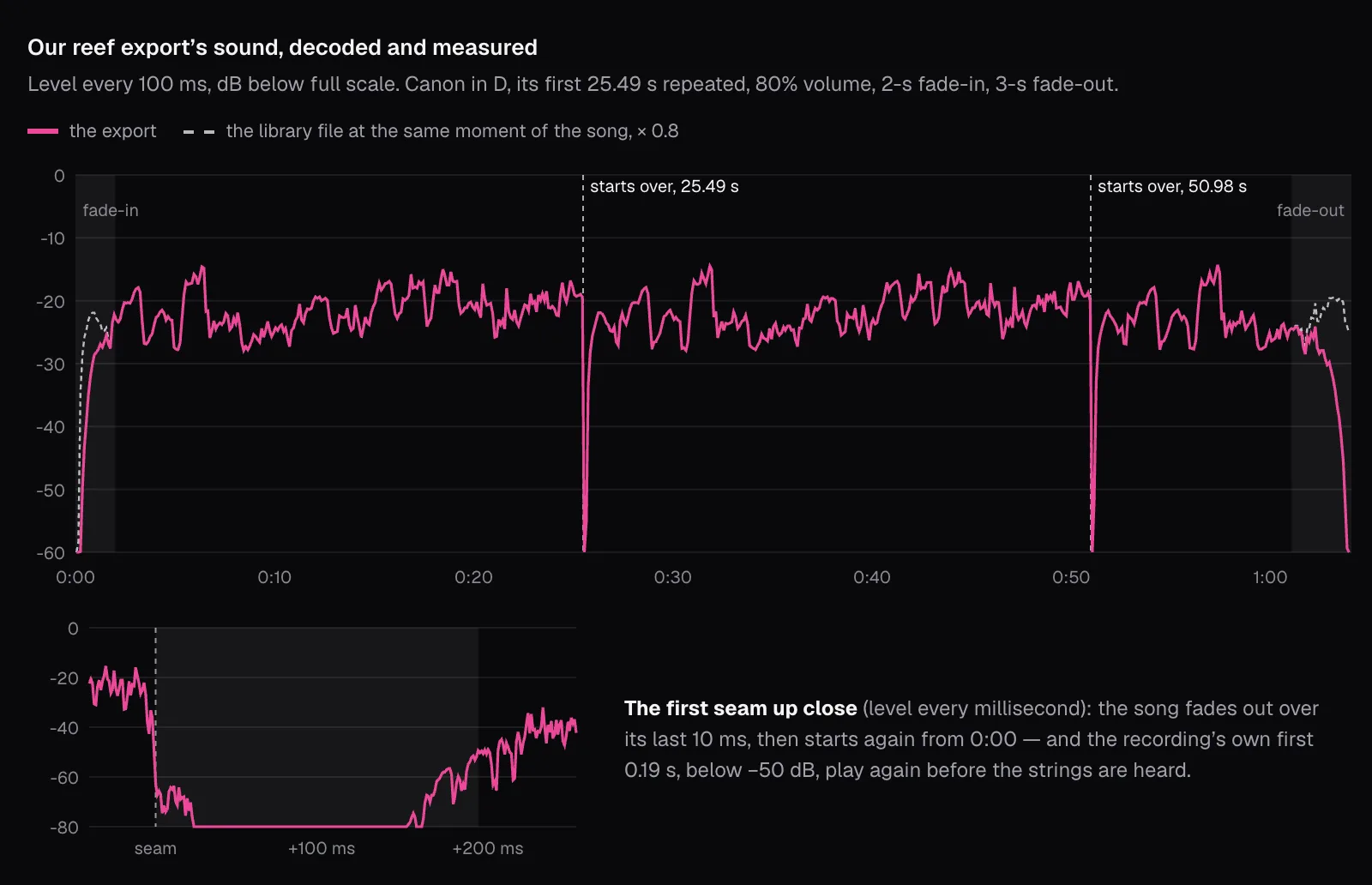
The loop did what it should, with one catch. The sound started over at 25.49 and 50.98 seconds, and after each seam it matched the first play with a correlation of 0.999: the same music, apart from the AAC encoding. The song fades out over the last 10 milliseconds before each seam, so the jump doesn't click. But each repeat also began with 0.19 seconds below −50 dB: the recording opens that way before the strings come in, and a loop from 0:00 brings that hush back every time. Listen to the seam in the preview before you export, start the repeated part on sound, or pick a song long enough not to need a loop: every library song outlasts both our clips, the shortest, “Fluffing a Duck”, running 65.3 seconds.
To keep a finished soundtrack as a file of its own, Video to MP3's M4A option, with no fades set, takes an export's AAC sound out copied without re-encoding, the same thing we did to measure ours.
The credit: what it has to say and where it goes
Creative Commons sums up a good credit as TASL: the title, the author, the source and the license, linked where possible. The CC BY 4.0 legal code also asks you to keep any copyright notice the licensor supplies and to say if you modified the material, in any reasonable way for the medium.
Add Music's three lines are MacLeod's own “Attribution Code”, and they came back with the download, under “Don't forget the credit in your video's description:”; the Share and Post on buttons copy them to the clipboard for a post's text. The reef's result screen had no reminder: a public-domain recording needs no credit.
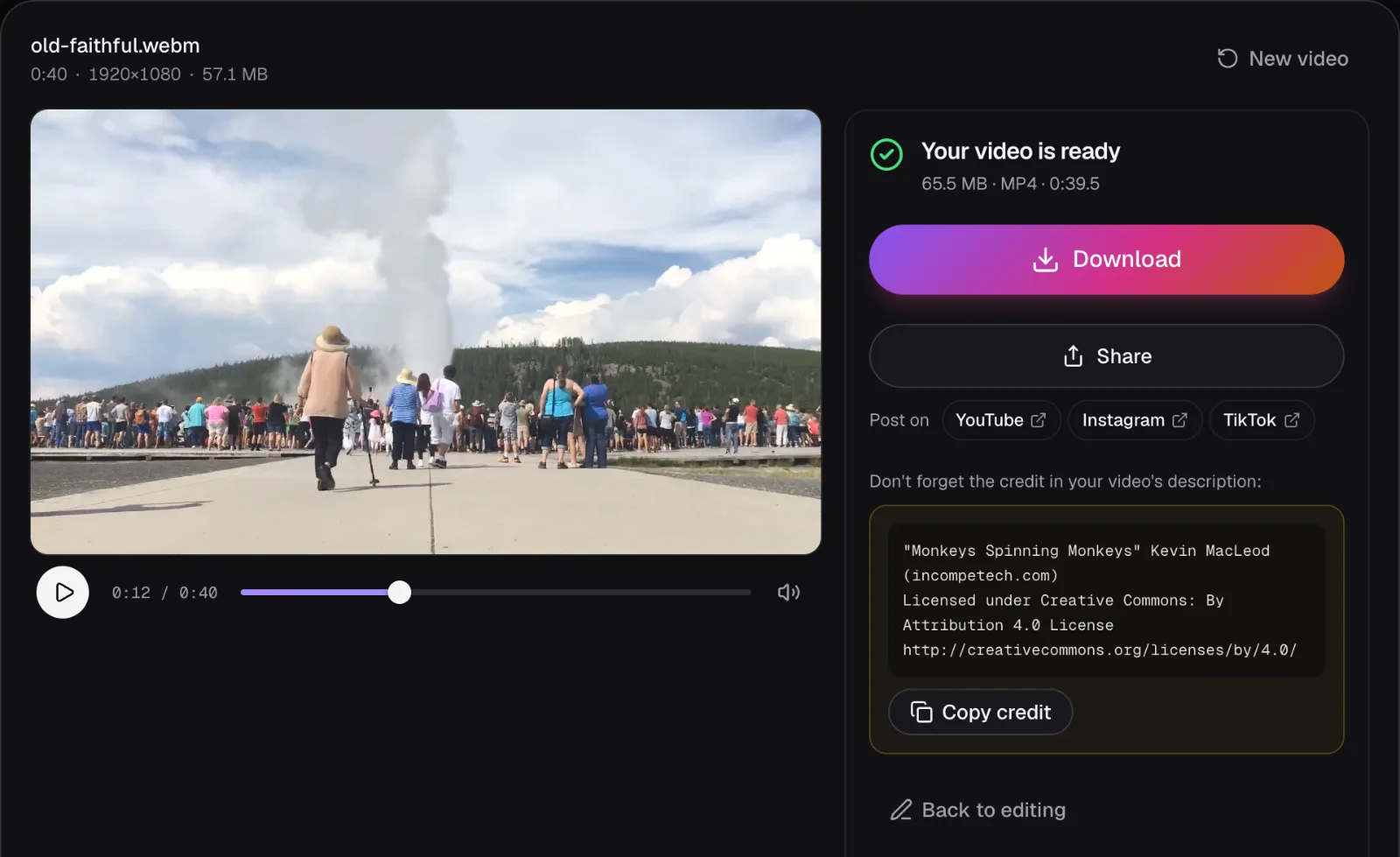
MacLeod's FAQ says “YouTube and Vimeo credits should be placed in the video description”, and YouTube's Audio Library asks the same for its own Creative Commons tracks. Creative Commons recommends the video itself as well, when reasonable: a credit on screen is an extra, never the only one.
Creative Commons warns against a description reading only “Creative Commons music.”, from which nobody could find the song, and against crediting the site where you found a work instead of its author. If you cut or loop a CC BY song, add a few words saying so, the way Creative Commons' own example adds “Cropped from original” to a photo's credit. The reef footage on this page is CC BY 3.0, so every picture of it carries Adam Fish's name.
Which music to use, and what to do if it's claimed
| Your video | Use | Before you publish |
|---|---|---|
| A monetized YouTube video | Public domain, CC0 or CC BY recordings, or YouTube's Audio Library | Paste every CC BY credit into the description |
| A YouTube Short | The same | Any active claim blocks a Short of one to three minutes |
| A TikTok or Instagram post | Public domain, CC0 or CC BY recordings, or the app's own library for that app | Put the credit in the caption |
| An ad or a client's video | Public domain, CC0 or CC BY recordings | Rule out NonCommercial licenses and apps' personal-use libraries |
| A video with a song you bought | Not that song: a purchase isn't a license to publish | Swap in a licensed track |
If a claim arrives on a Kevin MacLeod track, his instructions are short: add a credit such as “SongTitle” by Kevin MacLeod to the description before you dispute, then dispute; as of November 2026, his page says the claim is released within 72 hours, likely sooner. For anything else, YouTube lets you dispute a claim for a valid reason: you hold all the rights the video needs, your use falls under an exception such as fair use, or the match is wrong. The claimant then has 30 days to respond, and a claim left unanswered expires.
Be sure before you dispute. YouTube lists three reasons that are “NOT legitimate”: giving credit to the copyright owner, owning a copy of the song, and choosing not to monetize the video. A claimant who disagrees can send a copyright removal request, and a valid one brings a strike. If the claim is right, YouTube Studio may let you mute the song, trim the claimed part out or replace the song with one from the Audio Library, without a new upload. On Vimeo, an appeal on the strength of a license needs a copy of it “from a reputable source”.
Your evidence is the page the license comes from — the one “Source” opens under every library song: a Wikimedia Commons file page, a Free Music Archive track or an incompetech track page. MacLeod suggests quoting the recording's ISRC when someone else claims his music, and printing the license and the page showing the piece if anyone asks you to prove it's clear. Save that page with the project, and you'll have it the day you need it.
Questions people ask
Is royalty-free music the same as copyright-free music?
No. Royalty free describes payment: you don’t pay per use. The music can still be copyrighted and licensed on conditions, as Kevin MacLeod’s royalty-free music is: free to use, with a credit. YouTube warns that some royalty-free services may not give rights to use or monetize music on YouTube, so read the license before you use a track.
Is classical music free to use in videos?
The composition usually is; the recording often isn’t. A piece whose composer died long ago is out of copyright, but a recording of it normally has a copyright of its own. Use a recording that is itself public domain, such as one the U.S. Air Force Band made as part of its official duties, or one released under CC0 or CC BY.
Do I have to credit public-domain or CC0 music?
Usually not. Creative Commons says attribution is not a legal obligation under CC0 or the Public Domain Mark, though the Mark’s deed notes that in some countries an author’s moral rights, which can include the right to be named, outlast copyright. Most people credit the source anyway, and naming it gives you something to point to if the recording is ever claimed by mistake.
Can I use a song I bought if I give the artist credit?
No. Buying a copy isn’t permission to publish it, and a credit only fulfills a license that asks for one, such as CC BY. YouTube lists owning a copy of the song and giving credit to the copyright owner among the reasons that are not legitimate for disputing a claim, and its fair use page says the phrase “no infringement intended” won’t automatically protect you.
What happens if my video gets a Content ID claim?
The claimant’s settings decide: the video may be blocked, carry ads, or just have its views tracked, and this can differ by country. A claim isn’t a strike. You can leave it, remove the claimed music in YouTube Studio, or dispute it for a valid reason; the claimant then has 30 days to respond, or the claim expires.
Sources
Where the facts in this guide come from, besides our own tests:
- How Content ID works — YouTube Help
- Learn about copyright claims — YouTube Help
- Dispute a copyright claim — YouTube Help
- Copyright on YouTube — YouTube Help
- Fair use on YouTube — YouTube Help
- Tips to find safe music — YouTube Help
- Use music and sound effects from the Audio Library — YouTube Help
- Music Terms of Service (U.S.) — TikTok
- Rights Manager — Meta
- How to use music in your videos on Instagram or Threads — Instagram Help Center
- Problems with audio on Instagram — Instagram Help Center
- Why was my video set to private? — Vimeo Help Center
- CC BY 4.0 deed — Creative Commons
- CC BY 4.0 legal code — Creative Commons
- CC BY-ND 4.0 legal code — Creative Commons
- CC0 1.0 deed — Creative Commons
- Public Domain Mark 1.0 — Creative Commons
- About CC Licenses — Creative Commons
- Recommended practices for attribution — Creative Commons
- Music FAQ — incompetech
- YouTube Content ID — incompetech
- Monkeys Spinning Monkeys — incompetech
- The Entertainer — incompetech
- Canon (2004) - Strolling Strings - United States Air Force Band — Wikimedia Commons
Footage in this guide
The pictures were made with Cutlia's tools from this openly licensed footage, found on Wikimedia Commons:
- Aerial view of a green sea turtle (Chelonia mydas) swimming in the reef at Lady Musgrave Island, Queensland, Australia — Adam Fish, CC BY 3.0
- Old Faithful eruption timelapse (36948540241) — YellowstoneNPS, Public domain