Sound and music
How loud should background music be under a voice?
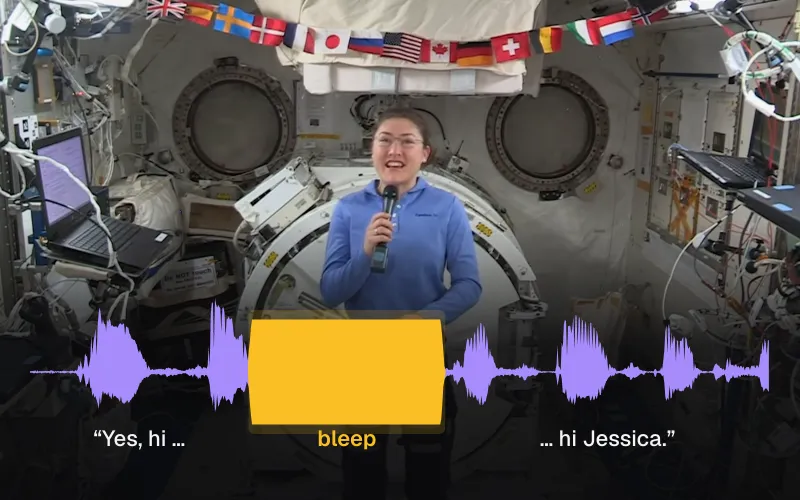
We put one library song under a 1:50 NASA interview at five volumes, with and without ducking, and measured the voice and the music in all 22 files.
By the Cutlia team · Updated · 16 min read
The short version
- Set background music by how far it sits under the voice, not by its percentage: at the editor’s default volume of 80%, with ducking switched off, our song came out 3.5 LU louder than the voices of a NASA interview, and Cutlia’s 30 library songs differ by 7.3 LU at the same setting.
- For speech, start at 20% with “Lower the music when people talk” switched on: the music sat 17.7 LU under the voice while people talked, and at 10% it sat 23.7 LU under.
- Ducking lowers the music by 9.1 dB under speech but lets it back up only in pauses longer than about a second, where it is exactly as loud as without ducking, so the slider alone decides how loud your pauses, intro and ending are.
- Every halving of the slider takes 6 dB off the music; a voice recorded louder than our interview’s −24.1 LUFS leaves room for a higher setting by the same amount.
- A speech transcriber went badly wrong only when the music was louder than the voice: its transcript differed from the voice-only one by 26 words of 393 at 80% without ducking, against 1 to 7 at every other setting we tried.
Put a song under someone talking and you have one decision to make: how loud. Too loud and the words blur; too quiet and the music might as well not be there. The control you get is a volume slider, and a slider is the wrong unit for the question. What matters is how far the music sits under the voice, and a percentage can't tell you that.
So we measured it. We took a real NASA interview from April 2019, with Brandi Dean and astronaut Jessica Meir in a studio and Christina Koch on the International Space Station, and put a song from the library of Cutlia's Add Music under it at five volumes, each with and without the tool's automatic ducking. We exported 22 files, measured the voice and the music in every one with a loudness meter built to the international standard, and ran the mixes through a speech transcriber to see which settings cost it words. The editing, the measuring and the transcribing all ran in Chrome on a MacBook Air with an Apple M5 chip.
Why a volume percentage can’t answer the question
Add Music's “Music volume” slider runs from 0 to 150% in steps of 5%, and it does one thing: it multiplies the song's samples by that number. We checked it in the exported files. The song alone at 100% matched the library's own file, a median difference of 0.02 dB, and each lower setting came out exactly where the arithmetic puts it: 80% was 1.94 dB quieter, 40% 7.96 dB, 20% 13.98 dB, 10% 20.00 dB and 5% 26.02 dB. Halving the slider always takes about 6 dB off.
That makes the percentage relative to the song, and songs aren't all equally loud. Cutlia's library was leveled by plain RMS, a simple average of the signal's power, but never raised past a −1 dBFS peak (1 dB under the loudest a digital file can hold), which left quieter recordings quieter. Measured as loudness, the 30 songs at 100% range from −21.0 LUFS (Für Elise) to −13.7 LUFS (Pachelbel's Canon in D): 7.3 LU apart. The same 20% under the same voice can be a quiet bed with one song and a competitor with another.
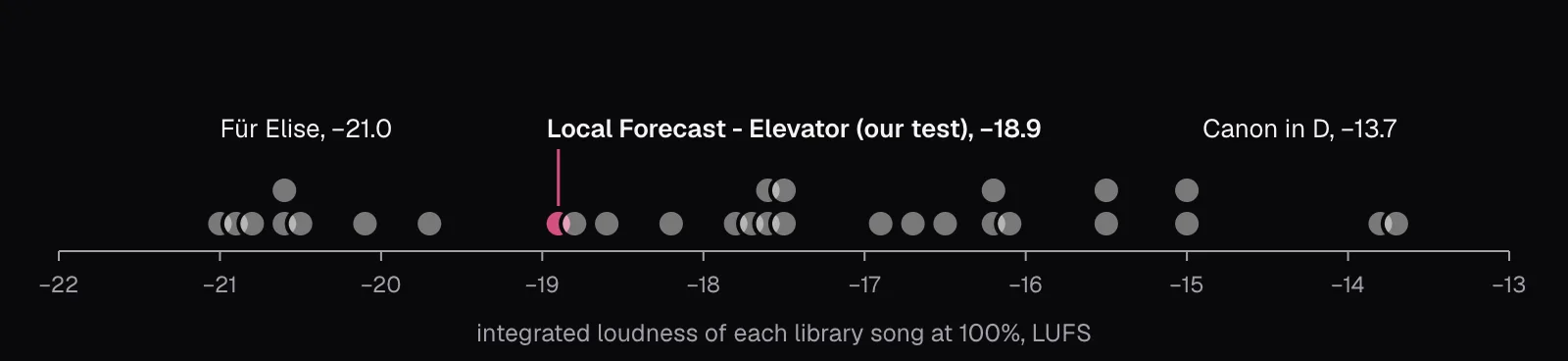
The other half of the balance is your voice, and recordings differ there too. Our interview's voice measured −24.1 LUFS. A voice recorded 6 dB louder would stand 6 dB further above the same music at the same setting. The only number that carries over from one video to the next is the difference between the two, so that is what we measured.
Measuring loudness: LUFS, K-weighting and gates
Peaks say little about how loud something sounds. EBU Tech 3343's example is the clink of two glasses, high in peak level but low in loudness, against a compressed rock guitar riff whose loudness is almost its peak. The measure EBU R 128 sets for European broadcasters is loudness as defined by the ITU's Recommendation BS.1770, in LUFS, loudness units relative to full scale. (The ITU writes LKFS; EBU R 128 notes that the two are the same unit.) One LU is one decibel of difference, so “the voice is 18 LU above the music” reads like 18 dB.
The method has four steps, and every number below follows them:
- K-weighting. Two filters shape the sound before it is measured. The first, in BS.1770's words, “accounts for the acoustic effects of the head”, raising the treble; the second cuts the deep bass. From the standard's own coefficients, the filter counts 31.5 Hz at 7.8 dB less and everything from 5 kHz up at 4.0 dB more.
- Mean square. The filtered signal's power is averaged per channel, and the channels are added.
- 400-millisecond blocks, overlapping by 75%, each given a loudness.
- Two gates. Blocks below −70 LUFS are dropped, then any block more than 10 LU below the average of the rest. What's left is the foreground: for our interview, the moments when someone is talking.
EBU Tech 3341 adds two running readings on the same footing: momentary loudness over the last 400 ms and short-term loudness over the last 3 seconds. We built the meter into the page that measured our files and fed it Tech 3341's first five test signals before trusting it; it read each within 0.02 LU of the expected −23.0 or −33.0 LUFS, where the document allows 0.1.
A plain RMS reading would have given a slightly rosier answer here. Kevin MacLeod's notes on this version of the song say he processed it to sound like it comes out of elevator speakers, and it shows: 97% of its energy fell in the third-octave bands from 500 to 4,000 Hz, against 69% of the voice's. K-weighting counts the upper half of that range, above about 1 kHz, up to 4 dB more, so plain RMS put the voice 1.5 dB further above the music than loudness did (19.2 dB against 17.7 LU at 20% with ducking). BS.1770 itself notes that measured loudness is an estimate of what listeners hear, with some uncertainty; it is still the measure the broadcast standards use.
Our test: one interview, one song, 22 exports
The interview is a WebM from NASA, 1 minute 50 seconds long: 1920 × 1080, VP9 picture, Opus sound, almost continuous speech from the first second to 1:45.1, then a silent end card. We opened it in Add Music and chose Kevin MacLeod's “Local Forecast - Elevator”, 3:09 long, so it covers the video without repeating. It is licensed CC BY 4.0, and the editor gives the credit it needs (for using songs like it without copyright trouble, see our guide to music without copyright claims). That credit, word for word, applies to every picture here drawn from the song: “Local Forecast - Elevator” Kevin MacLeod (incompetech.com) Licensed under Creative Commons: By Attribution 4.0 License http://creativecommons.org/licenses/by/4.0/
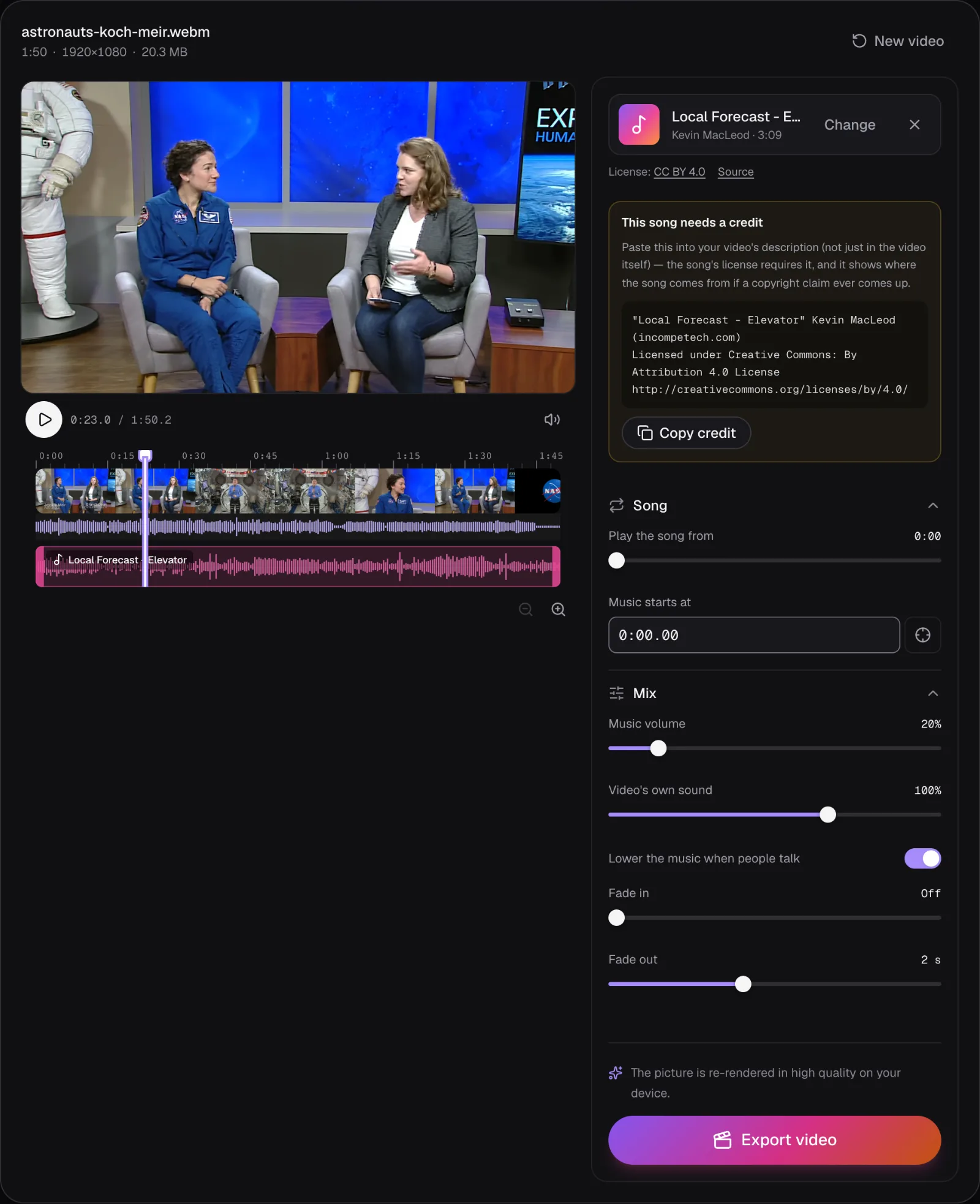
Keeping the editor's other defaults, including its 2-second fade-out, we exported five music volumes, 80, 40, 20, 10 and 5%, each with ducking on and off. To measure the voice and the music separately, we also exported the layers on their own from the same editor: the voice with the music at 0%, and the song at each setting with “Video's own sound” turned to Off. The ducking still followed the interview in those files, since it listens to the video whatever its own volume. Every export was an MP4 with H.264 picture and 48 kHz stereo AAC sound; the panel said the picture would be re-rendered, because Cutlia copies only H.264 and HEVC pictures into an MP4, and this one was VP9.
Every sound was decoded in Chrome at 48 kHz and measured. “While people talk” below means the 400 ms blocks that pass BS.1770's gates in the voice-only file; the music is measured over exactly those blocks in its own file.
The results: how far under the voice the music sat
The voice alone measured −24.1 LUFS integrated, close to the −23 LUFS that EBU R 128 sets for broadcast programs. The song at 100% measured −18.8 LUFS over the same 1:50, louder than the voice before any lowering. Here is where each setting left it, as the voice's lead over the music while people talked:
| Music volume | Not lowered | Lowered when people talk | Whole mix, not lowered / lowered |
|---|---|---|---|
| 80% (default) | −3.5 LU | +5.6 LU | −19.2 / −23.2 LUFS |
| 40% | +2.5 LU | +11.6 LU | −22.4 / −24.0 LUFS |
| 20% | +8.6 LU | +17.7 LU | −23.7 / −24.1 LUFS |
| 10% | +14.6 LU | +23.7 LU | −24.0 / −24.1 LUFS |
| 5% | +20.6 LU | +29.7 LU | −24.1 / −24.1 LUFS |
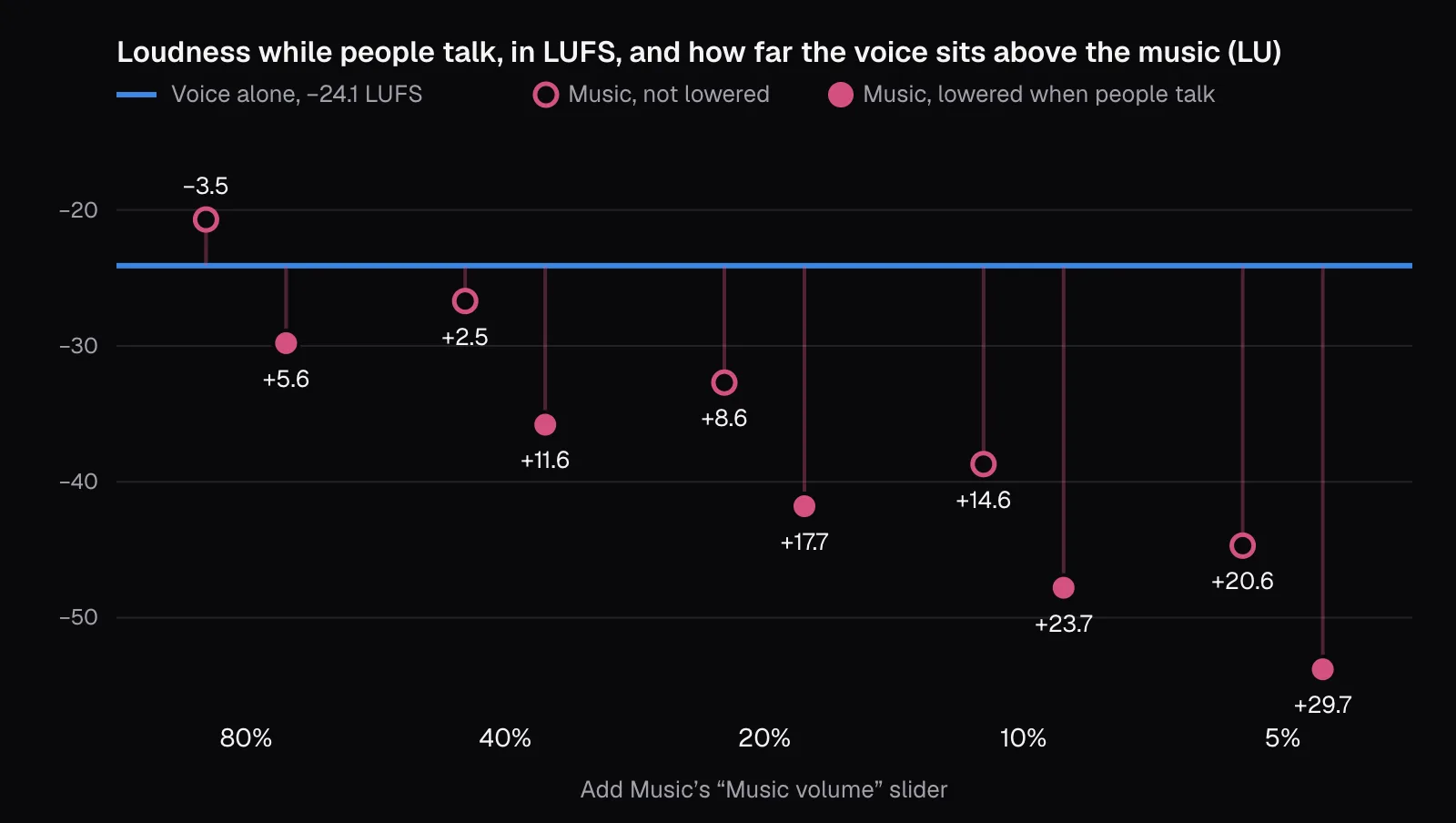
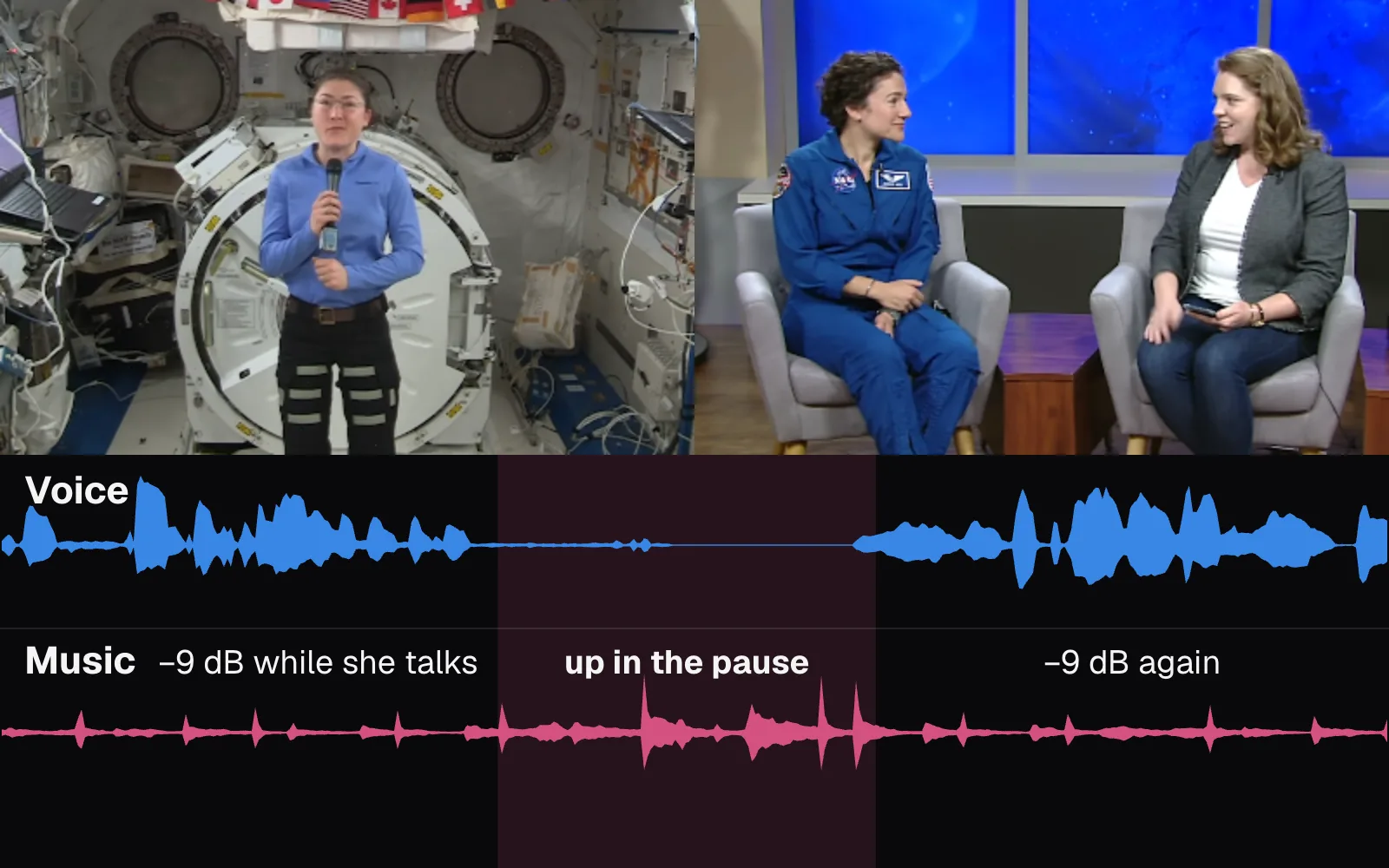
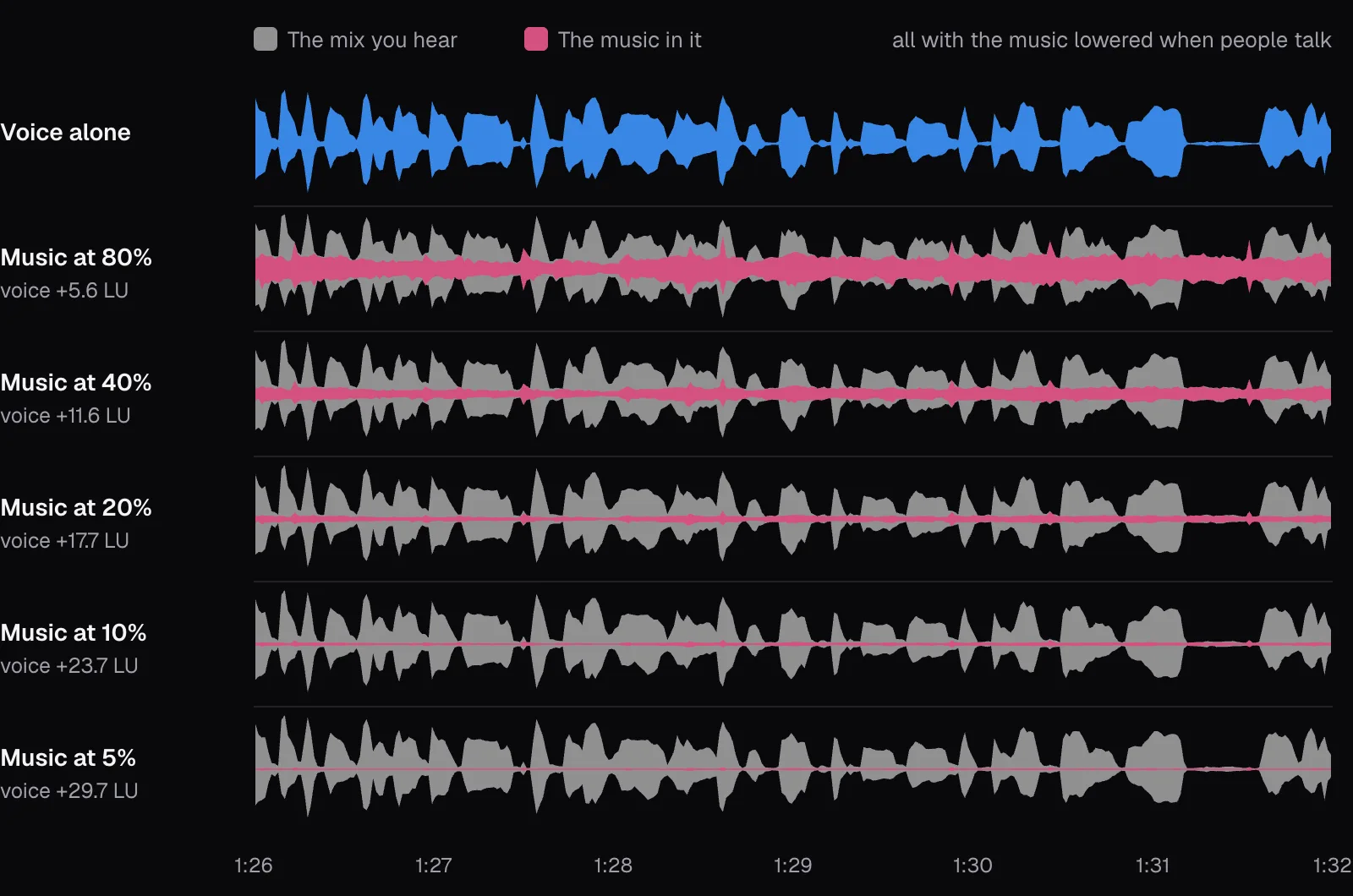
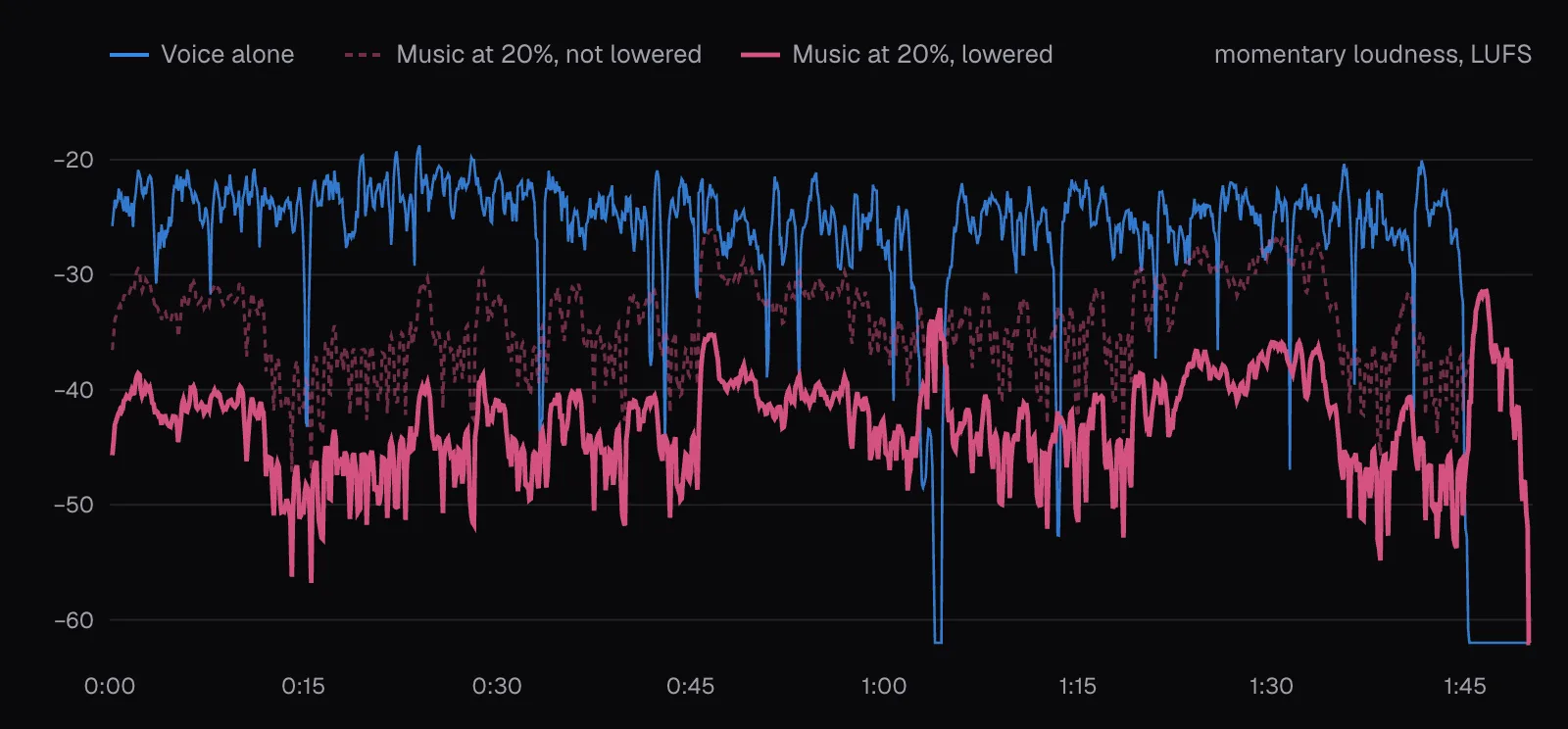
At the editor's default volume of 80% with ducking switched off, the music was louder than the people talking. With ducking on it was 5.6 LU under them, which still put plenty of song between the words, as the waveforms below show. And the mix's overall loudness barely moved once the music was well down: at 20% with ducking the whole mix measured −24.1 LUFS, the same as the voice alone, while at 80% without ducking the music raised it 4.9 LU, to −19.2. EBU Tech 3343 says it plainly: background sounds “only add to the Programme Loudness Level.”
How Add Music lowers the music when people talk
Ducking in Add Music doesn't recognize speech; it listens for loudness. When you open a video, the editor measures its own sound every 20 milliseconds (an RMS level, taking the louder channel sample by sample) and sets a threshold for that video: 30% of the level that 90% of those readings stay under (near-silence left out), and never lower than 0.015 of full scale. For our interview that came to −33.4 dBFS. Anything over it counts as talking, so applause, laughter or a slammed door lowers the music too.
Around every stretch over the threshold, the music follows a fixed shape:
- Down to 35% of its level, which is −9.1 dB, ramping over 0.15 seconds that end where the sound crosses the threshold. The editor analyzes the video's whole soundtrack when you open it, so it can start lowering before the first word.
- Held down 0.35 seconds after the sound drops below the threshold (0.36 seconds, counted in 20-millisecond steps), so the music doesn't pump between syllables.
- Back up over 0.6 seconds, in a straight line in amplitude, which looks curved on a decibel scale.
- Never back up for less than 0.75 seconds: if the next stretch starts less than 0.75 seconds after the hold ends, 1.11 seconds of quiet in all, the two are joined and the music stays down. Otherwise it comes all the way back.
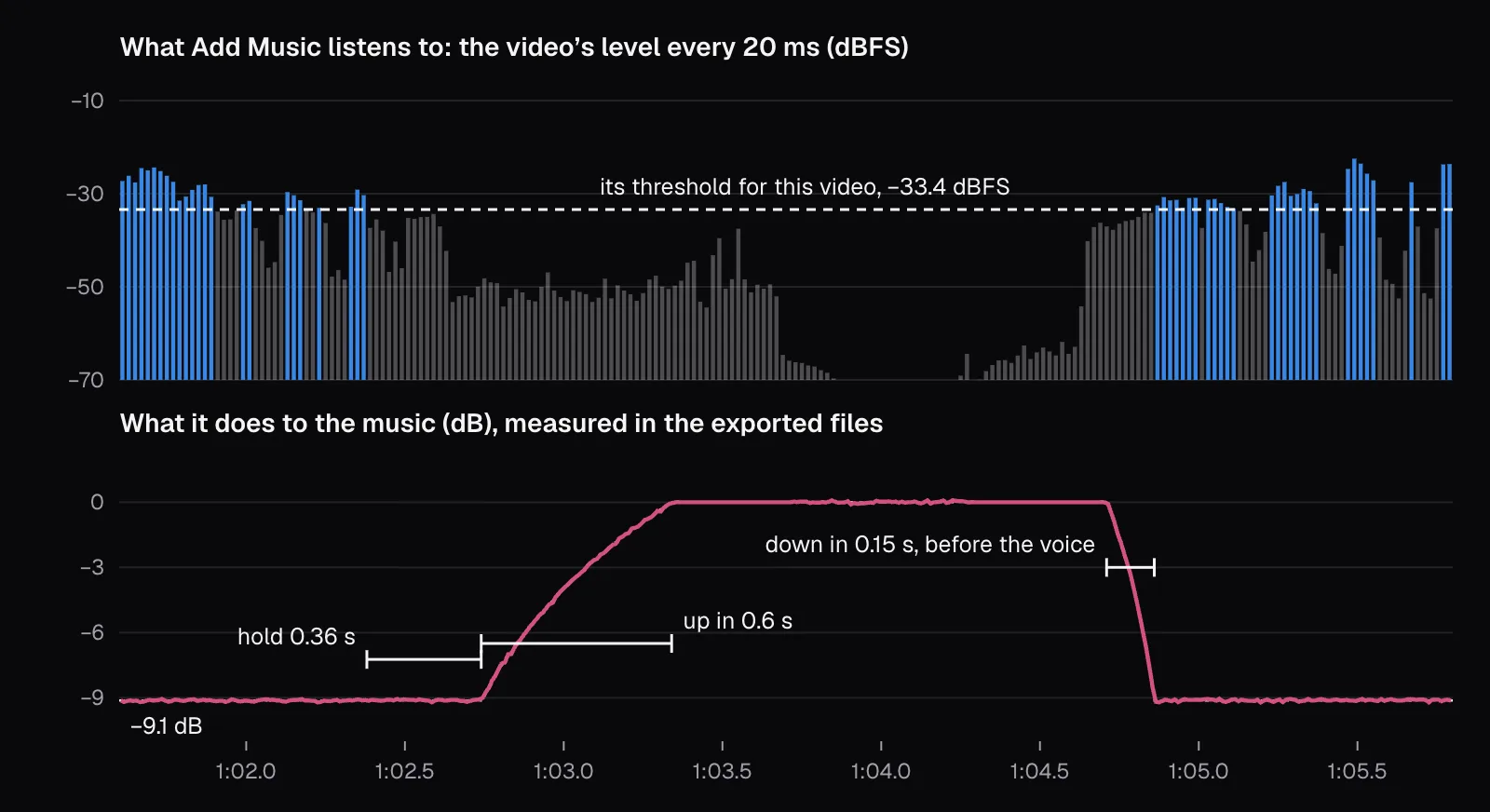
We checked that shape in the files. Dividing the ducked song by the unducked one, 10 ms at a time, gives the gain the export applied; across 10,911 such windows it stayed within 0.24 dB of the curve the code computes, with a median gap of 0.02 dB. The same curve drives the preview, so what you hear while editing is what you export. In the handover above, the last loud moment from the station ended at 1:02.38. Measured with a 1 dB margin, the music was rising by 1:02.78, back within 1 dB of full by 1:03.24, falling again by 1:04.74 and within 1 dB of the bottom by 1:04.85, as the studio's first word crossed the threshold at 1:04.86.
That handover was the only time the music came back up while anyone talked. Over the 105 seconds from first to last word, the song spent 97.8% of the time 9.1 dB down: in this conversation, only one pause lasted the second or so ducking needs. In practice, ducking on a talk like this is a steady 9 dB cut that lifts at the edges.
Pauses, fades and the end of the video
Ducking protects words, not silences. In the pause at the handover, the ducked song was exactly as loud as the unducked one, because by then it had come all the way back. At 20%, its loudest 400 ms in that pause measured −32.9 LUFS, 8.8 LU under the voice's average, with or without ducking. At 10% the figure was 14.8 LU; at 5%, 20.8 LU. The slider, not the switch, decides how present the music is in any pause longer than about a second, in an intro before anyone speaks and after the last word.
That matters if you read the one published number we found for this balance. The Web Content Accessibility Guidelines (WCAG 2.2) ask, in success criterion 1.4.7, that background sounds in prerecorded audio-only content be absent, be possible to turn off, or be “at least 20 decibels lower than the foreground speech content”, except “occasional sounds that last for only one or two seconds.” The W3C's reason: “People who are hard of hearing may have difficulty distinguishing speech from music and other sounds.” Its sufficient technique G56 measures the “loud values of background content between foreground speech”, in A-weighted sound pressure rather than LUFS, so our numbers aren't a compliance test. But they point the same way: under the words, 10% with ducking cleared 20 LU; in the pause, only 5% did.
The ends of the song are handled by the fades. Add Music's fades follow an S-shaped curve (3x² − 2x³), gentle at both ends and steepest in the middle. Our 2-second fade-out ran from 1:48.24 to 1:50.24, and the files show its shape: 1.5 dB down a quarter of the way in, 6.1 dB at halfway and 16.2 dB at three quarters, against 1.5, 6.0 and 16.1 for the curve. The fade-in is off by default, so a song starting under silence starts at its full slider level at once; give it half a second or more when the music opens a video alone.
Our interview ended with five seconds of silent end card, so the song rose to its full slider level after the last word and played alone until the fade: one more moment the slider, not the ducking, decides.
What a speech transcriber heard at each setting
Loudness numbers don't say whether the words survive. As one test of that, we ran the voice alone and all ten mixes through Cutlia's Audio to Text, which runs a Whisper speech-recognition model in the browser, and compared each transcript with the voice-only one, word by word: 393 words.
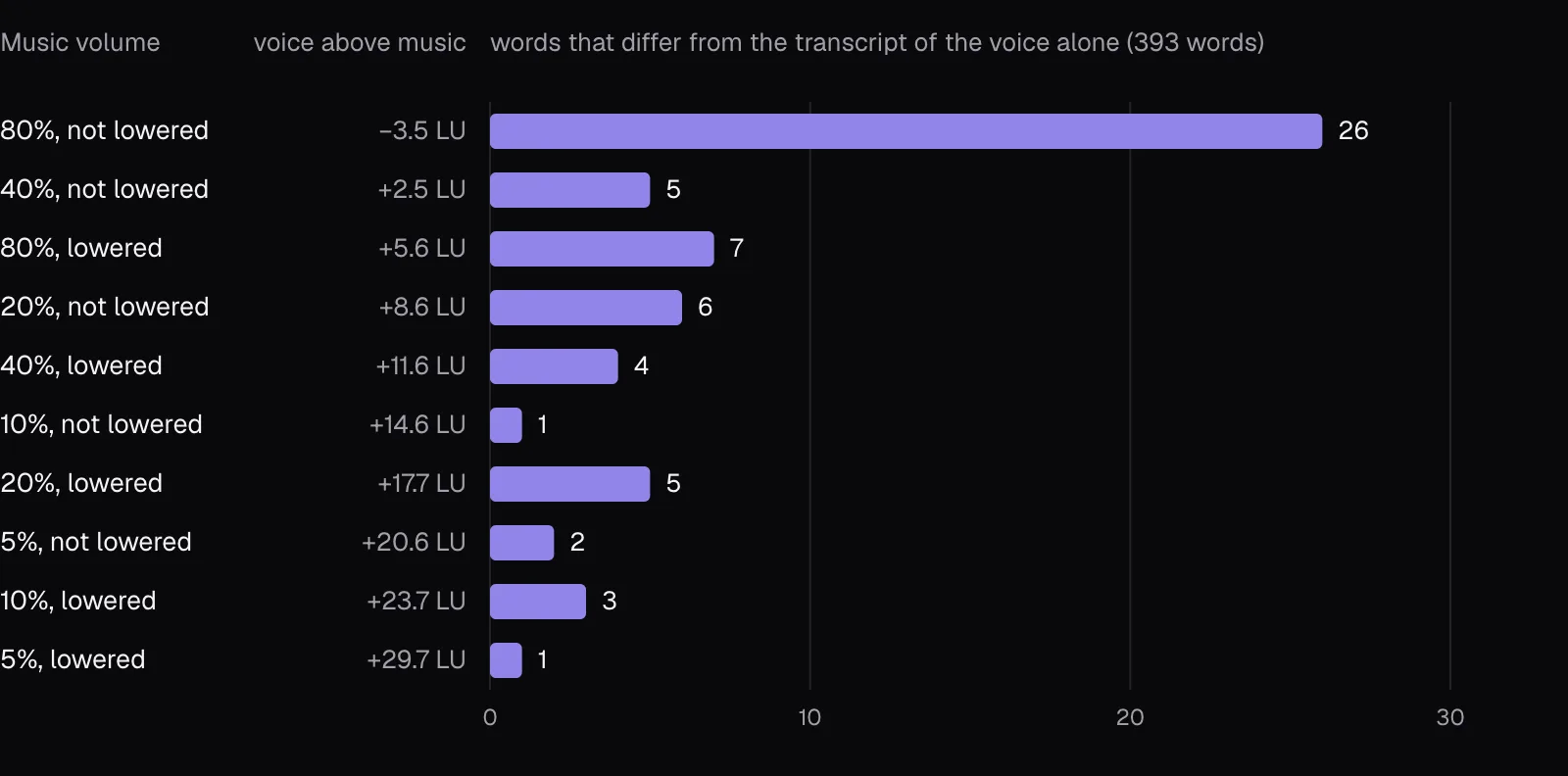
At 80% without ducking, 26 words were added, dropped or changed, and some changes altered the meaning: “it feels awesome” became “it feels quite a bit different. Awesome”, “are you too busy training” became “are you going to be training”, and the Soyuz became “the 30s”. With ducking on at the same 80%, 7 words differed, among them “Koch” heard as “Cook”. The other eight settings differed by 1 to 6 words, mostly small things like “all right” written “alright” or a stray “and”, and those didn't fade as the music did: the quietest mix, 5% with ducking, still had one.
A transcriber isn't a person, and these numbers say only where the music started to cost a machine words. Treat that line as a floor, not a target: the W3C's reason for its 20 dB is that people who are hard of hearing find it hard to separate speech from music, and a setting a machine shrugs off can still make a listener work.
Phones, noisy places and YouTube’s own volume tools
You mix at a desk; your viewers may not be at one. EBU R 128 s2, the European Broadcasting Union's guidance for streaming, separates devices used with plenty of playback volume and little background noise (TVs, smart speakers) from “situations with limited playback gain and headroom and/or higher background noise”, naming smartphones. For that case it allows an interim stream level of −20 to −16 LUFS instead of −23, while noting that revised device safety standards from CENELEC and the IEC now give phones enough gain for noisy places, so streams need no longer be louder than broadcast. Noise around a listener does what more music would: it fills the gaps between words, so a voice that is only a few LU ahead of the music at a desk has less to spare on a street.
The platforms may also change your balance after you upload. As of November 2026, YouTube's help pages describe Stable volume, on by default, which “balances the range between quiet and loud, continuously adjusting volume levels”, and Voice boost, which “makes it easier to hear dialogue by reducing background sounds and highlighting vocals.” YouTube says neither is available for every video. Its list of audio enhancements it may apply starts with “Automatic adjustments to volume levels and sound mixing”, and creators can turn those off with “Let YouTube enhance audio quality” in YouTube Studio. A tool that evens out quiet and loud can lift a music-only pause toward the level of speech, one more reason to keep the slider modest.
None of this needs a louder mix from you. To make a finished video louder or quieter as a whole, use Mute Video's “Change the volume”, from 0 to 200%, which moves voice and music together and keeps the balance you chose. In Add Music, “Video's own sound” goes up to 150% when only the voice needs lifting; the export rounds off peaks above 95% of full scale rather than clipping them. If a word or a passage needs to go rather than sit under music, our guide to muting and bleeping covers that.
Which setting to use
For a video where the words matter, this is what our measurements support:
- Leave “Lower the music when people talk” on. It took 9.1 dB off the music under every word, matched the computed curve to within 0.24 dB, and left the music untouched in the pause and after the last word.
- Start at 20%, not 80%. With our voice at −24.1 LUFS, 20% put the music 17.7 LU under the talking and 8.8 LU under the voice in the pause, and the transcript differed by only 5 words of 393.
- Go to 10% for anything everyone must follow, such as a lesson, a tutorial or a video for viewers who are hard of hearing: 23.7 LU under the words and 14.8 LU under the voice in the pause. If you want the music 20 LU down between sentences too, the margin WCAG asks of audio-only recordings, only 5% did that in our test.
- Adjust for your voice and your song. A voice recorded 6 dB louder than ours can take double the setting for the same gap; one 6 dB quieter, half. A song that measures louder at 100%, like Canon in D at −13.7 LUFS against our song's −18.9, needs about 5 LU more taken off: roughly half the setting.
- Listen where your viewers will: the exported file, on a phone speaker at low volume, then on headphones. If you have to concentrate to catch a sentence, take the slider down one more step.
Questions people ask
How many decibels below the voice should background music be?
Broadcast standards don't fix one number: EBU Tech 3343 calls the level of each element in a mix an artistic decision. The only official figure we found is WCAG 2.2's success criterion 1.4.7, for audio-only recordings: background at least 20 dB below the speech. In our test, Add Music at 20% with ducking put the music 17.7 LU under a voice while people talked, and 10% put it 23.7 LU under; in the pause between speakers, only 5% kept it 20 LU down.
What does audio ducking do?
It lowers the music automatically while someone speaks and raises it again in longer pauses. Add Music's version listens to the video's own sound every 20 milliseconds, lowers the song to 35% of its level (−9.1 dB) over the 0.15 seconds before the sound crosses a threshold set for that video, holds it down 0.35 seconds after, and brings it back over 0.6 seconds. In our 1:50 interview, the music came back up only once while people talked.
Should background music fade in and out?
Fading out is the default in Add Music: 2 seconds, on an S-shaped curve that measured 6.1 dB down at its midpoint in our file. Fading in is off by default, which is fine when the song starts under speech, since ducking lowers it within the first moments. When the music opens a video on its own, a fade-in of half a second or more keeps it from starting abruptly.
Why can I hear the music but not the words on my phone?
EBU R 128 s2, the broadcasters' guidance for streaming, names smartphones among devices used with limited playback volume or more background noise, and noise around you adds to the music under the voice. A mix that sounds balanced at a desk can leave the words too little room. Lower the music in the editor, keep ducking on, and check the export on a phone speaker before you publish.
Does Add Music lower music that's already in my video?
No. Its ducking lowers only the song you add, and it decides when from the loudness of the video's own sound, whatever that sound is. Music already in your video counts as sound to duck under, so the added song may stay lowered all along; the original music keeps the level set by the “Video's own sound” slider.
Sources
Where the facts in this guide come from, besides our own tests:
- Recommendation ITU-R BS.1770-5: Algorithms to measure audio programme loudness and true-peak audio level — International Telecommunication Union
- EBU R 128: Loudness normalisation and permitted maximum level of audio signals — European Broadcasting Union
- EBU Tech 3341: ‘EBU Mode’ metering to supplement loudness normalisation — European Broadcasting Union
- EBU Tech 3343: Guidelines for production of programmes in accordance with R 128 — European Broadcasting Union
- EBU R 128 s2: Loudness in streaming — European Broadcasting Union
- Understanding Success Criterion 1.4.7: Low or No Background Audio (WCAG 2.2) — W3C
- Technique G56: Mixing audio files so that non-speech sounds are at least 20 decibels lower than the speech audio content — W3C
- Control video volume on your device — YouTube Help
- Video & audio quality enhancements — YouTube Help
- Local Forecast - Elevator (license and notes) — incompetech
- Astronauts Koch and Meir React to International Space Station Mission Updates (date and description) — NASA, on Wikimedia Commons
Footage in this guide
The pictures were made with Cutlia's tools from this openly licensed footage, found on Wikimedia Commons:
- Astronauts Koch and Meir React to International Space Station Mission Updates — NASA, Public domain