Formats and playback
Why does my video play with no sound, and how do I fix it?
We made each kind of silent video from a U.S. Marine Band recording, played them in Chrome and in macOS's own media framework, and fixed the ones that can be fixed.
By the Cutlia team · Published · 15 min read
The short version
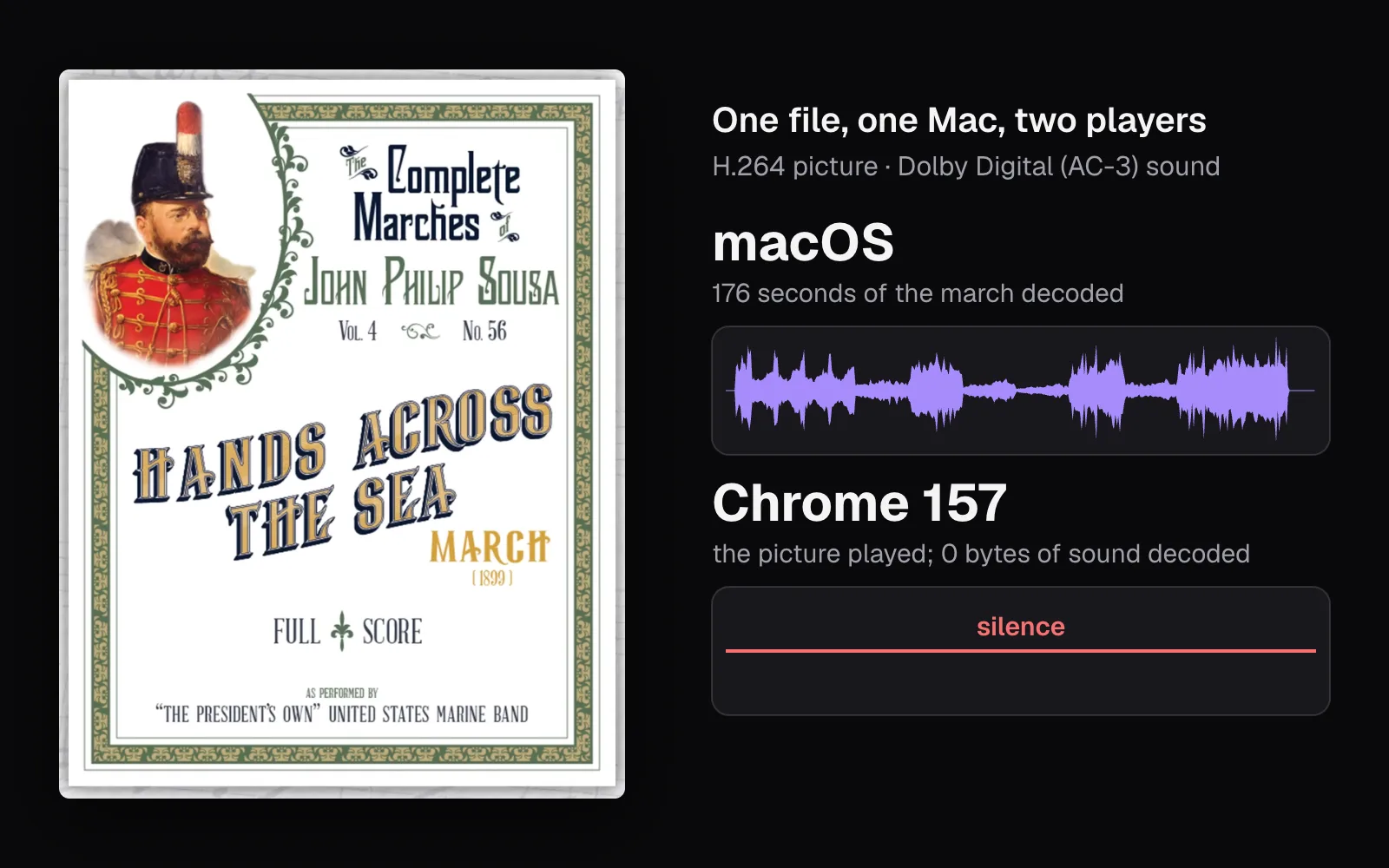
- If a video is silent in one player and has sound in another, the first player most likely can't decode its sound: macOS decoded the whole march from our MP4 with Dolby Digital sound, while Chrome showed the picture and decoded 0 bytes of sound, with no error message.
- Fix that by converting only the sound to AAC and copying the picture: Cutlia's converter did it as the file opened, and Chrome decoded the new MP4's sound at the same average level, −22.9 dBFS, that macOS decoded from the Dolby Digital track.
- If it's silent everywhere, look for a sound track: Cutlia shows no waveform and no “Keep the sound” switch when there's none, and a flat line when the track holds only silence. No converter can fix either.
- Look at the speaker icon in Chrome's own player: in our test it was grayed out for both a file with no sound track and one with sound Chrome can't decode, and white over a track of silence.
- With two sound tracks, programs choose differently: Chrome played the first track it could decode and ignored the file's default flag, while Cutlia's converter kept the track marked as the default.
A video that plays without sound often isn't broken at all. Its sound may be right there, in a format the player in front of you has no decoder for, and the player may show the picture without a word of complaint. Or the file has no sound track, or a track that holds nothing but silence. From the sofa the three look the same. They need different fixes, and two of them have none. A related puzzle is the file with several sound tracks, where the player picks one you didn't want.
To see each one happen, we built them. We started from the U.S. Marine Band's recording of John Philip Sousa's march “Hands Across the Sea”: 2 minutes 56 seconds of music whose picture is the full score, page after page. Cutlia's own tools made an MP4 of it with AAC sound, a DVD-ready MPG with Dolby Digital sound, a copy with no sound track and a copy turned down to 0%. A short script of ours then packed those pieces into the files people actually run into, copying every packet as it was: Dolby Digital in an MKV and in an MP4, Opus in an MP4, and MKVs with two sound tracks.
We played every file in Chrome 157 and opened it with AVFoundation, the media framework of macOS 26.6, both on one MacBook Air with an Apple M5 chip, and decoded every sound either of them would decode. Then we opened the files in Cutlia's Video Converter, which runs in the browser, to see what it says about the sound before anything is exported.
Rule out the device before you change the file
Play another video that you know has sound, in the same app on the same device. If it's silent too, the file isn't the problem: look at the volume, an app or browser tab that's muted, or sound going to headphones or a speaker you forgot were paired. Converting the file won't change any of that.
If other videos play with sound, try the silent one in a second player, ideally VLC on a computer: its feature list names Dolby Digital (AC-3), E-AC-3, TrueHD and DTS among the sound formats it decodes. Sound in VLC and silence on the first device means the file is most likely fine and the first player lacks a decoder for its sound. Silence in both points to the file itself: there's probably nothing audible in it.
Players differ in how much they tell you. Microsoft says that with a codec problem in Windows Media Player you'll probably see a message like “A codec is required to play this file”. Chrome showed no message at all for our Dolby Digital file, but its own player did leave a clue, the same one it left for a file with no sound track: the speaker icon was grayed out.
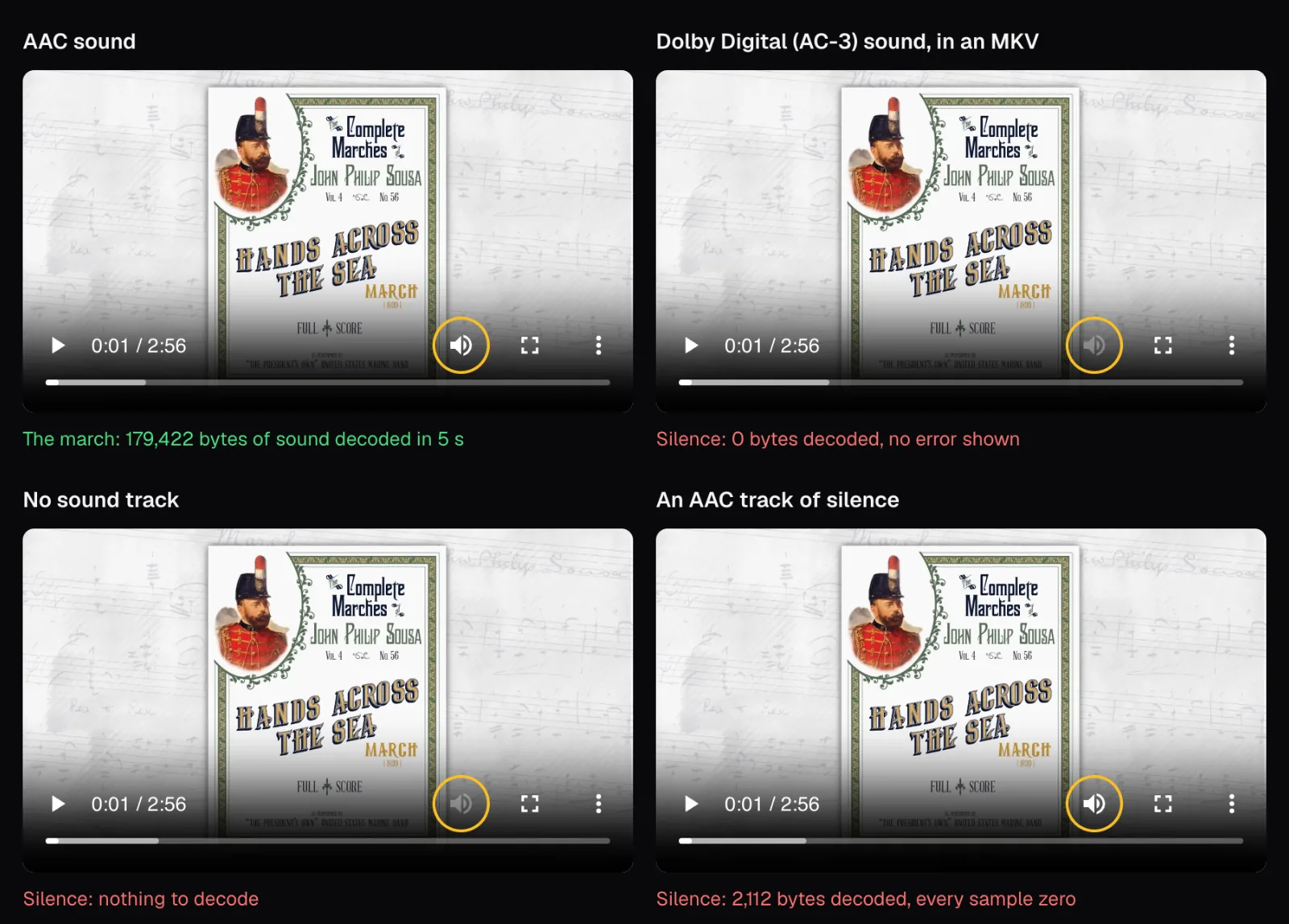
That makes the icon a quick test in Chrome. Grayed out: either there's no sound track or Chrome can't decode the one there is, and the next sections tell those two apart. White, with nothing coming out: the track itself is silent, or so quiet that it might as well be.
A video file is a box of tracks, each with its own codec
An MP4, MKV or MOV file is a container: a box that holds a picture track, usually a sound track, and an index that ties them together in time. Each track is compressed with a codec, such as H.264 for the picture and AAC for the sound, and to play the file a player has to read the container and have a decoder for every track it plays. It can read the container and decode the picture yet have no decoder for the sound, and then it plays the picture without the sound. Our comparison of video formats covers containers in depth.
A missing decoder is the first of three ways a video ends up silent; the others are a missing sound track and a track of silence. We made a file for each, and files with two sound tracks, all around the same 2:56 recording. Every file except the two built on NASA's news has the same 1080p H.264 picture, made by the converter from the original 4K, so only the sound differs.
| Test file | Sound | Size | How we made it |
|---|---|---|---|
| MP4, the control | AAC, 184 kbps | 35.1 MB | Video Converter, MP4 at 1080p |
| MKV with Dolby Digital | AC-3, 192 kbps | 35.3 MB | The MP4's picture with the sound of the converter's DVD-ready MPG |
| MP4 with Dolby Digital | AC-3, 192 kbps | 35.3 MB | The same two tracks in an MP4 |
| MP4 with Opus | Opus, 126 kbps | 33.8 MB | The MP4's picture with the original WebM's sound |
| No sound track | None | 31.0 MB | Mute Video, “Remove all sound” |
| A track of silence | AAC, 2 kbps | 31.1 MB | Mute Video, “Change the volume” at 0% |
| Two MKVs with two tracks | Opus narration and Opus march | 65.2 MB | NASA's Spanish news with the march added, the default flag on one track or the other |
| MKV with Dolby Digital and Opus | AC-3 march (the default), Opus narration | 37.7 MB | The MP4's picture, the MPG's Dolby Digital and NASA's narration |
Nothing in the packed files was re-encoded: Mediabunny, the library Cutlia reads and writes files with, copied each compressed packet into its new box. The Dolby Digital track is exactly what the converter wrote into the MPG, and the Opus track is exactly what the Marine Band's own file holds.
Sound the player can't decode: Dolby Digital in Chrome
Dolby Digital, also called AC-3, is the sound of film and television. Dolby states that every DVD worldwide and all HD broadcasts in the United States use it, and a film copied from a disc or a recording from a TV tuner keeps it unless someone converts it. Dolby says it has since evolved into Dolby Digital Plus.
Asked through WebCodecs, the interface a web page uses to reach the browser's own decoders, Chrome 157 said yes to AAC, MP3 and Opus and no to AC-3 and E-AC-3. So we played the Dolby Digital MKV for five seconds from 1:00: Chrome decoded 1.3 MB of picture and 0 bytes of sound, and nothing came out. Its Web Audio decoder, given the whole file, gave up with an “EncodingError”. The MP4 with the same two tracks fared no better, with 0 bytes of sound and the same error: a new box changes nothing when the sound inside is the problem.
On the same Mac, AVFoundation turned the tables. It decoded the MP4's Dolby Digital track from start to finish, 176.35 seconds with a peak of −0.1 dBFS and an average of −22.9 dBFS, the same average as the AAC control. But it couldn't open the MKV at all: macOS answered “Cannot Open” for every MKV we gave it, whatever was inside.
| Same Mac, same file | Chrome 157 | macOS 26.6 (AVFoundation) |
|---|---|---|
| MP4, AAC | Picture and sound | Picture and sound |
| MP4, Dolby Digital | Picture only | Picture and sound |
| MKV, Dolby Digital | Picture only | Won't open |
| MP4, Opus | Picture and sound | Picture and sound |
Beyond our Mac, each company's own list tells you what to expect, as of November 2026. Apple's specifications for the iPhone 17 name AAC, APAC, MP3, Apple Lossless, FLAC, Dolby Digital, Dolby Digital Plus and Dolby Atmos among the audio formats it plays. Android's table of the formats built into the platform has AAC, Opus (from Android 5.0), MP3, FLAC and Vorbis but no Dolby Digital, though Google adds that a particular device might support formats the tables don't list. MDN's list of the codecs common on the web has no Dolby Digital either. DTS, another surround format, is on none of the three lists.
The pattern: Dolby Digital is at home on Apple devices and in home theaters, which Dolby calls its established standard, and it's the first thing to suspect when a film copy is silent in a browser or on an Android phone. Old DVD and camcorder files, which can carry it too, have a guide of their own.
The fix: make the sound AAC and leave the picture alone
AAC is on all three lists above, and Chrome decodes it, so converting the sound to AAC is the fix; MP3 qualifies too, and it's what Cutlia's converter falls back on for an MP4. The picture doesn't need to be touched. We opened the Dolby Digital MKV on the MKV to MP4 page. Because Chrome can't decode its sound, Cutlia converted the file as it opened: FFmpeg, compiled to WebAssembly and running inside the browser tab, decoded the Dolby Digital, and the browser's own encoder made AAC from it, while the H.264 picture was copied as it was. The file never left the laptop.
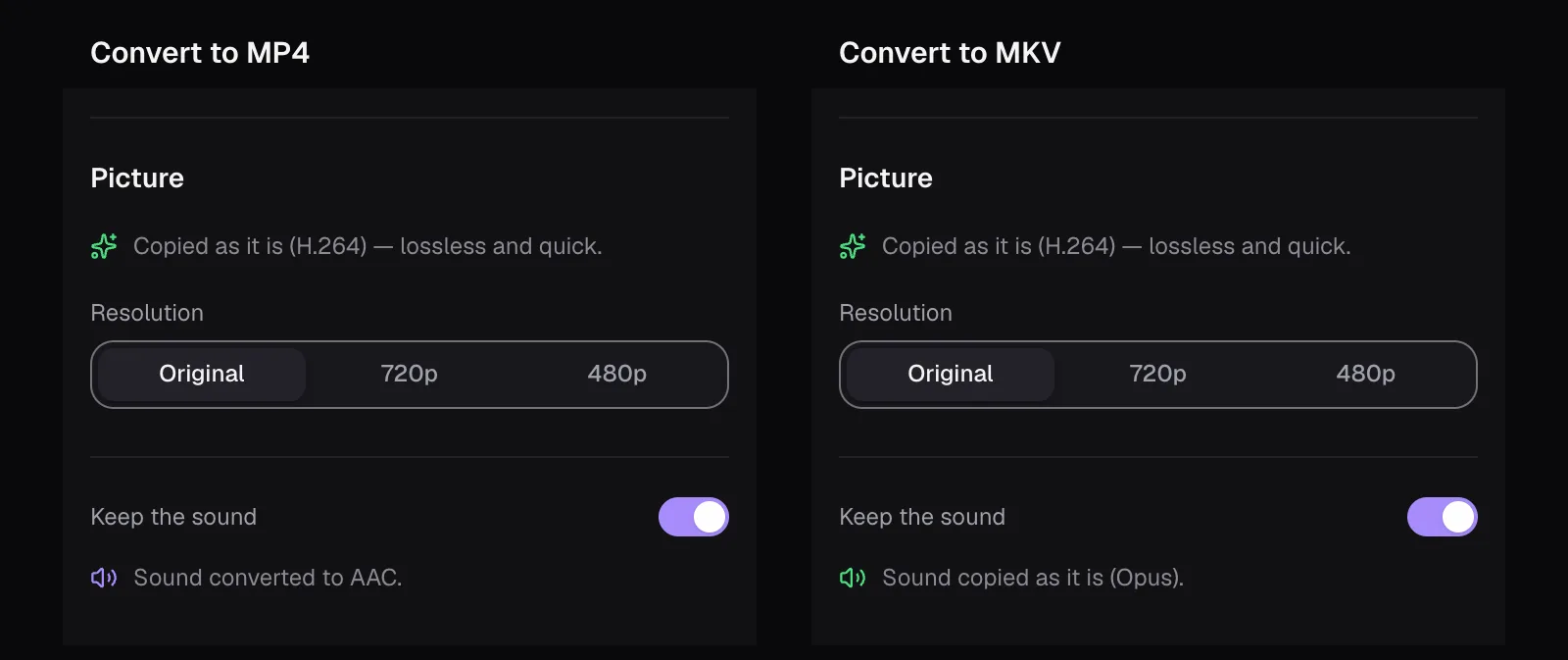
Before we pressed anything, the editor said what it had done and would do. Its toolbar read “2:56 · 1920×1080 · H.264 · 35.3 MB · Converted from MKV”, the panel said “Copied as it is (H.264) — lossless and quick.” for the picture and “Sound converted to AAC.” for the sound, and a waveform of the march ran under the filmstrip. The MP4 it saved was 35.1 MB, with AAC sound at 182 kbps on average.
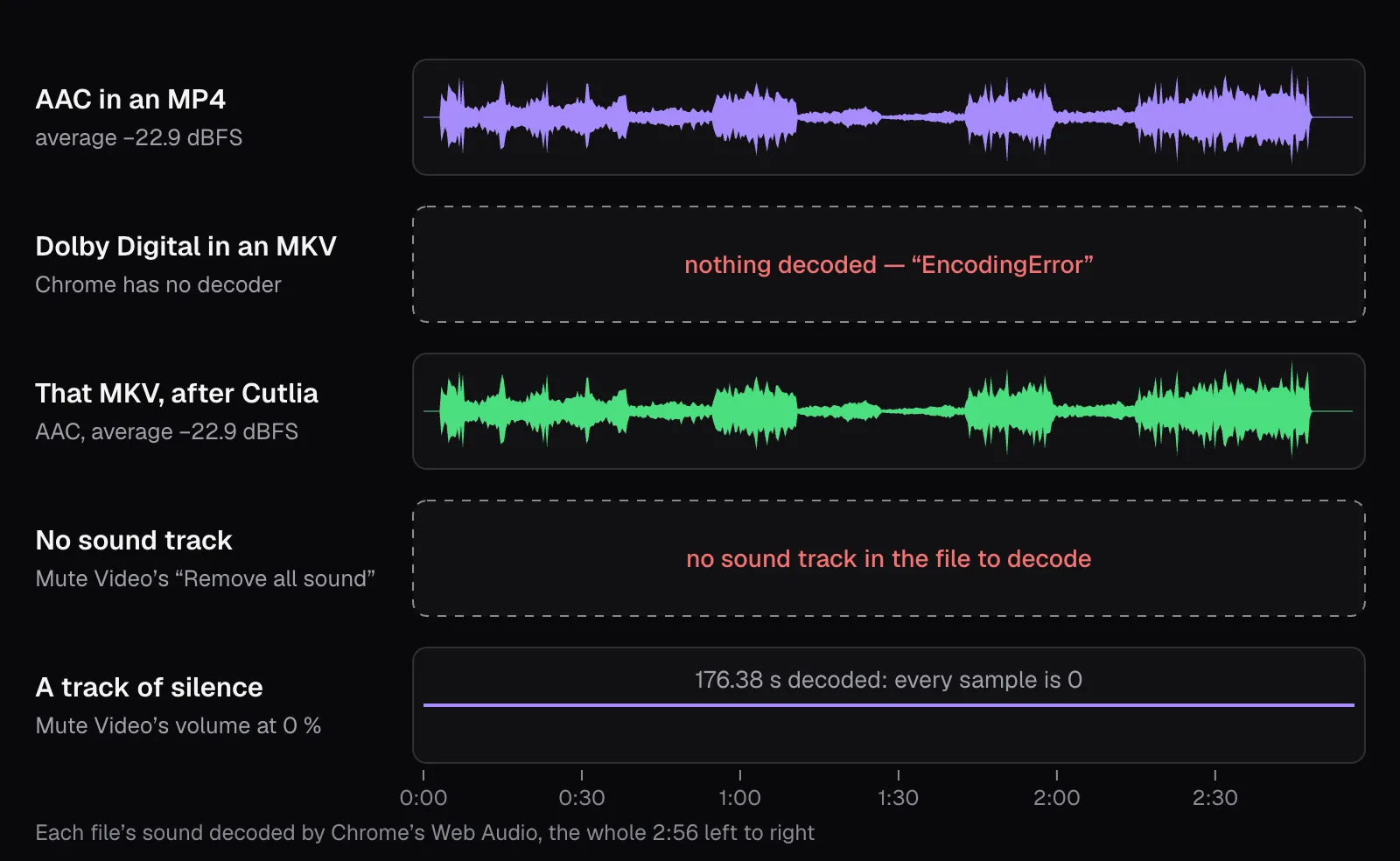
Chrome decoded the new MP4's sound from start to finish, with a peak of −0.1 dBFS and an average of −22.9 dBFS: the figures macOS had read from the original Dolby Digital track, so the level came through unchanged and no sample reached full scale. A surround track would come out as stereo, since the converter mixes every sound it converts down to two channels (mono stays mono). If you watch on a home theater receiver that decodes Dolby Digital itself, keep the original file for it and use the converted copy everywhere else.
In browsers that have no AAC encoder of their own, Firefox and Chrome or Edge on Linux, Cutlia loads its own, so the result is AAC there too. We tested Dolby Digital; the converter's FFmpeg build also contains decoders for E-AC-3, DTS and TrueHD, which we didn't try here.
If you only need the sound, Video to MP3 takes it out of the same MKV: ours became a 4.2 MB MP3 at 192 kbps that Chrome decoded from start to finish. Such an MP3 doubles as a test, because if it plays on the silent device, the video's sound format was the problem. Which audio format to keep is a question of its own, answered in our comparison of MP3, M4A and WAV.
Opus: at home in WebM, a gamble in an MP4
The Marine Band's recording is a WebM, and its sound is Opus at 126 kbps, one of the two sound formats MDN lists for WebM (the other is Vorbis). Opus is allowed in an MP4 too: MDN lists MP4 among its containers, Android's table lists MP4 among the files it reads Opus from, and YouTube's recommended upload settings name “AAC-LC or Opus or Eclipsa Audio”. Our MP4 with the original Opus track played with sound in Chrome, which decoded 118,748 bytes of it in five seconds, and macOS decoded all of it.
The gamble is everything else. Apple's list for the iPhone 17 doesn't name Opus, and TVs, cars and older phones each have lists of their own. For a file you hand to other people, the safe sound in an MP4 is AAC, or MP3 in a pinch.
Cutlia's converter follows that rule. Into an MP4 or a MOV it copies only AAC or MP3 sound and turns anything else into AAC; Opus goes into an MP4 only as a last resort, if neither the browser nor Cutlia's own encoders can make AAC or MP3. Into an MKV or a WebM it copies Opus untouched. With our Opus MP4 open, the panel said so before we exported anything.
No sound track, or a track that holds only silence
When a video is silent in every player, there's nothing audible in the file, and it happens in two ways that look alike but aren't. Which one you get depends on the app that made the file.
In the first, the file has no sound track at all. We made one with Mute Video's “Remove all sound”. It was 4.1 MB smaller than the control, about the size of the AAC track it no longer had. macOS listed a single track in it, the picture. Chrome decoded nothing and grayed out its speaker, and its Web Audio decoder gave the same “EncodingError” as for the Dolby Digital file, so an error alone doesn't tell a missing track from one that can't be decoded.
In the second, a track is there but holds only silence. We made one with Mute Video's volume at 0%, and it passed every check we made for a sound track. Chrome decoded 2,112 bytes of it in five seconds and kept its speaker white. Its AAC track runs at 2 kbps, because silence compresses to almost nothing, and Chrome and macOS both decoded all of it: 176.38 seconds by Chrome's count, and every sample zero.
Cutlia tells the two apart before you export anything.
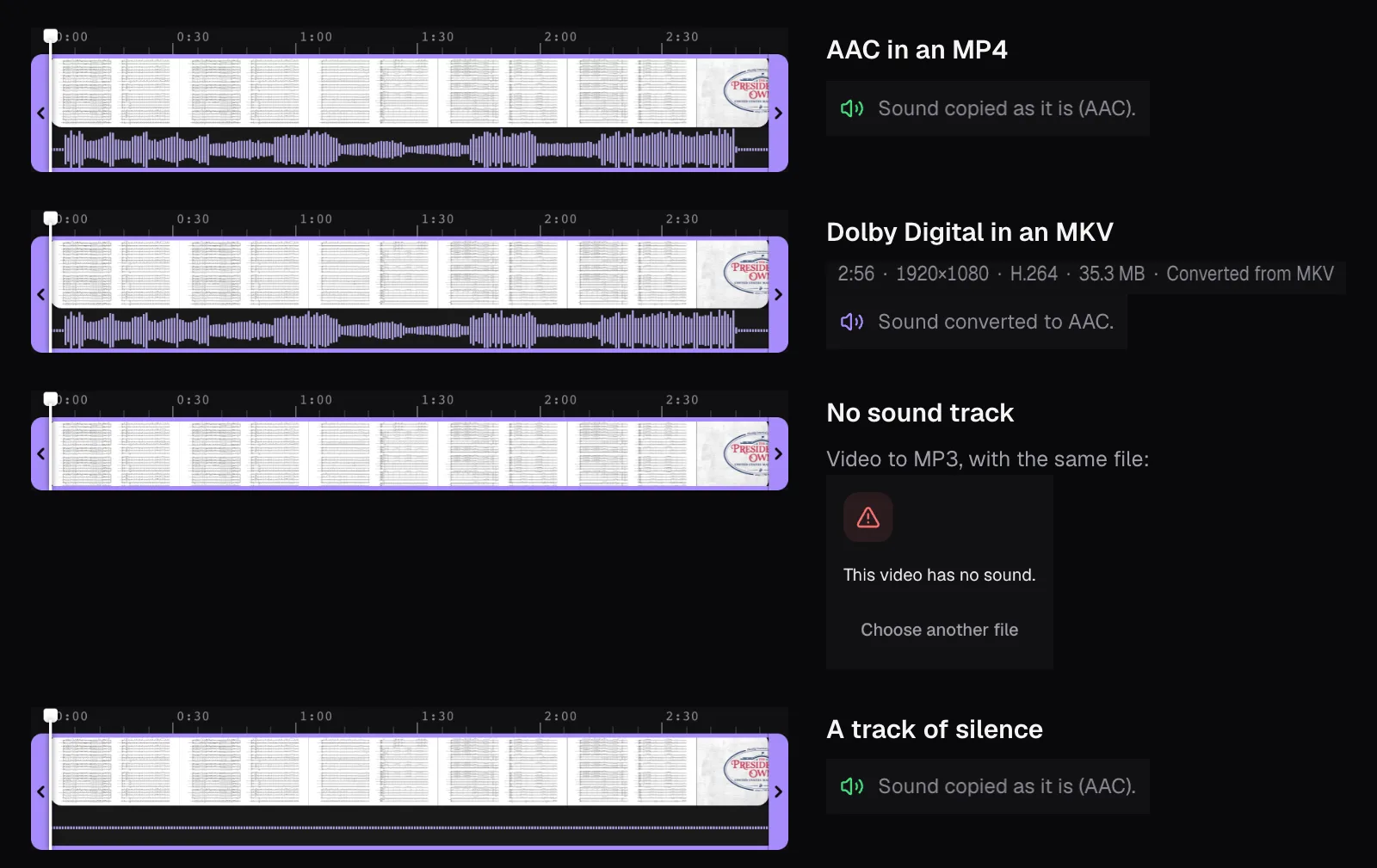
The converter shows a waveform lane under the filmstrip only when a file has sound, and only then a “Keep the sound” switch. For the file with no track, both were missing, and Video to MP3 and Mute Video refused it with “This video has no sound.” The file with a silent track got a waveform lane with nothing in it, a flat dotted line, and the panel said “Sound copied as it is (AAC).”
Converting can't fix either one, because there's nothing to recover. Use the original recording if you still have it, from the camera or phone that made it. Otherwise the video needs new sound: music from Add Music, or a voice-over recorded for it.
Two sound tracks, and the one that plays
A film or a TV recording can carry several sound tracks: languages, a director's commentary, an audio description. The Matroska specification, which defines MKV, gives each track a default flag, set when the track is “eligible for automatic selection by the player”. A track has it unless the file says otherwise, and the specification adds that a player “MAY override the Default flag for any reason”.
To see what that means in practice, we gave NASA's Spanish weekly space station news two sound tracks: its own narration as track 1 and the march as track 2. In one copy the default flag was on the narration, in the other on the march. To know which track Chrome played, we compared the loudness of what came out of its player, moment by moment, with each track. In both copies it matched the narration, with correlations of 0.955 and 0.996, and not the march, at 0.207 and 0.213. Chrome played track 1 both times and ignored the flag.
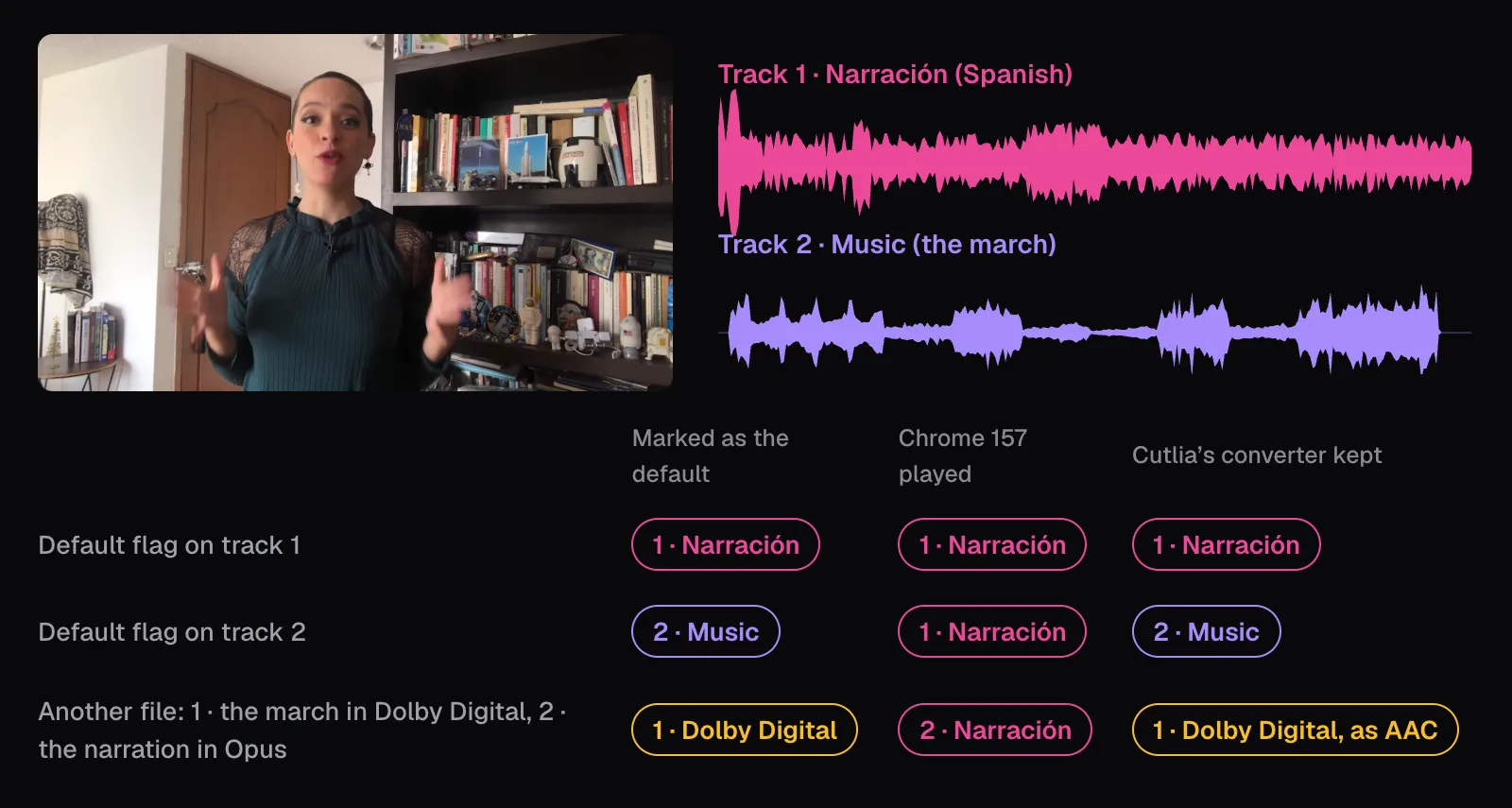
A third file put the two cases together: the march in Dolby Digital as track 1, marked as the default, and the narration in Opus as track 2. Chrome skipped the track it couldn't decode and played the narration, so this file had sound in Chrome while the single-track Dolby Digital MKV had none, just not the sound its maker chose. In our tests, then, Chrome played the first sound track it could decode.
Cutlia's converter keeps one sound track, and it kept the default every time: the narration, then the march, then the Dolby Digital march, which it converted to AAC. Its rules, in its code: prefer the track marked as the default, then the highest bitrate, then the first in the file. For a file it converts as it opens, like that last one, it also passes over an audio description or a track for the hearing impaired while there's another, and weighs the number of channels after the bitrate.
So if the wrong language plays, the fix is in the player: in VLC, you pick a track in the Audio menu's Audio Track list. A copy that keeps only the track you want plays it in any player that can decode it. Cutlia's converter makes one when that track is the one it picks, normally the file's default; it doesn't let you pick another.
Which fix for which silence
| What you notice | Likely cause | What to do |
|---|---|---|
| No video has sound on this device | Volume, mute or sound output | Check the device; leave the file alone |
| Silent in one player, sound in VLC; grayed speaker in Chrome | A sound codec the player can't decode | Convert the sound to AAC in an MP4; the H.264 picture is copied |
| An MP4 made from a WebM is silent on a phone or TV | Opus sound in an MP4 | The same: AAC |
| Silent everywhere, no waveform in Cutlia | No sound track | The original recording, or new sound |
| Silent everywhere, a flat waveform | A track of silence | The same |
| The wrong language or the commentary plays | The player chose another track | Switch tracks in the player |
The two silences you can fix come from the same place: a sound format chosen for one kind of player and sent to another. A file that will be shared, posted or played on devices you don't know is safe as an MP4 with an H.264 picture and AAC sound, a pair that Apple's, Android's and YouTube's lists all name.
The tools in this guide
Questions people ask
Why does my MKV have sound on my computer but not on my TV?
Most likely the computer's player has a decoder for its sound and the TV doesn't. A film copied from a DVD keeps the disc's Dolby Digital sound, which VLC decodes but Android's standard list doesn't include; in our test, Chrome played such a file's picture and decoded no sound. Converting the sound to AAC in an MP4 should fix it, and an H.264 picture is copied untouched.
Does renaming a video or changing its container fix missing sound?
No. Renaming changes nothing inside the file, and moving the tracks into another container keeps the same sound. We put one Dolby Digital track into both an MKV and an MP4, and Chrome decoded 0 bytes of sound from each. Only converting the sound itself, normally to AAC, makes it playable in players that lack a Dolby Digital decoder.
Will converting Dolby Digital to AAC lose surround sound?
In Cutlia, yes: its converter mixes the sound it converts down to stereo, and mono stays mono. Our test track was stereo, and the converted MP4 kept its average level, −22.9 dBFS. If a home theater receiver decodes the original surround track itself, keep the original file for it.
Can I fix a video that was recorded without sound?
No converter can, because there's no sound in the file to recover. Cutlia shows the difference before you export: a file with no sound track has no waveform and no sound settings, and a track of pure silence shows a flat line. Use the original recording if you have it, or add music or a voice-over.
Why does my video play in the wrong language?
It has several sound tracks, and your player chose one you didn't want. The file can mark a default track, but players may ignore the mark: in our test Chrome played the first track it could decode either way. Choose the track in your player's menu; in VLC, the Audio Track list in the Audio menu.
Is my video uploaded when Cutlia converts its sound?
No. The Dolby Digital sound is decoded by FFmpeg running as WebAssembly inside your browser tab, and the new AAC sound is encoded in the same tab, so the file never leaves your device and there's no upload to wait for. An H.264 picture goes into the new MP4 as it is, without being encoded again.
Sources
Where the facts in this guide come from, besides our own tests:
- iPhone 17 - Technical Specifications — Apple
- AVFoundation — Apple Developer Documentation
- AVAssetReader — Apple Developer Documentation
- Supported media formats — Android Developers
- Web audio codec guide — MDN Web Docs
- BaseAudioContext: decodeAudioData() method — MDN Web Docs
- YouTube recommended upload encoding settings — YouTube Help
- Dolby Digital 5.1 — Dolby
- VLC features — VideoLAN
- VLC User Documentation: Audio — VideoLAN
- Codecs FAQ — Microsoft Support
- RFC 9559: Matroska Media Container Format Specification — IETF
Footage in this guide
The pictures were made with Cutlia's tools from this openly licensed footage, found on Wikimedia Commons:
- SOUSA Hands Across the Sea (1899) - "The President's Own" United States Marine Band — United States Marine Band, Public domain
- Espacio a Tierra, la versión en español de las cápsulas Space to Ground de la NASA, te informa semanalmente de lo que está sucediendo en la Estación Espacial Internacional (ESPACIO A TIERRA - NOVEMBER 11, 2022) — NASA Johnson Space Center, Public domain