Sizes and sharing
How to send a large video by email, WhatsApp or Discord
We read each service's own limits, then made one 74 MB clip of nesting bald eagles fit email, Discord and WhatsApp, and compared the feathers in every file.
By the Cutlia team · Updated · 14 min read
The short version
- As of November 2026, Gmail and Outlook.com take 25 MB of attachments, the Outlook app 20 MB for the whole email (as little as 10 MB on a work account), Discord 20 MB per file on a free account, and WhatsApp 64 MB for a video.
- An email carries a file as Base64 text, about 37% bigger, so a 25 MB email limit holds an 18 MB video: our 17.5 MB email copy came to 24.0 MB once encoded.
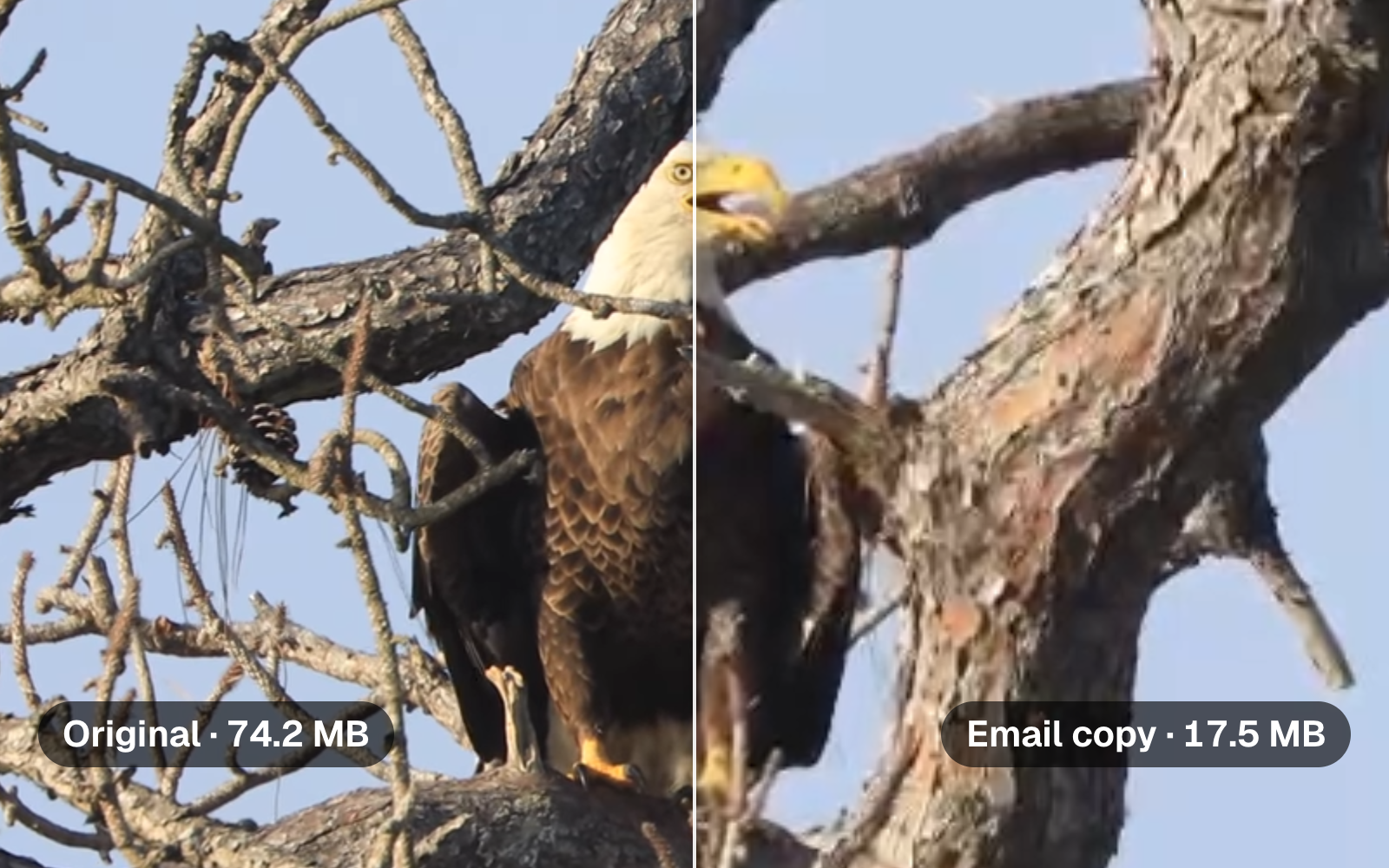
- Fitting 2½ minutes of full-HD video into email or Discord cost resolution: both copies came out 1024 × 540, and the eagle's feathers lost their fine edges. At 60 MB, under WhatsApp's 64, the file kept its full picture, though WhatsApp's own defaults for a video stop at 720p.
- Send less before you send smaller: 45 seconds of the same clip at Discord's 20 MB kept the full 1920 × 1014 picture.
- For a long video, or one someone needs at full quality, send a link: as of November 2026, Gmail turns an oversized attachment into a Google Drive link by itself, Outlook.com shares from OneDrive up to 2 GB, and WhatsApp takes a Document of up to 2 GB.
Video files outgrow mail and chat limits fast. The clip we used here, two and a half minutes of bald eagles at their nest, filmed by NASA at Kennedy Space Center, is 74.2 MB: about three times what Gmail will attach, and more than the 64 MB WhatsApp gives as the most for a video. Each service deals with an oversized file its own way. Gmail swaps the attachment for a Google Drive link automatically, Outlook stops with an error, Discord checks the size before its app compresses anything, and WhatsApp points you to sending the video as a document.
We read every limit on the service's own help pages, as of November 2026, then made the clip fit each one with Cutlia's Compress Video: its email, Discord and WhatsApp goals, custom sizes for WhatsApp and Outlook, and a 45-second part. We measured every file, including how big it gets once an email carries it, and compared the same frame from each one as a full-HD screen shows it. An eagle's feathers show quickly what a smaller file gives up.
The limits as of November 2026, from each service's help pages
| Service | Largest video it takes | Over the limit |
|---|---|---|
| Gmail, personal account | 25 MB of attachments per email, all files together | Gmail removes the attachment and adds a Google Drive link |
| Outlook.com | 25 MB of attachments | Share the file from OneDrive instead: up to 2 GB |
| Outlook app, with an Outlook.com or Gmail account | 20 MB for the whole email, message included | An error message; Microsoft suggests a link to a cloud copy |
| Outlook app, with a work (Exchange) account | 10 MB by default; Exchange Online's default is 35 MB | The same, or a SharePoint library |
| 64 MB as a video | Trim it, or send it as a Document: up to 2 GB | |
| Discord, free account | 20 MB per file | Nitro Basic allows 50 MB, Nitro up to 1 GB |
Gmail's help page is plain about it: for personal accounts the limit is 25 MB, and if the attachments together come to more, “Gmail automatically removes the attachment and adds it as a Google Drive link in the email.” At work or school, an administrator sets the limit.
Microsoft's figures depend on the page, and they count different things. Its Outlook.com page allows 25 MB of attachments. Its page on sending large files with Outlook describes a limit that “prevents your computer from continually trying to upload very large attachments”: the Outlook app's, as we read it, though that page lists Outlook.com among the versions it covers. That limit counts the attachment and the message together: 20 MB for an Outlook.com or Gmail account, and 10 MB by default for an Exchange work account. Attach more and, in Microsoft's words, “You'll receive an error message”. Its page on Exchange Online, the mail behind Microsoft 365 work accounts, gives a higher default, 35 MB for sending, which an administrator can set anywhere from 1 to 150 MB, so 10 MB is the cautious figure.
WhatsApp gives two numbers. Its page on long videos says “The maximum file size for videos sent or forwarded through WhatsApp is 64MB on all platforms”, then describes a default of 100 MB at 720p for faster connections and 64 MB at 480p for slower ones. 64 MB is the figure that holds for everyone. For larger files the same page suggests trimming the video, or choosing Document, where “The maximum allowed document size is 2 GB.”
Discord raised its free limit from 10 MB to 20 MB in August 2026. Its attachments FAQ adds two things worth knowing. Discord is “currently experimenting with various file upload size limits”, so some accounts may get more. And the size is now checked before the app compresses anything, on phones as on desktop, so a phone video that used to shrink its way under the limit may now be stopped by it. The FAQ warns Android users in particular. Discord lists MP4 with H.264, HEVC or AV1 picture among the files it takes.
One 74 MB clip, made to fit each
Our test clip is NASA's footage of bald eagles nesting at Kennedy Space Center, in the 1080p copy Wikimedia Commons makes of the 4K original: 1920 × 1013 pixels at 29.97 frames per second, 2 minutes 27 seconds, a WebM file with VP9 picture at 4.0 Mbit/s and Opus sound. It's a hard test for a compressor. The adult eagle's breast is rows of scalloped brown feathers, each with a pale edge, the pine behind it is ridged bark, and fine, regular detail like that is the first thing a smaller file loses.
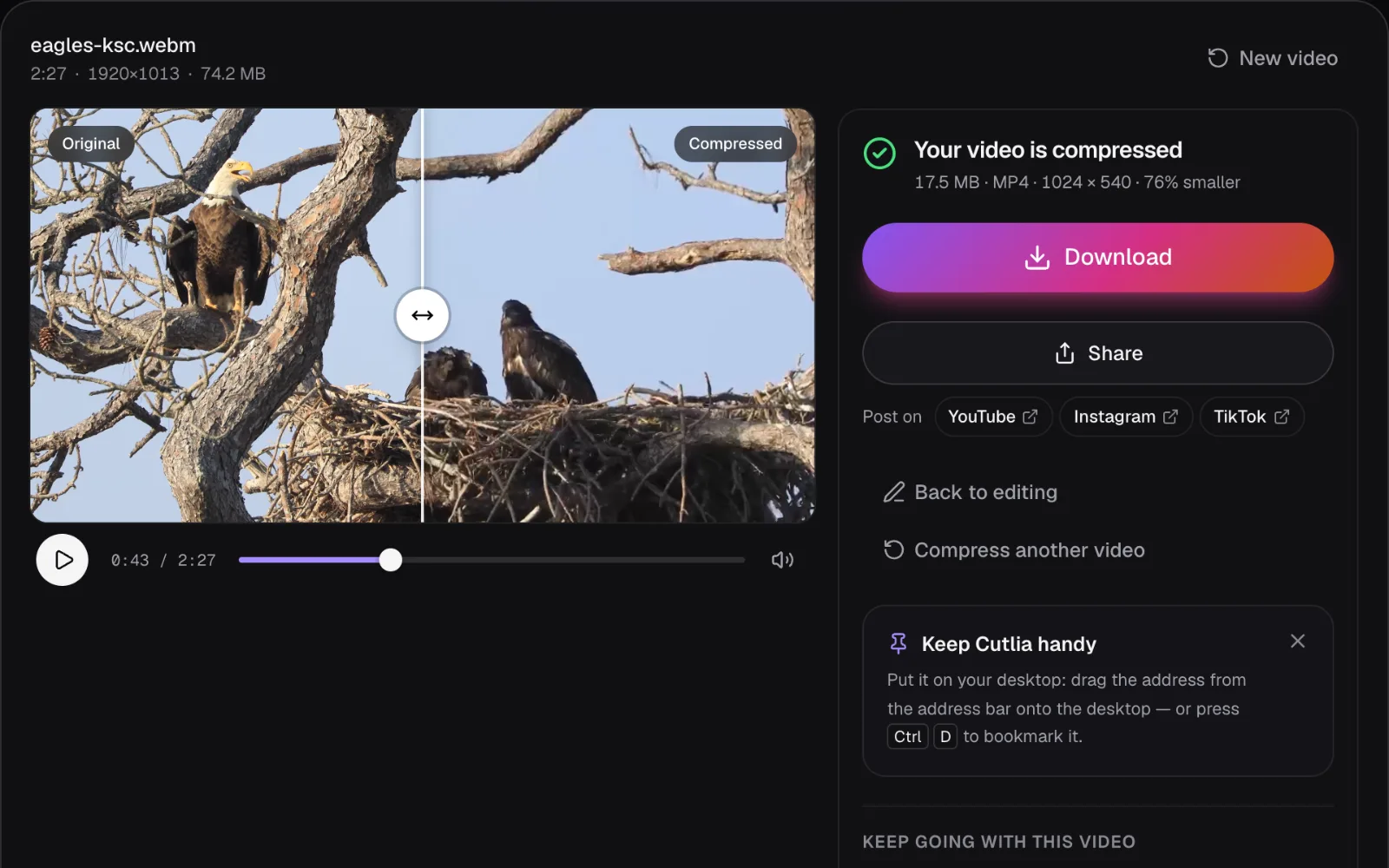
We opened it on Compress Video's email page and its Discord page, which start with their goal chosen, and pressed “Compress video”. On the tool's own page we chose “WhatsApp · 16 MB”, then “Custom size” with 60 for WhatsApp's 64 MB, 14 for the Outlook app's 20 MB and 7 for a 10 MB work account. Resolution stayed on “Auto”, the codec on H.264, the sound on. Everything ran in Chrome on a MacBook Air with an Apple M5 chip, and the video never left it.
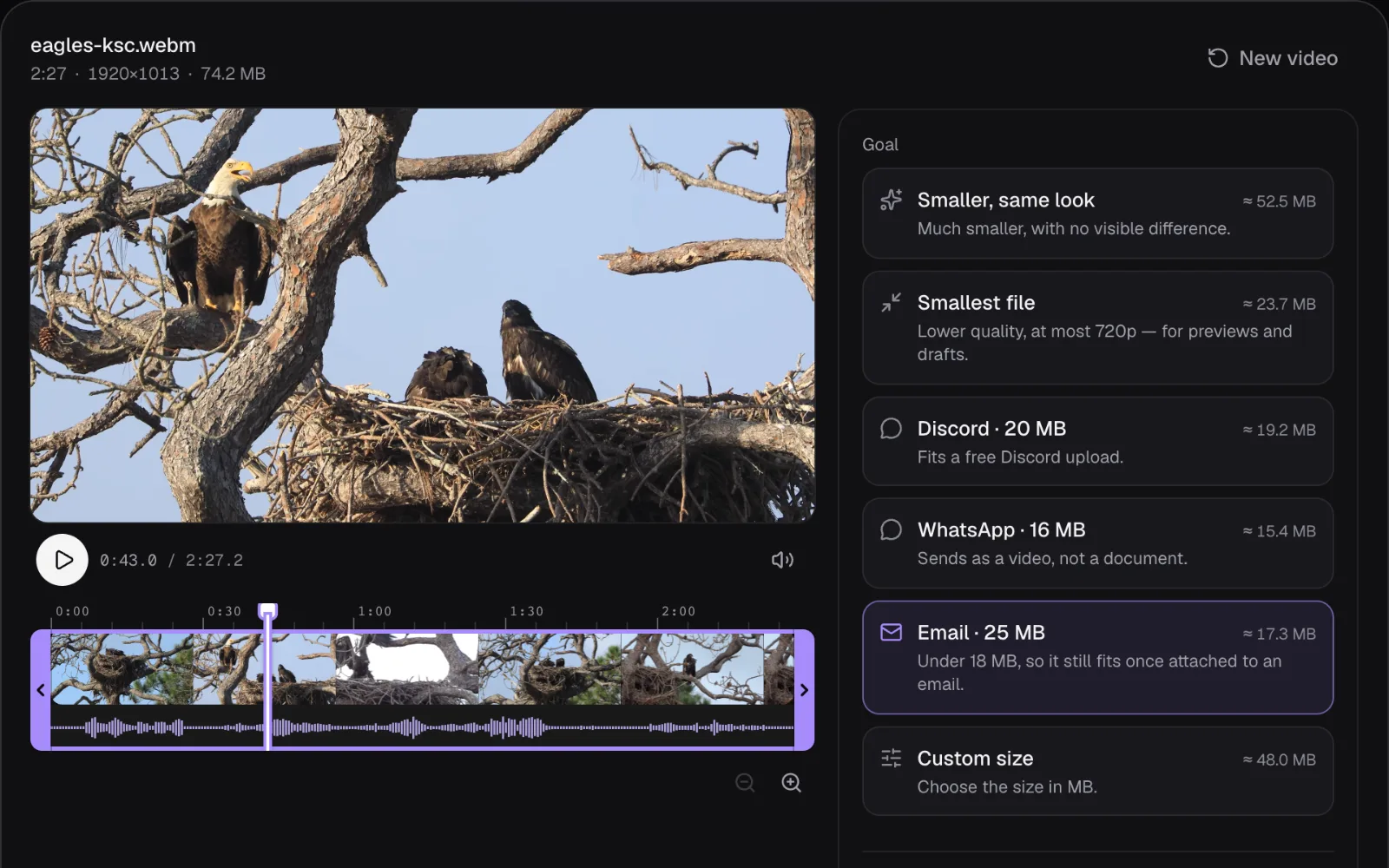
| Goal | Planned | File made | Picture |
|---|---|---|---|
| “Email · 25 MB” | About 17.3 MB | 17.5 MB | 1024 × 540 |
| “Discord · 20 MB” | About 19.2 MB | 19.2 MB | 1024 × 540 |
| “WhatsApp · 16 MB” | About 15.4 MB | 15.6 MB | 910 × 480 |
| “Custom size”, 60 MB | About 57.6 MB | 58.4 MB | 1920 × 1014 |
| “Custom size”, 14 MB | About 13.4 MB | 13.6 MB | 910 × 480 |
| “Custom size”, 7 MB | About 6.7 MB | 6.9 MB | 454 × 240 |
Every file is an MP4 with H.264 picture and AAC sound at the original 29.97 frames per second, and every one came in under the size it was made for. Each came out at or a little over the editor's estimate, by 0.8 MB at most, because an encoder only approximates the bitrate it's given. The plan leaves 5% of the target spare for that, and when a file still comes out too big, Compress Video makes it again with less, up to twice.
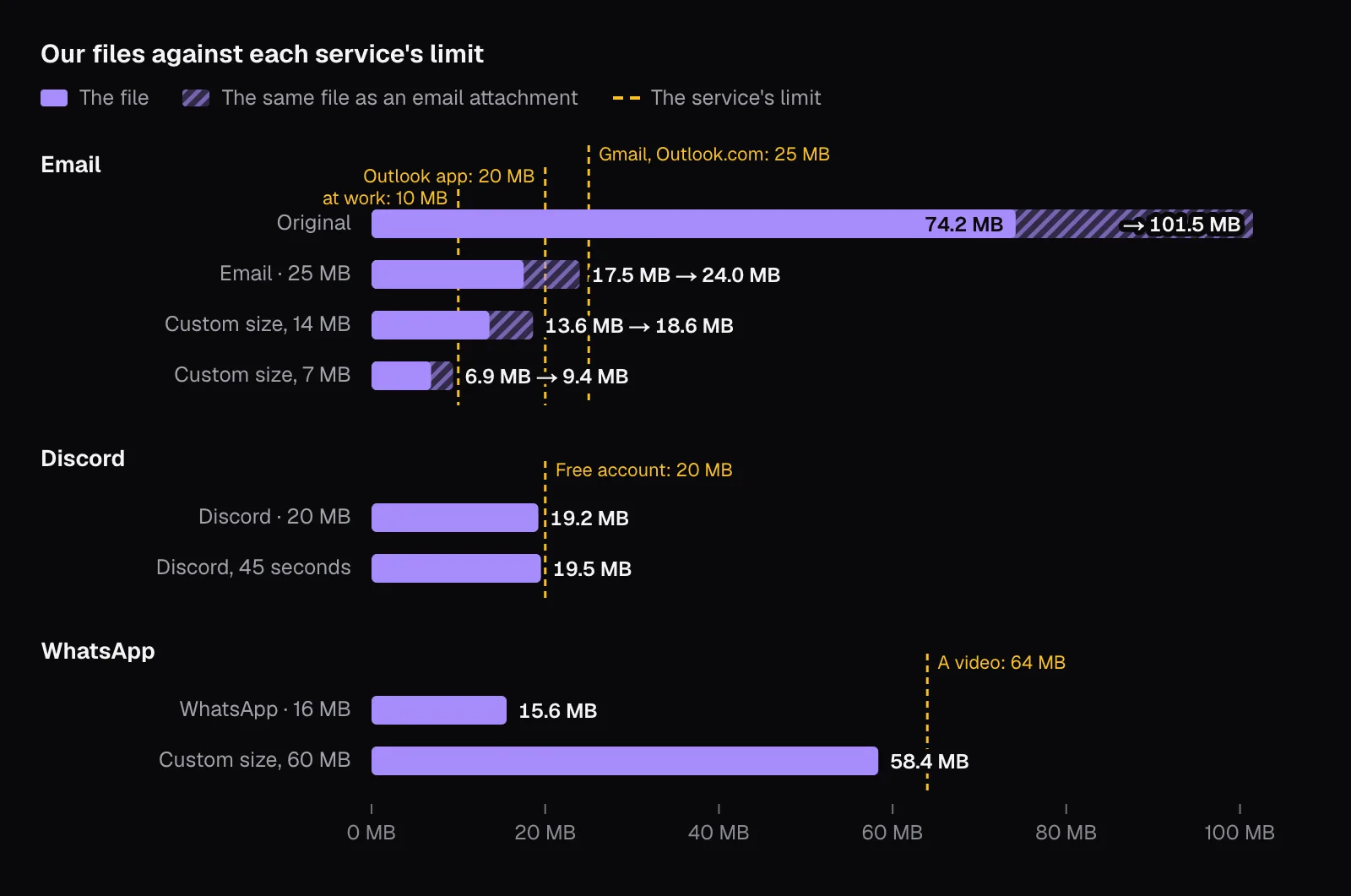
For email and Discord, the whole clip dropped to 1024 × 540, and for the WhatsApp goal to 910 × 480. The reason is a budget. Eighteen megabytes over 2 minutes 27 seconds, less the 5% kept spare, leaves about 0.93 Mbit/s for picture and sound together. Spread over all 1920 × 1014 pixels, about 30 times a second, the picture's share comes to 0.015 bits per pixel, and Compress Video's planner wants at least 0.05 for an H.264 picture to stay sharp. So it steps the frame down until each pixel gets that much: at 1024 × 540 it's 0.052. At 60 MB the clip kept its full size. Our guide to bitrate, resolution and file size works through that arithmetic in full.
Why 25 MB of email carries only about 18 MB of video
Email was designed for text, so a file travels inside one as text. RFC 2045, the standard behind attachments, sets out the encoding, Base64: it “represents 24-bit groups of input bits as output strings of 4 encoded characters”, so every 3 bytes of the file become 4 characters, and the result must come “in lines of no more than 76 characters each”, each ended by a line break. The standard puts the growth at “about 33 percent”; with the line breaks it comes to 36.8%.
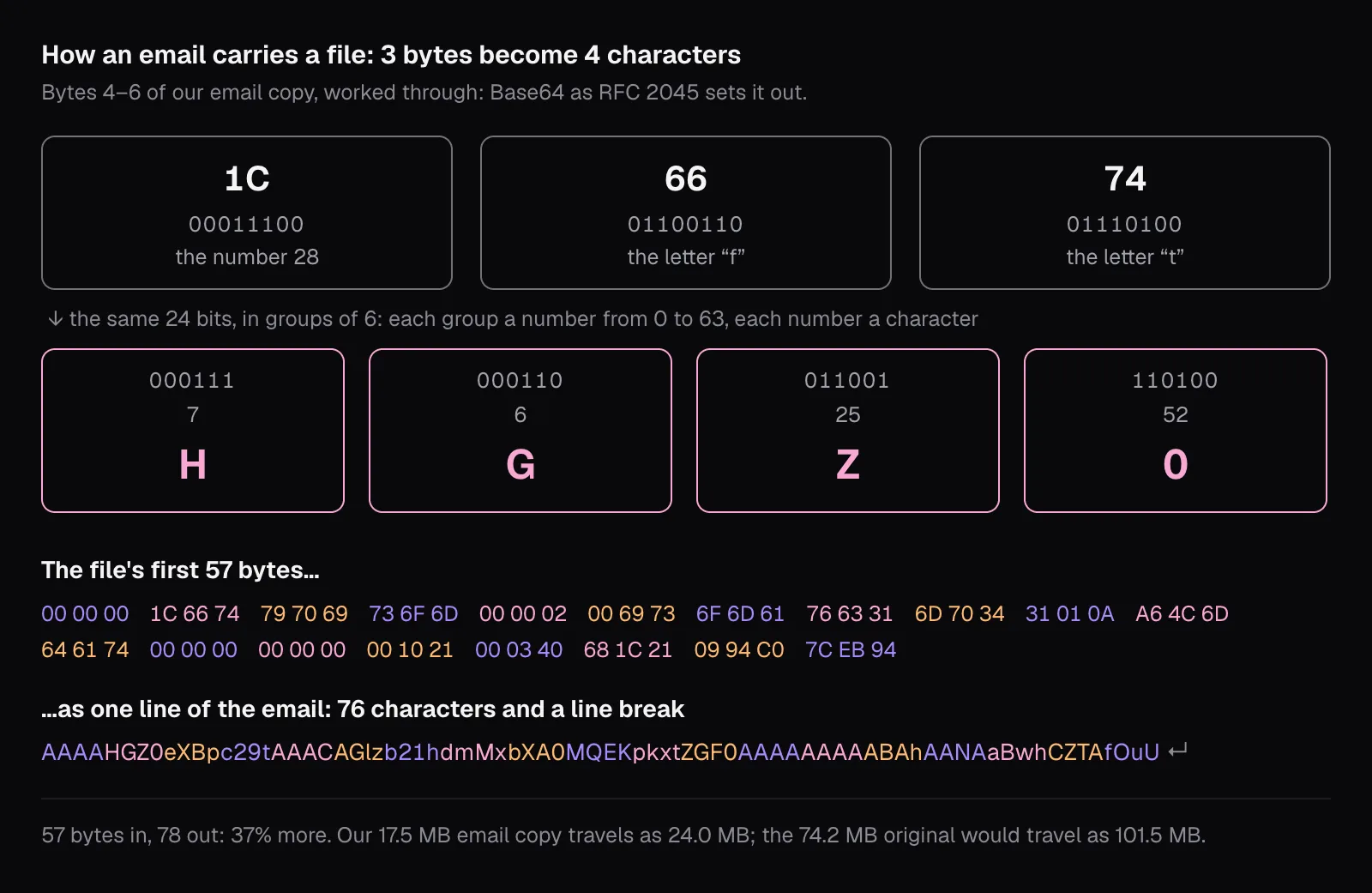
We encoded our files exactly that way. The 17.5 MB email copy came to 24.0 MB, inside 25 MB with room for the message. The 19.2 MB Discord copy became 26.3 MB, just over. The 74.2 MB original became 101.5 MB.
Whether the growth counts depends on who's measuring. Google's page for its Workspace accounts says their sending limit, 25 MB on most plans as of November 2026, counts the message and its attachments “before encoding”. The receiving server is another matter. Google measures the mail its Workspace accounts receive “after encoding, which adds about a 37% increase”, and Microsoft says that in Exchange Online a message routed outside its datacenters is “subject to an additional 33% translation encoding increase”. You rarely know which rule the other end applies, so the safe file is one whose encoded form fits too. For a 25 MB limit that's 18.27 MB at most, which is why Compress Video's email goal aims under 18 MB although its label says 25.
The same arithmetic gives sizes for Outlook's tighter limits, which count the message as well. A 14 MB file encodes to 19.2 MB, leaving room under the app's 20 MB, and a 7 MB file to 9.6 MB, under 10. Our files of 13.6 and 6.9 MB came to 18.6 and 9.4 MB once encoded.
What each size costs the picture
Sizes on a chart say nothing about how the video looks, so we took the same moment from every file: 0:43, the adult eagle calling from a branch beside the nest. Each crop below is the same 720 × 450 pixels of the frame, shown as a screen 1920 pixels wide shows it: the smaller pictures enlarged to fill it, as a player does.
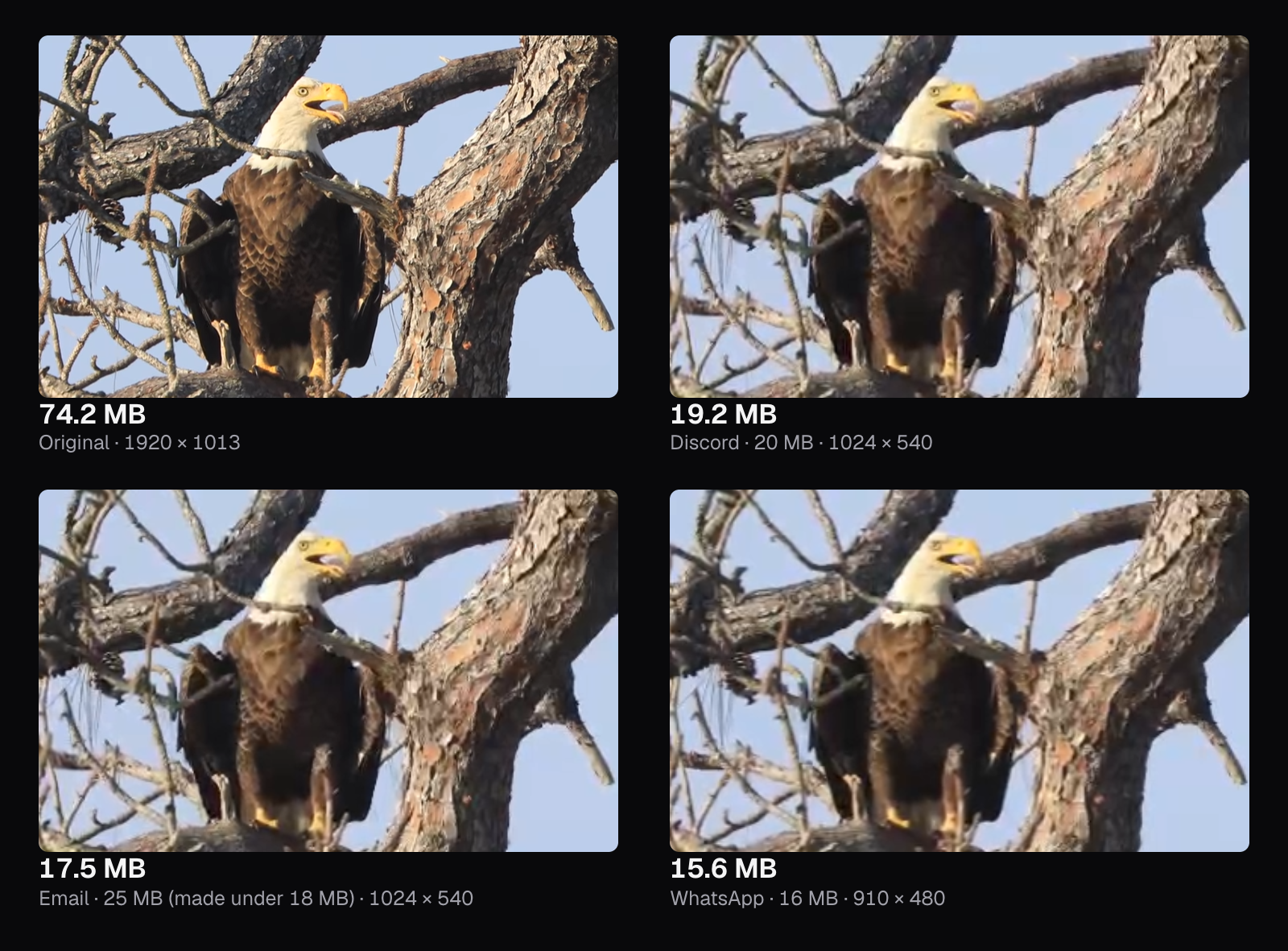
The original shows a pale edge on every breast feather, the yellow ring of the eye and the scales of a pine cone behind the eagle. The Discord and email copies, both 1024 × 540, keep the eagle's shape and colors, but the feather edges have run together into smooth brown with faint stripes, the pine cone is a smudge, and the bark has lost its finest cracks. Between those two files, 1.7 MB apart, we couldn't point to a difference. The WhatsApp goal's 910 × 480 is a step softer again: the eye is barely there.
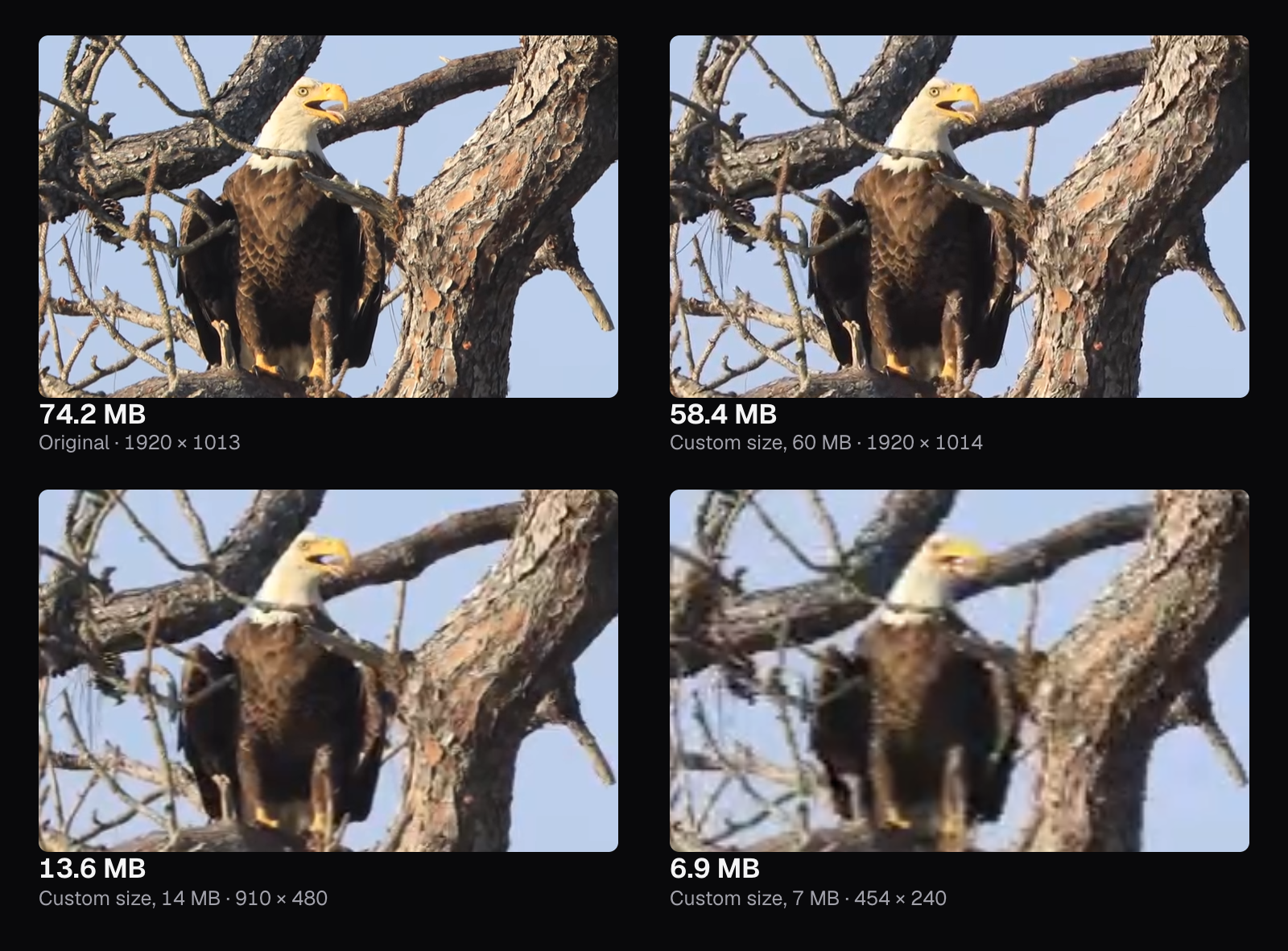
With the room WhatsApp allows, there's little to see. Asked for 60 MB, Compress Video kept the full 1920 × 1014 and made 58.4 MB, and its crop is close to the original's: the feathers and the pine cone are all there, a touch softer if you look for it. At the other end, 14 MB for the Outlook app came out at the WhatsApp goal's 910 × 480, and 7 MB went down to 454 × 240, where the eagle is a blur: the eye is gone and the beak is a yellow smudge.
The 7 MB file also shows where small targets get hard. For a size this tight, Compress Video plans the sound at 48 kbit/s, but in the file Chrome made on our Mac we measured 96 kbit/s: 1.8 MB of sound, about a quarter of the file. That pushed the first try over 7 MB, and Compress Video made the file again with less picture: its progress bar sat at 100% while it did, and the picture's bitrate ended 12% under the plan, where every other file's came out about 3.5% over. The result, 6.9 MB, fits a 10 MB work account, but at 454 × 240 it's past what anyone would want to watch. For a limit that tight, send a part of the video, or a link.
For a clip friends will watch once on a phone, 1024 × 540 is a fair trade. For a video someone will edit, show on a big screen or keep, send a link instead. Where the loss starts to show, and why the first halving of a file costs less than the last, is the subject of our guide to compressing without visible loss.
Trim before you compress
A size limit is a budget shared out over every second of the video, so the cheapest way to a sharper file is to send fewer seconds. We set “Part of the video” to 0:35–1:20, 45 seconds with the adult eagle calling and a young eagle spreading its wings, and kept the Discord goal. The editor planned 3.4 Mbit/s at the full 1920 × 1014, more than three times what the whole clip got, and the file came out 19.5 MB.
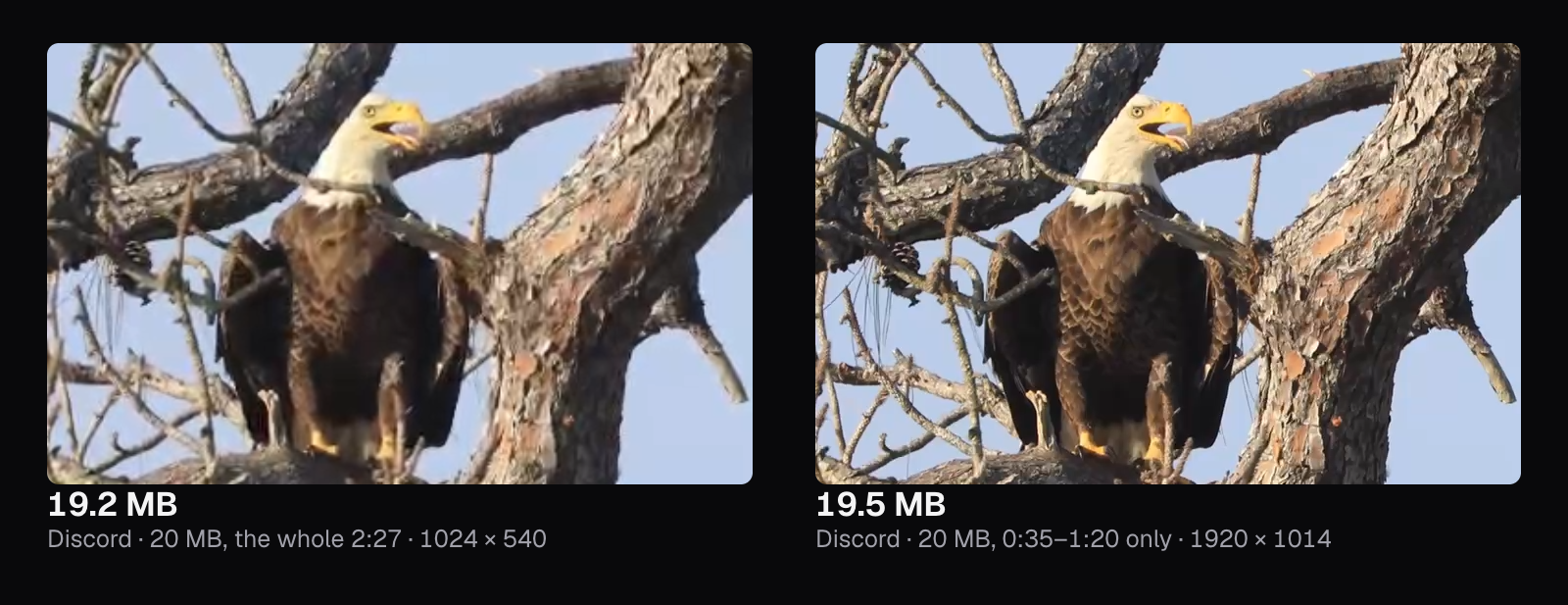
The difference shows at once. The whole clip at 20 MB came out 1024 × 540 with the breast a smooth brown; the 45-second part, 0.3 MB bigger, kept every feather edge and the pine cone's scales, close to the original. It costs the other 1 minute 42 seconds, and that's often the right trade: the moment you want someone to see is rarely the whole recording.
Compress Video's “Part of the video” keeps one stretch, from a start to an end. To take pieces out of the middle as well, cut them first with Trim Video, using “Remove parts”, then compress what it made. Switching off “Keep the sound” frees room too, when nothing in the sound matters: the picture gets the sound's share.
Zipping a video won't make it fit
Microsoft's advice for oversized attachments includes zipping the file, and for a document that works: text and spreadsheets are full of repetition a ZIP can squeeze out. A video's codec has already removed that kind of repetition, so a ZIP finds almost nothing left. We packed our files with Deflate, the method most ZIP programs use by default, at its strongest setting. The 74.2 MB original came out 11 KB larger than it went in, and the 17.5 MB email copy 0.6% smaller, about 100 KB: nowhere near enough to matter.
Making a video smaller means encoding its picture again with fewer bits, which is what Compress Video does, or sending less of it.
When a link is better than an attachment
Compressing has limits of its own. Send a link instead when:
- the video runs several minutes or more: our 2½-minute clip already had to drop to 1024 × 540 for email;
- the person needs it at full quality, to edit it, show it on a big screen or keep it;
- you're sending several videos at once, because Gmail's 25 MB covers every attachment in the email together.
Each service has its own way to do it, with its own limits as of November 2026. Gmail does it for you: past 25 MB, the attachment becomes a Google Drive link. Outlook.com shares files from OneDrive, up to 2 GB. On WhatsApp, a video sent as a Document can be up to 2 GB. Discord's own answer for bigger files is Nitro; without it, paste a link to a copy you've put on a cloud service.
A link has catches. The file sits on a cloud service under your account, and its sharing setting decides who can open it. Google's help page says that with “Anyone with the link”, “Recipients don't need to have a Google Account to see or edit the file”, while a file kept private stays closed to anyone without one. Check the setting before you send.
Which way to send it
| Where it's going | What to do |
|---|---|
| Gmail or Outlook.com, a short clip | Compress Video for Email, then attach the MP4 |
| The Outlook app | “Custom size” and 14, or 7 for a work account, and only a short part |
| Discord, free account | Compress Video for Discord, with only the part that matters |
| Discord with Nitro Basic | “Custom size” and 50 |
| WhatsApp, as a video | “Custom size” and 60 |
| Long, or wanted at full quality | A Google Drive or OneDrive link, or WhatsApp's Document |
Compress Video's “WhatsApp · 16 MB” goal aims far below the 64 MB WhatsApp states as of November 2026: it made our clip 15.6 MB at 910 × 480, the 480p WhatsApp's page gives slower connections anyway. “Custom size” with 60 uses the room WhatsApp gives, and kept the full 1920 × 1014 in the file. Whether it arrives at that resolution is up to WhatsApp, whose defaults for a video stop at 720p, or 480p on a slower connection.
Whichever route you take, leave the codec on H.264, the default. HEVC makes smaller files, but you rarely know what the other person watches on, and a file they can't open costs more than the megabytes it saved. Our guide to iPhone videos that won't play explains why.
The tools in this guide
Questions people ask
What is the largest video I can send on WhatsApp?
As of November 2026, WhatsApp's help center gives 64 MB as the most for a video sent or forwarded on every platform, and describes defaults of 100 MB at 720p on faster connections and 64 MB at 480p on slower ones. Anything bigger can go as a Document, up to 2 GB. To send it as a video rather than a document, make it smaller than 64 MB first.
Can I email a video bigger than 25 MB?
Not as an attachment from a personal Gmail account: as of November 2026, its limit is 25 MB. Past it, Gmail removes the attachment and puts a Google Drive link in the email instead, which works if the file's sharing lets the recipient in: set to “Anyone with the link”, they don't need a Google Account. To send the file itself, compress it under 18 MB so it still fits once encoded.
Why does Discord refuse a video from my Android phone that used to send?
Discord now checks a file's size before its app compresses it, not after, a change that came in August 2026 with the 20 MB free limit, still in place as of November 2026. Its own FAQ warns that Android users, whose source files tend to be larger, may hit the limit more often than before. Compressing the video below 20 MB before you share it avoids that.
Does zipping a video make it smaller?
Barely, and sometimes not at all. A video is already compressed by its codec, so a ZIP finds almost nothing left to remove. In our test, Deflate, the method most ZIP programs use by default, made a 74.2 MB video 11 KB bigger and took 0.6% off a compressed MP4. Encoding the picture again with fewer bits is what actually shrinks a video.
Will my video look worse after compressing it for email?
That depends on its length. Our 2½-minute full-HD clip had to drop to 1024 × 540 to fit under 18 MB, and the fine edges of the eagle's feathers ran together. A 45-second part of it kept the full picture within Discord's 20 MB. At a given size, the shorter the video, the less picture it gives up.
Sources
Where the facts in this guide come from, besides our own tests:
- Send attachments with your Gmail message — Gmail Help
- Send Google Drive attachments in Gmail — Gmail Help
- Gmail sending limits in Google Workspace — Google Workspace Help
- Gmail receiving limits in Google Workspace — Google Workspace Help
- Sending limits in Outlook.com — Microsoft Support
- Reduce attachment size to send large files with Outlook — Microsoft Support
- Exchange Online limits — Microsoft Learn
- How to send media, contacts, or location — WhatsApp Help Center
- Can't send longer videos — WhatsApp Help Center
- File Attachments FAQ — Discord Support
- RFC 2045: Multipurpose Internet Mail Extensions (MIME) Part One — IETF
- APPNOTE.TXT: .ZIP File Format Specification — PKWARE
Footage in this guide
The pictures were made with Cutlia's tools from this openly licensed footage, found on Wikimedia Commons:
- Wildlife Video - Bald Eagles (KSC-20260313-MH-JBS01-0001-Wildlife Video Bald Eagles BROLL-M19993) — NASA Kennedy Space Center, Public domain