Sizes and sharing
How bitrate, resolution and frame rate decide a video's file size
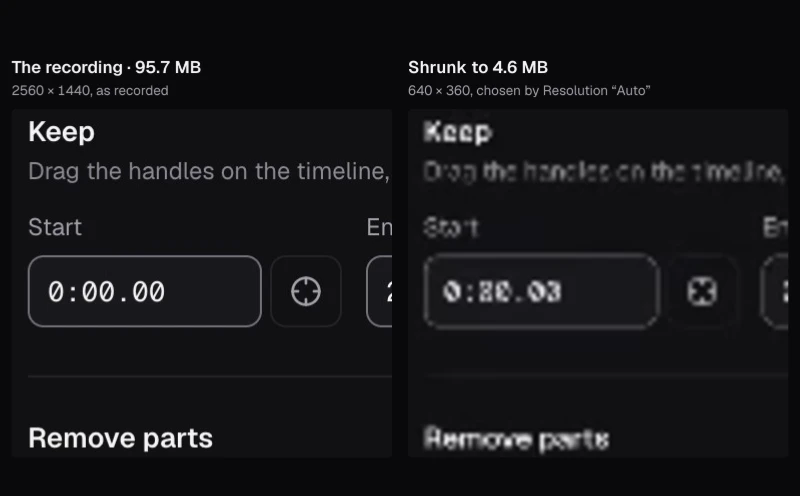
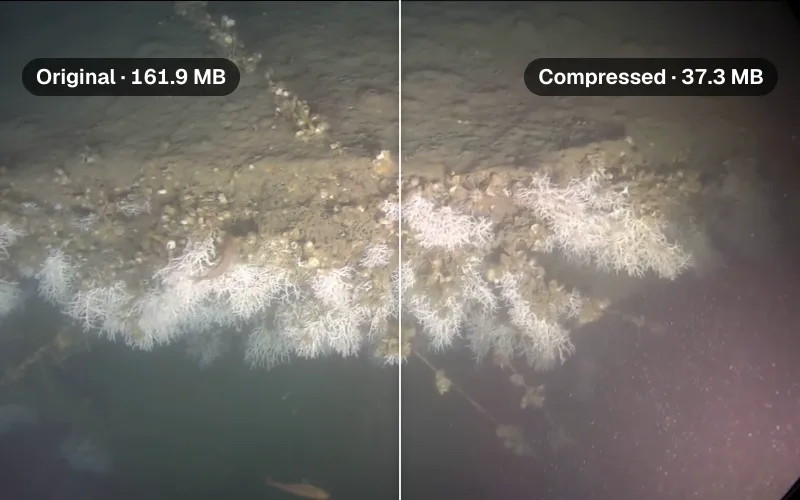
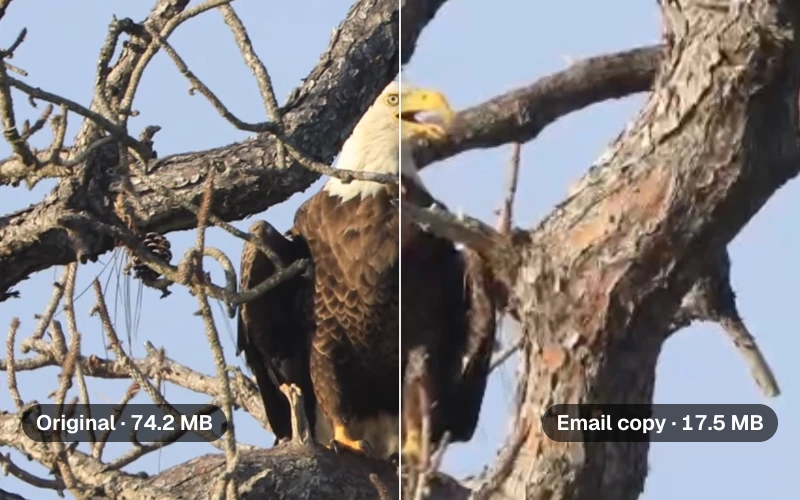
We gave 20 seconds of fireworks and 20 seconds of a studio interview the same bitrates, then the same quality, and measured and photographed every file.
By the Cutlia team · Updated · 15 min read
The short version
- A video's size is its bitrate times its length, divided by 8: each of our 14 Compress Video files weighed what its measured bitrates times its 20 seconds came to, plus about 8 KB of container.
- Resolution and frame rate change the size only through the bitrate they get: Compress Video's “Smaller, same look” budgets bits per pixel, so from an original with bits to spare, 720p gets 44% of 1080p's bitrate and 60 fps twice that of 30 fps.
- The same bitrate doesn't buy the same picture: at about 1 Mbit/s our studio interview looked like its original at 1920 × 1080, while the encoder on our Mac couldn't get the fireworks that small at 1080p, so Compress Video shrank their picture.
- At one fixed quality the fireworks needed 13.8 Mbit/s and the interview 2.6, more than five times as much, so judge a bitrate by what's in the picture, not by its resolution alone.
- To make a file smaller, shorten it first, then lower the resolution, and let the bitrate follow from the size you need: fewer pixels leave more bits for each one.
Two videos of the same length and the same resolution can differ in size five times over, which makes file size look arbitrary. It isn't. The size comes from one multiplication, bitrate times length, and resolution, frame rate and codec matter only because they change the bitrate a picture is given or needs. The one thing no setting controls is what's in the picture.
To show both sides of that, we took two pictures from opposite ends of the scale, both 1920 × 1080 at about 24 frames per second: 20 seconds of fireworks filmed close up, sparks and smoke against a black sky, and 20 seconds of a NASA studio interview with astronaut Jessica Meir. We made ten files of each with Cutlia's Compress Video and Video Converter — the same sizes, the same bitrates, then the same quality — and read every file back. Everything ran in Chrome on a MacBook Air with an Apple M5 chip.
File size is bitrate multiplied by length
Bitrate is the amount of data a video spends on each second of itself, counted in bits per second: kbit/s (thousands) for sound, Mbit/s (millions) for the picture. A video file holds its picture's bits, its sound's bits and a little bookkeeping, so its size follows from one sum.
Our two source files show the sum at work. The fireworks file is 31.0 MB for 1 minute 15 seconds, which comes to 3.3 Mbit/s: 3.2 for the picture, 0.12 for the sound. The interview file is 20.3 MB for 1 minute 50 seconds, 1.48 Mbit/s. The frame size is the same and the frame rate nearly so, yet second for second the fireworks file spends 2.2 times as much.
Every file we made checks out the same way. Compress Video's 3 MB interview file at 1080p carries a picture at 1.087 Mbit/s and sound at 0.075 Mbit/s for 20.03 seconds: 1.162 Mbit/s × 20.03 s ÷ 8 = 2.909 MB, and the file is 2.916 MB. The difference, 7.6 KB here and under 8 KB in each of our Compress Video files, is the MP4 container's own headers and index.
So only two things set a file's size: how long it runs, and how many bits it spends each second. Length is the simple one, since half the video is half the file. Everything else — resolution, frame rate, codec and the picture itself — works through the bitrate.
Two pictures, twenty files
The fireworks were filmed close up at a Lunar New Year celebration in Zhongshan, China, in 2026: bursts of gold and white sparks every few seconds, smoke rising through them, black sky everywhere else. Between one frame and the next, nearly every spark moves. The interview is NASA's: Jessica Meir on a studio set, first in a wide shot beside Brandi Dean, then in close-up, with a spacesuit and a blue wall behind her. Between one frame and the next, little changes but a face.
Both are VP9 WebM files from Wikimedia Commons, at 24 and 23.98 frames per second; the fireworks file is Commons' own 1080p copy of a 4K upload. We used 20 seconds of each, 0:28 to 0:48 of the fireworks and 1:10 to 1:30 of the interview, set in each tool's “Part of the video” fields, so that the same size always meant the same bitrate.
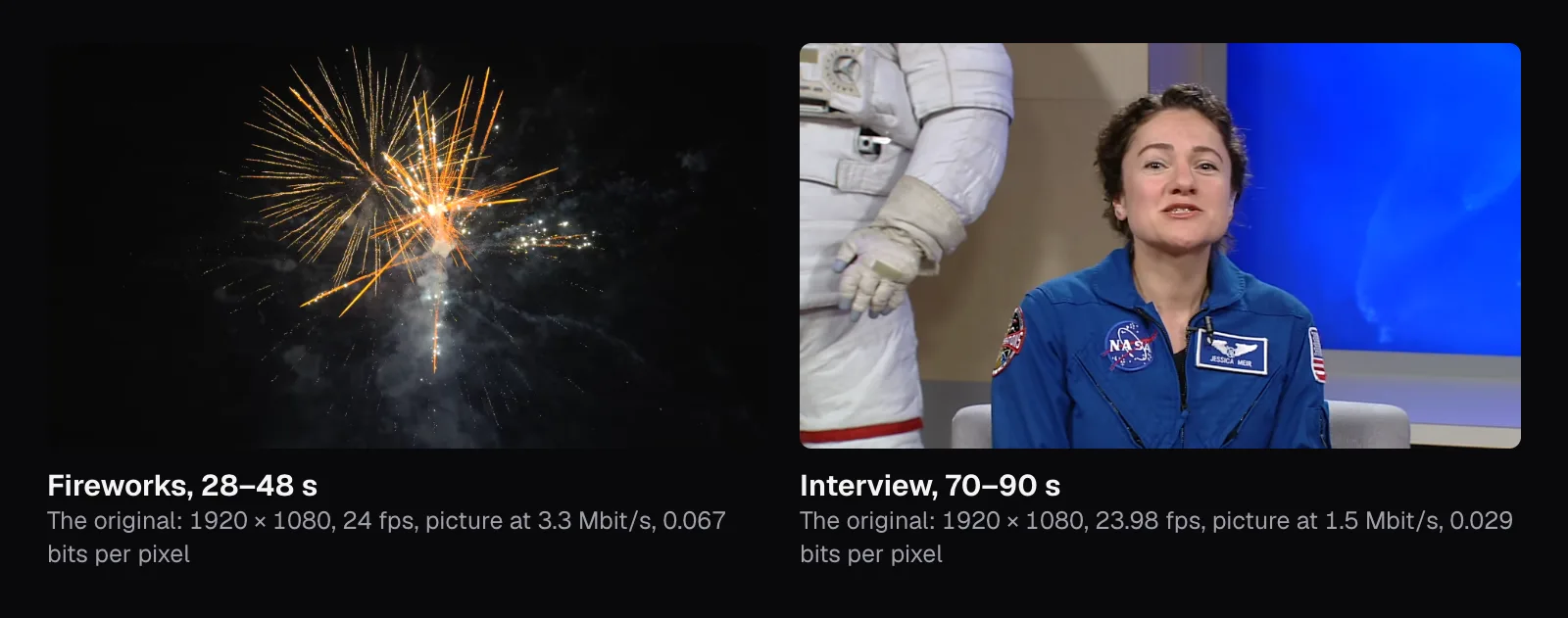
Then we made ten files of each, all H.264 MP4s:
- Compress Video, “Smaller, same look”, at each Resolution it offers for a 1080p video: 1080p, 720p, 540p and 480p.
- Compress Video, “Custom size” at 3 MB with Resolution on “Auto” and on 1080p, and at 1.5 MB on 1080p: the same bitrate asked of both pictures.
- The Video Converter, to MP4 at “Original”, 720p and 480p with the sound off. It asks for a fixed quality instead of a bitrate, so its files show how many bits each picture takes.
Our script read every file back: its size, its picture size, its bitrates and the bytes of picture in every second. Compress Video came close to its plans: twelve of its 14 files landed between 1.3% under and 5.6% over the size it estimated, because the encoder spent 2 to 7% more on the picture than it was asked while the sound came in under its share. The other two, the fireworks asked for 3 MB and 1.5 MB at 1080p, are the most telling files of the test, and they come up below.
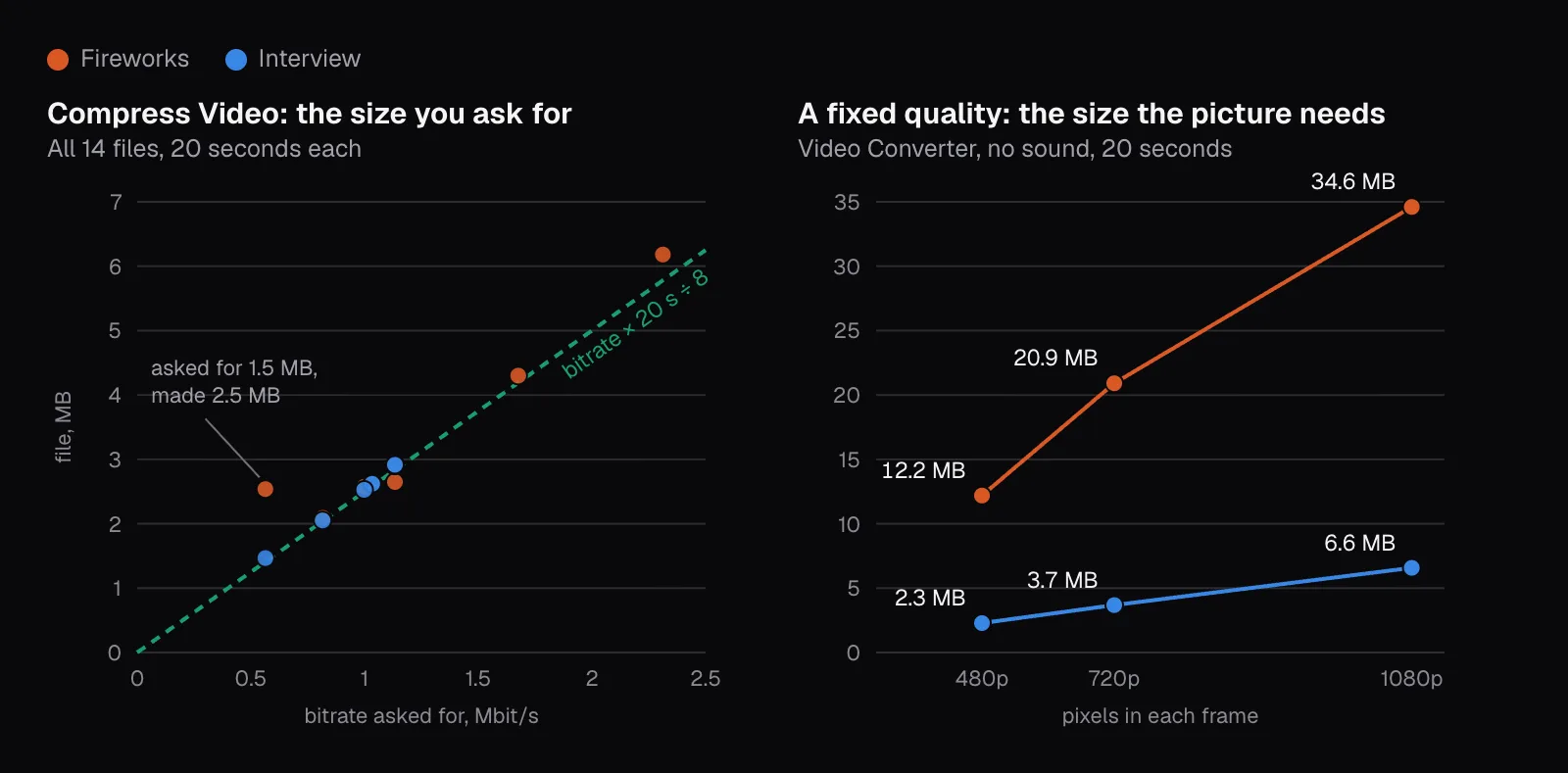
Resolution: how many pixels each frame has to describe
Resolution names make sizes sound closer than they are. 720p is 1280 × 720, about 0.9 million pixels a frame; 1080p is 1920 × 1080, 2.1 million; 4K is 3840 × 2160, 8.3 million. Double the width and the height and the pixels quadruple, so one 4K frame holds four 1080p frames.
Every pixel of every frame shares the bitrate, so the fair way to compare bitrates is bits per pixel: the picture's bitrate divided by width × height × frame rate. Compress Video's planner works in it. “Smaller, same look” gives H.264 0.07 bits per pixel, which at 1080p and 24 fps comes to 3.48 Mbit/s of picture. At 720p it plans 44% of that, because 720p has 44% of the pixels.
One rule bends that line, and our test hit it: “Smaller, same look” never asks for more than 70% of what the original spends per second, sound included. The interview's original spends 1.48 Mbit/s, so its plan stopped at 1.03 at both 1080p and 720p, two files of 2.6 MB. The fireworks' ceiling, 2.31 Mbit/s, mattered only at 1080p. At 540p and 480p, under both ceilings, the planner treated the two alike, and their pictures came out at 0.90 and 0.91 Mbit/s at 540p, 0.71 and 0.72 at 480p.
Fewer pixels at the same bits per pixel means a smaller file and a softer picture. The fireworks' four steps came to 6.2, 4.3, 2.6 and 2.1 MB, and each step shows.
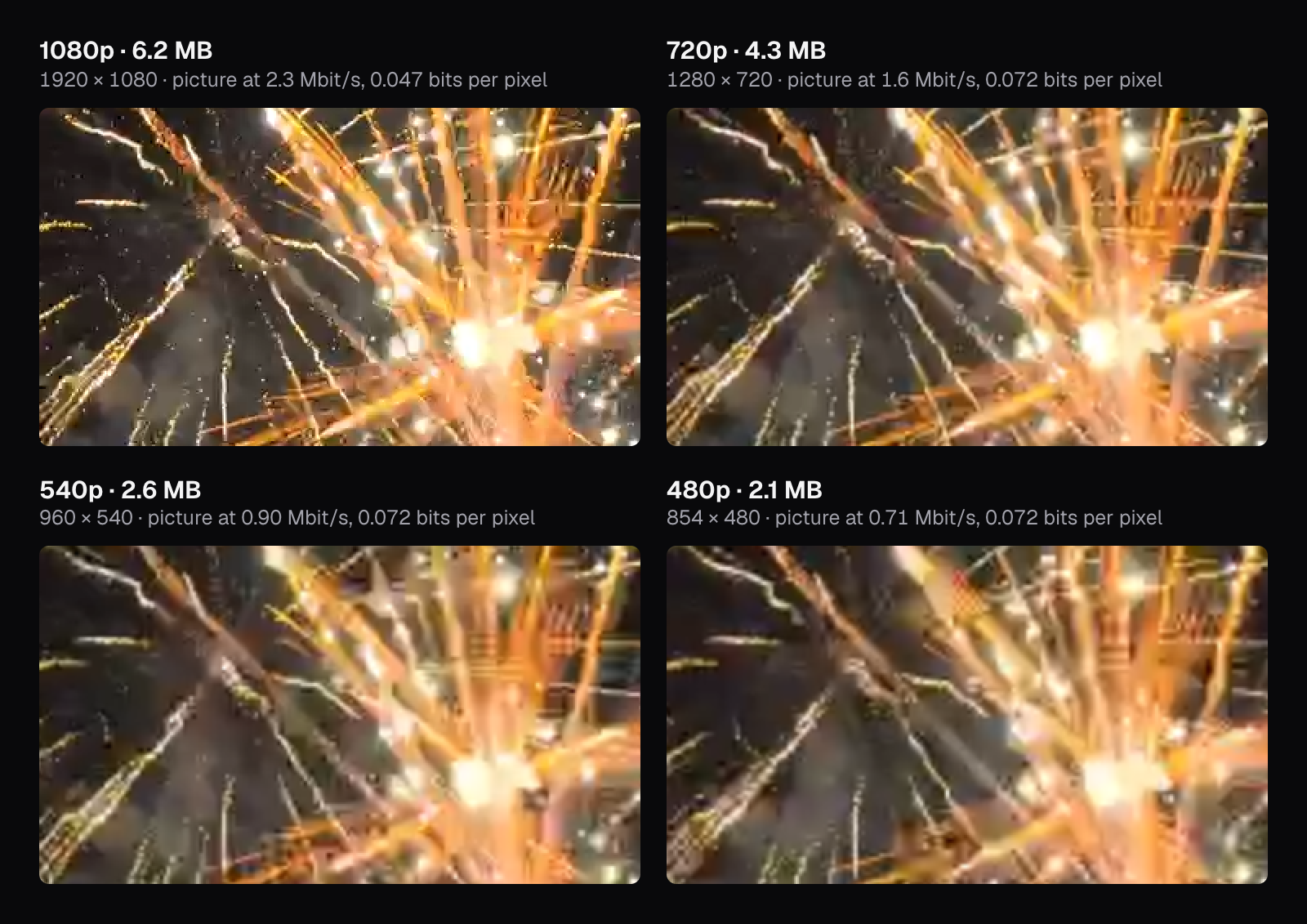
How much smaller a lower resolution makes a file is the picture's call as much as the pixel count's. At the Video Converter's fixed quality, the 720p fireworks file was 60% the size of the 1080p one and the interview's 56%, though 720p has 44% of the pixels. At 480p, a fifth of the pixels, both came to 35%. Each pixel of a smaller picture covers more of the scene and so carries more detail: the fireworks took 0.28 bits per pixel at 1080p and 0.50 at 480p. Lowering the resolution saves less than the pixel count suggests.
Frame rate: how often a new frame arrives
Frame rate multiplies the pixels just as resolution does: a 60 fps video carries twice the frames of a 30 fps one. Compress Video's planner takes that literally. “Smaller, same look” keeps the original's frame rate and budgets per frame, so at 1080p it plans 3.48 Mbit/s of picture for 24 fps, 4.35 for 30 and 8.71 for 60. Its other goals stop at 30 fps, which halves the frames of 60 fps footage.
An encoder can make do with less than double, because at 60 fps each frame differs less from the one before it, and the differences are what it stores. MDN's guide to web video codecs states the direction: “Assuming the frame rate is not reduced during encoding, higher frame rates cause larger compressed video sizes.” YouTube's upload recommendations for standard (SDR) video, as of November 2026, put a number on it: 8 Mbps for 1080p at 24 to 30 fps and 12 Mbps at 48 to 60, half as much again rather than twice.
Both of our clips run at about 24 frames per second, so frame rate didn't vary in our test. With a 60 fps video of your own, keep 60 for fast action and footage you'll slow down, as our slow-motion guide explains, and let talk, slides and screen recordings go to 30.
The same bitrate on two very different pictures
Here the two pictures part ways. We asked Compress Video for 3 MB of each at 1080p. The same goal over the same 20 seconds gave both the same plan, 1.04 Mbit/s of picture and 96 kbit/s of sound, “About 2.9 MB”, and the same warning, because 0.021 bits per pixel is far under what the planner considers clean. It sees the picture's size, frame rate and length and the original's bitrate, never what the picture shows.
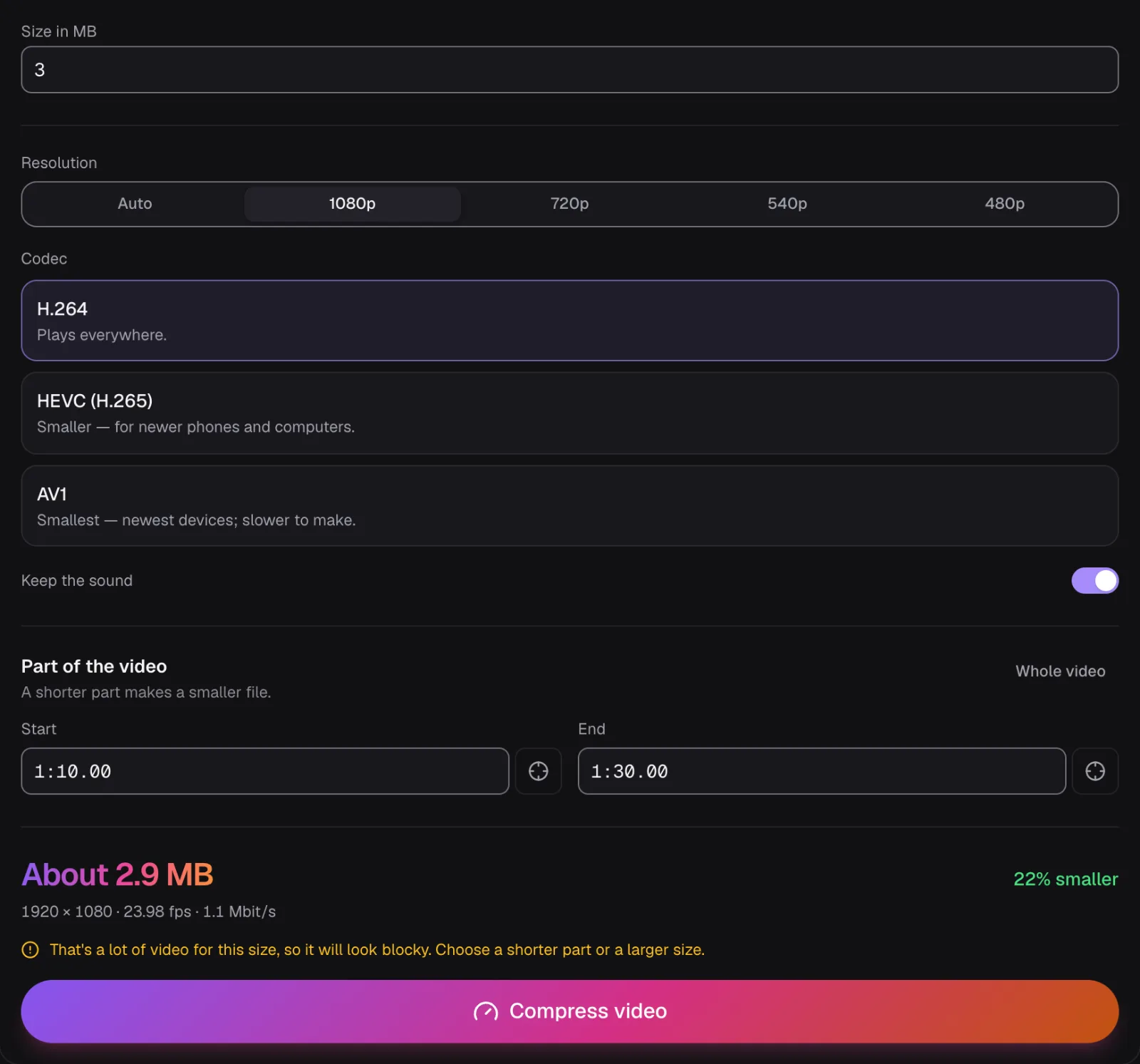
The interview came out as planned: 2.92 MB at 1920 × 1080, its picture at 1.09 Mbit/s, the face at actual pixels looking the same as the original's. At 1.5 MB, half the bitrate, it still held 1920 × 1080 and only the hair turned a little softer. The warning was wrong for this picture.
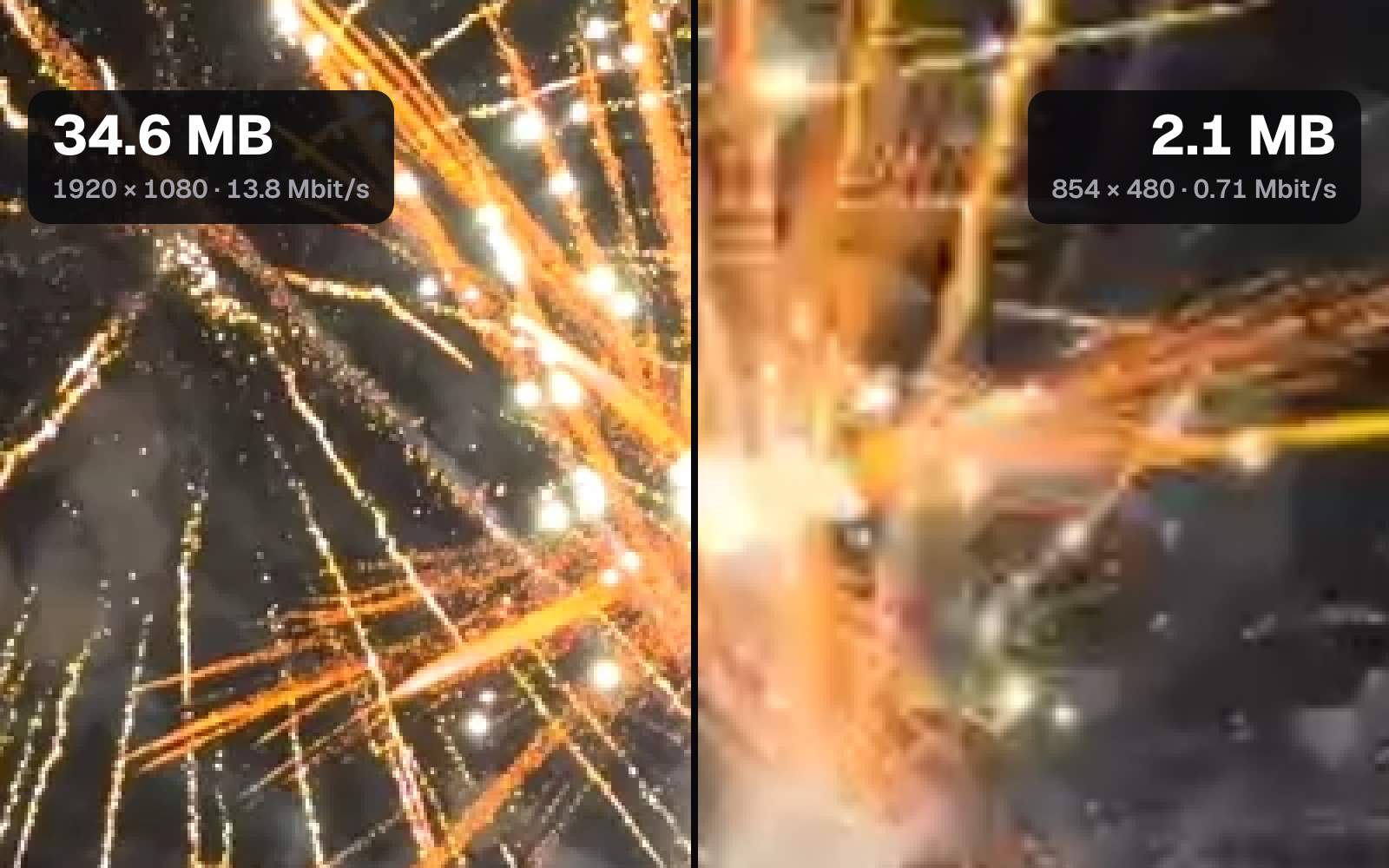
The fireworks didn't come out as planned. The first file at 1080p was over 3 MB, so Compress Video made it again with less, and again; its rule is to shrink the picture by a quarter each way on that last try. The result fit, 2.6 MB at 1440 × 810, but its sparks are smeared and its smoke is blotchy.
Asked for 1.5 MB, the fireworks hit a floor. By the arithmetic of Compress Video's retries, its last try asked the encoder for at most 0.46 Mbit/s; the encoder delivered 0.95, and the file came out 2.5 MB with the message “This video couldn't get under 1.5 MB — it's 2.5 MB. Try a shorter part or a lower resolution.” The 1.5 MB and 3 MB files carry nearly the same picture: in 16 of their 20 seconds it took the same bytes to within 1%. At 1440 × 810, the H.264 encoder Chrome used on our Mac wouldn't spend much less than 0.95 Mbit/s on these fireworks, even when asked for under half that.
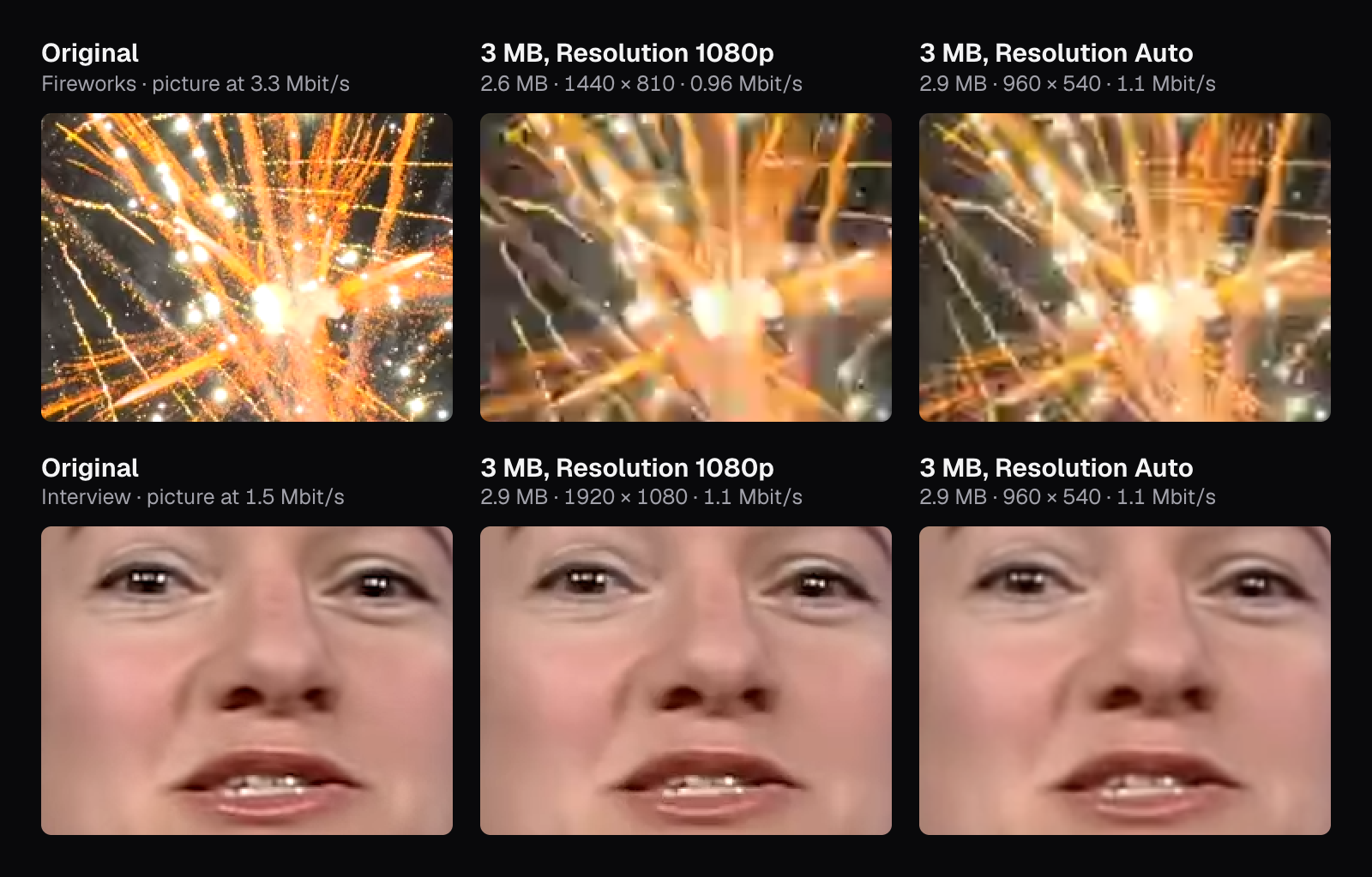
Spent on 960 × 540 instead, the same 3 MB served the fireworks better. Auto chose that size for both pictures: it's the largest step at which 1.04 Mbit/s still gives at least the 0.05 bits per pixel the planner wants for a sharp picture, and the encoder stayed close to it, at 1.06 Mbit/s. The sparks are softer than the original's, but they're sparks. For the interview the choice made no difference we could see.
MDN's codec guide names what makes a picture expensive. Compression works by recording how each frame differs from the last, so “the more motion there is in a video, the larger the output file will typically be”. Variability, such as noise, “generally makes compression more difficult”. Fireworks are both at once: a sky full of specks that are somewhere else in the next frame, and smoke that never holds its shape. A studio interview is the opposite, a fixed camera on a still set and a face that moves a little.
What the same quality costs each picture
There's another way to encode: fix the quality and let the bitrate land where it may. WebCodecs, the browser interface Cutlia encodes an MP4's picture with, offers both. Its “variable” mode aims at an average bitrate, “allowing more space to be used for complex signals and less space for less complex signals”; its “quantizer” mode encodes every frame with a quantizer the page sets, the setting that decides how coarsely detail is rounded off, from 0 to 51 for H.264. Compress Video uses the first. The Video Converter and Resize & Crop ask for no bitrate, and Mediabunny, the library Cutlia encodes through, then asks for a quantizer of 22, where 16 is its best and 41 its worst, falling back to a bitrate on an encoder without that mode. Chrome's H.264 encoder on our Mac accepted that mode at all three of our sizes.
At that one quality, the fireworks took 13.8 Mbit/s at 1080p and the interview 2.6, 5.3 times as much. The ratio held at every size, 5.7 at 720p and 5.4 at 480p, and the 20 seconds came to 34.6 MB against 6.6. Second by second the fireworks also swung far more. The interview's picture stayed between 0.9 and 4.3 Mbit/s, the top of that in the second the camera cut to the close-up. The fireworks ran from 6.5 to 35.4 Mbit/s, rising with each burst; the 35.4 is the last second, when a burst fills the frame with white light.
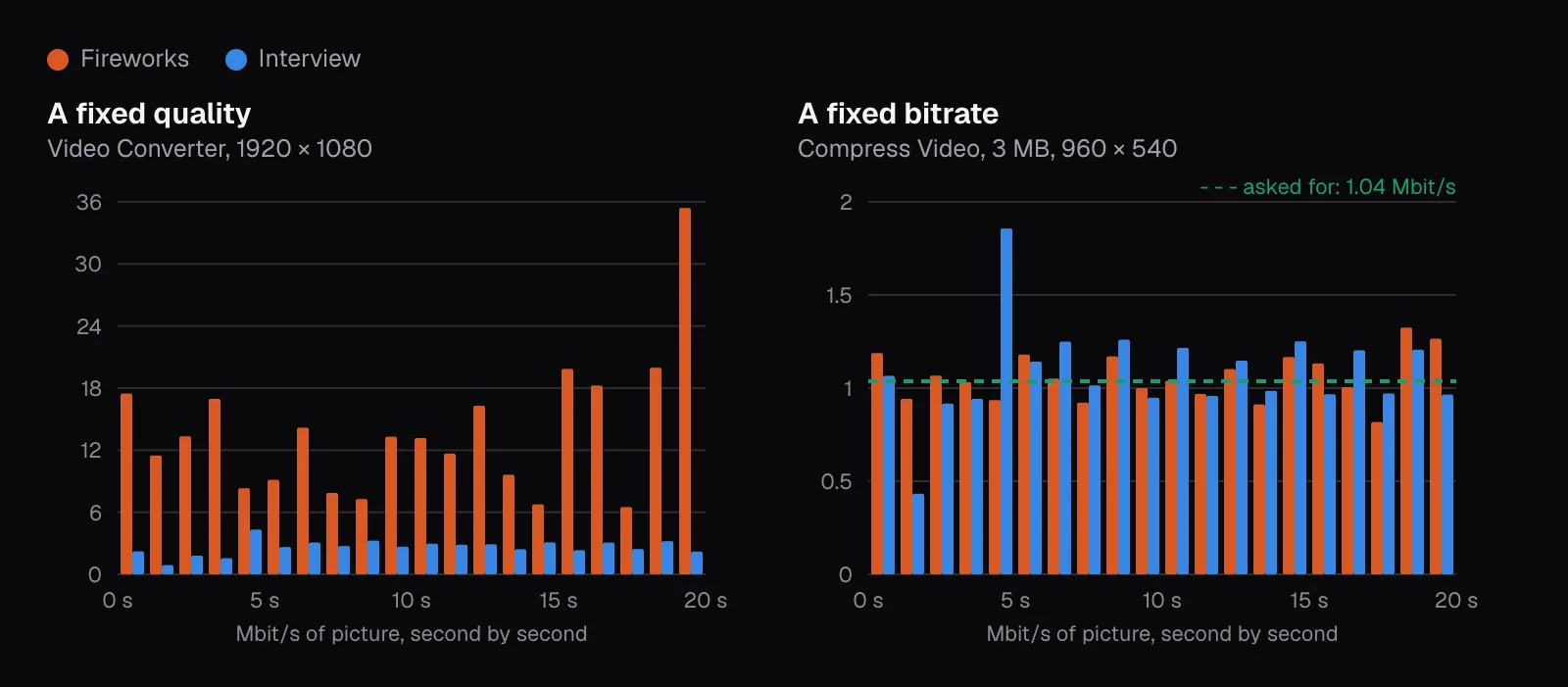
A fixed-quality file isn't a small one. The converter's fireworks file spent 4.2 times what the original spent on the same seconds, faithfully reproducing a picture that had already been compressed, and the interview's 1.8 times. Resize & Crop encodes the same way, so when a video needs a new shape and a smaller size, resize it first and compress it last.
And a bitrate that's generous for one video can starve another. The interview looked almost like its original at 0.5 Mbit/s; the fireworks couldn't hold 1080p at twice that. A bitrate on its own tells you how big a file is, not how good it looks. For where the loss starts to show as a file shrinks, see our test of how far a video can be compressed.
What a minute costs at common settings
This is what Compress Video's “Smaller, same look” budgets for one minute, sound included at 128 kbit/s, from an original with bits to spare, such as a camera recording. A file that was compressed hard before gets less, as the interview did.
| Picture | H.264 bitrate, with sound | H.264, a minute | HEVC, a minute |
|---|---|---|---|
| 4K, 60 fps | 35.0 Mbit/s | 264.9 MB | 159.3 MB |
| 4K, 30 fps | 17.5 Mbit/s | 132.9 MB | 80.2 MB |
| 1440p, 30 fps | 7.9 Mbit/s | 59.6 MB | 36.2 MB |
| 1080p, 60 fps | 8.8 Mbit/s | 67.0 MB | 40.6 MB |
| 1080p, 30 fps | 4.5 Mbit/s | 34.0 MB | 20.8 MB |
| 720p, 30 fps | 2.1 Mbit/s | 15.6 MB | 9.8 MB |
| 480p, 30 fps | 1.0 Mbit/s | 7.5 MB | 4.9 MB |
| 360p, 30 fps | 0.6 Mbit/s | 4.7 MB | 3.2 MB |
The planner credits HEVC with the same look from 60% of H.264's bitrate, and AV1 from 55%; the sound doesn't shrink, so small files save less. Their catch is playback, as our guide to iPhone videos that won't play explains. And the table is a budget, not a need. At the converter's fixed quality our interview took 2.6 Mbit/s at 1080p and the fireworks 13.8, so the planner's 3.5 Mbit/s for 1080p at 24 fps is more than enough for one and about a quarter of what the other took.
YouTube's recommended upload bitrates for SDR video, as of November 2026, run higher: 5 Mbps for 720p, 8 for 1080p, 16 for 1440p and 35 to 45 for 4K at 24 to 30 fps, and half as much again at 48 to 60. The same page asks for H.264 with a variable bitrate and adds that no bitrate limit is required, giving its figures for reference. It also notes that new 4K uploads play in 4K only in a browser or on a device that supports VP9.
Which setting to change first
When a file has to shrink, change things in this order, the cheapest loss first:
- Length. Cutting a third of the video cuts a third of the file and costs no picture at all. Compress Video's own “Part of the video” fields do it as part of the same export.
- Resolution. Match it to the screen it'll be watched on. At a fixed size, fewer pixels get more bits each, which is why our fireworks looked better at 960 × 540 than squeezed into 1440 × 810.
- Frame rate. 60 to 30 fps halves the frames; by YouTube's figures it saves about a third of the bitrate.
- Codec. HEVC or AV1, when you know the viewer's device plays them. Our codec comparison covers which plays where.
- Bitrate, last. A full-size picture starved of bits turns soft, then blocky, and on a busy picture the encoder may not go that low at all.
To fit a limit, run the sum backwards. Say a 3-minute 1080p clip at 30 fps must fit in 25 MB: 200 million bits over 180 seconds, 1.1 Mbit/s for everything. Keep 5% back for the container and the encoder's overshoot, give the sound 96 kbit/s, and the picture gets 0.96 Mbit/s: 0.015 bits per pixel at 1080p, 0.035 at 720p, 0.062 at 960 × 540. “Custom size” does this sum for you and picks 960 × 540 in H.264, or 1280 × 720 in HEVC or AV1.
Then think about the picture. A talking head, slides or a calm scene can go well below those bits per pixel, as our interview did at 0.011. Anything that moves everywhere at once, the way fireworks do, needs more than the sum gives it, so let Auto lower the resolution and look at the result before you send it. For the limits of email and chat apps, see our guide to sending a large video.
Questions people ask
How many MB is a minute of 1080p video?
It depends on the bitrate, and the bitrate on the picture. At the 4.5 Mbit/s Compress Video's “Smaller, same look” plans for 1080p at 30 fps with sound, a minute is about 34 MB. At the 8 Mbps YouTube recommends for the picture (as of November 2026), it's 60 MB before the sound. At one fixed quality our studio interview needed 2.6 Mbit/s, about 20 MB a minute, and our fireworks 13.8, about 104 MB.
What's the difference between Mbps and MB/s?
Mbps, or Mbit/s, counts millions of bits per second; MB/s counts millions of bytes, and a byte is 8 bits. Divide a bitrate by 8 to get bytes: a video at 8 Mbit/s fills 1 MB every second, so a 25 MB limit holds 25 seconds of it, sound included.
Does lowering the resolution make a video smaller?
Only if the bitrate drops with it. Compress Video's “Smaller, same look” plans the bitrate from the pixel count, so 720p gets 44% of 1080p's bitrate, unless the original's own bitrate caps both: our interview came out 2.6 MB at either size. Tools that encode at a fixed quality, such as the Video Converter, save less than the pixel count suggests: our 720p files were 56 to 60% the size of the 1080p ones, because each pixel of a smaller picture carries more detail.
Why do some videos need a higher bitrate than others?
Because encoders store how each frame differs from the last, and some pictures differ far more. Motion everywhere, fine detail and noise all cost bits; a still camera and a still background cost little. At the same fixed quality, our close-up fireworks took 13.8 Mbit/s and a studio interview 2.6, though both were 1920 × 1080 at about 24 fps.
Does 60 fps double the file size?
In Compress Video's “Smaller, same look”, yes: the planner budgets per frame, so 60 fps gets twice the bitrate of 30. Its other goals stop at 30 fps. An encoder can need less, because frames 1/60 of a second apart differ less; YouTube recommends 12 Mbps for 1080p at 60 fps against 8 at 30 (as of November 2026).
Sources
Where the facts in this guide come from, besides our own tests:
- Web video codec guide — MDN Web Docs
- WebCodecs: VideoEncoderBitrateMode — W3C
- AVC (H.264) WebCodecs Registration — W3C
- YouTube recommended upload encoding settings — YouTube Help
Footage in this guide
The pictures were made with Cutlia's tools from this openly licensed footage, found on Wikimedia Commons: