Formats and playback
H.264, HEVC, VP9 or AV1: which video codec should you use?
We encoded the same fireworks and deep-sea coral in all four codecs at six bitrates with the encoders Chrome gives every web page, then measured how much of the picture each file kept.
By the Cutlia team · Published · 18 min read
The short version
- For anything you send, post or hand over, use H.264 in an MP4: Windows plays it out of the box, Android's rules require every device to decode it, and every major browser plays it, while HEVC needs a paid extension on Windows.
- With Chrome's encoders on detailed footage, the newer codecs earned their reputation: to keep as much of our deep-sea coral as H.264 did, AV1 needed 59% of its bitrate, HEVC 66% and VP9 89%.
- On fireworks the newer codecs saved nothing, HEVC needing 106% of H.264's bitrate, AV1 104% and VP9 160%, most likely because sparks that appear from one frame to the next leave little to predict. Yet at the busiest moment AV1 kept bursts that H.264 smeared and HEVC broke into blocks.
- Smaller costs time: Chrome's software AV1 encoder took 3.7 seconds for 20 seconds of 1080p where the Mac's hardware H.264 took 2.2.
- A bitrate is only a request: asked for 0.25 Mbit/s, every encoder spent at least 1.39 Mbit/s on the fireworks, so to make a hard video much smaller, lower its resolution as well.
You meet these four names in a phone's camera settings, an export dialog or a video's file details: H.264, HEVC (also called H.265), VP9 and AV1. They're video codecs, the methods that squeeze a picture into a file, and each newer one is said to make the same picture smaller. MDN's guide to web video codecs says HEVC can in theory halve the size of an H.264 file, and that AV1 compresses as much as 50% better than H.264. A smaller file is no use, though, if the person you send it to can't play it.
We wanted numbers from real footage and from encoders people actually use. Cutlia encodes with the browser's own encoders, the ones any web page can ask for, so we used those: Chrome 157 on a MacBook Air with an Apple M5 chip. We took 20 seconds of fireworks, sparks that appear and vanish from one frame to the next, and 20 seconds of deep-sea coral, all fine white branches, and encoded both in all four codecs at six bitrates, from a quarter of a megabit a second to eight. Then we compared every file with the source at twelve moments, set crops side by side at their actual pixels, tried the same through Cutlia's own tools, and checked where each codec plays on Apple's, Microsoft's and Google's own pages and on MDN.
What a codec does, and what each newer one adds
A video file has two layers. Its extension (.mp4, .mov, .webm, .mkv) names the container, the box that holds the picture, the sound and an index; our guide to video formats covers those. The codec is the method that squeezed the picture into the box, and it decides most of the file's size. The squeeze is enormous: MDN puts uncompressed 1080p video at “at least 1.5 Gbps”, and the fireworks file we started from spends about 3.2 megabits a second on the same picture size, well under a hundredth of that.
All four codecs work the same way at heart. They cut each frame into blocks, and for every block they look for a prediction the player can make by itself: from the pixels around it in the same frame, or from a matching patch of an earlier frame, shifted to follow the motion. MDN calls the second trick block motion compensation. What the file carries is the difference between the prediction and the real picture, rounded off. The coarser the rounding, the fewer bits it takes and the more fine detail disappears, and the bitrate you ask for sets how coarse it gets. Every so often comes a key frame, predicted only from itself, where a player can start.
What separates the four is how many ways they have to predict and how freely they can cut up the frame. H.264 works in macroblocks. HEVC replaced them with coding tree units, each of which, in MDN's description, holds a tree of brightness values and a tree of color values. AV1's specification starts from superblocks of 64 × 64 or 128 × 128 brightness samples, each of which can be split into four sub-blocks, “which may themselves be further subpartitioned”. Big blocks cost little over black sky or smoke; small ones can follow a single spark. More ways to predict leave less difference to send, but an encoder that tries them all does far more work. That trade, size against time and against who can play the result, runs through everything below.
| Codec | Who maintains it | Licensing, in MDN's words | What MDN says about its compression |
|---|---|---|---|
| H.264 (AVC) | ITU and MPEG | “Proprietary with numerous patents” | The one the others are compared with |
| HEVC (H.265) | ITU and MPEG | Proprietary, “covered by a number of patents” | “Theoretically” half the size of H.264 at comparable quality |
| VP9 | “Open and free of royalties” | Quality “comparable to that of HEVC at similar bit rates” | |
| AV1 | Alliance for Open Media | “Royalty-free, open standard” | Better than VP9 and HEVC, and “as much as 50% higher” than H.264 |
How we tested: the encoders a browser hands to every web page
A web page can bring an encoder of its own, compiled to run in the browser, but only the browser can reach the chip's video hardware. Through WebCodecs it offers its encoders to any page and answers with what it has: a hardware encoder where there is one, a software encoder where there isn't. Before encoding anything, we asked Chrome which of the four it could encode at 1920 × 1080, the question Cutlia's tools ask too. All four were available on this Mac, but not in the same way:
| Codec | Encoder Chrome used | Decoding, as Chrome reported it |
|---|---|---|
| H.264 | Hardware (a software one too, if asked) | Hardware or software |
| HEVC | Hardware (in software it managed 16.6 frames a second) | Hardware only |
| VP9 | Software only | Hardware or software |
| AV1 | Software only | Hardware or software |
A request with no preference, the kind Cutlia makes first, got the hardware: four seconds of H.264 encoded that way carried the hardware encoder's codec string, avc1.640028, not the software one's avc1.640c28, and HEVC ran at 184 frames a second, near the hardware's 185 and far from the software's 16.6.
We encoded through Mediabunny, the library Cutlia's export engine is built on, with the settings the engine uses when it aims at a size: a target bitrate, which the encoder may spend unevenly, more on busy moments and less on calm ones, and a key frame every 2 seconds. Each codec got the same six targets, from 0.25 to 8 Mbit/s, doubling each time, for two 20-second stretches in full HD:
- Fireworks, filmed close up at a Lunar New Year celebration in Zhongshan, China: 0:38 to 0:58, 480 frames of sparks, smoke and black sky, including a burst that fills the frame. The file we started from is Wikimedia Commons' 1080p VP9 copy of a 4K original, and it spends 3.30 Mbit/s on this stretch.
- Corals, filmed for Ifremer by the submarine Ariane about 350 meters down in the Mediterranean: 2:20 to 2:40, 500 frames of the camera gliding past a rock wall into a mass of white branching coral, at 6.40 Mbit/s in the file we started from.
Then we measured each file against the source. At twelve moments of each stretch we took the same frame from both and scored the pair with SSIM, the structural similarity index. Rather than comparing pixels one at a time, SSIM compares small overlapping windows of the picture's brightness, their level, contrast and structure, and averages the result: 1 means identical. We also checked that every file lined up frame for frame with the source, so no score compares two different moments. SSIM measures fidelity to the file we started from, which had already been compressed once: a codec can't score above 1 by looking better than its source.
A bitrate is a request, not a promise
The first surprise came before any comparison. On the corals, from 0.5 Mbit/s up, the encoders came near what we asked for, H.264 spending 0.49 when asked for 0.5, though HEVC wouldn't go below 0.63. On the fireworks, none of them would go low. Asked for 0.25 Mbit/s, the four spent between 1.39 and 1.79 Mbit/s, more than five times as much. At the other end they fell short: asked for 8 Mbit/s, they spent 5.43 to 6.62.
| Fireworks: asked for | H.264 spent | HEVC spent | VP9 spent | AV1 spent |
|---|---|---|---|---|
| 0.25 Mbit/s | 1.73 | 1.79 | 1.40 | 1.39 |
| 1 Mbit/s | 1.76 | 1.80 | 1.64 | 1.54 |
| 4 Mbit/s | 3.20 | 3.24 | 3.20 | 3.59 |
| Coarsest setting, no bitrate | 0.60 | 0.30 | 0.67 | 0.44 |
The low end wasn't the limit of the formats. When we told each encoder to use its coarsest setting instead of a bitrate, it made the same 20 seconds at 0.30 to 0.67 Mbit/s, the last row above. Driven by a bitrate, as an app drives them when it aims at a file size, they stopped well short of that. The likely reason: sparks that weren't there a frame earlier can't be predicted, so every frame of a fireworks show has a lot of new picture to send, and in bitrate mode these encoders kept sending it.
For you, it means a bitrate on a hard picture is a request. Cutlia's export engine is built around it: when a file has to fit a size and comes out too big, the engine makes it again with a lower bitrate, and on its last try it also makes the picture a quarter smaller each way, because, as a comment in its code says, “at very low bits per pixel, encoders stop going lower”. Fewer pixels is the lever that still works there, as our guide to bitrate and resolution shows. It also means comparing codecs “at the same bitrate” only works by the bitrate each file actually spent, so that is what every number below uses.
Four codecs at the same bitrate, side by side
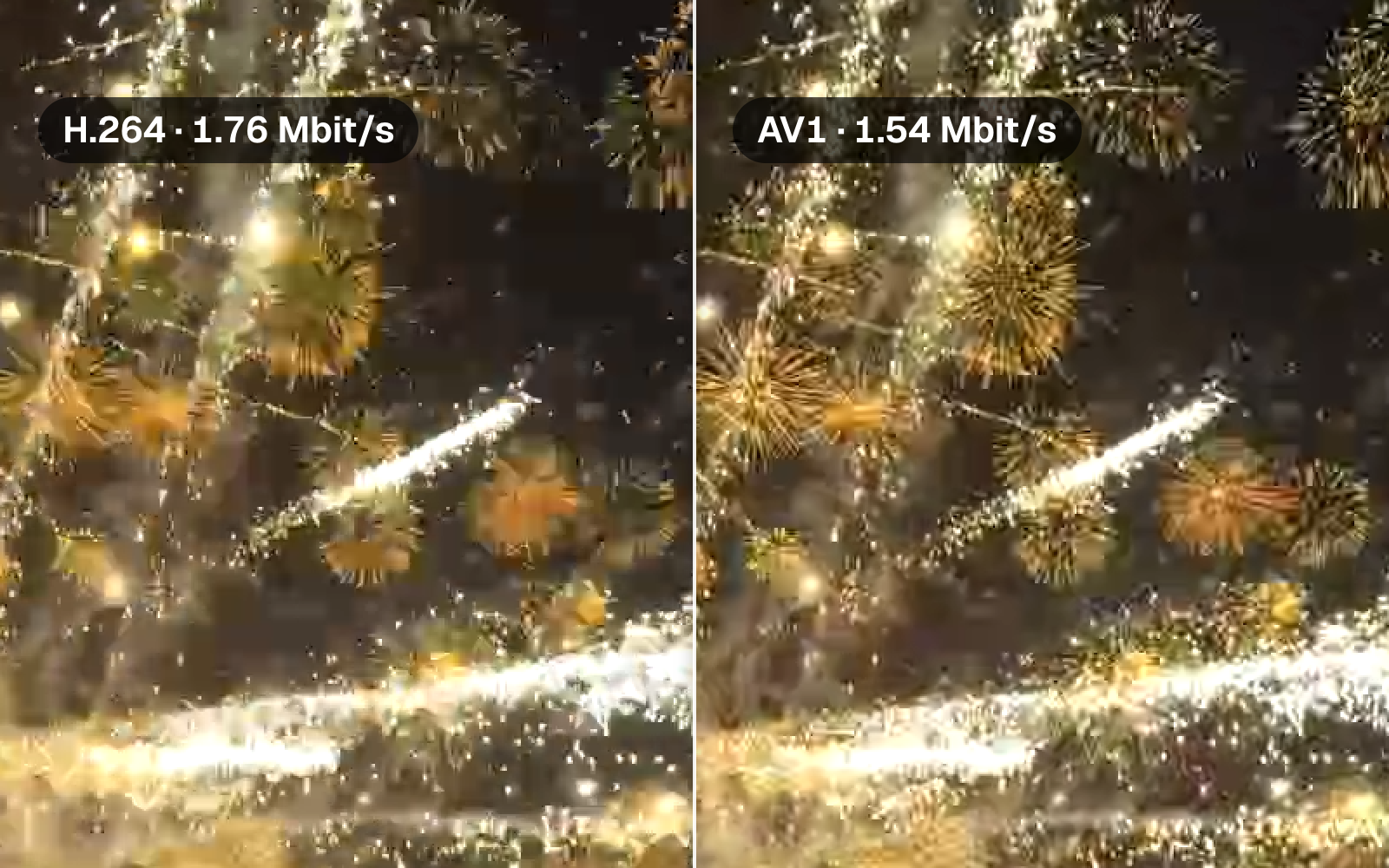
Asked for the same bitrate, the four made visibly different pictures, and the busiest moment showed it most. At 0:51 a burst fills the whole frame. Asked for 1 Mbit/s, the H.264 file spent 1.76 and smeared the golden chrysanthemums into soft orange blobs. HEVC, at 1.80, broke them into square blocks. VP9 at 1.64 and AV1 at 1.54 kept them as bursts of separate sparks, AV1 the more cleanly of the two, with the fewest bits of all four.

SSIM inside that box agreed with the eye at the two ends, 0.67 for HEVC and 0.79 for AV1, but scored H.264 and VP9 alike, 0.76 each, though they look quite different. SSIM counts every departure from the source's exact pattern of brightness, so a sharp burst that differs in its fine detail can lose nearly as much as a smear, while the eye judges the two very differently. That's why we show the pictures and not only the scores.
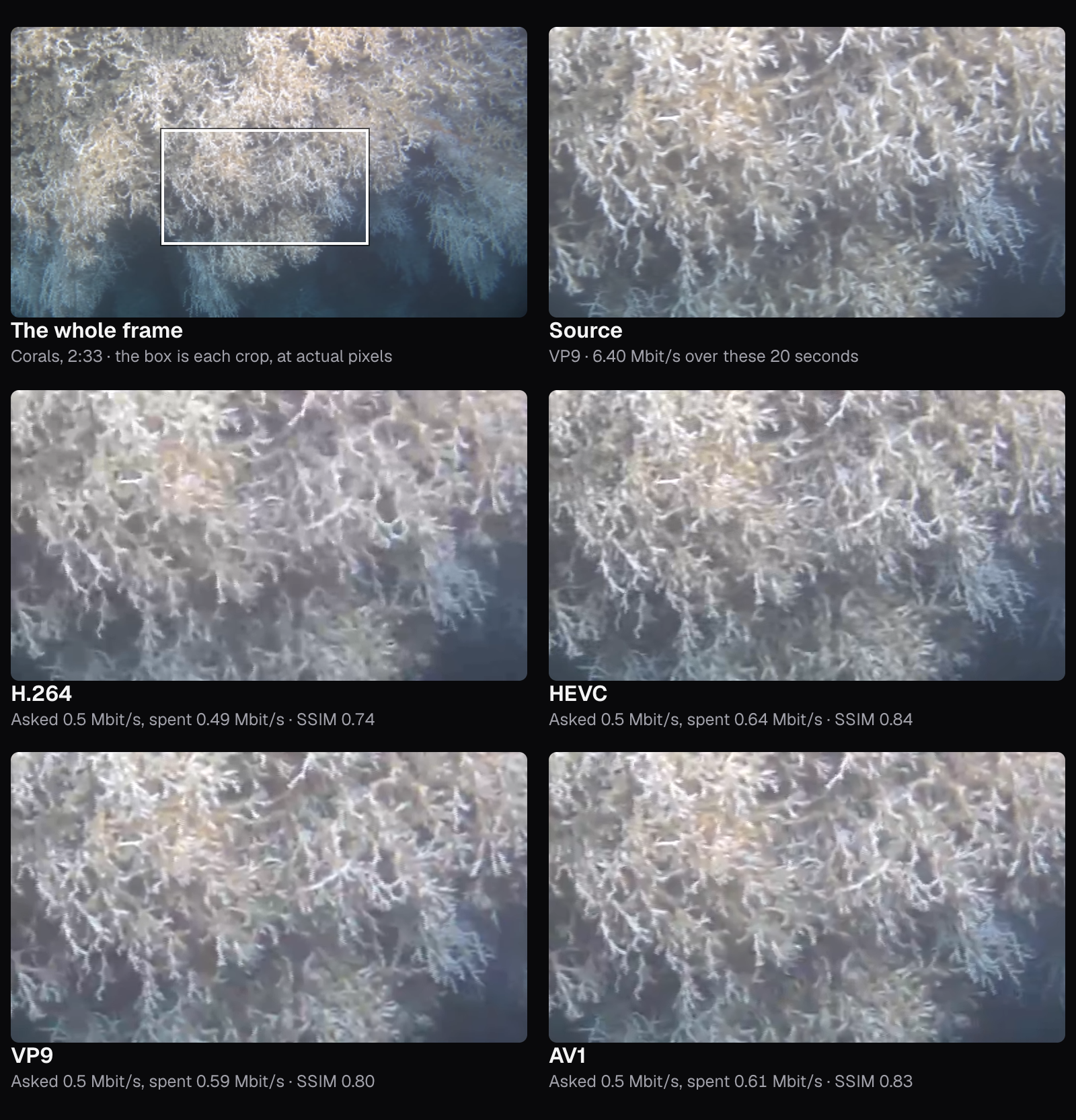
The corals ask something different: no burst, just thousands of thin white branches drifting slowly past. Here the encoders could go low, so we compared the files asked for 0.5 Mbit/s. H.264 spent 0.49 and turned the branches into a soft, smeared mesh, SSIM 0.74 in the box. HEVC kept them distinct at 0.84, though it spent 0.64: asked for half that, it still spent 0.63. AV1 at 0.61 came close to HEVC, at 0.83, and VP9 at 0.59 sat between, at 0.80.
How much smaller each codec makes the same picture
One frame can mislead, so here is every file over all twelve moments. Each line is one codec, each point one of its six files, placed by the bitrate it really spent and the SSIM it kept.
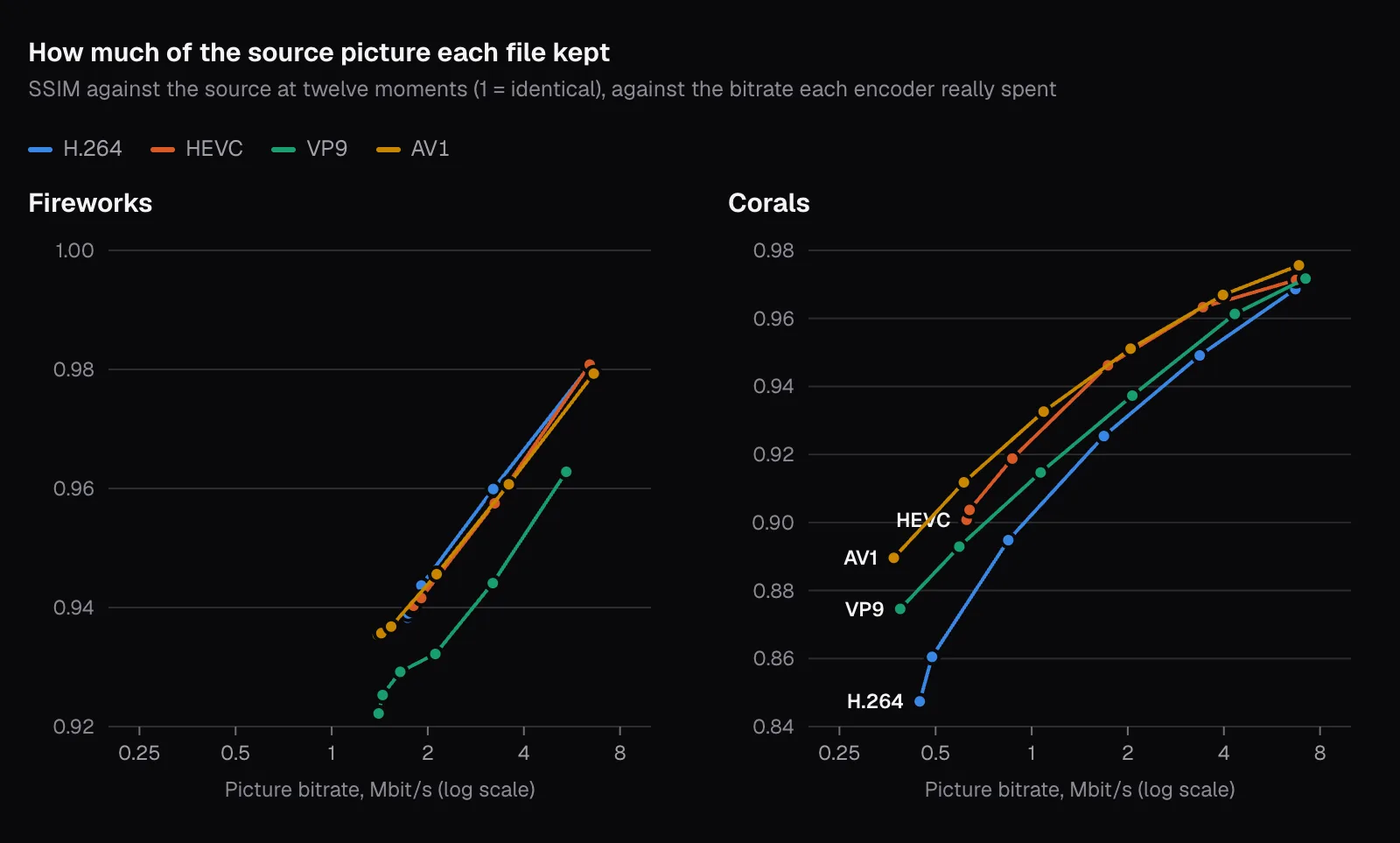
Read across the chart and you get the answer the codec debates are about: how many bits each codec needed to keep as much of the picture as H.264 did. We read it off each line at the SSIM H.264 reached at each of its own steps, and averaged over the steps where all four could be compared.
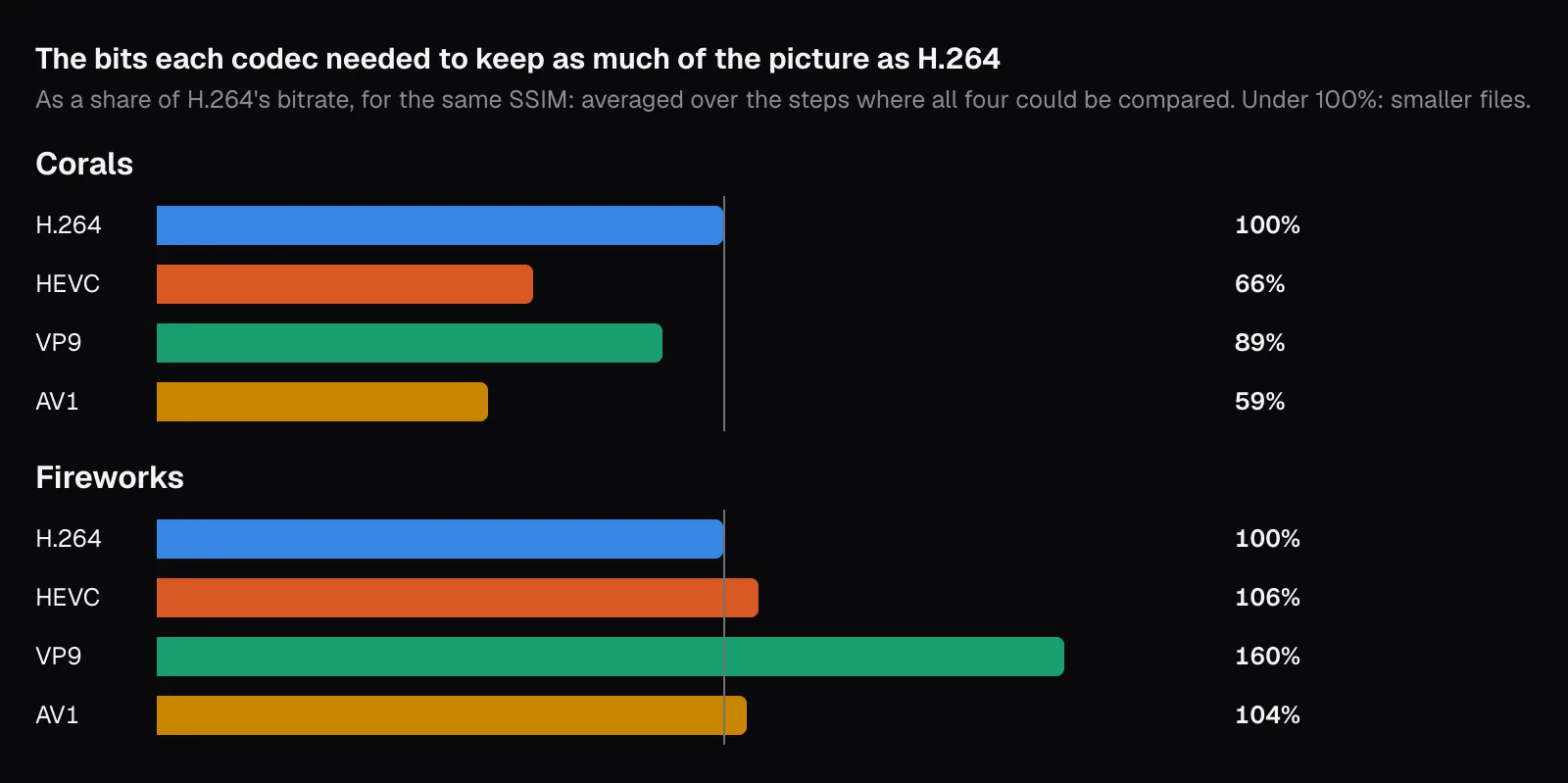
On the corals the newer codecs did what they promise. AV1 kept the same detail with 59% of H.264's bitrate, HEVC with 66% and VP9 with 89%, averaged over H.264's steps at 1.68, 3.36 and 6.70 Mbit/s. At H.264's 0.84 Mbit/s step, the lowest where AV1 could be compared, AV1 needed 49%, in line with MDN's “as much as 50%”. The HEVC and AV1 figures sit near the planner in Cutlia's Compress Video, which gives an HEVC file 60% of the bitrate it would give H.264 for the same look and an AV1 file 55%, and near YouTube's advice for live streams: as of November 2026 it recommends 10 Mbit/s for 1080p at 30 frames per second in AV1 or HEVC, and 14 Mbit/s in H.264.
On the fireworks they saved nothing. Over H.264's steps at 1.76, 1.91 and 3.20 Mbit/s, HEVC needed 106% of its bitrate for the same SSIM, AV1 104%, and VP9 160%. A newer codec's advantage is better prediction, and a picture made of sparks that weren't there a frame before, over black sky that costs almost nothing, most likely leaves little to predict. Where AV1 did pull ahead, to the eye, was the burst at 0:51, where H.264 smeared the sparks and HEVC broke them into blocks. SSIM only partly saw it, as the crops showed, and an average over twelve moments hardly moves for a few bad frames; someone watching the video would notice them.
Smaller files take longer to make
Better prediction means more searching. We timed each encoder making the fireworks' 20 seconds at 1 Mbit/s, decoding included, three times, and took the middle run. Chrome's software AV1 encoder took 1.7 times as long as the Mac's hardware H.264:
| Codec | Encoder | 20 seconds of 1080p took | Frames a second |
|---|---|---|---|
| H.264 | Hardware | 2.2 s | 218 |
| HEVC | Hardware | 2.2 s | 218 |
| VP9 | Software | 2.4 s | 200 |
| AV1 | Software | 3.7 s | 130 |
On an Apple M5 even AV1 ran faster than the video plays: 130 frames a second for a picture of 24. HEVC shows what the hardware is worth: forced into software, it encoded four seconds of the same fireworks at 16.6 frames a second, slower than the video plays and about a seventh of software AV1's speed on the same four seconds, so on this Mac, without its video hardware, HEVC would be the slowest of the four by far. Compress Video warns about the cost on its AV1 option: “Smallest — newest devices; slower to make.”
Where each codec plays, and who pays for it
A file plays only where there's a decoder for its codec, and that, not efficiency, is why H.264 is still the default. This is what each company's own pages and MDN say, as of November 2026:
| Where | H.264 | HEVC | VP9 | AV1 |
|---|---|---|---|---|
| Windows | Built in | HEVC Video Extensions, $0.99 in the US Microsoft Store | VP9 Video Extensions, free | AV1 Video Extension, free |
| iPhone 17 | Records and plays | Records and plays | Not on Apple's list | Plays |
| Android | Decoder required | Decoder from Android 5.0 | Decoder from Android 4.4 | Decoder from Android 10, required from 14 |
| Browsers (MDN) | All | Chrome, Edge, Firefox and Safari, with conditions | All | All; Safari only with an AV1 hardware decoder |
Windows. Microsoft's page on Windows Media Player errors lists H.264 among the formats supported “out of the box” and points to the Microsoft Store for HEVC, VP9 and AV1. Apple. The iPhone 17's specifications list “HEVC and H.264” as the formats it records and “HEVC, H.264, and AV1” among those it plays. MDN adds that Safari plays AV1 only on devices with a hardware decoder for it: M3 MacBooks and later, the iPhone 15 Pro, and the iPhone 16 and later. Android. Google's list of supported formats gives the HEVC decoder as “Main Profile Level 3 for mobile devices”, makes AV1's encoder and decoder “mandatory beginning with Android 14”, and lists no HEVC or VP9 encoder at all.
Browsers. In MDN's tables HEVC is the one with conditions: Chrome supports it on Windows, Linux and ChromeOS where the device has hardware for it, and on every Mac from macOS Big Sur; Edge on Windows needs both hardware for it and the Store extension; Firefox on Windows uses the device's hardware or an extension the user “must pay for and install”. YouTube. Its upload guide recommends H.264, at 8 Mbit/s for 1080p at standard frame rates, and adds that watching new 4K uploads in 4K takes a browser or device that supports VP9, a sign that what viewers watch is YouTube's own encode, not your file.
Licensing, from the first table, plays a part too. MDN says commercial use of H.264 needs a license, though the Via LA patent pool charges no fees for streaming internet video that's free to its viewers, and that HEVC's fees are charged to developers “rather than to content producers and distributors”. If you're choosing a codec for an app or a website, MDN's advice is to check the license terms first. For everyone else it shows up as which apps and devices include which decoders: MDN notes that Firefox relies on the operating system's own H.264 codecs “in order to avoid patent concerns”. If your problem is an iPhone video that won't open somewhere, our guide to iPhone videos that won't play goes through the fixes.
What Cutlia uses, and where you choose
When a Cutlia tool has to encode an MP4's picture and you haven't picked a codec, it tries H.264 first. The order is in its code: MP4 tries H.264, then HEVC, then VP9, then AV1, moving on only when the browser can't encode the one before; MOV tries H.264 and then HEVC; WebM tries VP9, then AV1, then VP8. Within H.264 its export engine steps down from the High profile to Main and then Constrained Baseline before trying another codec, because, as its decision record explains, where Chrome for Android's encoder lacked High, every MP4 had come out in VP9: slow to make on a phone, and refused by QuickTime, older Windows players and many apps people post to.
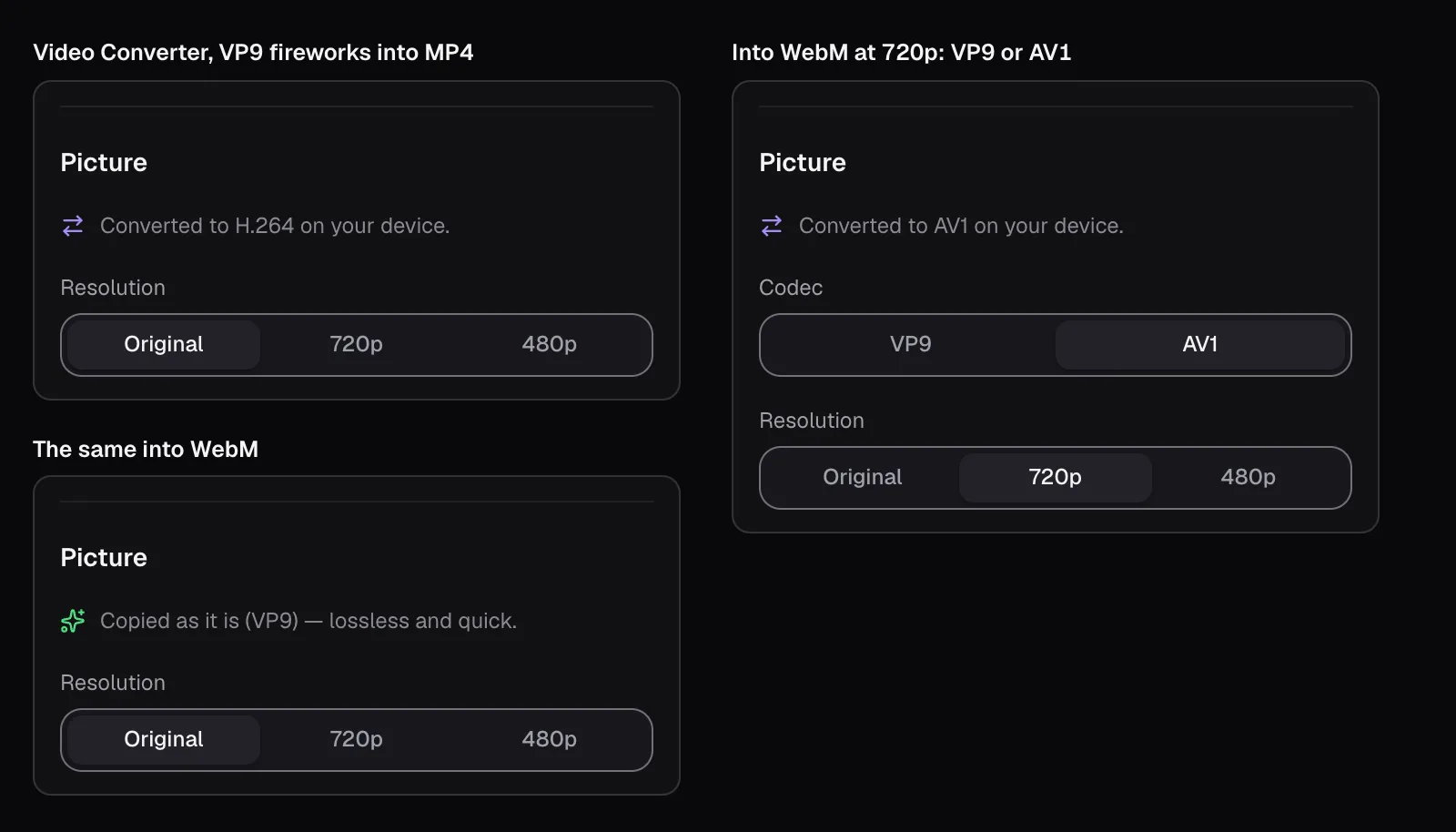
Where the codec already suits the new container, the Video Converter doesn't encode at all. Our VP9 fireworks went into WebM and MKV as “Copied as it is (VP9) — lossless and quick.”, and into MP4 and MOV as “Converted to H.264 on your device.” In WebM, the VP9 or AV1 choice appears when the picture has to be made again, at 720p for example. The converter aims at a quality rather than a size, so the size follows the picture: at 720p our 20 seconds came out at 21.2 MB in H.264, 14.0 MB in VP9 and 13.2 MB in AV1, with SSIMs of 0.980, 0.968 and 0.971. At the original size the H.264 MP4 was 35.2 MB, 14.1 Mbit/s against the source's 3.30, for an SSIM of 0.993.
Compress Video is where you pick the codec yourself: H.264, or HEVC or AV1 where this browser can encode them. Its planner expects HEVC and AV1 to need fewer bits, so for the same size it keeps more pixels. Asked to make the fireworks' 20 seconds 2 MB without sound, it planned 960 × 540 in H.264 and 1280 × 720 in HEVC and AV1, all at 0.8 Mbit/s.
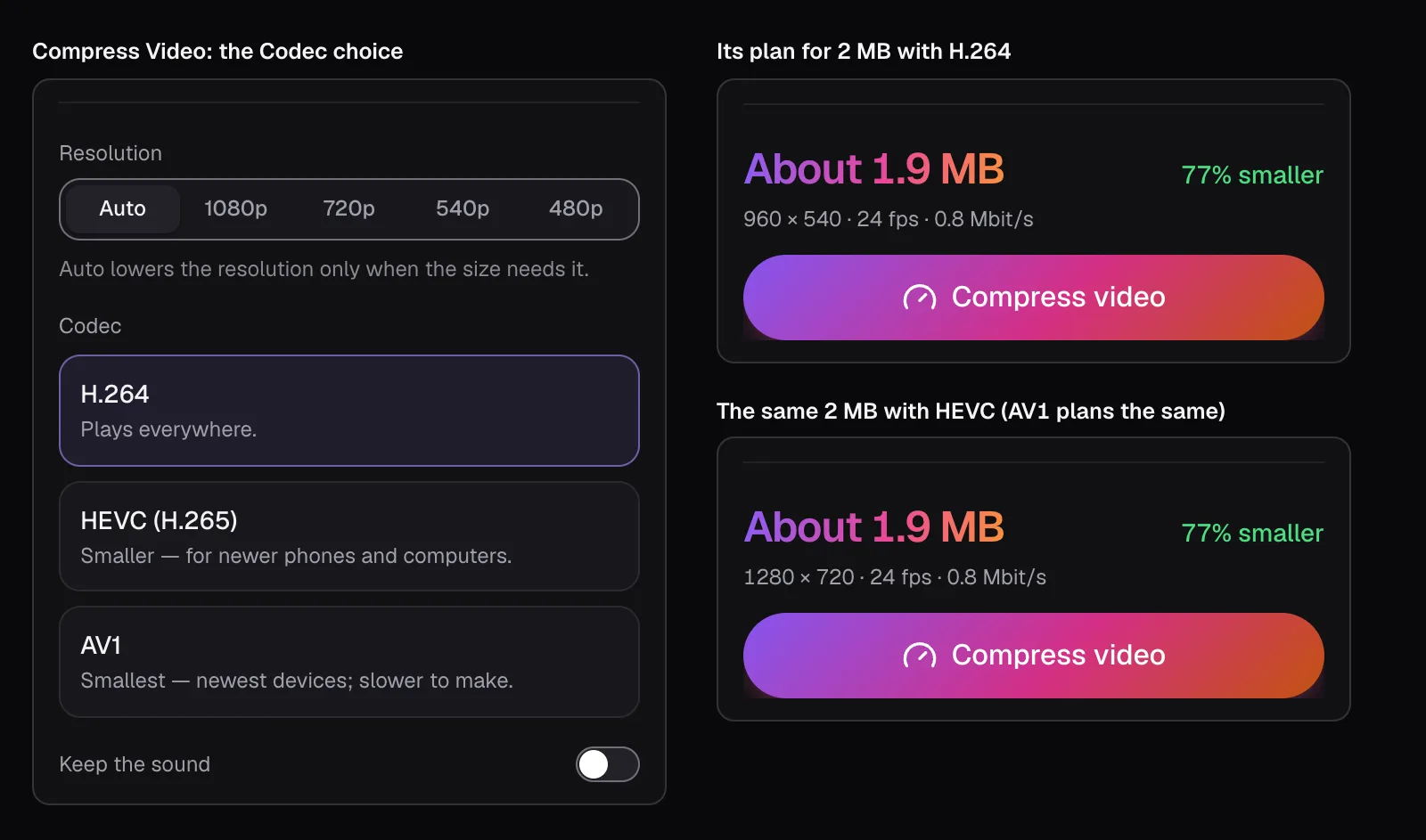
On the corals at 3 MB that worked: HEVC and AV1 came out at 1280 × 720, 2.95 and 2.84 MB, with an SSIM of 0.928 each, against 0.924 for H.264's 960 × 540 at 2.86 MB. On the fireworks it didn't. The HEVC and AV1 encoders couldn't bring 720p fireworks under 2 MB, so Compress Video fell back on its last try, the one that also shrinks the picture a quarter each way, and both finished at 960 × 540, the size H.264 started at: 1.5 MB for HEVC and 1.6 MB for AV1, against H.264's 1.9 MB. HEVC matched H.264's SSIM of 0.91 with a file nearly a fifth smaller; AV1 scored 0.90.
Which codec to use
- Anything you send, post or hand over: H.264 in an MP4. It plays on Windows out of the box, Android's rules require every device to decode it, and every major browser plays it. On our detailed footage it needed about 1.7 times AV1's bitrate for the same picture; on the fireworks, no more at all.
- Videos you keep on Apple devices, or send to people with recent ones: HEVC. It's what an iPhone records on its High Efficiency setting, it's quick to make where there's hardware for it, and it needed two thirds of H.264's bitrate on our corals. Avoid it for Windows users without the extension.
- A video for your own web page: AV1 in WebM, with an H.264 MP4 as the fallback. That is MDN's own recommendation for the web, and AV1 kept the most detail for its bits on our corals.
- An archive you'll play on recent devices: AV1, if you can wait for it. It was the slowest to make and the smallest for our detailed footage.
- VP9 mostly when a WebM is asked for. In this browser it saved the least of the three newer codecs.
Whatever you choose, choose it once. Converting an H.264 file into AV1 to save space encodes it a second time, which rounds off more detail on top of what the first encode lost, as our guide to compressing without visible loss measures. Keep the original, make the version you need from it, and if a file won't play, convert it toward H.264, not away from it: the HEVC to H.264 page does exactly that.
Questions people ask
Is HEVC better than H.264?
It can compress better, but it plays in fewer places. In our test with Chrome's encoders, HEVC needed two thirds of H.264's bitrate to keep the same detail in deep-sea coral footage, and saved nothing on fireworks. As of November 2026, Windows needs Microsoft's HEVC Video Extensions, $0.99 in the US Store, to play it, and Android lists a decoder only from Android 5.0. Use HEVC on your own Apple devices and H.264 for sharing.
Is AV1 better than HEVC?
On our coral footage AV1 kept the same detail with slightly fewer bits: 59% of H.264's bitrate against HEVC's 66%. On fireworks neither beat H.264. AV1's Windows extension is free and Android's rules require every device to decode it from Android 14 on, but MDN says Safari plays AV1 only on devices with a hardware decoder for it: M3 MacBooks and later, the iPhone 15 Pro, and the iPhone 16 and later.
Which codec should I upload to YouTube?
H.264. YouTube's upload guide recommends an MP4 with H.264 video, at 8 Mbit/s for 1080p at standard frame rates. It also says that watching new 4K uploads in 4K takes a browser or device that supports VP9, so viewers get YouTube's own encodes rather than your file. A newer codec would make your upload smaller, not what your viewers watch.
Does converting H.264 to HEVC or AV1 lose quality?
A little, every time. Converting decodes the picture and encodes it again, and the second encoder rounds off detail of its own. Even a high-quality H.264 copy of our VP9 fireworks, at more than four times the source's bitrate, scored an SSIM of 0.993 rather than 1. Convert to a newer codec only when you need the smaller file, and always from the original.
Why did my video get bigger when I converted it to MP4?
Most likely because the picture was encoded again by a converter that aims at a quality rather than a size, so the new file spends what that quality takes, whatever the original spent. Our 20 seconds of VP9 fireworks, 3.30 Mbit/s in the source, came out of the Video Converter as a 35.2 MB H.264 MP4, at 14.1 Mbit/s. To aim at a size instead, use Compress Video.
Is VP9 the same as WebM?
No. WebM is a container, a type of file, and VP9 is one of the codecs it can hold; MDN lists VP8 and AV1 in WebM too. VP9 plays in every major browser and its Windows extension is free. In our test Chrome's VP9 encoder saved the least of the three newer codecs, 89% of H.264's bitrate on the corals, and on the fireworks it needed more.
Sources
Where the facts in this guide come from, besides our own tests:
- Web video codec guide — MDN Web Docs
- AV1 Bitstream & Decoding Process Specification — Alliance for Open Media
- iPhone 17: Technical Specifications — Apple
- Using HEIF or HEVC media on Apple devices — Apple Support
- Troubleshoot Windows Media Player errors — Microsoft Support
- HEVC Video Extensions — Microsoft Store
- VP9 Video Extensions — Microsoft Store
- AV1 Video Extension — Microsoft Store
- Supported media formats — Android Developers
- YouTube recommended upload encoding settings — YouTube Help
- Choose live encoder settings, bitrates, and resolutions — YouTube Help
Footage in this guide
The pictures were made with Cutlia's tools from this openly licensed footage, found on Wikimedia Commons:
- Close-up fireworks during Lunar New Year celebration in Zhongshan, China, 2026 — JaydenChao, CC BY 4.0
- Sélection d'images sous-marines issues de la campagne Caladu 2019 (Ifremer 00947-105924 - 54670) — Olivier Dugornay and Marie-Claire Fabri (Ifremer), CC BY 4.0