Formats and playback
MP4, MOV, MKV, WebM or AVI: which video format should you use?
We converted one 3½-minute deep-sea clip into seven formats, read what every file says it holds, and compared its pixels with the original’s.
By the Cutlia team · Published · 16 min read

The short version
- A video’s extension names its container, not its quality: the picture’s quality and size come from the codec inside and the bitrate it was given, so the same picture can sit in several containers unchanged.
- When the new container accepts the codec already in the file, a good converter copies it: our MKV took 0.8 seconds, and every one of its 5,372 picture packets was byte for byte the original’s.
- For anything you send, post or put in a presentation, choose MP4 with H.264 picture and AAC sound: it played in Chrome, it’s what YouTube’s upload guide and Microsoft’s PowerPoint help recommend, and it’s on Android’s list of supported formats.
- Choose MOV when an Apple app or workflow asks for it, MKV for an archive with several sound or subtitle tracks, and WebM for a web page; our MP4 and MOV held the very same H.264 packets and differed by 7 bytes.
- Choose AVI, MPG or WMV only for a player or program that needs one: they took minutes instead of seconds, came out 1.5 to 2.4 times the size of the original, and Chrome played none of them.
Pick the wrong format and a video you send simply won't open: a phone shows a blank thumbnail, a TV calls the file unsupported, an editing app refuses to import it. Pick a needlessly heavy one and it won't fit through an email or a chat app. The choice is simpler than the list of extensions suggests, because those letters say less about the video inside than they seem to.
To show it rather than claim it, we took one demanding clip and converted it into every format Cutlia's Video Converter makes: MP4, MOV, MKV, WebM, AVI, MPG and WMV. The clip is 3 minutes 35 seconds of cold-water corals filmed by the French research institute Ifremer from the underwater vehicle Ariane, about 350 meters down: 1920 × 1080 at 25 frames per second, a WebM file with VP9 picture and Opus sound, 161.9 MB. Coral branches, drifting particles and fish are fine detail of the kind a codec has to work to keep. Then we opened every file we made, read what its header says it holds, checked the copies packet by packet, and compared five frames of each with the original's, pixel by pixel. Every conversion ran in Chrome on a MacBook Air with an Apple M5 chip, and no file left that laptop.
A format is a container, not a quality setting
MP4, MOV, MKV, WebM and AVI are containers. MDN describes a container as a file format that “encapsulates one or more media streams (such as audio or video) along with metadata, enabling them to be stored and played back together.” The compression is done by a codec inside it: H.264, HEVC, VP9 and AV1 for the picture; AAC, Opus and MP3 for the sound. The Matroska standard, published by the IETF as RFC 9559, is blunt about the difference: a container “is NOT a video or audio compression format (codec)”.
Quality and file size come almost entirely from the codec and the bitrate it was given, the number of bits it may spend on each second of video. That's why the same picture can move between containers without changing at all, and why two files with the same extension can behave completely differently. Apple lists what the iPhone 17 plays as codecs, not file types: “HEVC, H.264, and AV1”. When a player refuses a file, the codec inside can be the reason as easily as the container, as our guide to iPhone videos that won't play shows with HEVC.
Each container does accept only certain codecs, though, and each is read by a different set of devices and programs. Those two facts decide everything below. How the codecs themselves compare is the subject of our guide to H.264, HEVC, VP9 and AV1.
What a video file holds: tracks, labels and an index
Open a container and you find tracks: usually one picture track and one or more sound tracks, sometimes subtitle tracks too. Each track is cut into packets, one per frame of picture or, in our files, one per 20 milliseconds or so of sound, with a time stamp that says when it plays. Around them sit labels that name each track's codec, size and language, and an index that lets a player jump to the middle without reading everything before it. The Matroska standard lists what its format was built to carry beyond that: chapter entries, full metadata, “selectable subtitle/audio/video streams” and attached files such as cover art and fonts.
Every one of our files held two tracks, a picture and a sound. Each announced itself in its first bytes, and its header named the codecs inside:
- MP4 and MOV are built of “boxes”. Both start with a box named
ftypthat carries a brand:isomin our MP4,qtin our MOV. The picture track's description gives the codec stringavc1.640028, which reads, as MDN's guide to codec strings explains, as H.264 (avc1) in its High profile (64) at level 4.0 (28in hexadecimal is 40); the sound's,mp4a.40.2, is AAC. - MKV and WebM start with the same kind of header, which names a document type:
matroskain one,webmin the other. In our two copies that word was the whole difference in size: the MKV came out 4 bytes bigger. Both describe the picture asvp09.00.40.08: VP9, profile 0, level 4.0, 8 bits per color. - AVI starts with
RIFFandAVI. In Microsoft's reference, AVI is a RIFF file: a header followed by “zero or more lists and chunks”, each named by a four-character code. Ours names its picture codecXVIDand its sound format by a number,0x0055, which the IETF's registry of these numbers lists as MPEG Layer 3: MP3. - MPG starts with an MPEG pack code,
00 00 01 ba; ours turned out to be an MPEG-1 program stream carrying MPEG-2 video. WMV is an ASF file, which Microsoft's documentation calls “the container format for Windows Media Audio and Windows Media Video-based content”. Ours starts with the identifier of an ASF header, beginning30 26 b2 75, and names its picture codecWMV2, which is WMV 8.
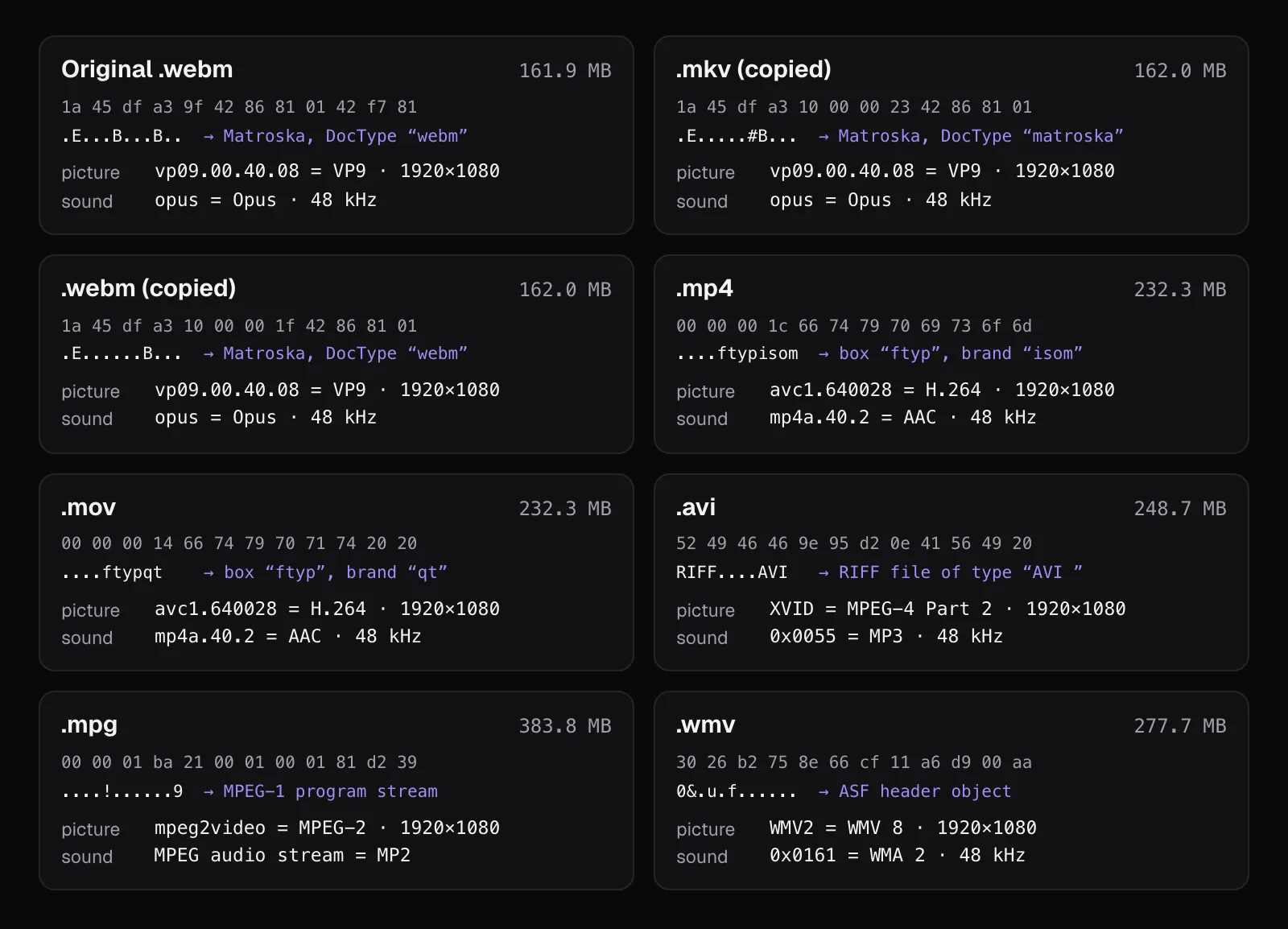
Players read these labels to decide whether they can play a file. Renaming .mkv to .mp4 changes none of them. The labels also weigh almost nothing: of our MKV's 162.0 MB, 158.0 MB was picture, 3.8 MB was sound and 148 KB was the container's own bookkeeping. In the MP4 the bookkeeping came to 67 KB, most of it the moov box, the index that lists where every one of its 5,373 frames sits.
Cutlia's converter keeps the main picture track and the main sound track. Extra sound tracks and subtitle tracks don't come along, which matters most when the file you start from is an MKV built to hold several.
One clip, seven formats: sizes and times
We opened the clip in the converter and converted it to each format in turn, with everything else left as it was: the original resolution, the sound kept. Sizes are the downloaded files' sizes; times run from pressing Convert to the Download button, the middle of three runs.
| Converted to | Picture and sound | Size | Time |
|---|---|---|---|
| MKV | VP9 and Opus, copied | 162.0 MB | 0.8 s |
| WebM | VP9 and Opus, copied | 162.0 MB | 0.9 s |
| MP4 | H.264 and AAC, re-encoded | 232.3 MB | 22.2 s |
| MOV | H.264 and AAC, re-encoded | 232.3 MB | 22.2 s |
| AVI | MPEG-4 Part 2 and MP3 | 248.7 MB | 3 min 41 s |
| WMV | WMV 8 and WMA 2 | 277.7 MB | 3 min 49 s |
| MPG | MPEG-2 and MP2 | 383.8 MB | 5 min 10 s |
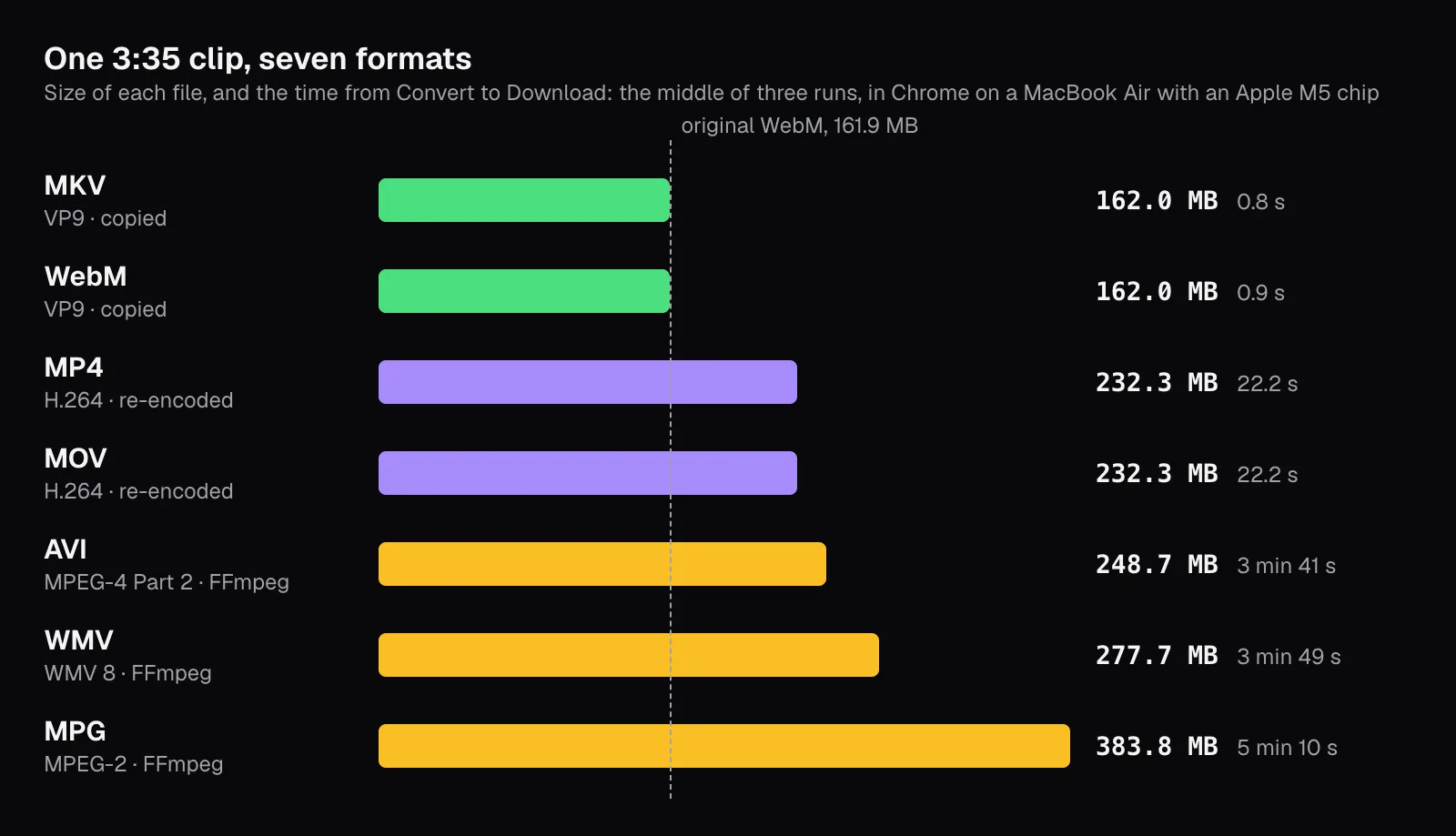
Three things stand out. MKV and WebM took 0.8 and 0.9 seconds, because nothing had to be converted: both accept VP9 and Opus, so the converter copied the streams into a new container. MP4 and MOV needed a new H.264 picture and AAC sound, and the two files came out 7 bytes apart. And the three older formats took minutes and came out 1.5 to 2.4 times the size of the original, because the converter gives their older codecs more bits a second, for reasons covered below.
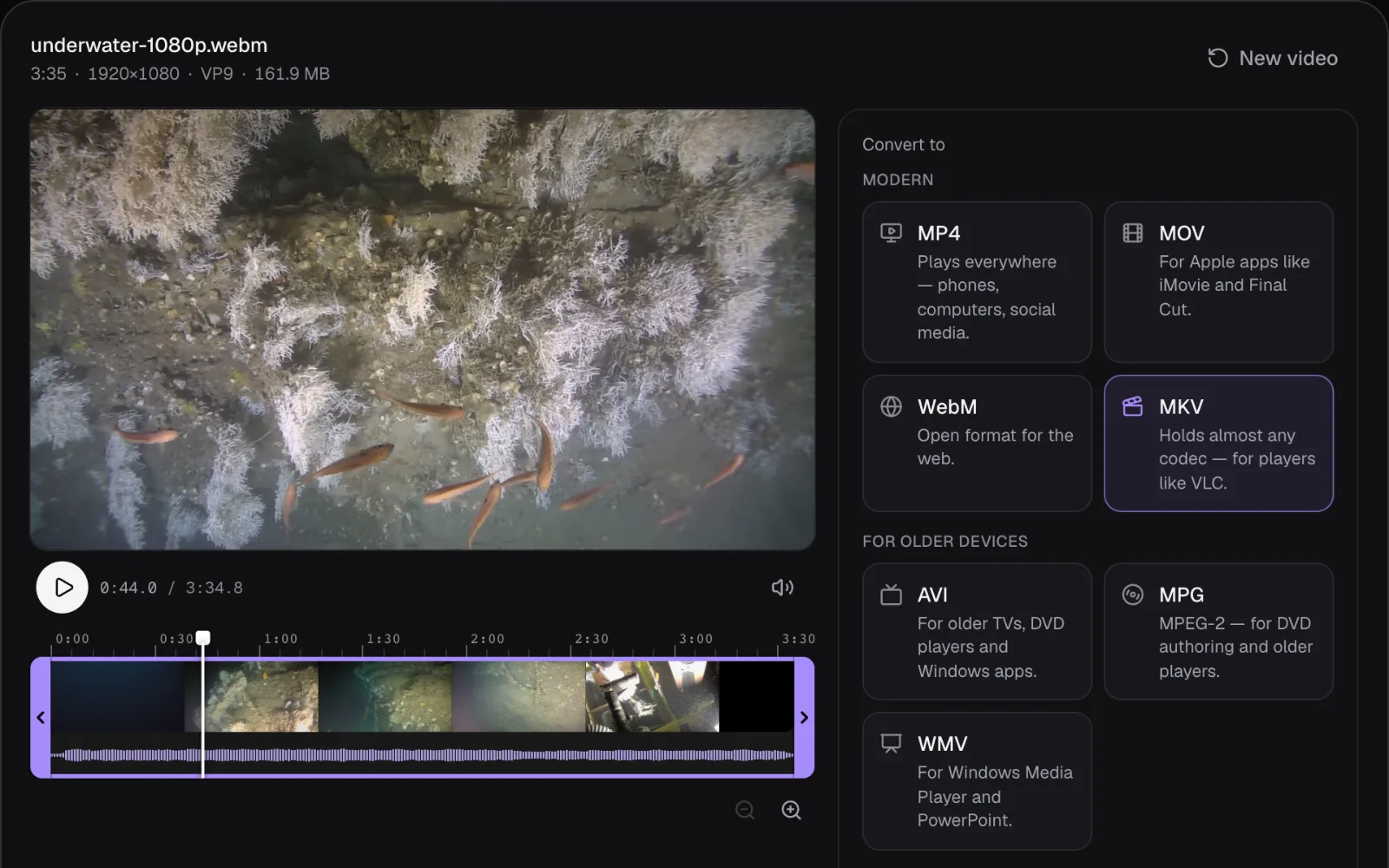
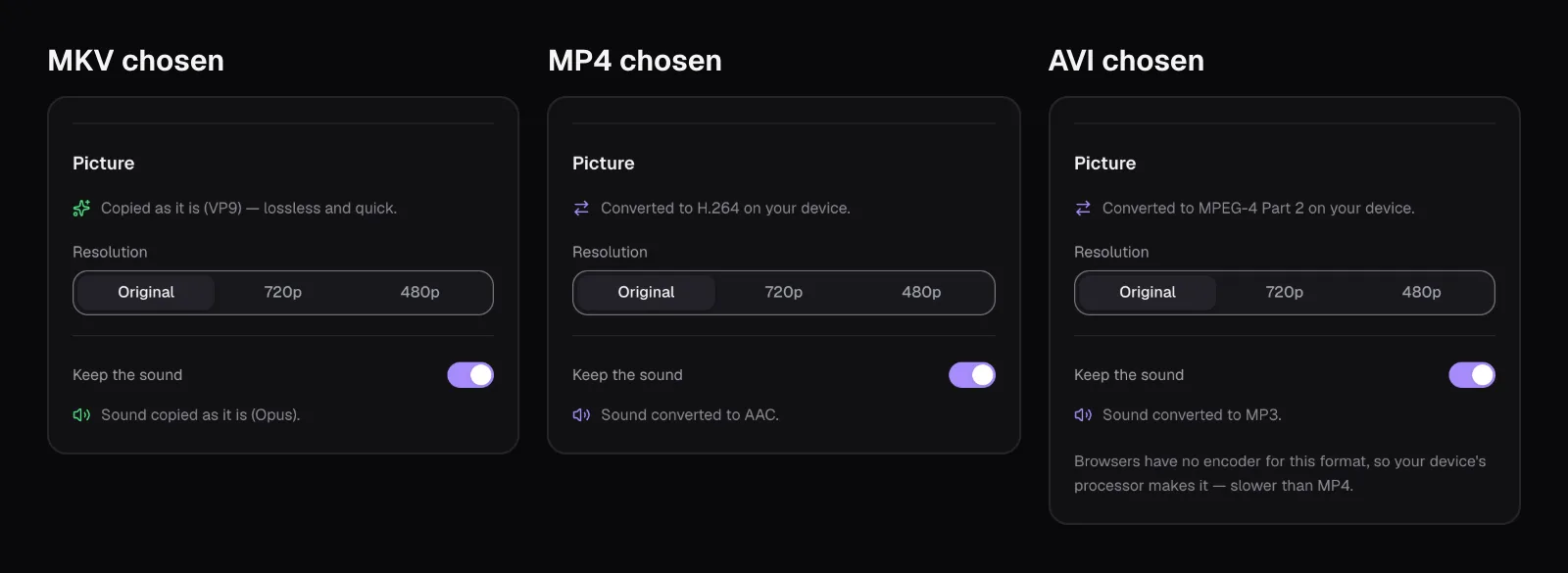
Before we started, the converter said which would happen: under “Picture” it read “Copied as it is (VP9) — lossless and quick” for MKV, and “Converted to H.264 on your device” for MP4. For AVI, MPG and WMV it added a note: “Browsers have no encoder for this format, so your device's processor makes it — slower than MP4.” For the four modern formats, Cutlia uses the encoders built into the browser, plus an AAC encoder of its own where the browser has none. For MPEG-4 Part 2, MPEG-2 and WMV 8 browsers have no encoder at all, so it runs FFmpeg's encoders, compiled to WebAssembly, on the processor.
Copied means untouched, and the pixels prove it
Copying isn't a figure of speech. We read every packet of the original and of our MKV and WebM, one by one. All 5,372 picture packets in each copy were the original's, byte for byte and with the same time stamps, and so were all 10,744 sound packets. The one packet left behind was the original's last: 3 bytes of sound that start after the last frame ends. The 31 KB the MKV gained is all container bookkeeping, not picture or sound.
Then we decoded five frames of every file, at 0:44.84, 1:20.60, 1:38.48, 2:32.20 and 3:08.00, and compared each, all 2,073,600 pixels of it, with the same frame of the original. Chrome decoded the MKV, WebM, MP4 and MOV frames; the other three, which Chrome can't read, the same FFmpeg build that made them. A pixel counts as changed visibly when one of its colors moved by more than 12 of 255 levels. PSNR is a common engineering score of how close a copy is, in decibels: higher is closer.
| File | Average difference per color value | Pixels changed visibly | PSNR |
|---|---|---|---|
| MKV and WebM, copied | 0 of 255 | None: every pixel the original's | Identical |
| MP4 and MOV, H.264 | 1.5 of 255 | 0.01–0.04% | 40.0–42.8 dB |
| MPG, MPEG-2 | 2.0 of 255 | 0.01–0.35% | 37.5–41.0 dB |
| WMV, WMV 8 | 2.3 of 255 | 0.01–1.95% | 35.5–40.8 dB |
| AVI, MPEG-4 Part 2 | 2.4 of 255 | 0.06–2.0% | 35.5–39.9 dB |
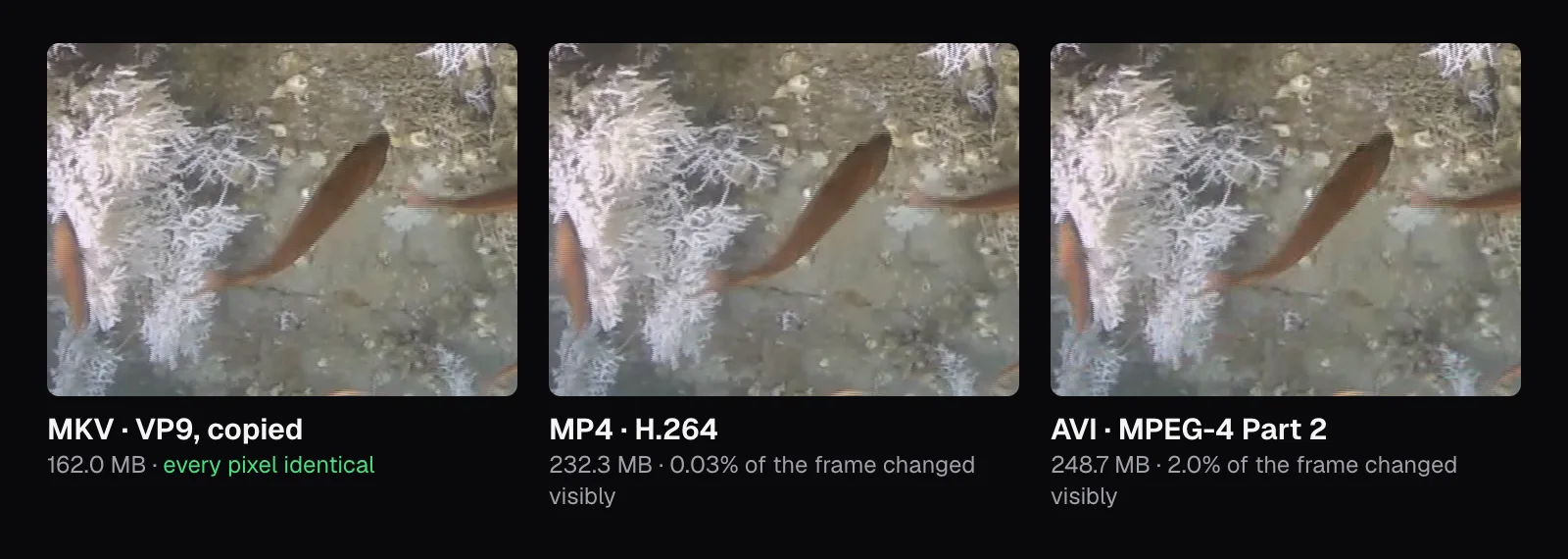
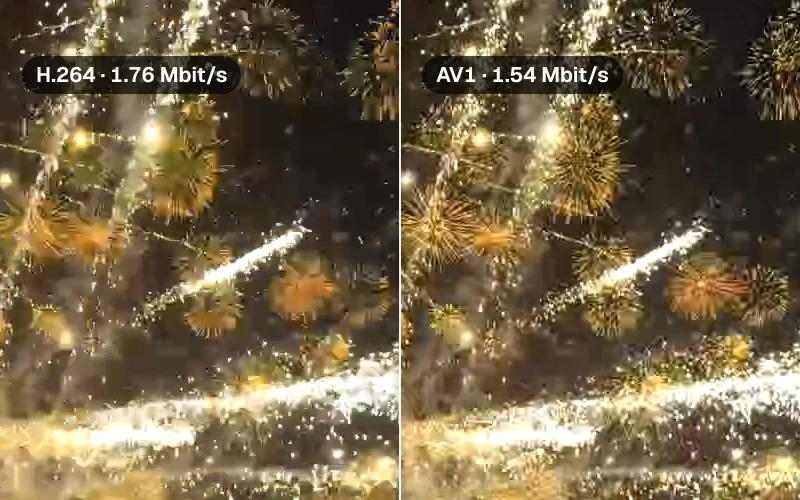
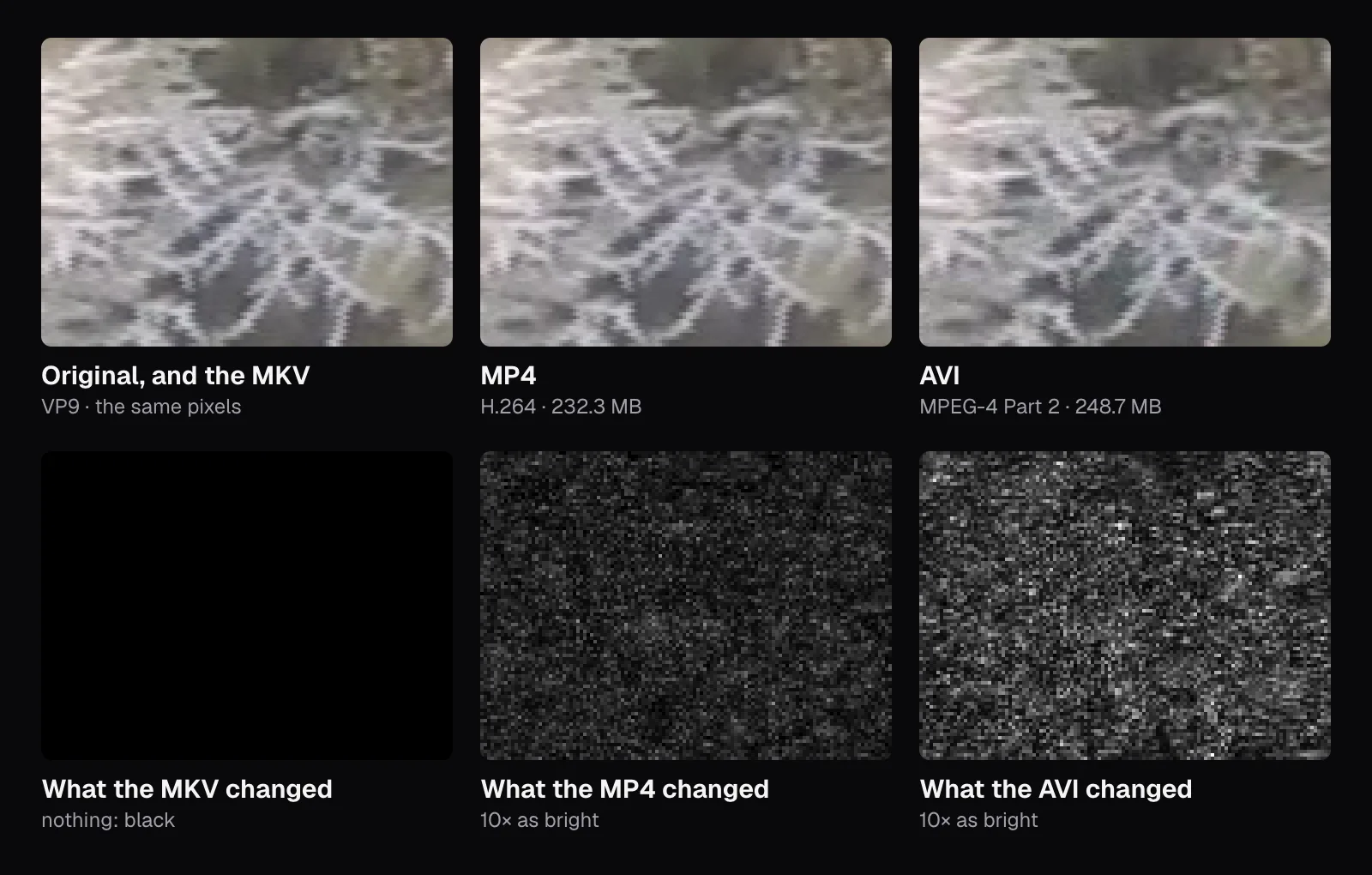
At actual size the three crops are hard to tell apart, which is what a good re-encode aims for. The changes are there all the same. Subtract each file's frame from the original's and make what's left ten times as bright, and the MKV comes out black, the MP4 shows a faint grain over the coral and the fish, and the three older formats a brighter, coarser one.
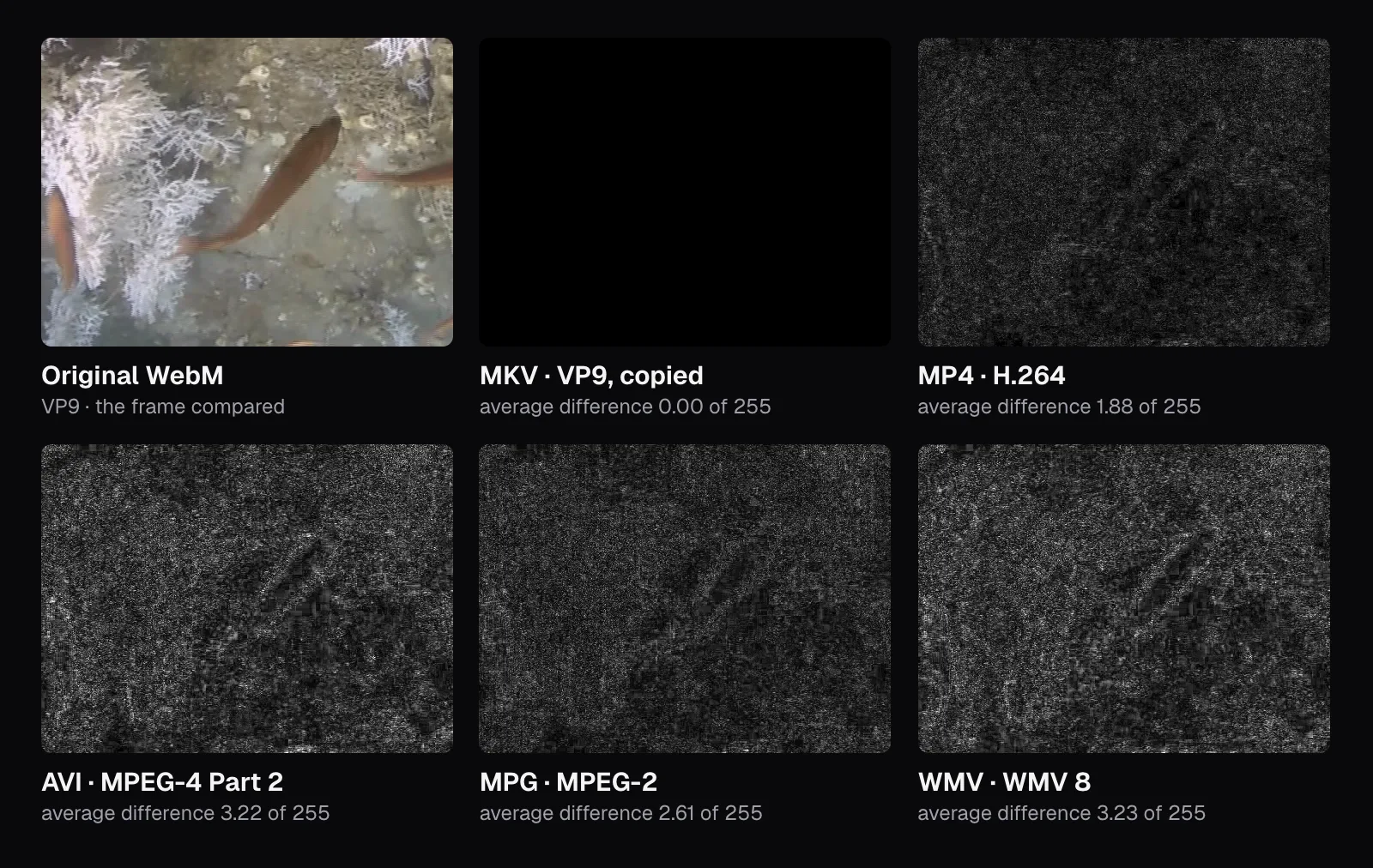
The AVI is the instructive one. It came out 7% bigger than the MP4, with more bits a second for its picture, 9.1 megabits against 8.5, and still kept less: an average difference of 2.4 levels against the MP4's 1.5, and at 0:44.84, where fish cross the coral, 2% of the frame changed visibly against 0.03%. Here the older codec spent more bits and kept less. Enlarged four times, the coral's finest branches still look alike in all three files; only the difference maps show the AVI's coarser grain.
MP4: the format almost everything plays
MP4 with H.264 picture and AAC sound is the closest thing video has to a universal format. As of November 2026, Microsoft recommends exactly that for PowerPoint, “.mp4 files encoded with H.264 video and AAC audio”. YouTube's recommended upload settings list “Container: MP4” with H.264 and AAC-LC. Android names MP4 among the containers it reads, and MDN marks it as playing in all browsers. If you don't know where a video will end up, this is the safe answer.
Our MP4 came out bigger than the WebM it was made from: 232.3 MB against 161.9 MB, 43% more. That isn't a mistake. VP9 compresses better than H.264 (MDN rates its quality on a par with HEVC's at similar bitrates), so keeping the same look costs H.264 more bits: our MP4's picture averaged 8.5 megabits a second, the original's 5.9. When Cutlia's converter re-encodes, it asks the encoder for high quality at the frame's size rather than for a file size, so the size follows from the picture, and this picture is hard work: walls of thin coral branches, and specks drifting through the vehicle's lights, different in every frame. A conversion can't add detail that wasn't there; it can only try to keep what is, at a cost in size. If the MP4 has to be smaller, set a size in Compress Video afterwards. That's a second encode, so do it once, at the end.
MOV: Apple's own container
MOV is the QuickTime file format, created by Apple, and MDN notes that it “served as the basis for the MPEG-4 file format”, though the two “are not quite interchangeable”. Inside, a MOV holds the same H.264 or HEVC an MP4 holds. Our two files show how close they are: we compared them packet by packet, and all 5,373 picture packets and 10,076 sound packets in the MOV were the MP4's, byte for byte. The MOV came out 7 bytes bigger, all of it in the labels: a shorter ftyp box with the brand qt , and a few more bytes of QuickTime's own description in the index.
MOV is what Apple's QuickTime Player writes. On a Mac it exports “a QuickTime movie (.mov) using the H.264 or HEVC codec”, and Apple's guide adds that it “doesn't export movies as MP4 videos.” Final Cut Pro lists both MOV and MP4 among the containers it imports, so for Final Cut either works. Outside those apps our MOV had nothing the MP4 lacked, since the two held the same packets, and MOV is missing from Android's list of video containers, which names MP4, 3GP, WebM, MKV and MPEG-TS. Turning a MOV into an MP4 usually means putting the same picture in a different box, which the MOV to MP4 page is set to do without re-encoding when the picture is H.264 and you convert the whole video.
MKV and WebM: Matroska for archives and for the web
MKV (Matroska) takes almost any codec, as many sound and subtitle tracks as a film has languages, chapters and attached fonts. Its standard describes it as “an envelope in which there can be many audio, video, and subtitles streams, allowing the user to store a complete movie or CD in a single file.” Its weakness is support. Android lists Matroska among the containers it plays, but Final Cut Pro's list of containers doesn't include it, and Apple's help page for media files that won't open suggests searching for an app that supports the file's format, giving .avi, .wmv and .mkv as its examples of extensions to search by.
WebM is a cut-down Matroska for the web. The WebM Project defines it as “a subset of the Matroska multimedia container format” whose document type should be webm, with VP8 or VP9 picture and Vorbis or Opus sound, and MDN lists AV1 in WebM as well. MDN marks WebM as supported in all browsers, so a web page can rely on it, while Final Cut Pro's list of containers leaves it out too. Chrome played both of our copies, the MKV and the WebM. If either has to go into an app that doesn't list it, converting to MP4 is the fix, and the MKV to MP4 page is set to copy an H.264 or HEVC picture instead of re-encoding it when you convert the whole video.
AVI, MPG and WMV: only for the players that need them
AVI is Microsoft's RIFF format, documented today under DirectShow, which Microsoft's own reference marks as a legacy feature. The converter fills it with what DivX and Xvid players expect: MPEG-4 Part 2 picture, tagged XVID, and MP3 sound. The converter treats MPEG-4 Part 2 as an older codec that needs more bits than H.264 to look good, and asks FFmpeg for about 0.18 bits for every pixel of every frame: for our clip, 9.3 megabits a second of picture. The file came out at 248.7 MB, 7% more than the MP4, and as the pixels above show, it kept less.
Our MPG holds MPEG-2, which MDN calls “the primary video codec used for DVD video media”, with MP2 sound. Asked for 15 megabits a second, the most the converter gives MPEG-2 outside a DVD, it came out at 383.8 MB, 2.4 times the original. With “Ready for a DVD” switched on, the converter makes it for DVD authoring instead: 720 × 576 at 25 frames per second (PAL) or 720 × 480 at 29.97 (NTSC), with Dolby Digital sound. WMV, Windows Media Video in its ASF container, came out at 277.7 MB. The converter offers it for Windows Media Player and PowerPoint, and for PowerPoint, as of November 2026, Microsoft says support for WMV, MPEG-2 and AVI is “limited and deprecated in PowerPoint version 2505 and above”, and that such files “will be converted to MPEG-4 format upon insertion and playback”. PowerPoint for Mac doesn't take WMV at all.
All three are slow to make in a browser, and Chrome played none of the three files we made, so the converter shows no preview for them, only a note to open the file in your player. Choose one only for a device or program that can't read anything newer. For a DVD player or TV that plays DivX or Xvid files, switch on “For DVD players and older TVs”: it keeps the AVI within 720 × 576 at up to 30 frames per second and would shrink our clip to 720 × 406, asking for 1.3 megabits a second of picture instead of 9.3, so the file would come out far smaller too. The MP4 to AVI page goes into those players' limits, and if you're going the other way, from old AVI, MPG and DVD files to MP4, our guide to saving old home videos covers it.
Which format to choose, by where the video is going
| Where it's going | Choose | Why |
|---|---|---|
| Anyone, on devices you don't know | MP4 (H.264 and AAC) | What YouTube and Microsoft recommend, and what Android and every browser read |
| YouTube, TikTok, Instagram | MP4 (H.264 and AAC) | YouTube's upload settings name MP4, H.264 and AAC; for the others, see our specs guide |
| PowerPoint | MP4 (H.264 and AAC) | Microsoft's recommendation; it calls WMV support deprecated from version 2505 |
| Final Cut Pro | MOV or MP4 | Both are on Apple's list for it; MKV and WebM aren't |
| Your own archive of films | MKV | Holds every language and subtitle track, and almost any codec without a re-encode |
| A video element on a web page | MP4, or WebM | MDN lists both as playing in all browsers |
| An old DivX player or TV | AVI | With “For DVD players and older TVs” on |
| A DVD you'll author | MPG | With “Ready for a DVD” on, PAL or NTSC |
If a video is too big once it's an MP4, make it smaller in one step with Compress Video rather than converting again and again: every re-encode loses a little more, as our guide to compressing without visible loss measures. And keep the file you started from. A copy of a copy can only keep what the first one kept.
The tools in this guide
Video Converter
Convert almost any video to MP4, MOV, WebM, MKV, AVI, MPG or WMV — on your device.
Compress Video
Shrink big videos to fit email, Discord and WhatsApp limits.
MKV to MP4
Make MKV films and recordings play on phones, TVs and in editors.
MP4 to AVI
Make AVIs that older TVs, DVD players and Windows apps play.
Questions people ask
Is MP4 or MOV better quality?
Neither: quality comes from the codec and its bitrate, not the container. In our test the same H.264 picture went into both, and the two files differed by 7 bytes, all of them in the labels. Choose MOV when an Apple editing app or a workflow asks for it, and MP4 for everything else, since more devices and programs read it.
Why is my converted MP4 bigger than the original?
Often because the original used a more efficient codec. Our 161.9 MB VP9 WebM became a 232.3 MB H.264 MP4, 43% bigger, since H.264 needs more bits to keep the same detail, and an HEVC video from a phone can grow the same way. Converting aims to keep the picture, not the size. If the size matters, make the MP4 smaller afterwards with Compress Video, which works toward the size you choose.
Does converting a video lose quality?
Only when the picture is re-encoded. When the new container accepts the original codec, the picture can be copied instead: MKV and WebM accepted our VP9, and every packet in both copies was identical to the original's. Our H.264 MP4 was re-encoded: its pixels were on average 1.5 levels of 255 away from the original's, and at most 0.04% of a frame changed by more than 12 levels.
Why won't my MKV open in Final Cut or on my iPhone?
In Final Cut Pro the container is the reason, whatever codec is inside: Apple's list of the containers it supports includes MOV, MP4, AVI and MXF but not Matroska, so converting the MKV to MP4 fixes it. For other Apple apps and devices, Apple's help page on files that won't open suggests finding an app that supports the format, and gives .mkv as an example. When the MKV holds H.264 or HEVC, the picture can be copied into the MP4 rather than re-encoded.
Is AVI outdated?
For most uses, yes. Our AVI was 7% bigger than the MP4 of the same clip, kept less of the picture, took minutes rather than seconds to make, and Chrome couldn't play it. Microsoft calls AVI support in PowerPoint version 2505 and above limited and deprecated. It's still the right choice for an older DVD player or TV that reads DivX or Xvid files but not MP4.
Can I change a video's format by renaming the file?
No. The extension is only a hint: players read the file's first bytes and its track labels, which say MP4, Matroska or RIFF and name each codec. A renamed MKV is still a Matroska file, and a player that rejects Matroska will still reject it. Converting rewrites those labels, and can copy the picture when the new container accepts its codec.
Sources
Where the facts in this guide come from, besides our own tests:
- Media container formats (file types) — MDN Web Docs
- Web video codec guide — MDN Web Docs
- The "codecs" parameter in common media types — MDN Web Docs
- RFC 9559: Matroska Media Container Format Specification — IETF
- WebM Container Guidelines — The WebM Project
- AVI RIFF File Reference — Microsoft Learn
- RFC 2361: WAVE and AVI Codec Registries — IETF
- Overview of the ASF Format — Microsoft Learn
- YouTube recommended upload encoding settings — YouTube Help
- Video and audio file formats supported in PowerPoint — Microsoft Support
- Export movies to other file formats and resolutions using QuickTime Player on Mac — Apple Support
- Media formats supported in Final Cut Pro for Mac — Apple Support
- If a media file doesn't open or play on your Apple device — Apple Support
- iPhone 17: Technical Specifications — Apple
- Supported media formats — Android Developers
- Sélection d'images sous-marines issues de la campagne Caladu 2019: the footage's record — Wikimedia Commons (Ifremer)
Footage in this guide
The pictures were made with Cutlia's tools from this openly licensed footage, found on Wikimedia Commons:
- Sélection d'images sous-marines issues de la campagne Caladu 2019 (Ifremer 00947-105924 - 54670) — Olivier Dugornay and Marie-Claire Fabri (Ifremer), CC BY 4.0