Sound and music
Should you save a video's sound as MP3, M4A or WAV?
We took the sound out of a U.S. Marine Band recording in every format and quality Video to MP3 offers, then decoded each file and compared what it kept.
By the Cutlia team · Published · 16 min read
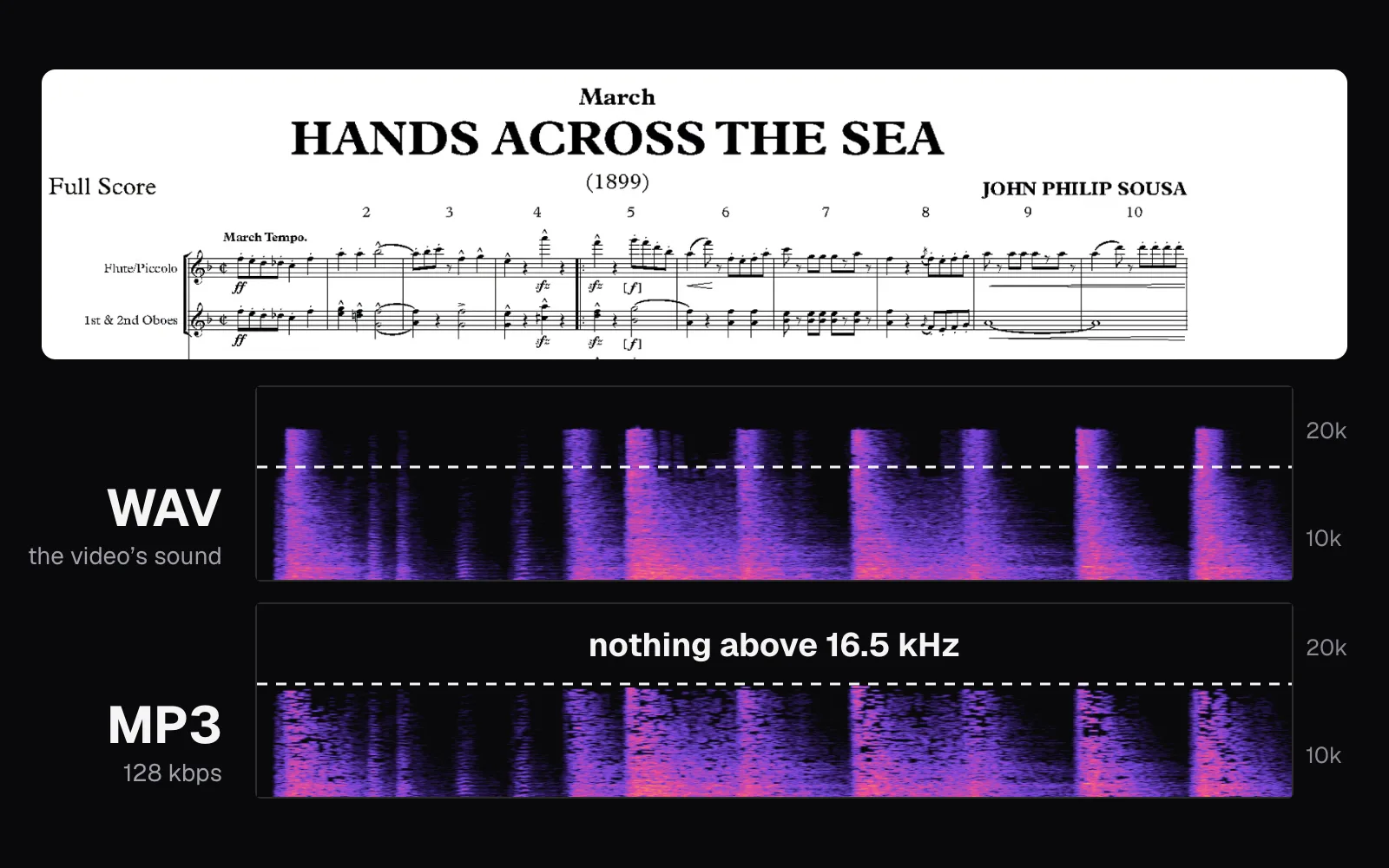
The short version
- Choose M4A when Video to MP3 says it will copy the video's own sound, which it does for AAC sound without fades: our copy decoded to exactly the same samples as the video's track.
- Choose MP3 when the file has to play on as many players as possible; at 320 kbps ours reached the same 20.3 kHz top as the video's sound, while 192 kbps cut the top at 18.8 kHz and 128 kbps at 16.5 kHz.
- Choose WAV for editing, mixing or transcription software, not for keeping: it adds no compression loss, but a minute of it took 11.52 MB, eight times a 192 kbps MP3.
- No format can restore what the video's own compression removed, so a 320 kbps MP3 of a video whose sound is 126 kbps is bigger than the original sound, not better.
Taking the sound out of a video is quick. The decision that comes with it is easy to rush: MP3, M4A or WAV, and for MP3 a bitrate. That one choice sets how big the file is, how much of the original sound is still in it, and what will play it. We measured the first two and looked up the third.
Our recording is “The President's Own” United States Marine Band playing John Philip Sousa's march Hands Across the Sea, first performed in 1899, from the band's project to record every Sousa march. Its video is public domain: 2 minutes 56 seconds in 4K, the picture showing the full score page by page as the music plays. A march makes a demanding test. Cymbal crashes and the snare drum put a great deal of noise-like sound at the very top of the spectrum, the part the spectrograms below show lossy codecs giving up first, while a full brass section plays loud underneath.
We saved its sound with Cutlia's Video to MP3 in every format and quality the tool offers, made an MP4 of the same video to test the M4A copy, then decoded every file in Chrome with the Web Audio API and compared it, sample by sample and frequency by frequency, with the WAV. Everything ran on a MacBook Air with an Apple M5 chip; no file left it.
MP3, M4A and WAV: three ways to store the same sound
Digital sound is a long list of numbers. A microphone's signal is measured thousands of times a second, and each measurement, a sample, is stored as a number. Two settings describe that list. The sample rate is how many samples are taken each second: 44,100 on a CD, 48,000 on a DVD and in our video. The bit depth is how precise each sample is; 16 bits allow 65,536 different levels. The sample rate also sets the highest pitch a recording can hold, which is half the rate: 22,050 Hz for a CD, 24,000 Hz at 48 kHz. People hear up to about 20,000 Hz, MDN's guide to digital audio notes, and less with age.
WAV stores those numbers as they are. Stereo at 48 kHz and 16 bits is 48,000 × 16 × 2 = 1,536,000 bits each second, or 1,536 kbps. Nothing is left out, which is why it's big.
MP3 and AAC are lossy codecs. They take that stream of samples and rebuild it from far fewer bits, dropping what listeners are least likely to miss. Their bitrate is the budget: 192 kbps means 192,000 bits for each second of sound, one eighth of the WAV's. What gets dropped is decided by a model of hearing, and once dropped it can't be recovered. A lossless codec such as FLAC works differently: decoded, its sound is identical to the original down to the last bit.
M4A isn't a codec at all. It's an MP4 file that holds only sound, the same container an MP4 video uses, just without the picture. Microsoft's list of the formats Windows Media Player 12 opens describes .m4a as often AAC, which is lossy, though it can also hold Apple Lossless. The M4A files Cutlia makes hold AAC, a codec designed, in MDN's words, to give “more compression with higher audio fidelity than MP3”. When a video's own sound is AAC too, it can go into an M4A without being touched, which is the copy described further down.
| Format | What's inside | Loses detail | A minute of our march |
|---|---|---|---|
| WAV | The samples themselves (16-bit PCM) | No | 11.52 MB |
| M4A | AAC sound in an MP4 file | When encoded; not when copied | 1.39–1.84 MB |
| MP3 | MPEG-1 Audio Layer III frames | Yes, more at lower bitrates | 0.96–2.40 MB |
The test: one march, saved five ways
The video file is a 37.2 MB WebM: a 3840 × 2160 AV1 picture and an Opus sound track, stereo at 48 kHz. Read packet by packet, the sound is only 2.77 MB of the file, an average of 125.6 kbps. That number matters for everything below. The band's sound reached us already compressed by a lossy codec, so the best any extracted file can do is keep what that Opus track holds.
We opened the video in Video to MP3, kept the whole length, added no fades, and exported five files: MP3 at each of its three qualities, M4A and WAV. Before each export the panel shows an estimate of the size, and we noted that too.
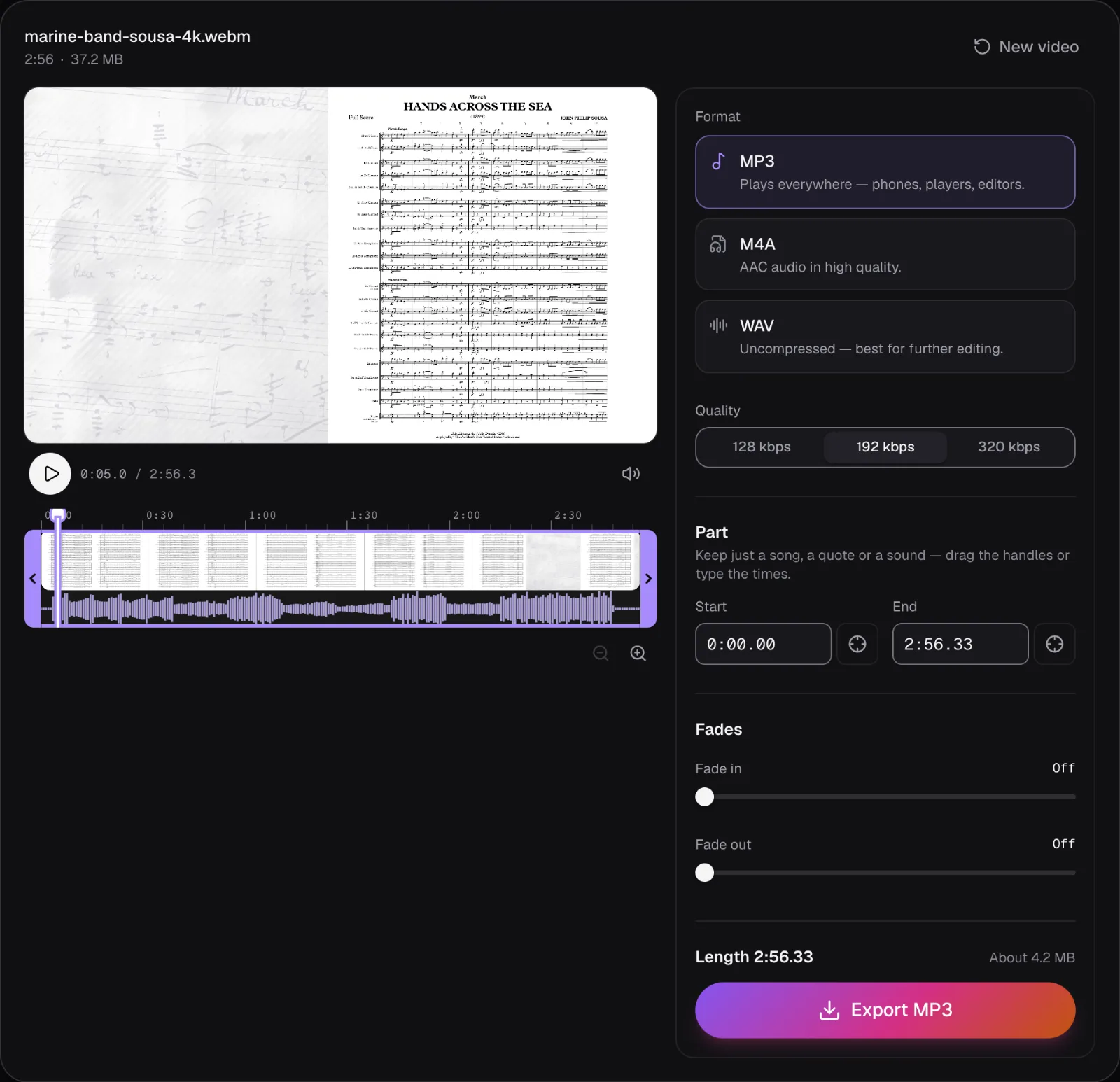
| Export | Estimate shown | File | Per minute | Bitrate measured | Time |
|---|---|---|---|---|---|
| MP3, 128 kbps | About 2.8 MB | 2.82 MB | 0.96 MB | 128 kbps | 1.9 s |
| MP3, 192 kbps | About 4.2 MB | 4.23 MB | 1.44 MB | 192 kbps | 1.8 s |
| MP3, 320 kbps | About 7.1 MB | 7.05 MB | 2.40 MB | 320 kbps | 1.8 s |
| M4A (AAC, encoded) | About 5.6 MB | 5.42 MB | 1.84 MB | 244.2 kbps | 0.8 s |
| WAV | About 33.9 MB | 33.86 MB | 11.52 MB | 1,536 kbps | 0.8 s |
Each time is the middle of three exports, from the click on Export to the Download button. By that measure every MP3 took longer than the M4A and the WAV. Chrome has no MP3 encoder of its own, so Cutlia runs LAME, an open-source MP3 encoder, compiled to WebAssembly, and loads it only for an MP3 export; the AAC was made by Chrome's own encoder.
Before comparing anything with the WAV, we checked that the WAV deserves to be the reference. We decoded the WebM's own sound in Chrome and compared it with the WAV, sample by sample: 16.9 million samples across both channels. They differed by at most 0.004% of full scale, just over one step of 16-bit rounding, with four exceptions. Those four samples were the loudest peaks in the march, above 95% of full scale, and Cutlia had pulled them down a little, by up to 0.009 of full scale. Its sound engine eases every sample above 95% of full scale toward the limit, so that a mix can never clip, whenever it renders sound rather than copying it.
Sizes: a minute costs from 0.96 MB to 11.5 MB
MP3's sizes are the easiest to predict, because Cutlia's MP3s use a constant bitrate: every second gets exactly the bits you chose. Our 128 kbps file is a 168-byte header followed by 7,348 frames of 1,152 samples each, and every frame is 384 bytes, 128,000 bits a second divided into 41.7 frames a second. That's why the panel's estimate for MP3 is exact to the first decimal: length times bitrate, nothing else.
WAV is just as predictable, by different arithmetic. Our 33,855,020-byte file is a 44-byte header followed by 8,463,744 pairs of samples, left and right, 4 bytes a pair: 176.328 seconds at 48 kHz, the video's exact length. MDN's guide works the same sum for a three-minute song and arrives at 34.56 MB. At a given rate and number of channels, a WAV's size depends only on its length, never on what's in it: silence costs as much as cymbals.
AAC is the one that varies. We asked for 256 kbps and Chrome's encoder averaged 244.2 kbps, so the file came in at 5.42 MB against the estimated 5.6 MB.
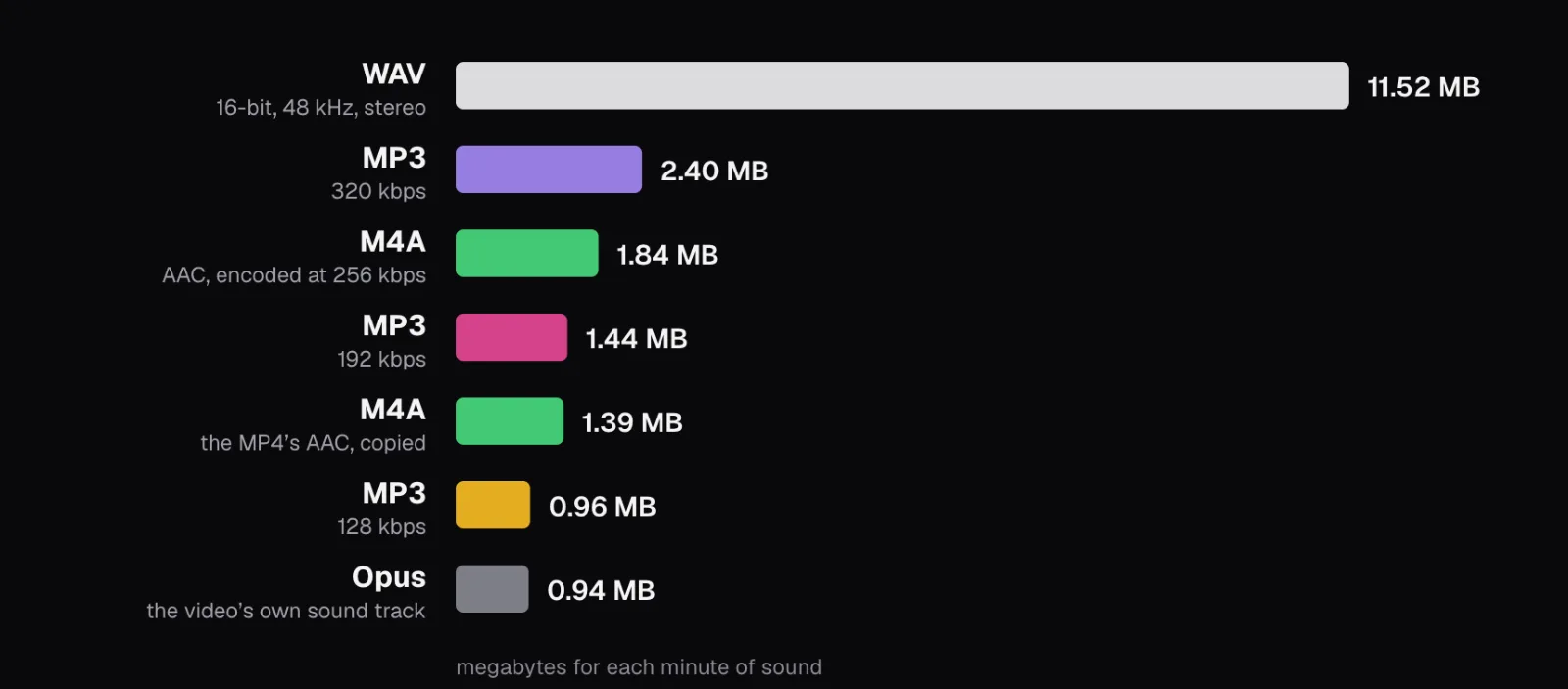
The last bar is the one to remember. The video's original sound needed 0.94 MB a minute. Every lossy file we made from it is a new encoding of that already-compressed sound, so a 320 kbps MP3, 2.5 times the size, holds at most what the 126 kbps Opus track held. Bitrate beyond the source buys a closer copy of the source, never more than it. Video follows the same arithmetic of bitrate times length, which our guide to bitrate and file size works through.
What MP3 throws away, seen in a spectrogram
A waveform shows how loud sound is from moment to moment. A spectrogram shows which pitches it's made of: time runs left to right, frequency runs from 0 Hz at the bottom to 24 kHz at the top, and brightness is loudness. Low brass and drums glow at the bottom. A cymbal crash is a bright vertical streak, because it spreads its sound across almost every frequency at once, then fades.
We drew the march's last five seconds from each decoded file, with the same colors for the same level in all of them. The final chords end on a crash that rings out into silence.
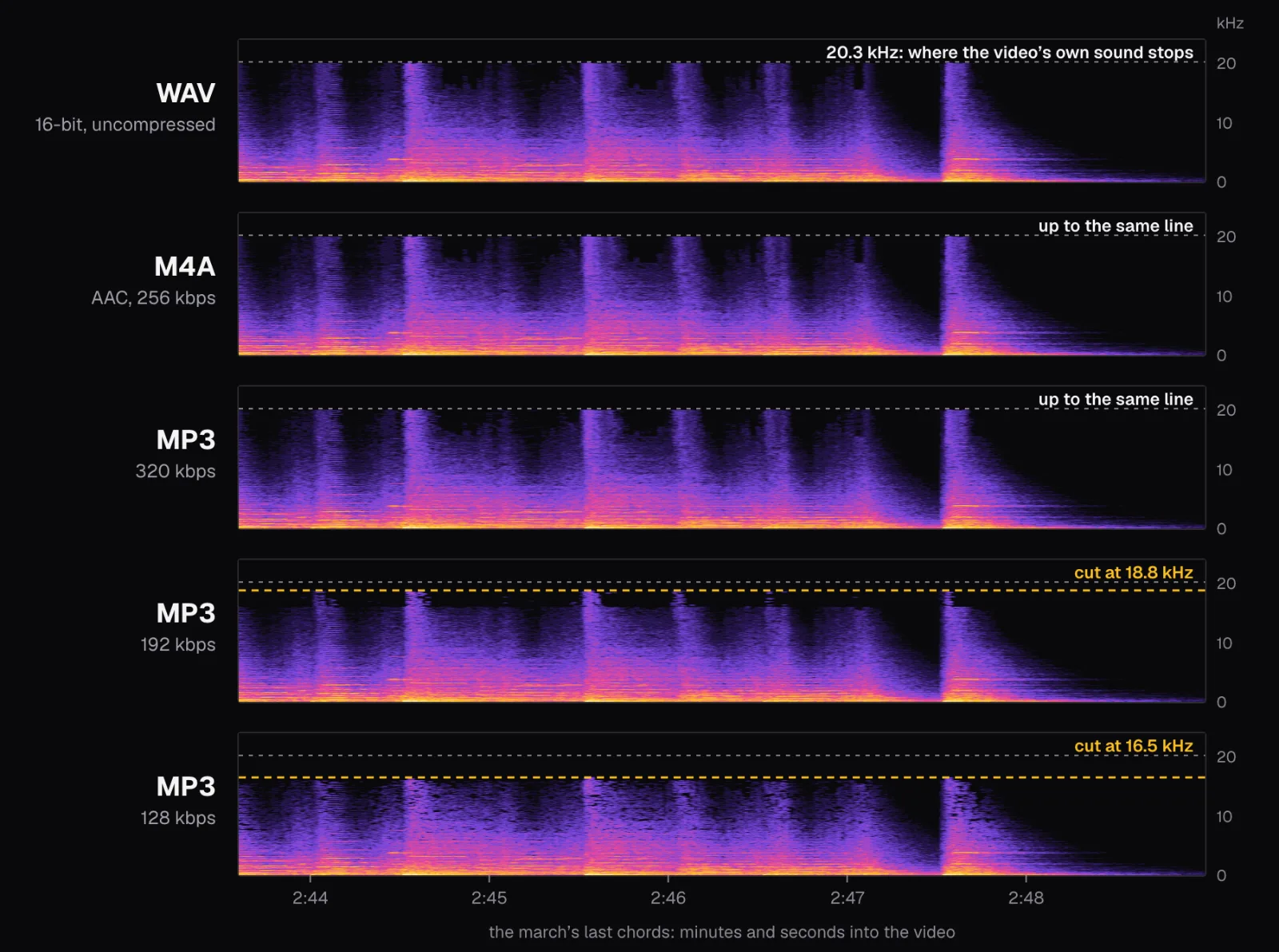
Three things stand out. First, even the WAV stops at 20.3 kHz. That isn't the WAV's doing: Opus, the codec of the video's sound, never encodes anything above 20 kHz, as MDN's codec guide notes. Second, the M4A and the 320 kbps MP3 reach that same line: they kept the whole range the video had. Third, the lower bitrates cut the top off. At 192 kbps the MP3 stops at 18.8 kHz, and at 128 kbps at 16.5 kHz, so the upper part of every crash is simply gone.
To put numbers on it we averaged each file's spectrum over the whole march, all 2 minutes 45 seconds of music, and plotted it from 8 kHz up.
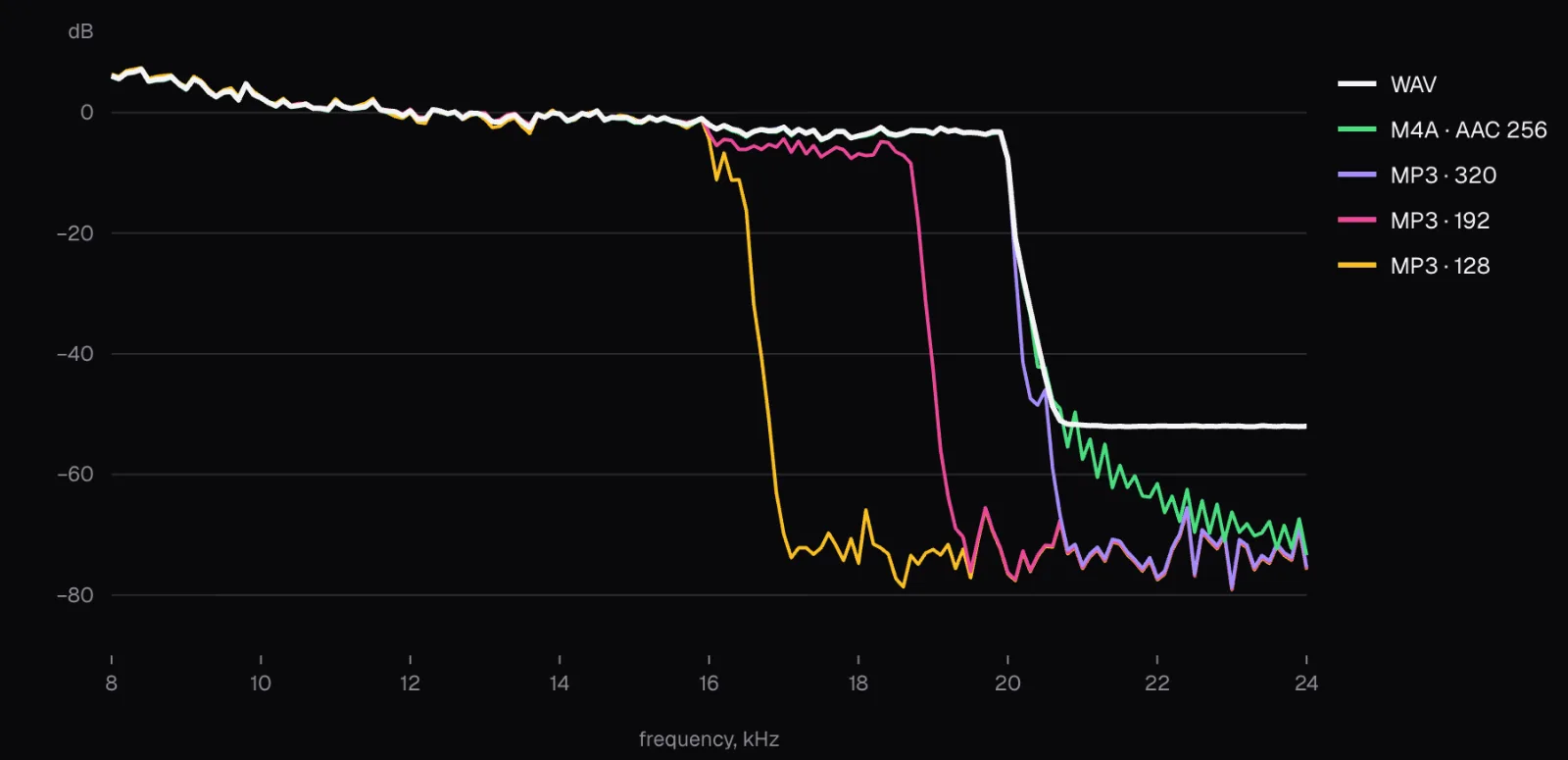
Below 16 kHz the lines can't be told apart. Above it, the 128 kbps MP3 averages 54.6 dB below the WAV between 16 and 19 kHz, which is to say practically nothing; the 192 kbps MP3 is 4.6 dB weaker there, keeping that band only in bursts; the 320 kbps MP3 and the M4A match the WAV to within 0.2 dB.
By energy, the top band hardly counts: everything above 16 kHz carried 0.014% of the march's sound energy. By ear, it depends on the ear and on the music. It's where the upper part of every crash sits, as the spectrograms show, and it's the part of the range that, MDN notes, hearing tends to lose with age. Whether you would notice the difference on your own headphones only a listening test can tell you; what the spectrogram shows is that the 128 kbps file no longer contains it.
Below the cutoff: the gaps a low bitrate leaves
Cutting the top is only the most visible saving. Inside the range it keeps, an MP3 encoder has to fit the sound into its budget, 384 bytes for every 24 milliseconds of stereo sound at 128 kbps, and when the music is dense it can't describe everything. It spends the bits where its model of hearing says they matter most and leaves some small regions of the spectrum empty.
We counted them. We split the 8–16 kHz band of the whole march into small cells, about 23 Hz high and 43 milliseconds wide, kept the million or so cells in which the WAV has sound, and counted those where a file is more than 20 dB quieter than the WAV, under a hundredth of its power.
- MP3, 128 kbps: 9.3% of the cells were gaps.
- MP3, 192 kbps: 0.6%.
- M4A, AAC at 256 kbps: 0.16%.
- MP3, 320 kbps: 0.03%.
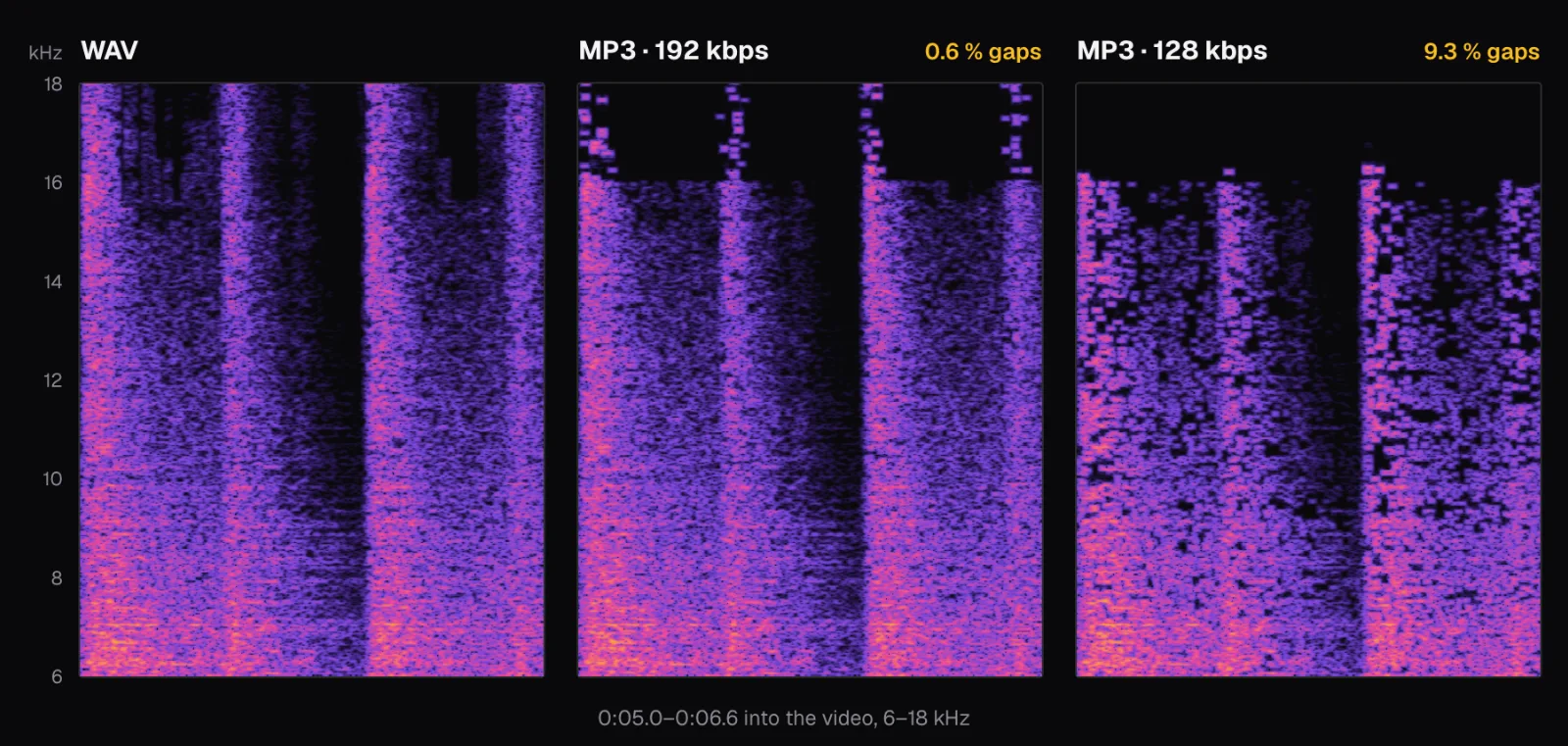
Enlarged, the 128 kbps file looks tiled: its sound is broken into small rectangles of a few fixed sizes, and some rectangles are simply empty. The 192 kbps file keeps the 8–16 kHz band almost whole, and above 16 kHz it holds on only to the strongest moments of each crash. In this passage its top stops at 16 kHz, lower than its average cutoff over the whole march.
M4A: a perfect copy, or a new encoding
M4A has two different behaviors in Video to MP3, and the panel tells you which one you'll get. When the video's sound is AAC already and you add no fades, the tool doesn't decode or encode anything. It takes the video's AAC packets and writes them into a new MP4 file without the picture. When the sound is anything else, or when you add a fade, it decodes the sound and encodes new AAC at 256 kbps.
Our band video has Opus sound, so its M4A was an encoding. To see the other case, we made an MP4 of the same video with the Video Converter. Its panel said “Sound converted to AAC.”, and the MP4 it made, at 720p, came out at 22.3 MB with AAC sound averaging 184.1 kbps. Then we opened that MP4 in Video to MP3 and chose M4A again.
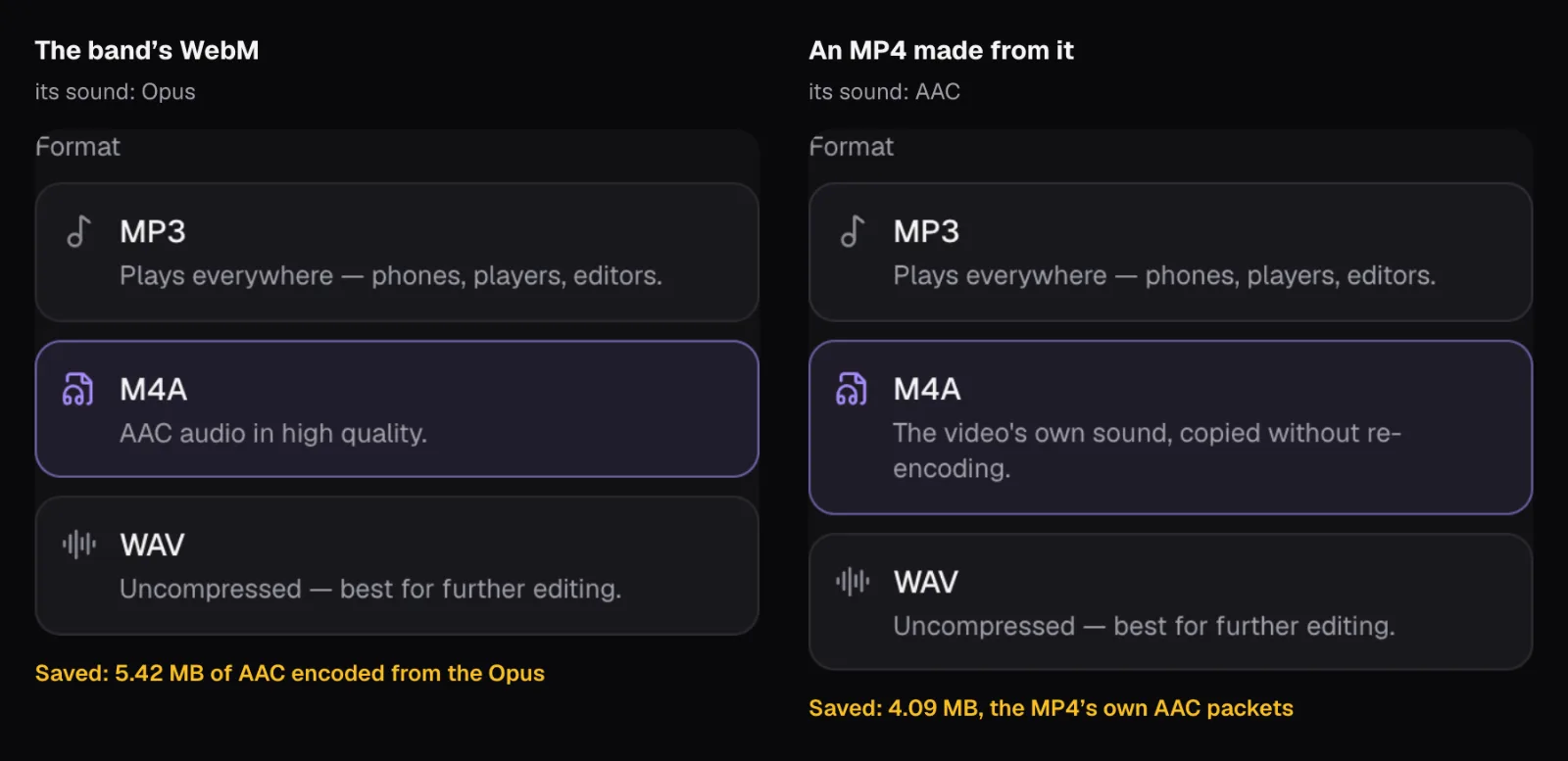
The line under M4A changed from “AAC audio in high quality.” to “The video's own sound, copied without re-encoding.”, and the size estimate disappeared, since the size is whatever the video's sound already is. The export took a tenth of a second, the middle of three tries. We then checked the copy two ways. Compared packet by packet, the M4A's 8,268 sound packets are byte-for-byte the MP4's, which has one more: a 6-byte packet that ends before the sound begins. Decoded in Chrome, the two files gave the same samples, all 16.9 million of them, without a single difference.
That makes a copied M4A the only lossy-codec file in this test that loses nothing: it is the video's sound, not a version of it. At 1.39 MB a minute it was also smaller than the 192 kbps MP3, simply because the MP4's AAC was smaller.
A fade breaks the copy. With a one-second fade-in, the line under M4A went back to “AAC audio in high quality.”, the estimate came back (“About 5.6 MB”), and the file was encoded afresh, 5.35 MB at 241.3 kbps. The fade has to change the sound's samples, and changed samples have to be encoded again. Keeping only a part of the sound, by contrast, still gives a copy: fades are the only setting that turns it into an encoding.
Where each file starts: MP3's 23 milliseconds
One more difference shows only when you line the files up. The march's first chord begins 3.473 seconds into the WAV, at sample 166,687. In the M4A it begins at sample 166,685, two samples earlier, which is 0.04 milliseconds. In every MP3 it begins at sample 167,792: 1,105 samples, or 23 milliseconds, late.
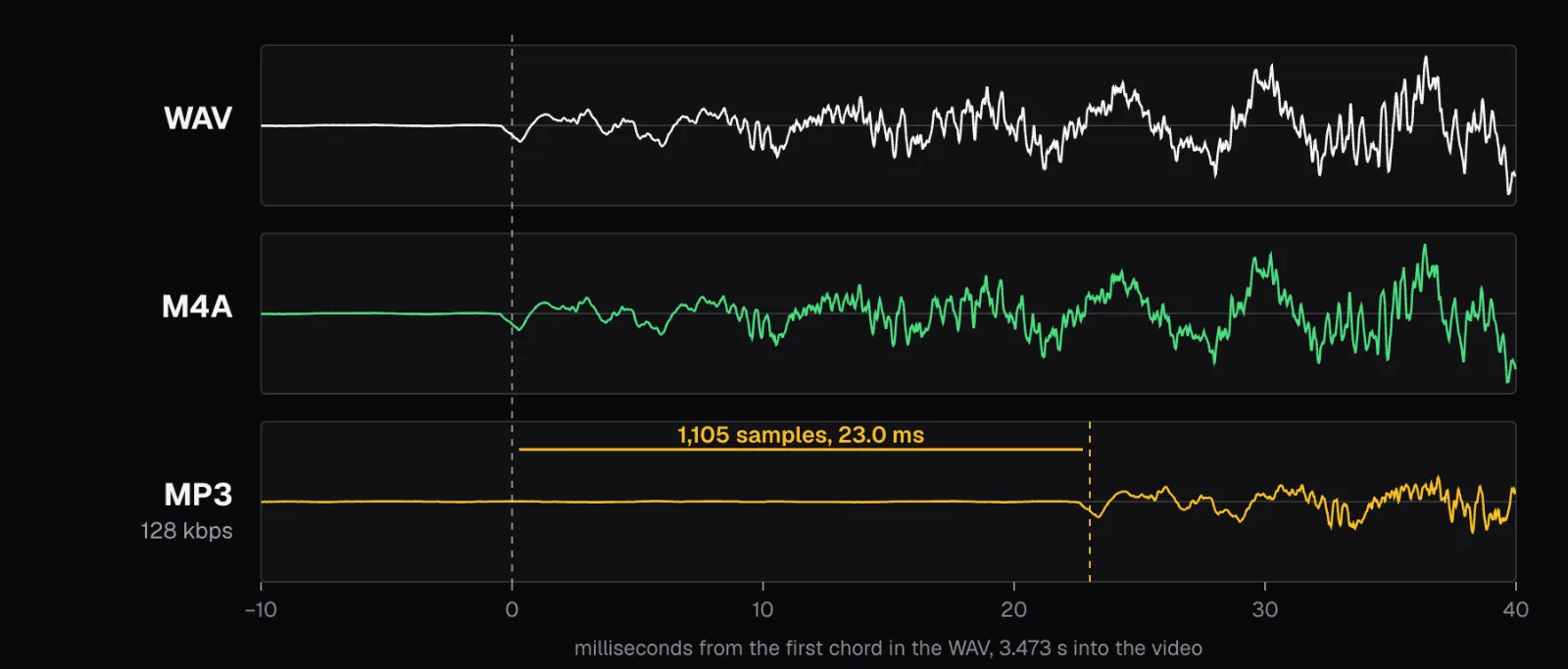
Encoders put a short run of extra samples ahead of the sound, and decoding an MP3 adds a lag of its own; for LAME, a note in Cutlia's code puts them at 576 samples of the first kind and 529 of the second, 1,105 in all. An MP4 file, and so an M4A, can record how much to skip at the start, Cutlia writes it there, and Chrome honored it, which is why the M4A lines up. The MP3s carry no such note, so Chrome decoded each of them with 23 milliseconds of extra silence in front. Each MP3 is also 24 milliseconds longer than the WAV in all: the delay at the start, then padding to the end of its last whole frame of 1,152 samples.
It's a small offset, and it's in every MP3 we made. It can matter when the extracted sound goes back under the picture in an editor, or when tracks have to follow each other with no gap. For those jobs, take WAV or M4A.
Which format should you choose
Start with where the file is going, then let the video's own sound settle the rest.
- To keep or listen to: M4A, if the panel says “The video's own sound, copied without re-encoding.” It loses nothing, and ours was smaller than the 192 kbps MP3. Apple lists AAC among the formats the iPhone 17 plays, Android's documentation lists AAC in .m4a files, and Windows Media Player 12 opens .m4a (all as of November 2026).
- For anything that has to play on as many players as possible: MP3, in MDN's words “perhaps the most widely distributed audio file format in the world”. Android's documentation lists MP3 at 8 to 320 kbps, Apple lists it for the iPhone 17, and Windows Media Player 12 opens it. Use 320 kbps for music you'll keep: in our test it reached the video's own 20.3 kHz top and left the fewest gaps of any file we encoded. 192 kbps, the tool's default, is a reasonable everyday choice at 1.44 MB a minute.
- For speech: 128 kbps MP3 keeps a talk or an interview small, at 0.96 MB a minute, and the losses we measured, the cut at 16.5 kHz and the gaps between 8 and 16 kHz, all lie well above the range a voice needs to be understood. MDN notes that ordinary telephone audio carries only about 300 to 3,400 Hz, enough for speech to stay intelligible in many listening conditions.
- For editing, mixing or more processing: WAV. Every lossy encoding throws something away, and MDN's codec guide advises avoiding lossy compression for audio that will be remixed or compressed again, because the losses compound. A WAV holds plain samples, so there is nothing left to lose when an editor opens it; Android lists 16-bit WAV among the formats it plays too. For a transcript you need no audio file at all: Video to Text reads the video itself.
- Not for archiving a video's sound: a WAV is 11.52 MB a minute and adds nothing the video's own track didn't have. Keep the video, or a copied M4A.
If you only need part of the sound, a song from a concert or a quote from a talk, set the start and end in Video to MP3 before exporting rather than cutting the file later; the estimate follows the part. The MP4 to MP3 and MP4 to WAV pages are the same tool with the format already chosen. And if the video's sound won't play at all on a device, the cause is most likely its codec, which Why does my video play with no sound, and how do I fix it? covers.
The tools in this guide
Video to MP3
Pull the soundtrack out of any video in seconds.
MP4 to MP3
The sound of any MP4 as an MP3 that plays on every phone, car stereo and player.
MP4 to WAV
Uncompressed sound from any MP4, for editing, mixing and transcription.
Video Converter
Convert almost any video to MP4, MOV, WebM, MKV, AVI, MPG or WMV — on your device.
Questions people ask
Is M4A better quality than MP3?
When it's a copy, yes: an M4A copied from an MP4's AAC sound is that sound, unchanged, and ours decoded to exactly the same samples. When it's encoded, it compares with a good MP3: our 256 kbps AAC reached the same 20.3 kHz top as the video's sound, like the 320 kbps MP3, and left fewer gaps than the 192 kbps MP3, though more than the 320 kbps one. For a player that takes only MP3, choose MP3.
Does extracting audio from a video lose quality?
Only if the extracted file is encoded again. A WAV adds no compression loss, and an M4A copied from AAC sound, or an MP3 copied from MP3 sound, adds none at all. Any other M4A or MP3 is a new lossy encoding of sound that was usually lossy already: at 320 kbps our MP3 reached the same 20.3 kHz top as the video's sound, while at 128 kbps it cut everything above 16.5 kHz.
Is a 320 kbps MP3 as good as the original video's sound?
It can't be better, and in our test it came very close: between 16 and 19 kHz its average level matched the WAV's, it reached the same 20.3 kHz top, and only 0.03% of the 8–16 kHz detail was missing. But it was 2.5 times the size of the video's own 126 kbps Opus track for no gain, since a higher bitrate can't restore what the original compression removed.
Why is a WAV file so much bigger than an MP3?
A WAV stores every sample uncompressed: at 48 kHz, 16 bits and stereo, that's 1,536 kbps, or 11.52 MB for each minute. A 192 kbps MP3 stores the same minute in 1.44 MB by leaving out what a model of hearing says won't be missed. Our 2:56 march took 33.86 MB as WAV and 4.23 MB as that MP3.
Can converting an MP3 to WAV bring the quality back?
No. Converting an MP3 to WAV decodes it into samples, so the WAV holds the MP3's sound as decoded, cutoff and gaps included, in a file eight times the size of a 192 kbps MP3 at 48 kHz. What the MP3 encoder dropped is gone. To get a better file, extract the sound again from the video itself, as M4A or WAV, or as MP3 at a higher bitrate.
Sources
Where the facts in this guide come from, besides our own tests:
- Web audio codec guide — MDN Web Docs
- Digital audio concepts — MDN Web Docs
- BaseAudioContext: decodeAudioData() method — MDN Web Docs
- iPhone 17: Technical Specifications — Apple
- Supported media formats — Android Developers
- File types supported by Windows Media Player — Microsoft Support
- SOUSA Hands Across the Sea (1899): the recording's description — United States Marine Band, on Wikimedia Commons
Footage in this guide
The pictures were made with Cutlia's tools from this openly licensed footage, found on Wikimedia Commons:
- SOUSA Hands Across the Sea (1899) - "The President's Own" United States Marine Band — United States Marine Band, Public domain