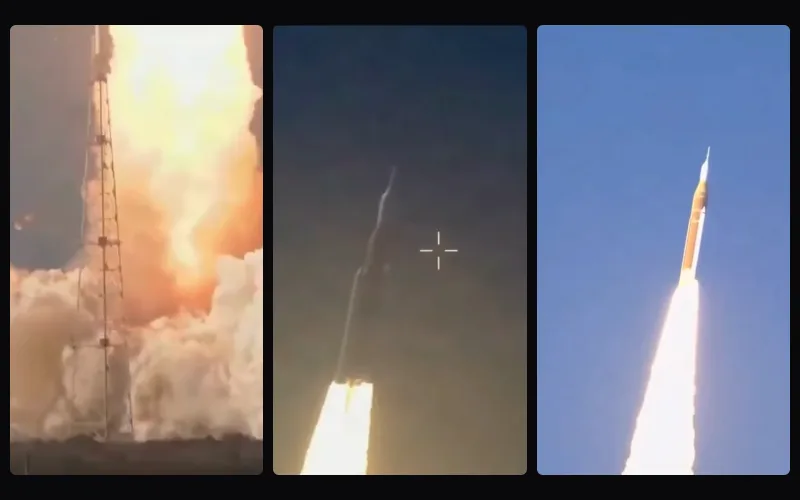
Short video and social
What makes a moment from a long video work as a short clip?
We gave the AI Clip Maker a real 10-minute call between two spacecraft, then took apart every clip it chose: why, where it starts and ends, and how it fills a vertical screen.
By the Cutlia team · Updated · 15 min read
The short version
- A clip has to work for someone who never saw the rest: start where a thought starts, end on the line that lands, and keep a question together with its answer.
- Let the transcript find the candidates, but don't trust key words to find hooks: all three picks the transcript marked “Strong hook” in our test were false alarms, and the on-device AI replaced all three.
- Read every clip's last line before you export: the AI's third clip ended on a question, and moving its end to the answer took two clicks.
- In a crowded shot the clip maker shows the whole picture, and it frames the people it finds, not the one speaking: where one person carries a clip, try “Middle” or “Split screen” and play it through.
- Cut the dead air between speakers, then check what went with it: the clip maker shrank 8.4 seconds without words between the two crews to a quarter of a second, and the crews laughing and clapping went out with the wait.
A long video usually holds a few moments that could live on their own as a Short, a Reel or a TikTok. Finding them is the hard part. A line that made sense at minute six can mean nothing to someone who meets it cold in a feed, and a 16:9 picture has to be squeezed into a frame turned on its side.
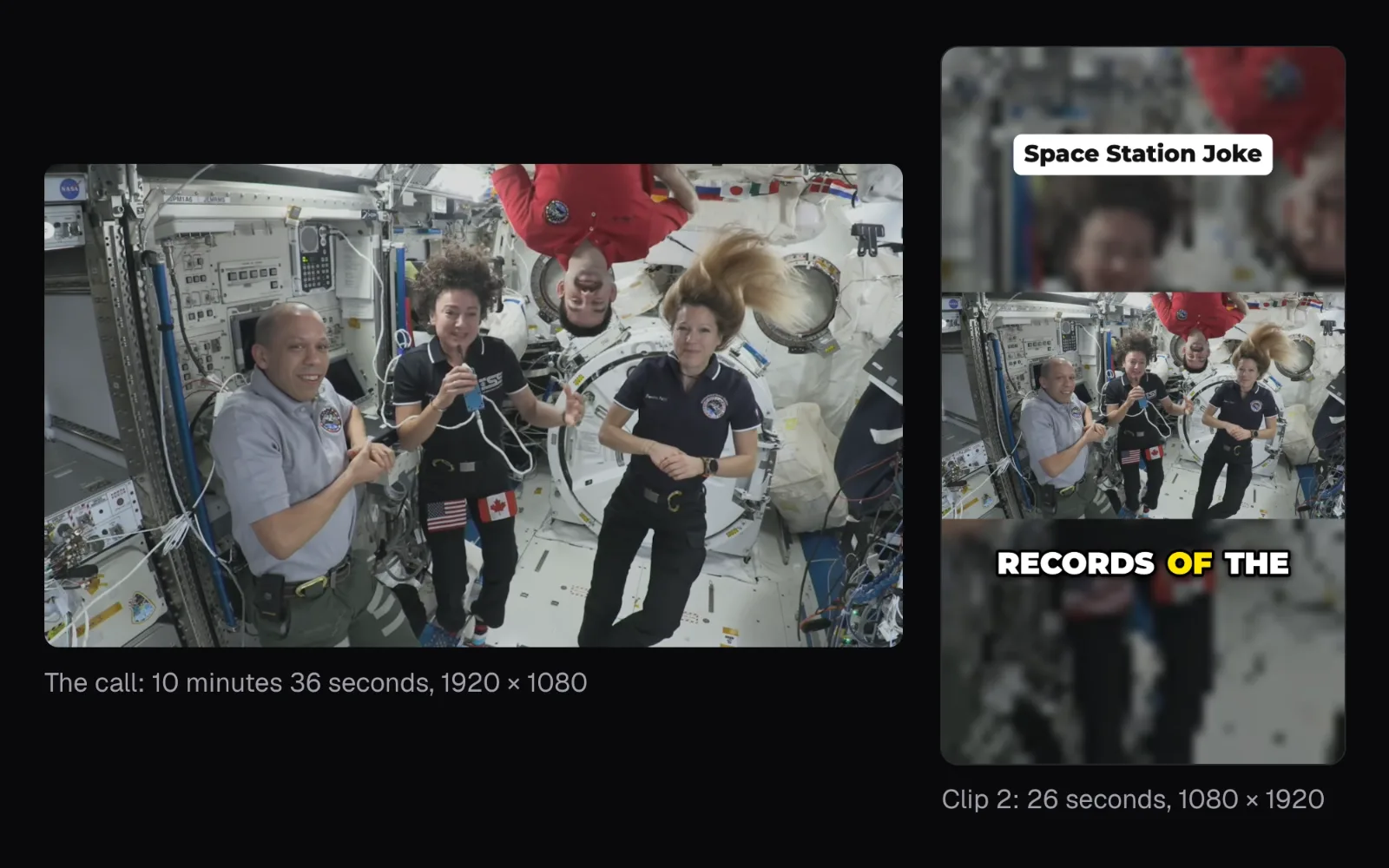
To see what that takes on a real recording, we gave Cutlia's AI Clip Maker a video that is hard on both counts: NASA's 10-minute 36-second edit of the call between the Artemis II crew, in their Orion capsule in deep space after seeing the Moon up close, and the Expedition 74 crew on the International Space Station. Two crews in two spacecraft, a wait before many answers, a crew of four in most shots. We followed every decision the tool made, and checked which ones we'd overrule.
The test: ten minutes of two crews talking across space
NASA's description of the video says the call began at 2:40 p.m. EDT on April 7, 2026, and lasted 15 minutes. Eight astronauts took part: Reid Wiseman, Victor Glover, Christina Koch and Jeremy Hansen of Artemis II, and Chris Williams, Jack Hathaway, Jessica Meir and Sophie Adenot on the station. NASA edited the recording to keep sound and picture in step and to shorten the gaps left by the communications delay, as the signals traveled more than 232,000 miles. Our copy runs 10 minutes 36 seconds at 1920 × 1080.
Three things make it a hard test for any clip maker, human or automatic:
- Everything is half of an exchange. A question is asked in one spacecraft and answered in the other, often after a wait. A clip that keeps only one side can leave the viewer with a riddle.
- The pictures are crowded. NASA's edit cuts back and forth between the capsule and the station, and in every shot of our clips the tool found three to five people.
- The best moments are quiet ones. They are jokes, stories and goodbyes between colleagues, not the bold claims and pointed questions that rule-based hook detection is built to spot.
Every step ran in Chrome on a MacBook Air with an Apple M5 chip; our three timed runs are the source of every time in this guide. With the speech model already saved, transcribing the whole call took 1 minute 14 seconds, and the first clips appeared after 20 seconds, while the rest was still being transcribed. A first visit downloads the speech model, and the AI once you accept it; afterwards the browser held 3.4 GB in its cache for the site, which later visits reuse.
What makes a moment work outside the long video
Someone scrolling a feed hasn't seen your long video and can swipe away at any second. The clip maker's AI asks one thing of every passage it judges, “Would this work as a short clip on its own”, and its prompt spells that out as three tests, the ones an editor would apply; in bold, in the prompt's words:
- Does it hook the viewer in the first seconds? The opening line has to give a reason to stay: a surprise, a question worth answering, a person speaking straight to someone.
- Does it make sense without the rest of the video? A reference to something said earlier, a “they” with no one named, or an answer without its question loses a stranger.
- Does it end on a payoff? Stop on the line that lands — the punchline, the answer, the thank-you — not on the first sentence of what comes next.
In a conversation, the second test is the hard one to pass. A joke needs its setup, a reply needs the line it replies to, and a thank-you needs the thing it thanks for. Length matters far less: as of November 2026, YouTube counts a square or vertical upload of up to three minutes as a Short, and each platform's numbers are in our specs guide.
How a transcript becomes a list of candidate clips
A word chopped in half makes a clip feel like an accident, so the clip maker starts and ends its clips only between sentences. A sentence ends at a period, question mark, exclamation point or ellipsis, at any pause of 0.8 seconds or more, and, in a run longer than 15 seconds without punctuation, at its next pause of 0.4 seconds or more. Every run of whole sentences that fits the chosen length is a candidate.
The call came out as 1,783 words in 129 sentences. With the default length, “Auto” — 15 to 60 seconds, 35 preferred — that made 1,094 candidates. The tool makes one clip per six minutes of video by default, never fewer than three, so a 10-minute call gets three, with the next 12 best listed under “More moments” and a search box, “Find a moment”, for a line you remember.
Why key words alone picked the wrong moments
Before any AI, each candidate gets a score from its words and sound, weighted as in the clip maker's code. The hook weighs most, 0.3 of the score, and is itself rated from 0 to 1: a question in the first sentence gives 0.45, a strong opening phrase (“here's”, “nobody”, “imagine”…) 0.45, a number 0.3. Then come a finished last sentence (0.2); a lively pace of speech, loudness and pauses that set the passage apart (0.15 each); and closeness to 35 seconds (0.1). Opening mid-thought, on “and” or “so”, takes 0.35 off the score, more than a strong opening phrase adds.
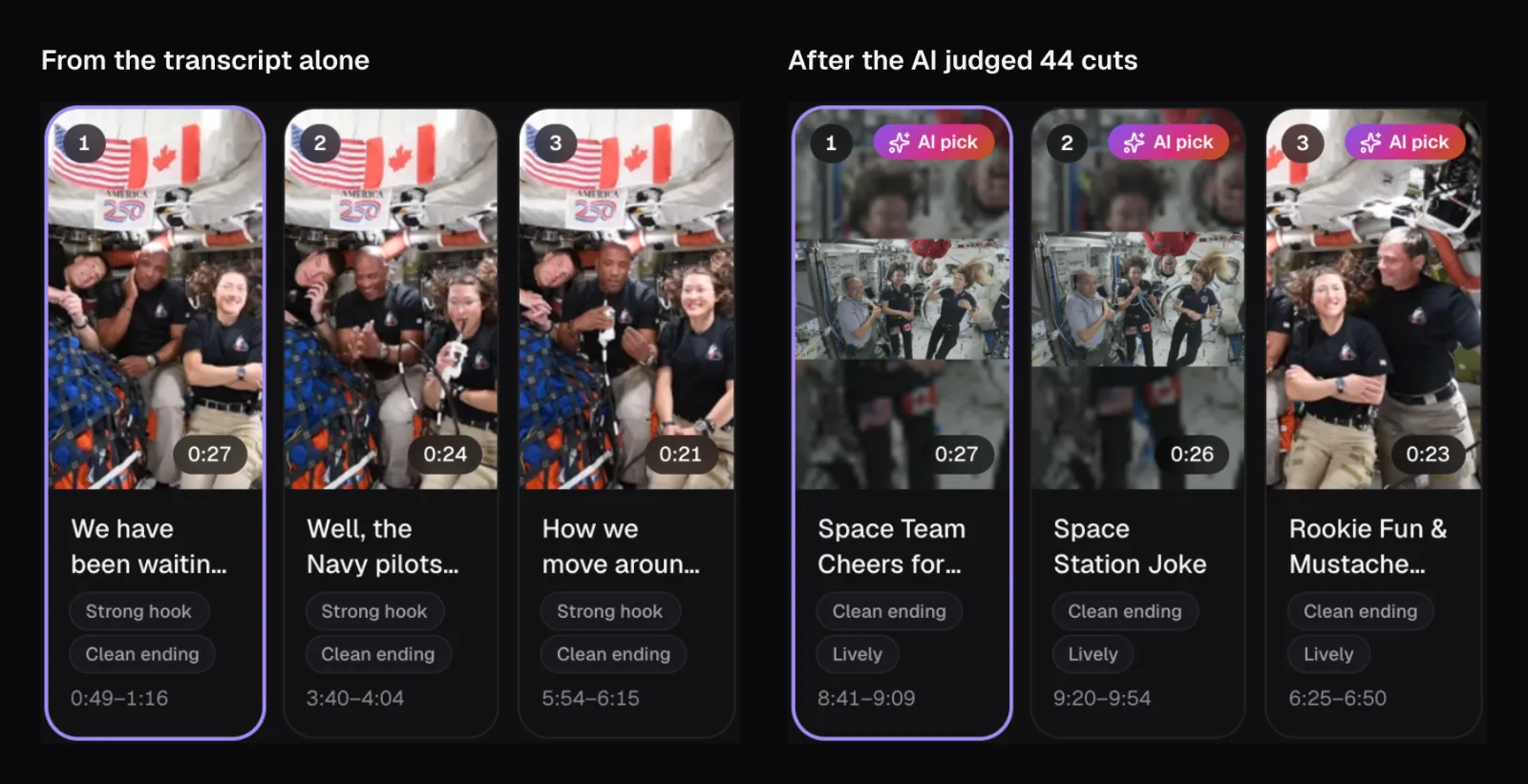
The transcript's own three picks all earned their “Strong hook” label from a phrase list:
| From the call | Opening line | Phrase it matched | AI's margin |
|---|---|---|---|
| 0:49–1:16 | “We have been waiting for this like you can't imagine.” | “imagine” | +4.7 |
| 3:40–4:04 | “Well, the Navy pilots were carrying on, so I'm the only one that heard the question.” | “the only” | +5.2 |
| 5:54–6:15 | “How we move around and eat those things have also been surprising because the The difference between ISS and here is…” | “here is” | +5.3 |
None of them is a hook. “Like you can't imagine” is a figure of speech; “the only one that heard the question” points back to a question the clip leaves out; and “here is” is two words that happen to sit side by side, in a clip that opens mid-answer, its “those things” pointing back to words it leaves out. A phrase list can't tell those apart from the real thing, which is why the clip maker treats these scores as a first pass.
What the on-device AI changed, and why
On a computer with a recent graphics chip and at least 8 GB of memory, the clip maker offers an AI that runs inside the browser. It reads the transcript of the strongest passages, answers the question above with Yes or No, and the gap between its Yes and its No — its margin — becomes most of the new ranking: the margin divided by ten, plus the transcript's own score. In the clip maker's own tests, passages that work scored about +12 to +20 and weak ones from −13 up to about +5. On our MacBook, the AI loaded from the browser's cache in 4 seconds, then judged 44 cuts and titled the three winners in 40 seconds:
| Clip | From the call | Length | AI title | Margin |
|---|---|---|---|---|
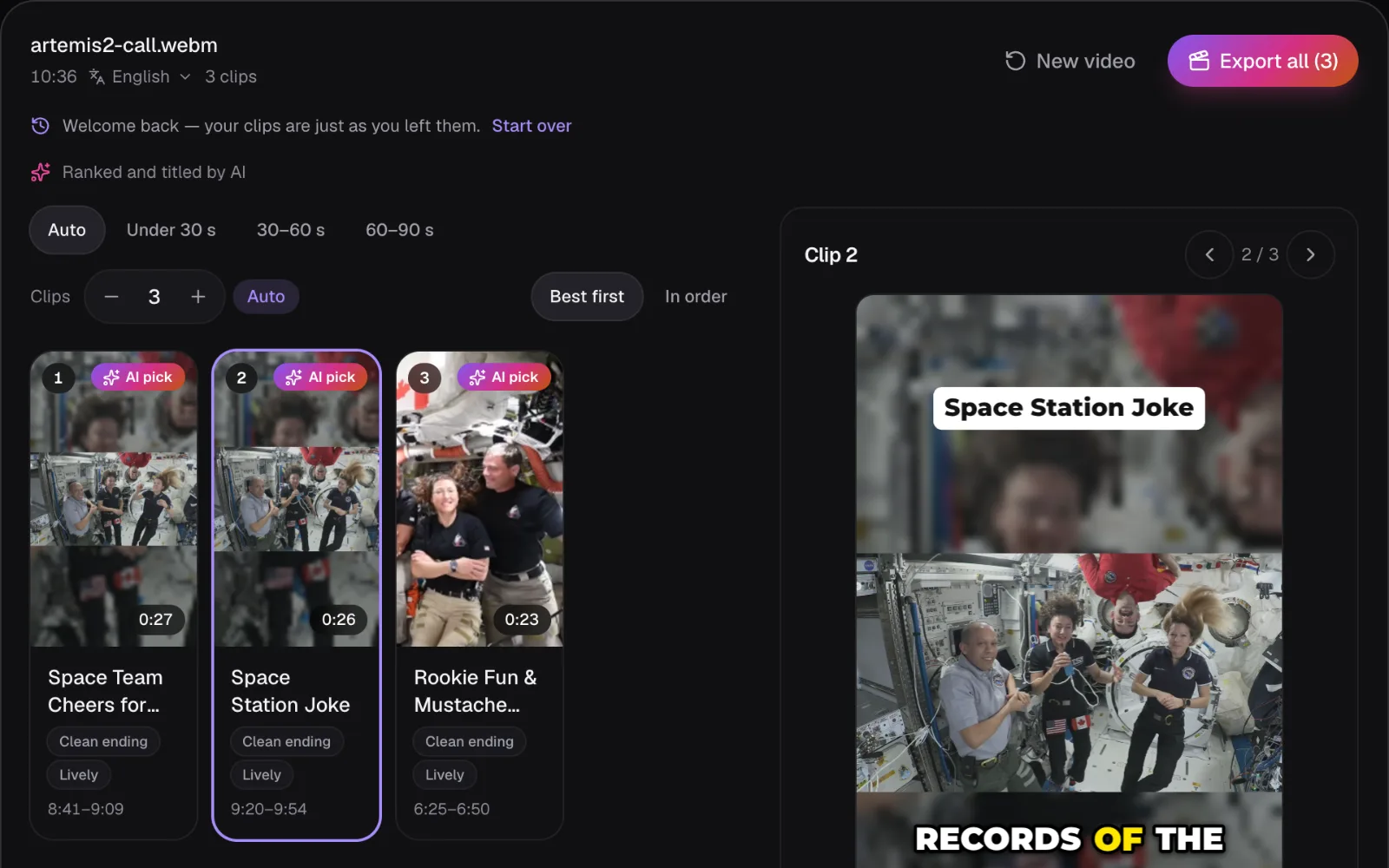
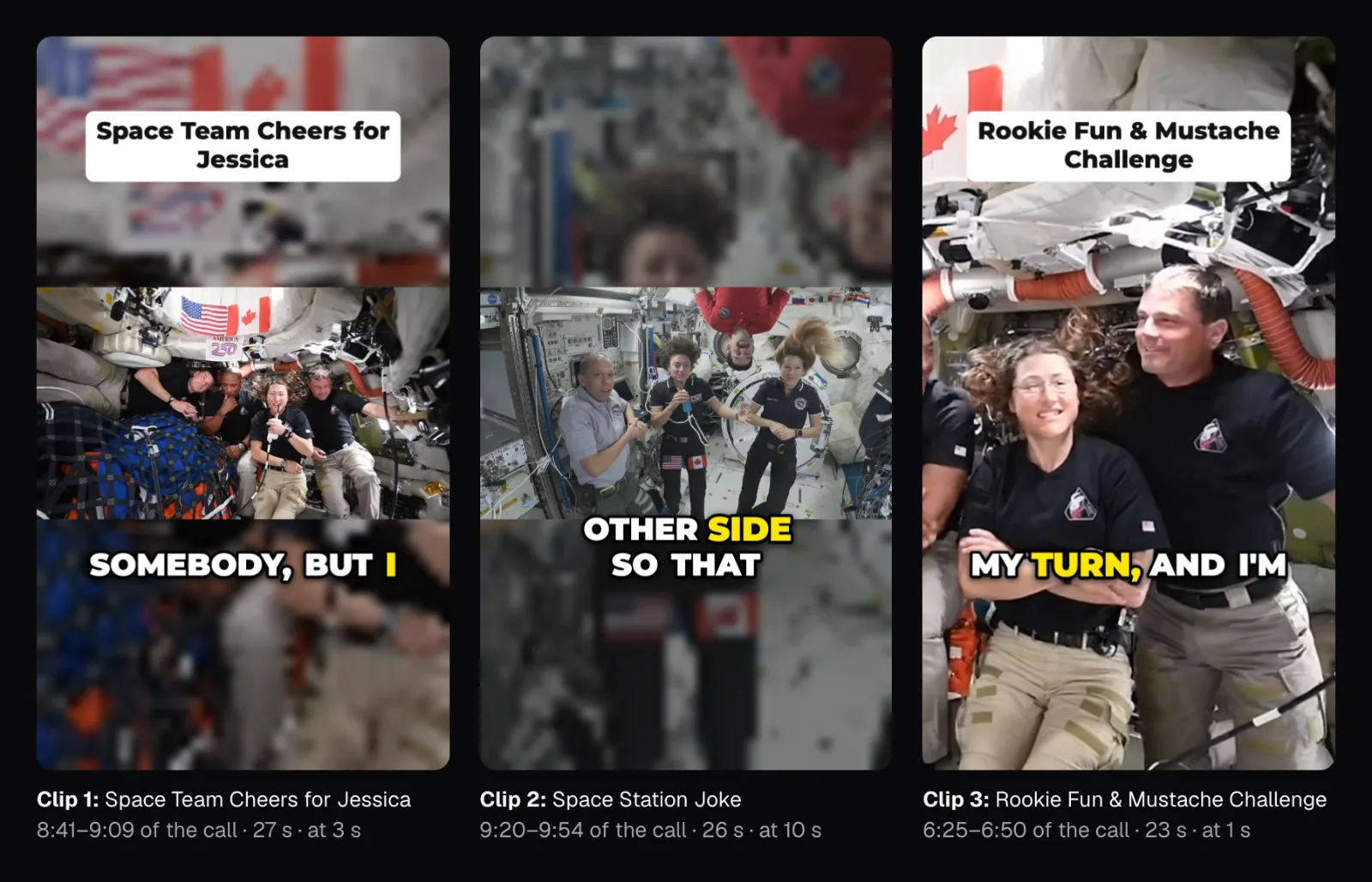
| 1 | 8:41–9:09: Christina Koch to Jessica Meir, her “Astro sister” | 0:27 | Space Team Cheers for Jessica | +14.3 |
| 2 | 9:20–9:54: both crews racing to the far end of their spacecraft for the distance record | 0:26 | Space Station Joke | +14.0 |
| 3 | 6:25–6:50: “All right, my turn”: a rookie, a mustache dare and a question | 0:23 | Rookie Fun & Mustache Challenge | +13.1 |
By the transcript's rules, none of the three has a hook at all. What they have is what the phrase list can't see: someone speaking to someone by name, and small stories with a setup — a race for a record, a mustache dare. The transcript's three picks, which the AI also judged, scored +4.7 to +5.3, about where the clip maker's tests put weak passages. And the AI's choices all come from the second half of the call, after the greetings, when the talk had turned to jokes and stories.
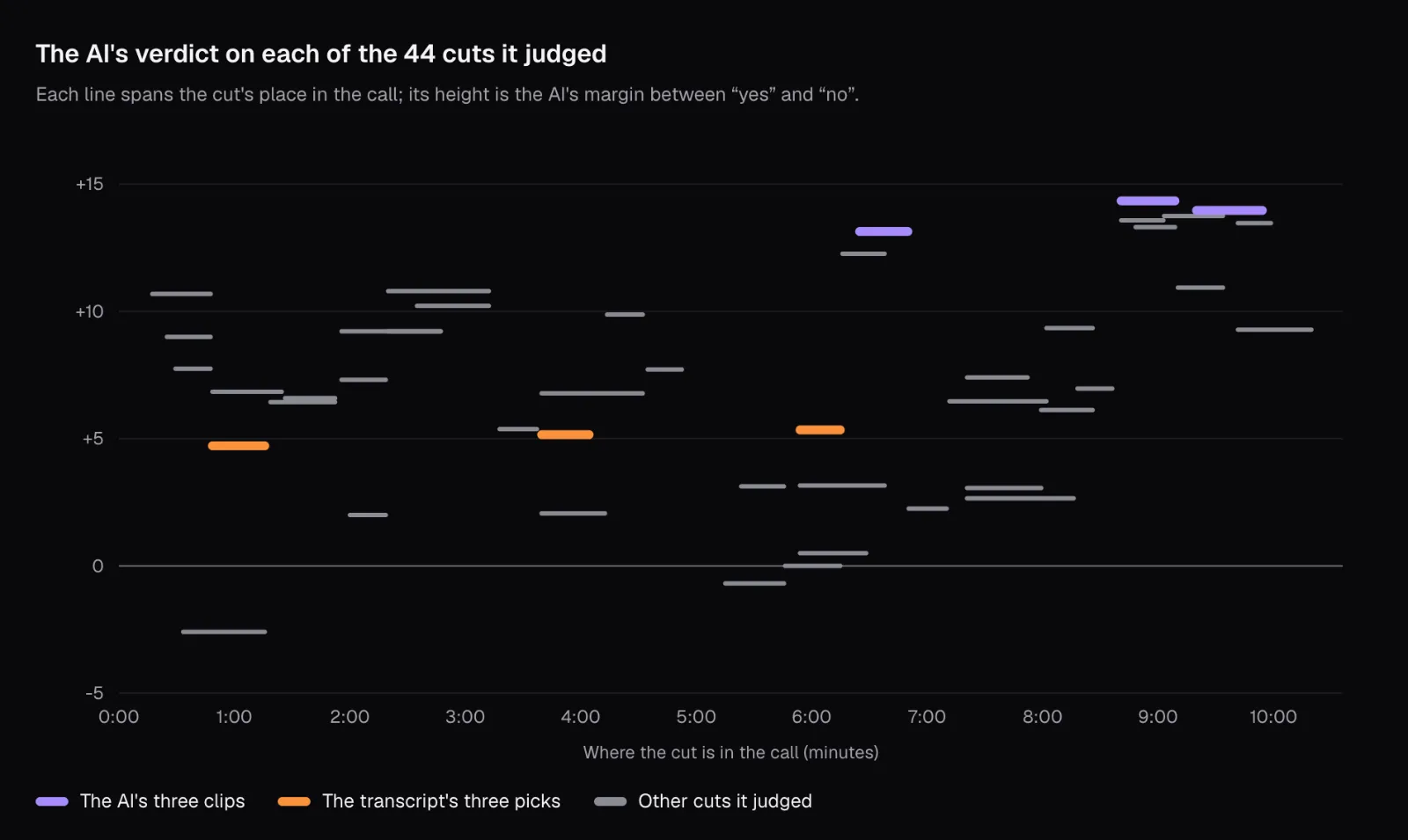
The AI only reads words. It can't hear that a line got a laugh or see that a speaker is floating upside down, so the transcript's signals for pace and loudness stay in the ranking, and the picture is left to the next step. On a phone, or a computer without a suitable graphics chip or enough memory, the AI isn't offered and the transcript's picks stand; there, reading each pick's first and last line yourself matters even more.
Where each clip should start and end
Besides the best passages, the AI judges other places each clip could start or end, and the verdicts show how much an edge matters. Clip 1 is Christina Koch's message to Jessica Meir; three of the verdicts on it:
- From “Well, I hope I'm not talking over somebody” to “…an amazing rest of your trip in space.”: +14.3, the clip it chose.
- The same start, stopping at “It's amazing.”: +13.6.
- Starting a sentence later, at “One, sorry to steal your next spacewalk day”: +13.3.
The opening it preferred is the one that names who's speaking to whom: “…a couple things to my Astro sister, Jessica.” Without it, the clip starts with “One,” and a viewer has to work out the rest.
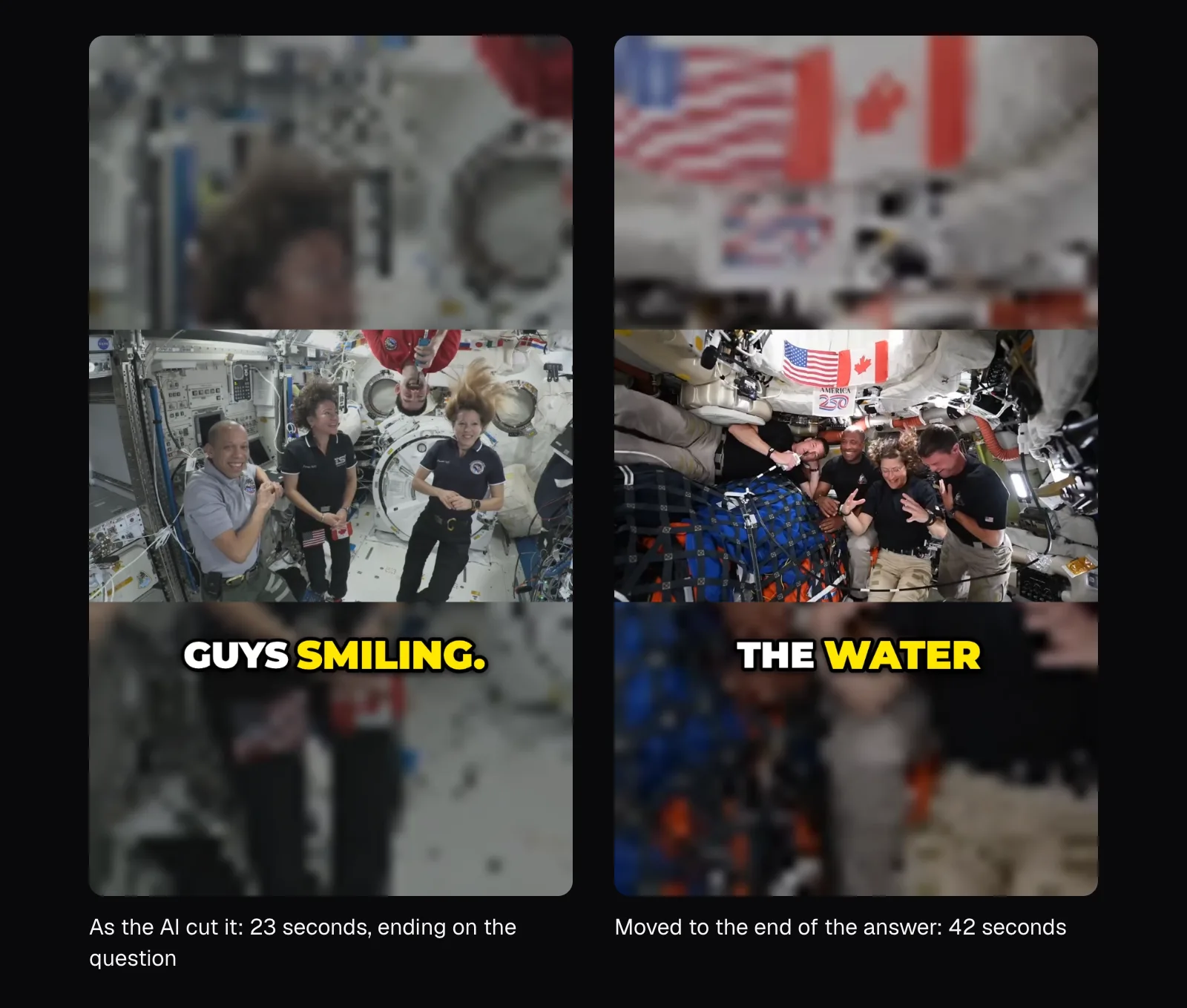
Clip 3 is the one we'd overrule. It ends on a question to the station's crew — “…what kind of fun you guys had in your training and on your flight here that's been keeping you guys smiling.” — and the answer, a story about a water valve left open a little too long, starts a second later. The AI judged that answer on its own at +2.3: without the question it means little. Together they are one exchange, 45 seconds long, inside the 60 seconds “Auto” allows. That cut was among the 1,094 candidates, but the AI never saw it: it only weighs a few other cuts of each clip, chosen by the transcript's score and the pauses around them.
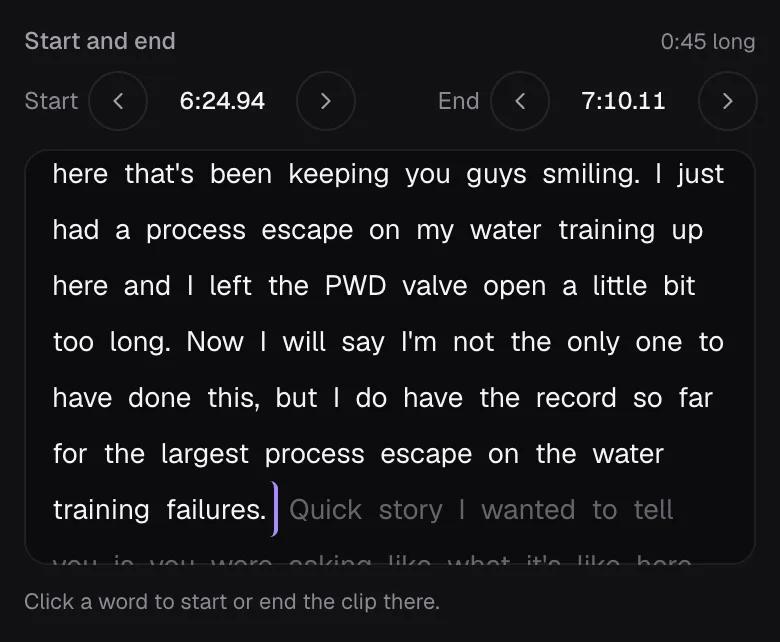
In “Start and end”, a click on a word moves the nearer edge of the clip to it, and the panel shows 40 words either side of the clip. The answer's last word was further than that, so it took two clicks: the last word shown, then the answer's last word. The panel's 0:45 is the stretch of the call; with its pauses tightened, the exported clip grew from 23 to 42 seconds, and it now ends on the answer, with the capsule's crew laughing, instead of on a question. An edited clip is yours: it stays as you left it when the clips are ranked again.
Clip 2 shows the opposite case done right: it starts with Jessica Meir on the station and ends with the Orion crew's reply, so it crosses from one spacecraft to the other. Between her last word and their first, the transcript has 8.4 seconds without words: silence while the reply came, then sound with no words as both crews laugh and clap on screen. The clip maker's pace setting turns any pause over 0.6 seconds into a 0.25-second beat and cuts “um” and “uh”, so 34.2 seconds of the call became a 26.0-second clip. It finds pauses between the transcript's words, not in the sound, so the laughing and clapping went out with the wait. Our jump-cut guide covers when tightening helps and when it hurts.
The AI rated the exchange above either side's turn on its own. Jessica Meir's reply alone, from “Thank you so much, Christina”, scored +10.9; the Orion crew's answer on its own, +13.5; the cut holding the joke and the comeback, +14.0. In a conversation, the moment is often the back-and-forth, not one person's turn.
Two crews in two spacecraft on one vertical screen
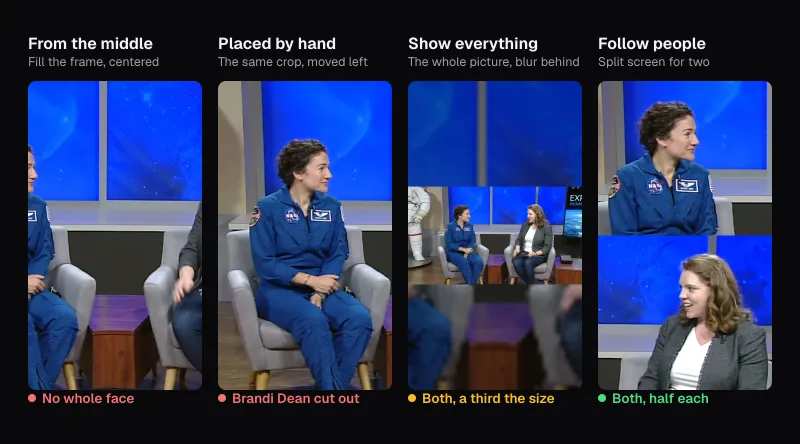
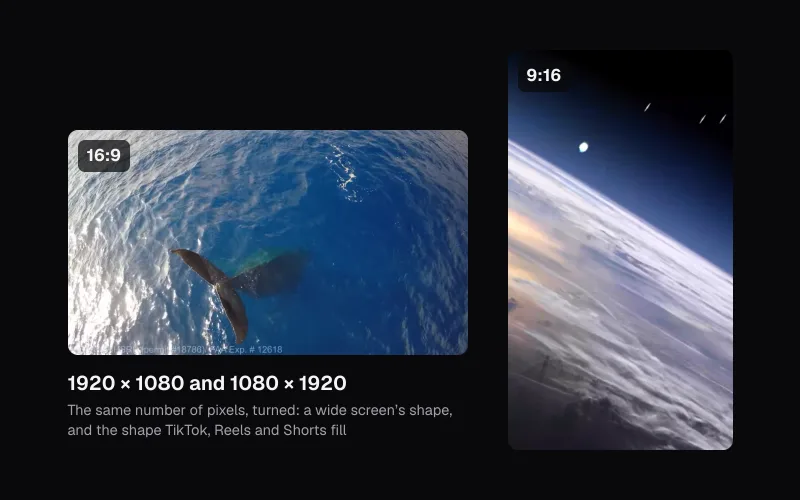
A 9:16 frame cut from a 1920 × 1080 picture keeps a slice about 608 pixels wide, under a third of it, and enlarges it to 1080 × 1920. So the clip maker looks for the people in each shot and decides shot by shot: one person, or people close enough to share the slice, are followed; two people too far apart get a split screen, one above the other; three or more get the whole picture, shown across the middle over a blurred, enlarged copy of itself.
In our three clips the third case won almost everywhere. In their shots the tool found three to five people at every look, in the capsule and on the station alike, and it showed the whole picture for all but the first 1.9 seconds of clip 3, where the shot was close enough on two astronauts for one crop. Everyone stays in view, the upside-down astronaut included, but each face is small.
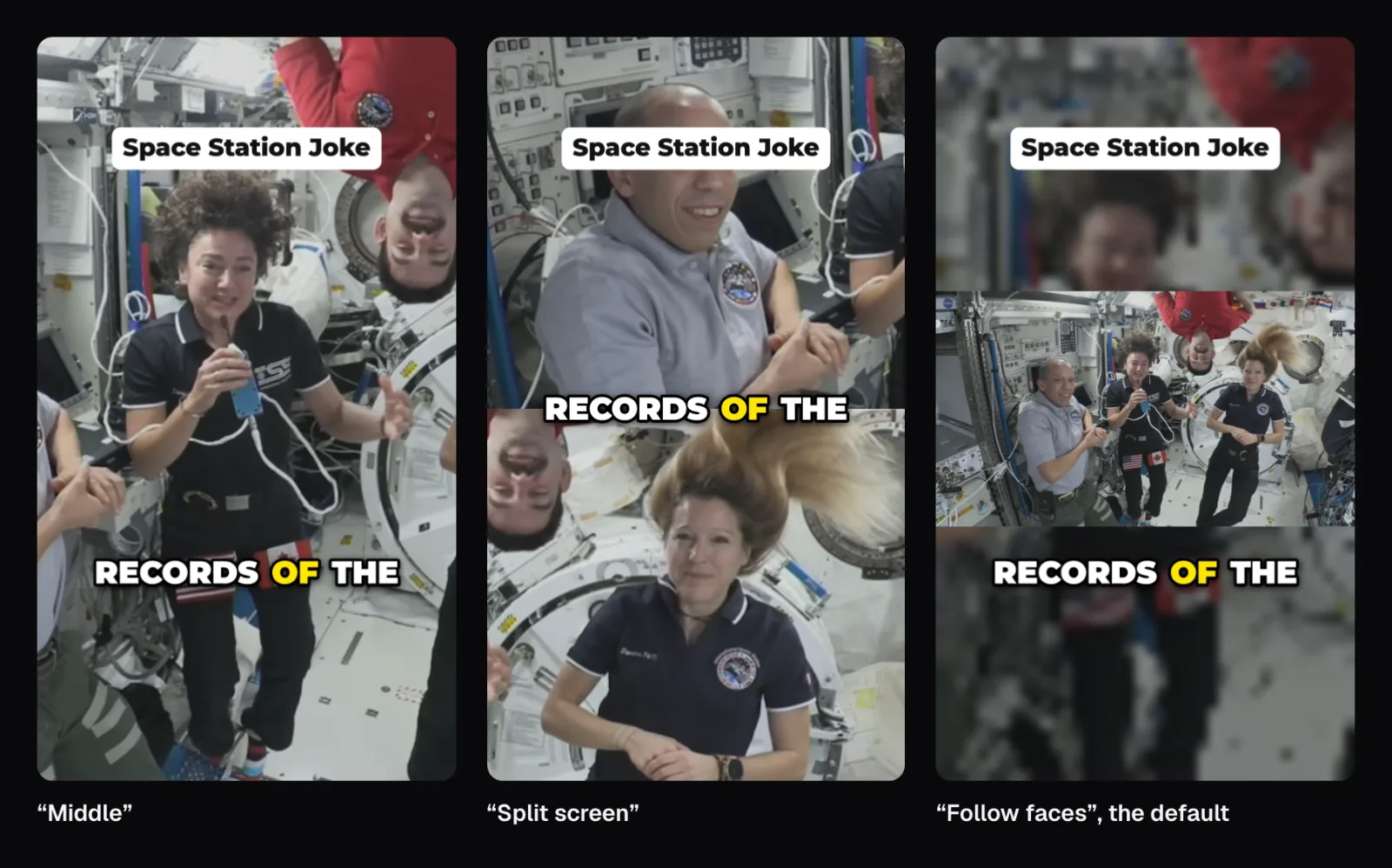
The comparison shows the catch: the clip maker frames the people it finds, not the person speaking, because it doesn't know who that is. At this second Jessica Meir has the microphone. The plain middle crop happens to land on her, with the upside-down astronaut behind; the split screen takes the two astronauts it saw most in the shot and leaves her out; the default keeps all four.
So choose clip by clip. For one speaker in a group, try “Middle” or “Split screen” and play the clip through, since the same choice has to work for every shot in it, the capsule's included; for a group moment, keep the whole picture. The framing is set for one clip under “Framing” in its editor, or for all of them under “Look”. There's more on choosing a crop in our guide to vertical video.
What to check in every clip before you export
The clip maker gets you to good candidates; the last pass is yours. Play each clip through and check five things, in this order:
- The first line. Does it say who is talking to whom, or about what? If it opens on “One,” or “the only one that heard the question”, move the start back to where it's set up.
- The last line. Is it the payoff? A question needs its answer and a joke its comeback; a clip that stops on a question is a teaser at best.
- The silences. Long waits should be gone; a pause that is part of a joke may deserve to stay, and laughter or applause without words is cut like silence. If the timing suffers, “Cut long pauses” is under “Look”, for all clips at once.
- The picture. Is the person who matters visible, and big enough to read a face? If not, try another framing for that clip.
- The words. Captions are drawn into the picture, so a wrong word stays wrong once posted.
Speech recognition handled the call well, but not perfectly, and its slips are the usual ones to look for:
- Names. The capsule's call sign, Integrity, is capitalized four times and written “Spacecraft integrity” once.
- Jargon. The translunar injection came out right once, and as “transluer injection burn” the second time.
- Repeats and drops. “because the The difference” keeps a stumble. And NASA's own description quotes Koch saying “Every single thing that we learned on ISS is up here,” while the closest line in our transcript stops at “ISS,” — so listen while you read.
Fix a word under “Captions” in the clip editor; “Find & replace” corrects a name in every clip at once. Titles deserve the same look: the AI's are short and plain, and “Ideas” asks it for three more. Caption style, size and placement are covered in our caption guide.
Exporting and posting the clips
On the same MacBook, “Export all” rendered the three clips in 10 seconds: MP4 files at 1080 × 1920 with H.264 video and AAC sound, of 13.8, 13.2 and 10.7 MB, named after the video, the clip's number and its title (artemis2-call-01-space-team-cheers-for-jessica.mp4), so a batch sorts in order. Nothing was uploaded: the transcript, the AI, the face search and the rendering all ran in the browser, and the project — transcript, verdicts, faces found and edits, never the video — is saved there for the next visit, in about 0.7 MB.
A clip can send viewers back to the full video. As of November 2026, YouTube lets you add a related video from your channel to a Short after uploading it, shown as a link under your handle; it needs advanced feature access. YouTube's own “Edit into a Short” takes up to 60 seconds of a public video on your channel and links the two by itself. Elsewhere, name the full video in the post text.
Mind the sound, too: YouTube blocks any Short over a minute that has an active copyright claim. NASA's video is public domain, but music added to a clip may not be; see music without claims and what platforms say about reach. The same tool also has pages set up for one job each: Video to Shorts, Long Video to TikTok and the Podcast Clip Maker.
Questions people ask
How long should a clip cut from a long video be?
Long enough for the moment to land, and no longer. The clip maker's “Auto” length looks for 15 to 60 seconds and prefers about 35; the AI's three clips of the Artemis II call came out at 27, 26 and 23 seconds. As of November 2026, YouTube counts vertical videos of up to three minutes as Shorts.
How many clips can I get from one long video?
By default the AI Clip Maker makes one clip per six minutes of video, at least three and at most 20, and lists the next 12 best moments under “More moments”, each with an “Add” button. You can set the count from 1 to 20, and “Find a moment” searches what's said to make a clip from a line you remember.
Do I need the AI to get good clips?
It made a big difference on our conversation. The transcript's own rules picked three passages because of phrases like “imagine”, and the AI scored all three far below the passages it chose instead. Without the AI — on a phone, or a computer without a recent graphics chip or 8 GB of memory — the transcript's picks stand, so read each clip's first and last line before exporting.
Why does my vertical clip show the whole picture with a blurred background?
Because the people in that shot don't fit in a vertical crop. The clip maker follows one person or a close group, splits the screen for two people far apart, and shows the whole picture over a blurred copy for three or more spread too wide for one crop. Choose “Middle” or “Split screen” under “Framing” if you'd rather crop.
Is my video uploaded to find the clips?
No. Transcribing, the AI's ranking and titles, finding faces and rendering the MP4 files all happen in your browser. The models are downloaded once and kept by the browser where it allows; the saved project holds the transcript, the AI's verdicts and your edits, never the video itself.
Sources
Where the facts in this guide come from, besides our own tests:
- Artemis II and Space Station Expedition 74 Astronauts Call in Space — NASA Image and Video Library
- Understand three-minute YouTube Shorts — YouTube Help
- Create YouTube Shorts from your videos — YouTube Help
- Add a related video to your YouTube Shorts — YouTube Help
Footage in this guide
The pictures were made with Cutlia's tools from this openly licensed footage, found on Wikimedia Commons:
- Artemis II and Space Station Expedition 74 Astronauts Call in Space (jsc2026m000083) — NASA Johnson Space Center, Public domain