Editing
How much silence should you cut from a talking video?
We ran a 10-minute call between two spacecraft and a calm studio interview through Remove Silence at every pace, measured every cut, and exported the jump-cut version.
By the Cutlia team · Published · 15 min read
The short version
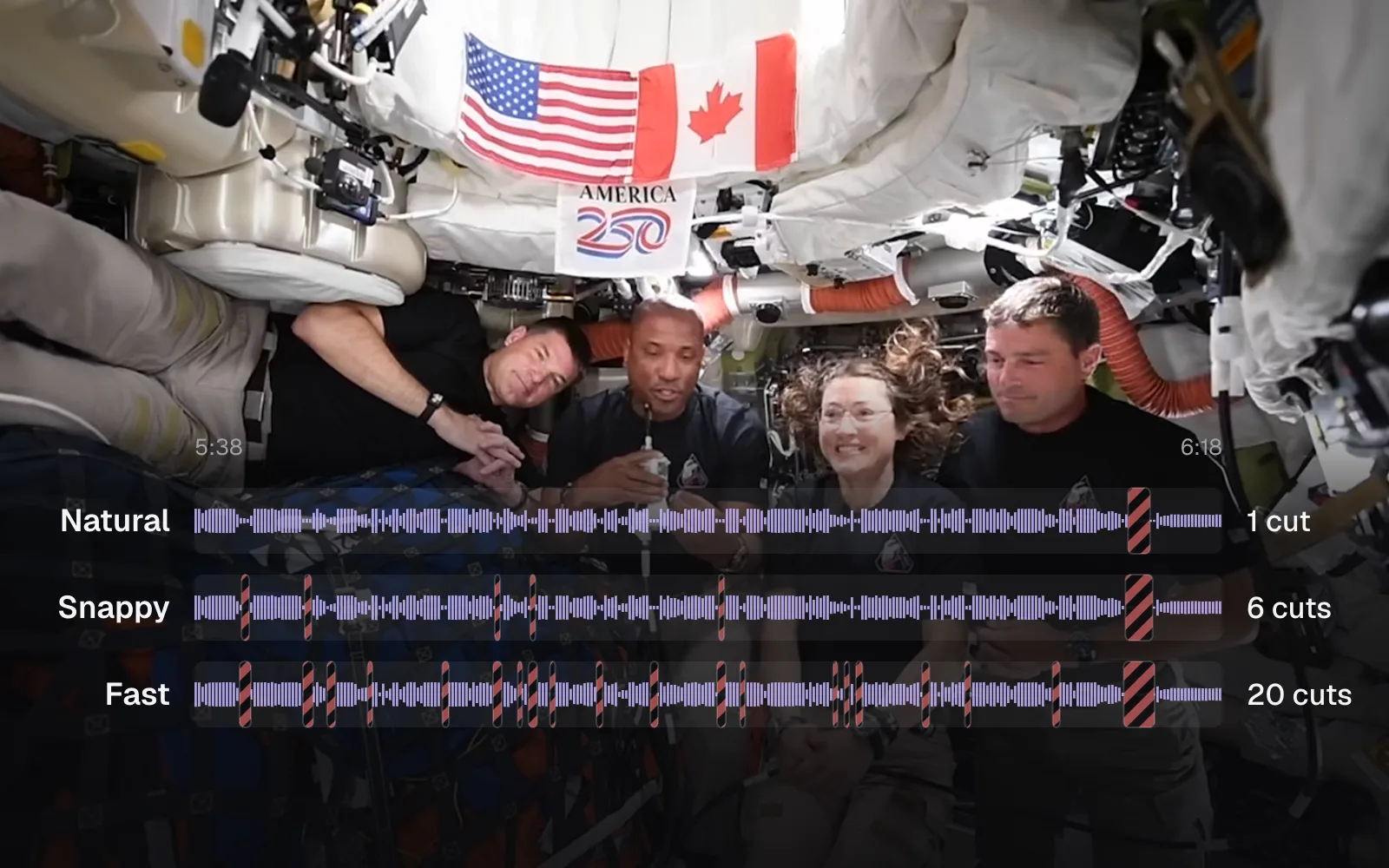
- Start at the Snappy pace and go tighter only if the talk still drags: on our 10:36 call, Natural removed 1:08, Snappy 1:19 and Fast 1:40, so Fast's 63 extra cuts over Snappy bought only 20 more seconds.
- Half the dead air sits in a few long pauses: the call's 20 quiet stretches of 2 seconds or more held 67.7 of its 134.4 quiet seconds, and every pace shortens each of them to half a second or less.
- A practiced speaker leaves far less to cut: the studio interview lost 6.8 seconds (6%) at Natural and 12.0 seconds (11%) at Fast, and more than 5 seconds of each was its closing title, which has no sound at all.
- Remove Silence cuts by what it hears, so laughter you can hear stays: in the call it kept 3.4 seconds of laughter that the AI Clip Maker's pacing, which works from the gaps between transcribed words, cut along with the silence.
- Review the longest cuts before you export: six of the call's ten longest were waits between the two spacecraft, where a pause can be part of the moment.
Cutting the pauses out of a talking video is quick. Deciding how many to cut is the real decision. Take out too few and the video drags; take out too many and every sentence lands on top of the last one, with the picture jumping at each join. The right amount depends on who's talking and how they talk, so we measured it on two real conversations instead of guessing.
The first is NASA's recording of the Artemis II crew in their Orion capsule talking with the crew of the International Space Station: 10 minutes 36 seconds of questions, answers, laughter and people talking over each other, with a radio link between two spacecraft in the middle. The second is a calm 1 minute 50 second NASA studio interview. We ran both through Cutlia's Remove Silence at every pace, with and without speech recognition, read every cut it made to the millisecond, and exported the call at the tightest pace to see what a viewer gets.
Two NASA conversations, cut at every setting
The call is a 204.5 MB WebM file, 1920 × 1080. It shows one spacecraft at a time: the four Artemis II astronauts packed into Orion, or the station's crew floating in front of the hatch, one of them upside down. NASA's description says the video “has been edited to synchronize the latency between video and audio and shorten gaps in the communications delay that was experienced during the live call as signals traveled more than 232,000 miles,” and that the call itself lasted 15 minutes. So the pauses in our file are what was left after a first round of cutting, done by NASA.
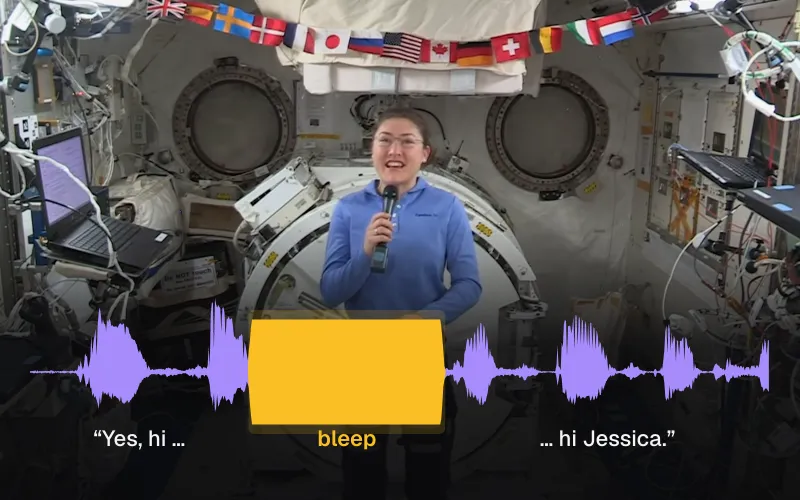
The interview is the opposite: Brandi Dean of NASA communications in a studio with astronaut Jessica Meir, and Christina Koch joining them from the space station. A host, a planned conversation, very few hesitations.
For each file we opened Remove Silence in Chrome on a MacBook Air with an Apple M5 chip, read the summary it shows for each pace, and read the cuts from the timeline itself: the exact start, end and kind of every hatched block. Then we set the shortest pause to 0.2 seconds and the margin to zero to count every quiet stretch in each file, tried the silence level 6 dB higher and lower, and turned on speech recognition to see what it changes. Finally we exported the call at the Fast pace from the Auto Jump Cut page, which opens on it, and looked at the frames on both sides of its joins.
How Remove Silence decides what is a pause
Unless you turn on speech recognition, it listens to the loudness of the sound, not the words. It measures every 20-millisecond slice of the sound, 50 a second, in the same pass that draws the timeline's waveform. Then it draws a line, the silence level: anything quieter is silence. Every recording has its own background noise, so the line is set per file. It sits 40% of the way from the file's background, the level that 15% of its moments stay under, up to its speech, the level only 10% of moments go above (moments of digital silence, with no sound at all, left out), and it never goes below −70 or above −20 dB.
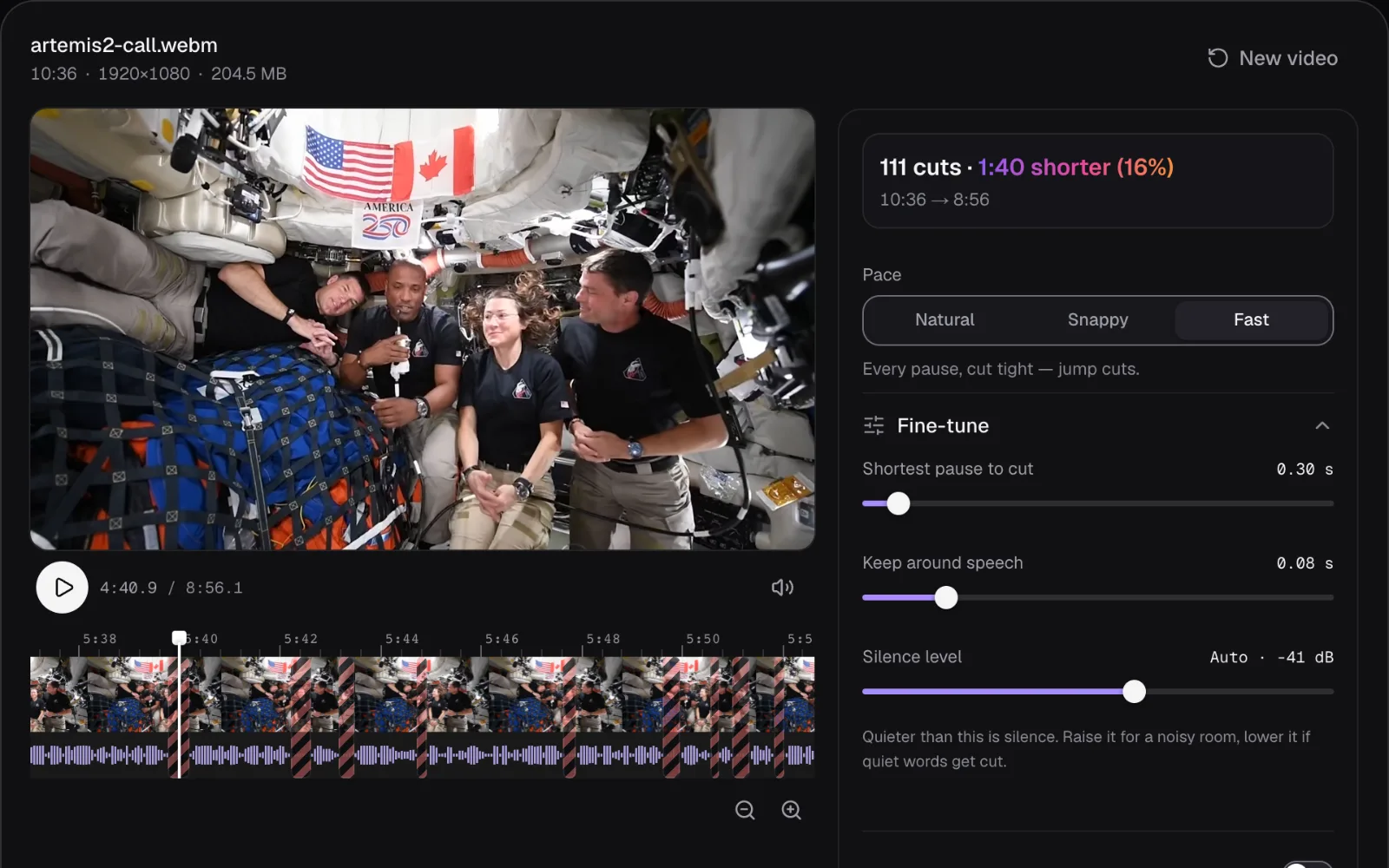
In the call, the background measured −53.5 dB and the speech −22.1 dB, which put the line at −41 dB. The interview's line came out at −38 dB. You can see the value under “Fine-tune”, where the “Silence level” slider reads “Auto · -41 dB”.
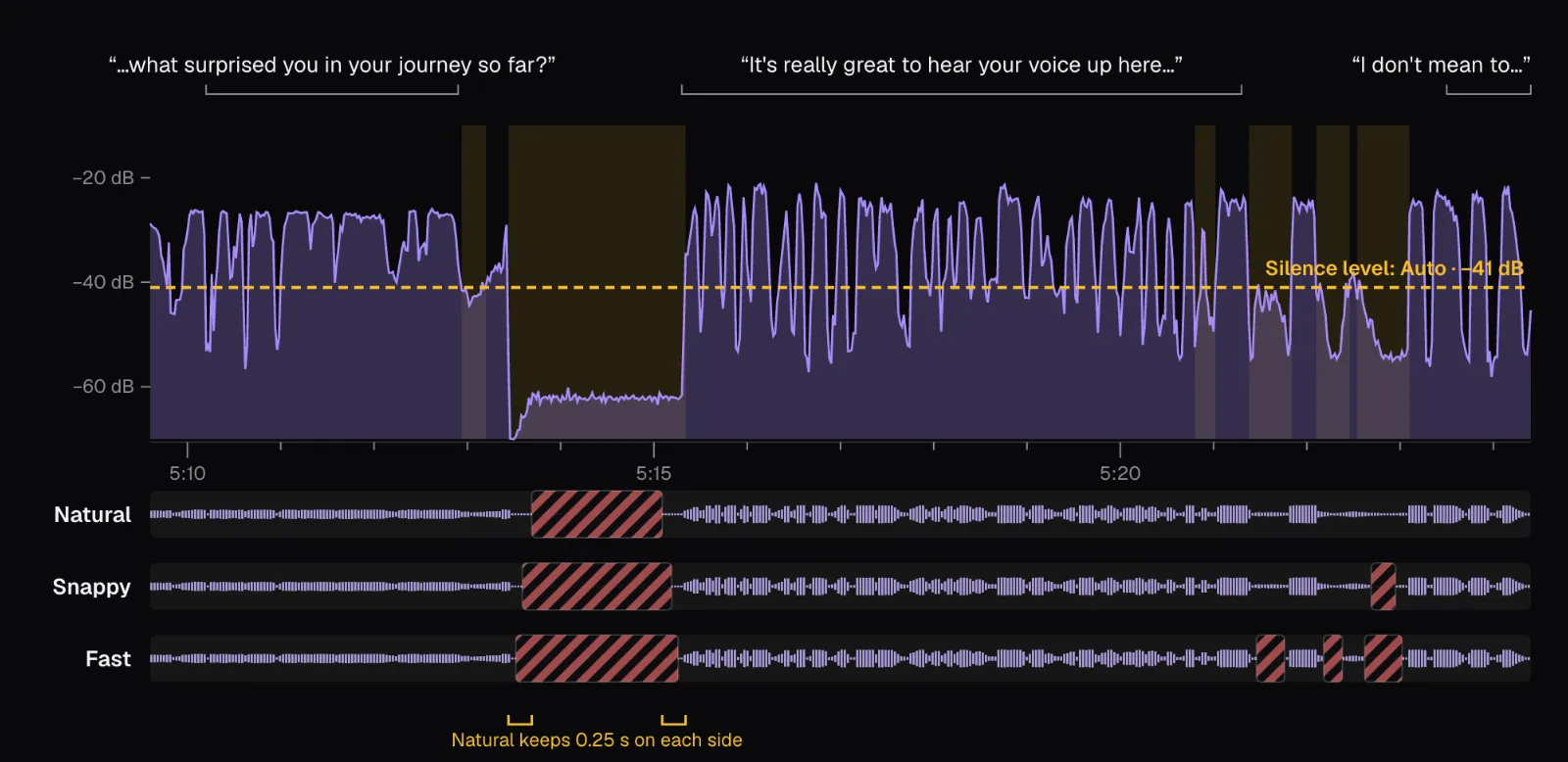
Two more numbers then decide which quiet stretches become cuts, and those two are what a pace sets:
- The shortest pause to cut. A quiet stretch shorter than this stays as recorded: 1 second at Natural, 0.5 at Snappy, 0.3 at Fast. A click or a tap of up to 40 milliseconds inside a silence doesn't end it.
- What stays around speech. From a pause long enough to cut, a little is kept against the words on both sides: 0.25 seconds at Natural, 0.15 at Snappy, 0.08 at Fast. Speech fades out below the line before it stops, and the breath before a sentence belongs to it, so a cut right at the line would clip them.
The second number has a consequence that's easy to miss: once a pause is long enough to cut, what's left of it no longer depends on its length. At Natural, a 1.2-second pause and the call's longest, 6.6 seconds, both end up as half a second of quiet: 0.25 before the cut and 0.25 after. At Snappy every cut pause becomes 0.3 seconds, at Fast 0.16.
The silence level matters too. At Snappy, raising the call's line by 6 dB, to −35 dB, made 65 cuts and took 1:31 instead of 48 cuts and 1:19; lowering it to −47 dB left 38 cuts and 1:13. A higher line finds more pauses, but it also starts treating soft syllables and the tails of sentences as silence. Raise it when music or steady noise runs under the voice and nothing gets cut; lower it when a join sounds as if the end of a word is missing. “Back to auto” puts the measured level back.
Minutes removed at each pace
| Pace | Cuts pauses of | Leaves of each | The call, 10:36 | The interview, 1:50 |
|---|---|---|---|---|
| Natural | 1 s or more | 0.5 s | 31 cuts, 1:08 shorter (11%) | 2 cuts, 6.8 s shorter (6%) |
| Snappy | 0.5 s or more | 0.3 s | 48 cuts, 1:19 shorter (12%) | 7 cuts, 8.7 s shorter (8%) |
| Fast | 0.3 s or more | 0.16 s | 111 cuts, 1:40 shorter (16%) | 18 cuts, 12.0 s shorter (11%) |
The call's 10:36 became 9:28, 9:16 or 8:56. Look at how the cuts and the seconds grow: from Natural to Snappy, 17 more cuts took 11 more seconds; from Snappy to Fast, 63 more cuts took 20 more seconds. Each step toward Fast adds many cuts that are each a fraction of a second long: the median cut lasted 1.92 seconds at Natural and 0.3 seconds at Fast.
The interview gave up a smaller share at every pace, and its biggest single cut, 5.3 seconds at Natural, wasn't a pause at all: it's the animated closing title at the end, which has no sound, and every pace removes it. Without it, Natural would have taken 1.5 seconds from the conversation itself.
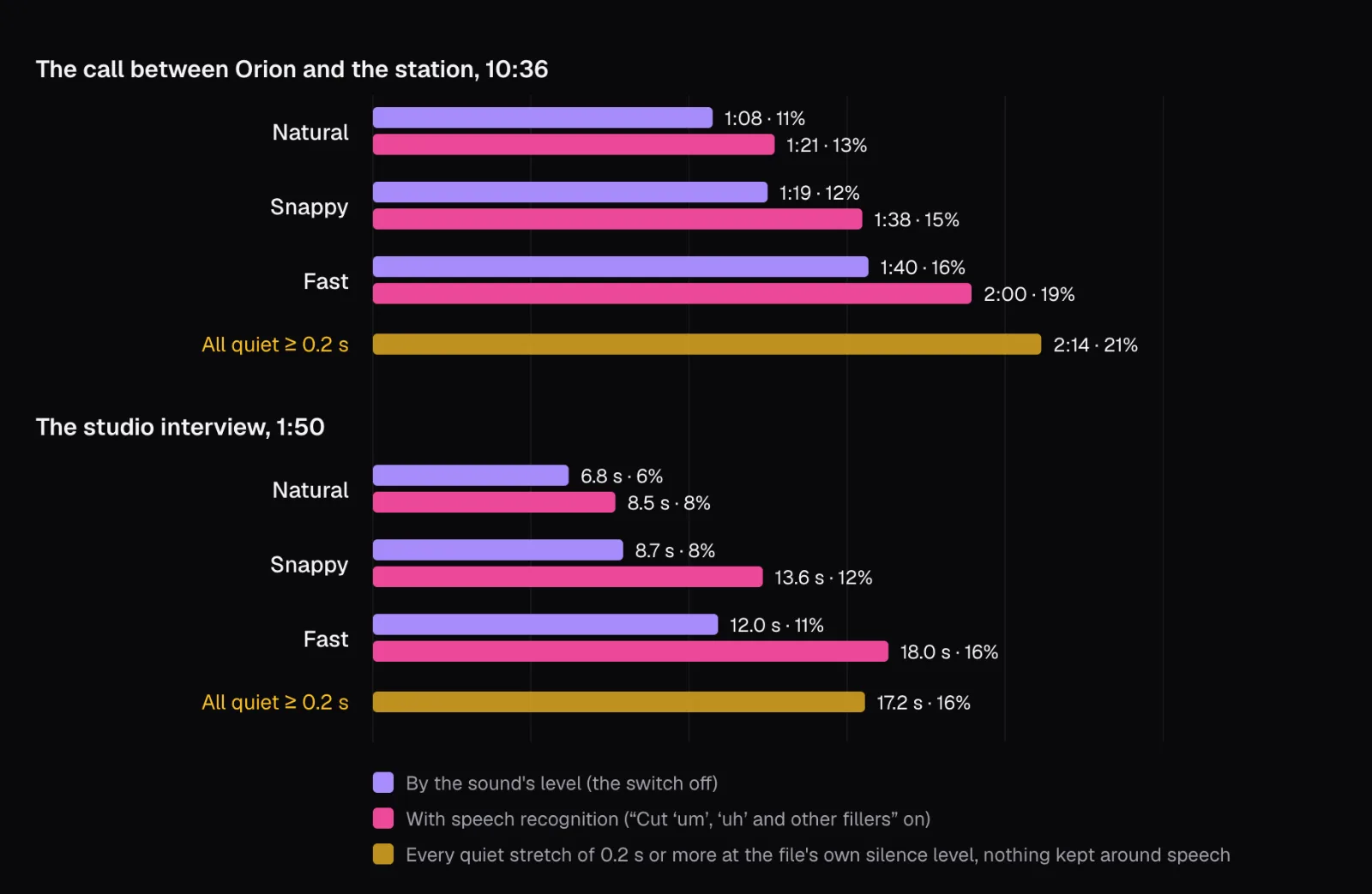
The yellow bars are the ceiling for cutting by sound at each file's own level: with the shortest pause at 0.2 seconds and nothing kept around speech, the summary showed 185 cuts in the call, 2:14 in all (21%), and 28 in the interview, 17.2 seconds (16%).
Half of the dead air sits in a few long pauses
Sorting the call's 185 quiet stretches by length explains the table. Most of them are short: 137 last under half a second and hold 40.9 seconds between them. Twenty last 2 seconds or more and hold 67.7, half of all the quiet in the call. Besides the opening voice checks and the end card, those long ones are mostly the waits between the two spacecraft, where the communications delay falls: even after NASA's shortening, the longest lasts 6.6 seconds.
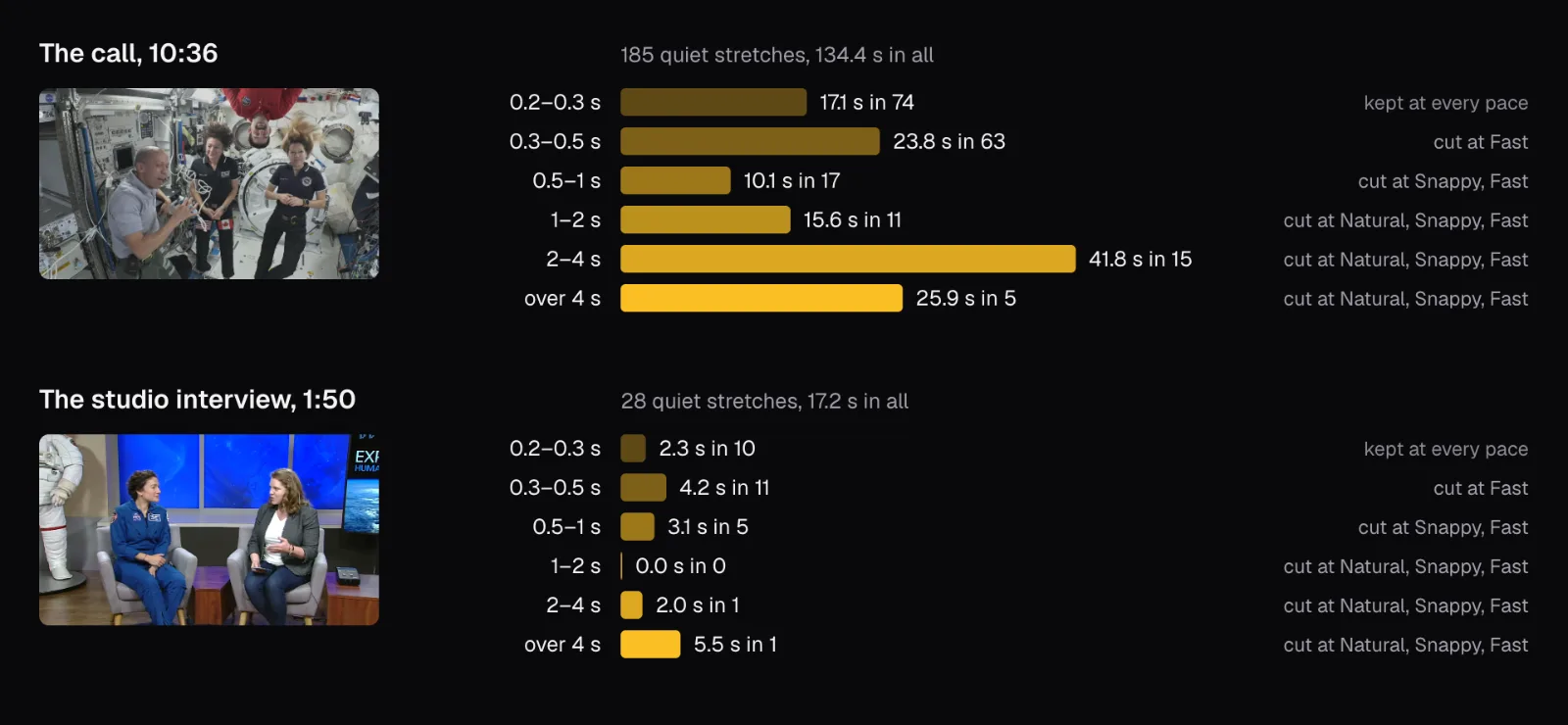
That's why Natural already does most of the work on a conversation like this one. Holding the margin at Snappy's 0.15 seconds and raising only the shortest pause, cutting just the pauses of 2 seconds or more removed 1:02; lowering it to 0.5 seconds added 28 cuts and 17 seconds. Going lower still, 0.3 and 0.2 seconds both gave 70 cuts: with 0.15 seconds kept on each side, a pause under 0.4 seconds leaves less than the 0.1 seconds Remove Silence needs before a cut is worth making.
The interview has almost no long pauses. Its 28 quiet stretches are spread across the sentences, 26 of them shorter than a second. Its one real pause, 2.0 seconds, comes where the conversation passes from Christina Koch on the station back to the studio. On a recording like this, a faster pace mostly shaves fractions of a second between phrases, inside sentences, where a cut changes how the speaker sounds.
What a jump cut looks like to a viewer
A jump cut is a cut between two moments of the same shot. The camera hasn't moved, so nothing tells the eye a cut happened except that the people in the picture suddenly are somewhere else. Every cut that silence removal makes inside one shot is a jump cut. In the call, the cameras on both spacecraft stay still, so the only cuts that don't jump are the ones that happen to land where NASA's edit switches from one spacecraft to the other.
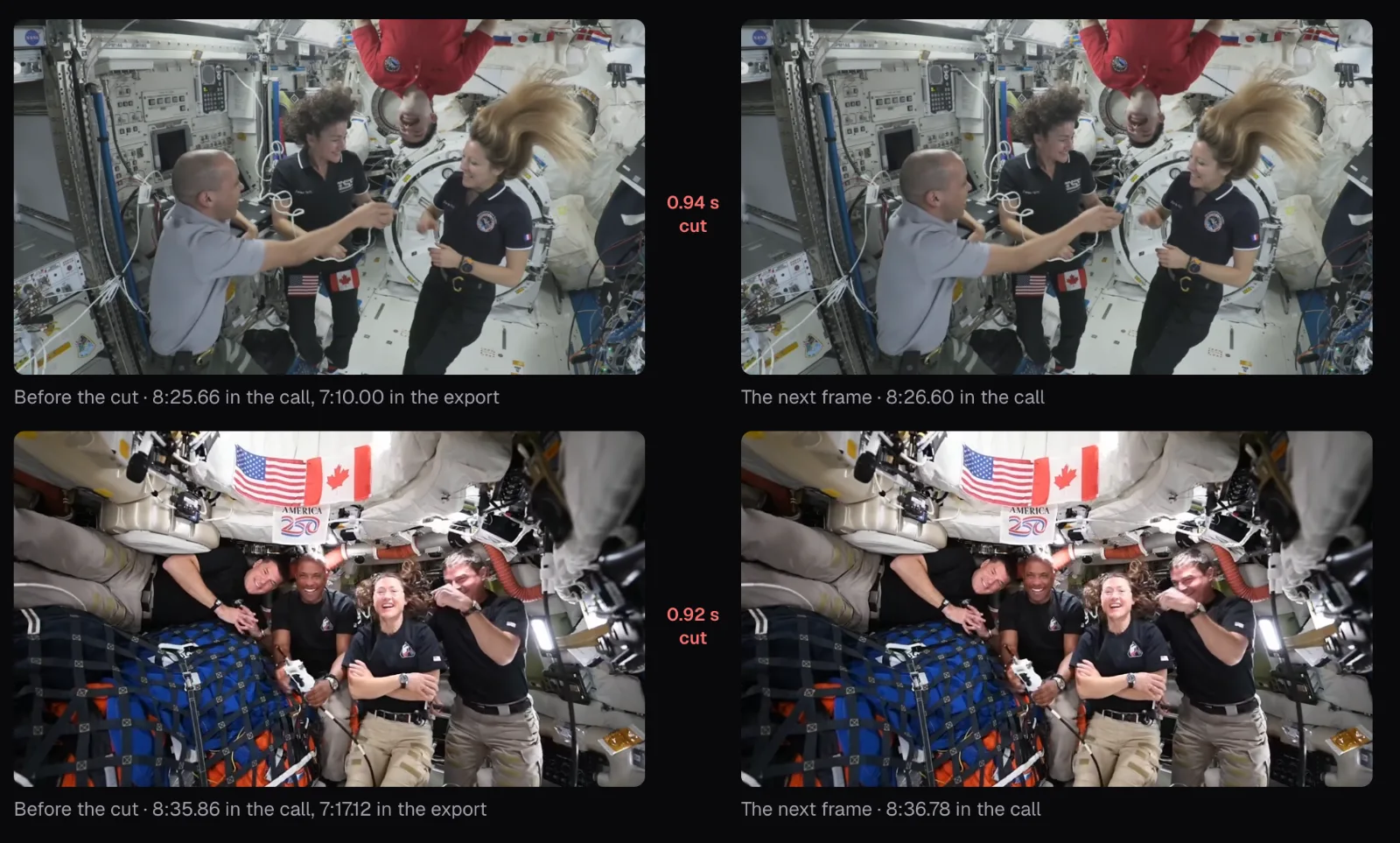
Our Fast export of the call has 109 joins: the cuts at the very start and the very end leave none. Comparing the frames on both sides of each, more than 90 fall inside a shot, where any movement shows as a jump. The others land where NASA's edit switches between the spacecraft anyway and look like ordinary cuts, but for the last two, at and inside the end card. Half of the jumps remove 0.28 seconds or less. On average the Fast result has a join every 4.9 seconds; at Natural it has one every 20 seconds.
How much a jump shows depends on how much the people move during the pause. On the space station, where nobody can stand still and hair floats, less than a second is enough for the people in the picture to jump visibly. Check your own footage before choosing Fast: a speaker sitting still in front of a camera on a tripod hides short cuts well, while people moving around show every one.
The exported MP4 ran 536.21 seconds, against the 536.18 seconds the cuts left. Picture and sound are cut at the same moments, and each join gets a 12-millisecond fade down and back up so the sound doesn't click. It also came out bigger than the original, 293 MB against 204.5 MB: the export encodes the picture again, as H.264 at a high quality for its frame size, whatever the original's bitrate was. If size matters, see how to make a video smaller.
Laughter, applause and the wait for an answer
Near the end of the call, the station's crew tell Orion how they “ran to the far end of the space station” so they “could claim we were the furthest away from you in that moment.” In the transcript, the next word comes 8.4 seconds later. The AI Clip Maker, whose pace setting works from those gaps between words, shrank that whole stretch to a quarter of a second, the crews laughing and clapping with it, as our guide to turning a long video into short clips found.
Remove Silence does something different, because it cuts by sound. In those 8.4 seconds, the picture cuts to the Orion crew laughing and clapping while the sound stays flat at about −55 dB, below the call's background level. Then the sound comes back, loud, with the station's crew laughing. At Snappy, Remove Silence cut the 4.3 quiet seconds and kept the 3.4 seconds of laughter you can hear. With speech recognition on, the cut was the same: a gap between words that holds more than 0.8 seconds of sound keeps that sound and loses only its silences.
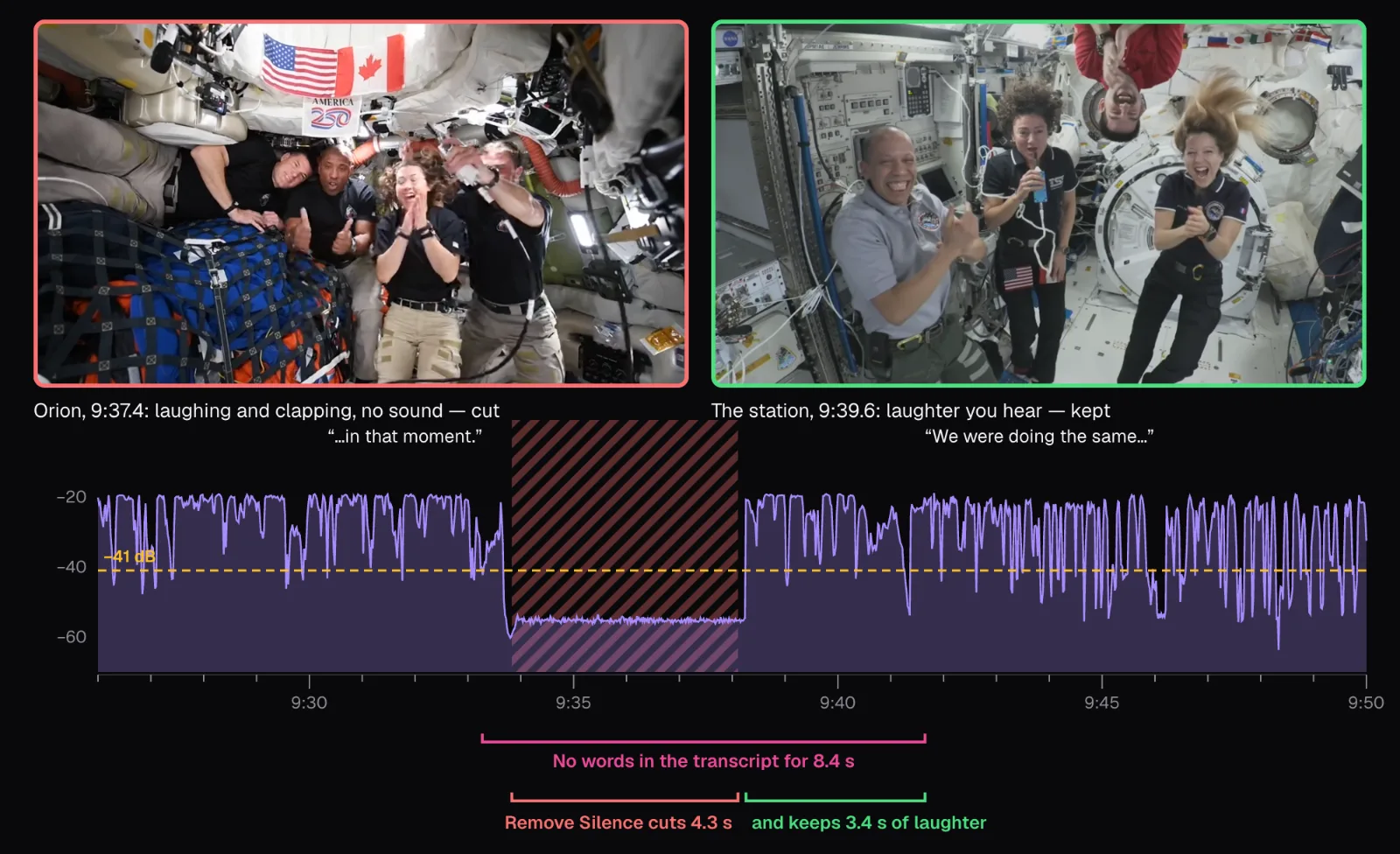
The same rule protects crosstalk: when two people talk at once, the sound never drops under the line, so nothing there is cut. The flip side is in the picture. A cut by sound can't see that the quiet seconds show the Orion crew reacting, and those reactions are often the best faces in a conversation. If you want them, put that part back, as the next section shows.
The wait for an answer deserves the same thought. In the call, most of the longest cuts are waits between the two spacecraft, and they change the feel of it most: a question followed at once by its answer sounds like two crews in one room, not a call across more than 232,000 miles. For a highlights reel that's what you want. For a record of what the call was like, half a second of waiting may be too little.
Review the longest cuts before you export
Remove Silence shows every cut as a hatched block on the timeline. Click one, or step through them with the arrows under “Review the cuts”, and the panel says which cut it is, what kind and how long; the preview moves to 1.5 seconds before it, so pressing play lets you hear the join coming. “Keep this part” puts it back, and it stays kept when you change the pace. “Play” switches between “With cuts”, the result, and “Original”.
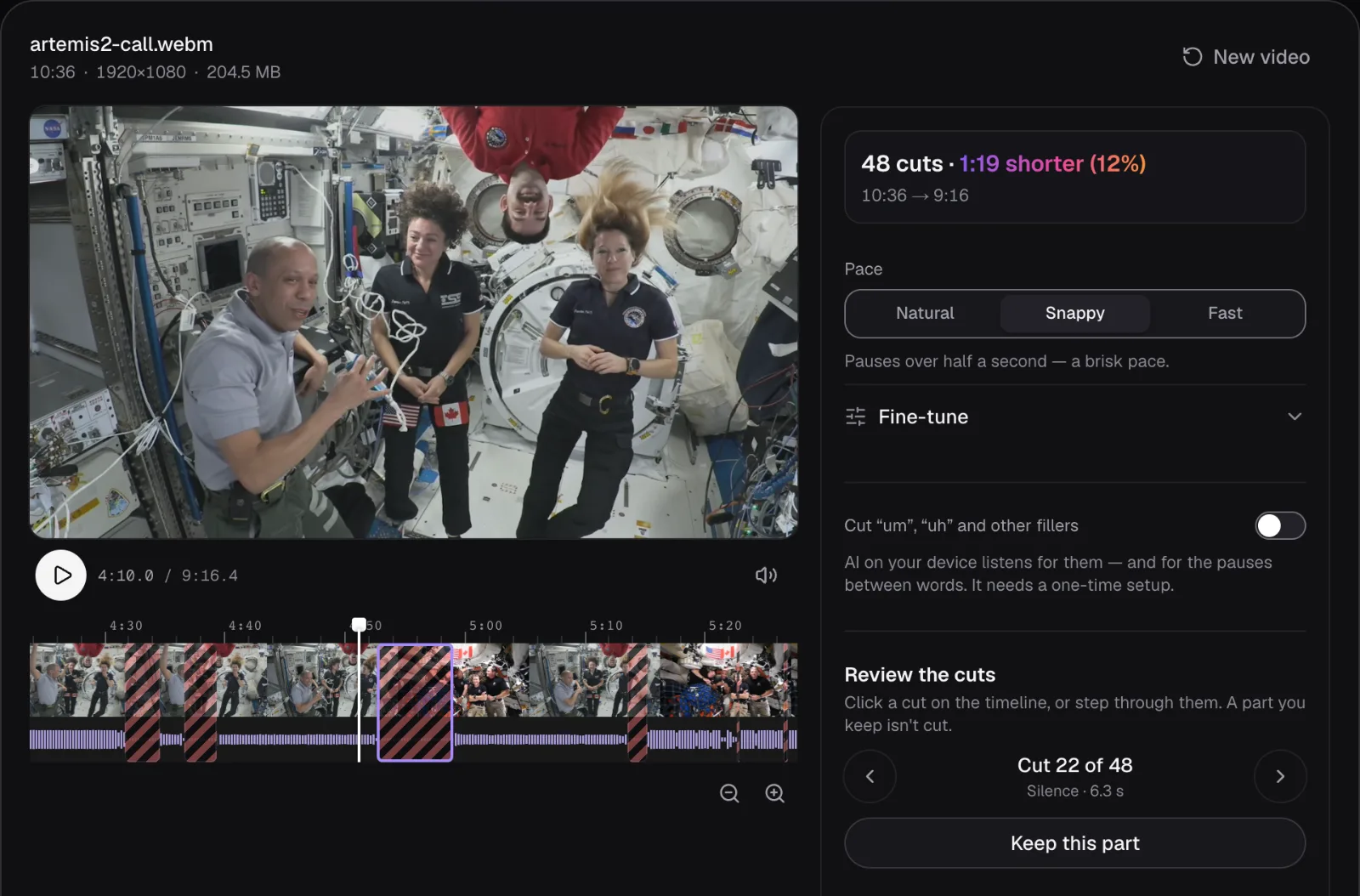
You don't need to hear all 48 cuts. Start with the longest: there are few of them, and they're where the conversation changes hands. In the call, the 10 longest Snappy cuts last from 2.8 to 6.3 seconds, and seven of them span a change of picture: six from one spacecraft to the other, one into the end card. The short cuts inside an answer are much like each other, and listening to a few tells you whether the pace suits the speaker.
If you'd rather finish in a desktop editor, “For your video editor” has “Download EDL” (Premiere Pro, DaVinci Resolve, Avid) and “Download FCPXML” (Final Cut Pro): the kept parts as an edit list in whole frames, to link to your original file there.
Speech recognition: fillers and the gaps between words
Cutting by sound can't remove an “um”: a hesitation is as loud as the words around it. The switch “Cut ‘um’, ‘uh’ and other fillers” adds speech recognition, running in the browser on your own device, and the Remove Filler Words page opens with it on. With the words known, the cuts are planned from the gaps between them: a hesitation goes with the pause around it, a gap at least as long as the shortest pause that holds only a little sound (0.8 seconds of it at most) goes whole, but for the margin, as a “Pause”, and a gap with more sound in it loses only its silences.
In our two recordings it found nothing to cut as a filler. Recognition wrote down 1,783 words in the call and not one hesitation, and none in the interview either: the panel said “No fillers found — the pauses between words are cut.” The cuts changed anyway. At Snappy the call went from 48 cuts and 1:19 to 66 cuts and 1:38, and 62 of them were labeled “Pause”. A gap between words with a little sound in it, a breath or a lip noise, is cut whole that way, where the sound's level alone cuts only its quiet parts and keeps the sound.
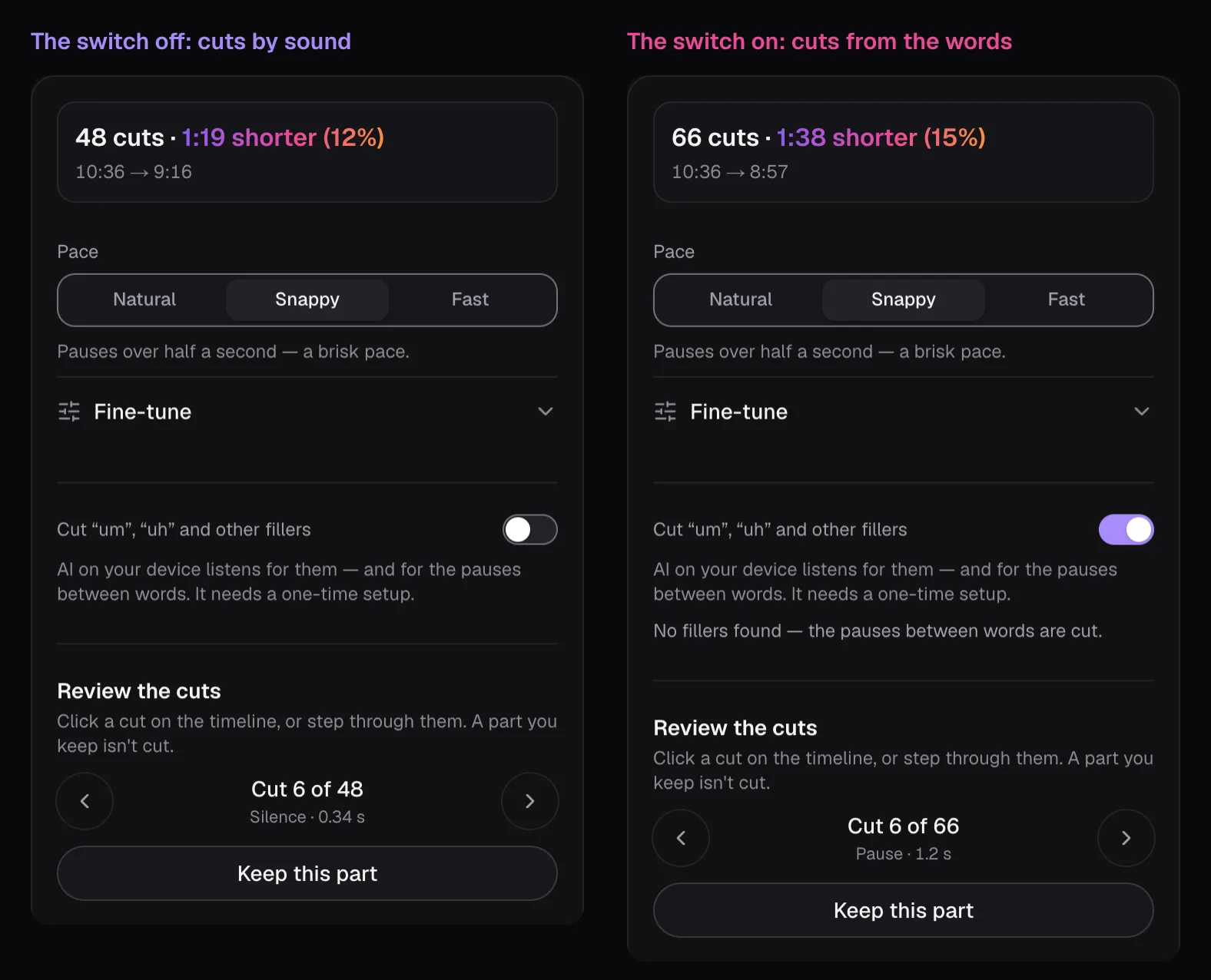
So the switch is worth turning on even for speakers who don't hesitate, when you want the tightest result, and it's the setting to review most carefully: a gap with a breath in it is cut whole. The export waits until recognition has heard the whole video. For a long recording that takes minutes, about as long as a transcript, which our guide to transcribing a video privately measures. A padding “so” or “like” and a sentence started twice stay, because they're words; take those out by hand in Trim Video.
Which pace to use for your video
| What you recorded | Start with | Why |
|---|---|---|
| A lesson, tutorial or screen recording | Natural | Viewers need time to take a point in or read the screen; only the real stops go |
| An interview, a call, a podcast with video | Snappy | The waits between speakers shrink to 0.3 s; pauses under half a second stay |
| One person talking to camera: commentary, a reaction, a short | Fast | The tightest rhythm, and a still speaker hides the jumps |
| Jokes, stories, anything with timing or reactions | Snappy, then keep the beats | A punchline needs the pause before it, and the faces after it |
For our two recordings: we'd publish the call at Snappy, which removes 1:19, 1:02 of it from the pauses of 2 seconds or more, and leaves every pause under half a second alone. Then we'd put back the 4.3 seconds of the Orion crew's silent laughter with “Keep this part”, for 1:15 removed in all. The interview needs nothing more than Natural, which takes out its silent ending and one long handover. Fast made the call 1:40 shorter, but 109 joins in nine minutes, more than 90 of them inside a shot, make it look like a highlights reel.
Once a video is out, its viewers tell you whether the pace works. YouTube Studio's audience retention report marks dips, which YouTube describes as moments where “viewers are abandoning or skipping”, and an intro figure: the share of viewers still watching after the first 30 seconds. As of November 2026, those key moments appear only for videos at least 60 seconds long with at least 100 views. A dip on a stretch you left slow is a reason to cut tighter next time.
Cut the pauses first, then make the captions from the shortened file, so each line lands on its words: our guide to captions people actually read covers the rest. To shorten a talk without cutting anything, speeding it up is the other way, and our guide to speeding up without chipmunk voices explains it.
Questions people ask
How long should a pause be in a talking video?
There's no single right length, but leaving a little of each cut pause keeps sentences from landing on top of each other. Remove Silence leaves 0.5 seconds of quiet where it cuts a pause at Natural, 0.3 at Snappy and 0.16 at Fast, and shorter pauses stay as recorded. Lessons and tutorials need the longer gaps; quick commentary can take the shortest.
Does removing silence cut out laughter and applause?
Not when Remove Silence cuts by sound: laughter is loud, so it stays. In our test it kept 3.4 seconds of laughter and cut only the 4.3 quiet seconds before it. With speech recognition on, a gap between words long enough to cut that holds 0.8 seconds of sound or less goes whole, so a short laugh can go with it. Tools that cut every gap between transcribed words can remove laughter of any length, because it has no words in it.
Why did removing silence barely shorten my video?
Often the speaker simply pauses little: our studio interview lost only 6% at Natural. Or something runs under the voice and never goes quiet, like music or an air conditioner. When that leaves nothing to cut, the summary says “Nothing goes quiet enough to cut” and suggests raising the silence level: under “Fine-tune”, raise it until it sits above that background.
Does cutting out silences put the sound out of sync?
No. Picture and sound are cut at the same moments, and each join gets a 12-millisecond fade down and back up so it doesn't click. Our 10:36 call, cut 111 times at the Fast pace, came out 536.21 seconds long; the parts the cuts left added up to 536.18.
Should I remove silences before or after adding captions?
Before. Captions timed to the uncut recording slip further out of step with every cut, and a ten-minute talk can have a hundred. Export the shortened video first and make the captions from it, so every line starts and ends with its words.
Sources
Where the facts in this guide come from, besides our own tests:
- Artemis II and Space Station Expedition 74 Astronauts Call in Space — NASA Image and Video Library
- Measure key moments for audience retention — YouTube Help
Footage in this guide
The pictures were made with Cutlia's tools from this openly licensed footage, found on Wikimedia Commons:
- Artemis II and Space Station Expedition 74 Astronauts Call in Space (jsc2026m000083) — NASA Johnson Space Center, Public domain
- Astronauts Koch and Meir React to International Space Station Mission Updates — NASA, Public domain