Editing
Which videos look magical in reverse, and how do you make a boomerang?
We ran Old Faithful and a 4K waterfall backwards, bounced a humpback whale’s tail, and matched every frame of the results to the original.
By the Cutlia team · Published · 17 min read
The short version
- Reverse motion that only ever runs one way in real life — falling water, spreading steam, people walking — and bounce motion that looks natural both ways, like a turn or a tail tilting in the swell.
- Reversing keeps every frame but encodes them all again: our 1080p Old Faithful grew from 57.1 MB to 70.9 MB and our 4K waterfall from 43.0 MB to 380.1 MB, so reverse only the part you need.
- A steady sound like running water sounds the same backwards — our waterfall’s reversed track matched the original’s spectrum within 0.2 dB — while speech turns to gibberish, so choose “As recorded” or “No sound” for voices.
- Make a boomerang from one movement of 1 to 4 seconds; at 1× ours turned without showing any frame twice, while at the Boomerang Video Maker’s default 1.5× one turn held a picture for a tenth of a second.
- Post loops as MP4 and keep GIF for places with no video player: our GIF weighed the same 6.7 MB as the full-HD MP4 of one pass, with a ninth of its pixels.
Some footage turns into a small trick when it runs backwards: water climbs a cliff, a geyser swallows its own steam, a crowd walks backwards away from the thing it came to see. Other footage just looks broken. The difference lies in the motion, not in the editor, and a boomerang, which plays a moment forwards and then back again, wants the opposite kind of motion from a reverse.
We tested both on three films from Wikimedia Commons that anyone may reuse: Yellowstone National Park's time-lapse of Old Faithful erupting in front of a late-summer crowd, a 4K shot of Delaneys Falls in Tasmania, and NOAA's drone footage of a humpback whale holding its tail above the sea off Maui. We reversed the first two whole in Cutlia's Reverse Video, made boomerangs of the whale in the Boomerang Video Maker, as MP4s and as a GIF, then decoded every file we downloaded and matched each of its frames to the frame of the original it shows, all of it in Chrome on a MacBook Air with an Apple M5 chip.
Reverse or boomerang: two effects that want opposite motion
A reversed clip plays once, from its last frame to its first. A boomerang plays a moment forwards and then backwards, once or several times in a row, so one movement becomes a loop. In Cutlia both come from the same editor: Reverse Video opens on “Backwards”, and the Boomerang Video Maker is the same tool opened on “Boomerang”.
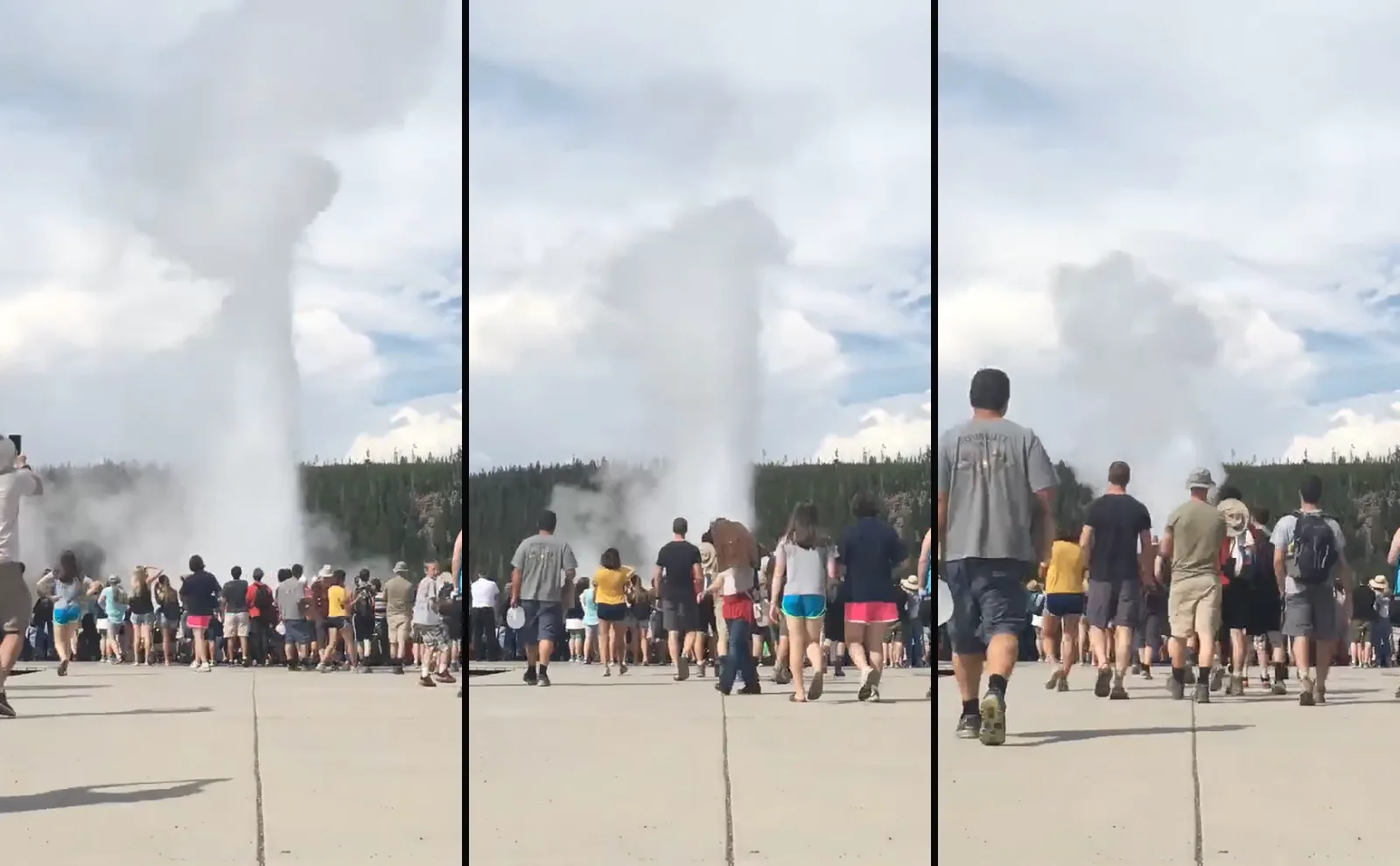
A reverse is worth watching only when the motion has a direction everyone knows, so that the backwards version is something that never happens. Old Faithful packs three of them into one shot. Water shoots up and falls back. Steam billows out, thins and drifts off on the wind. And people walk forwards, with a gait anyone recognizes within a step. Run backwards, a drifting cloud gathers itself up and sinks into a hole in the ground, while the crowd that came to watch it walks backwards down the boardwalk.
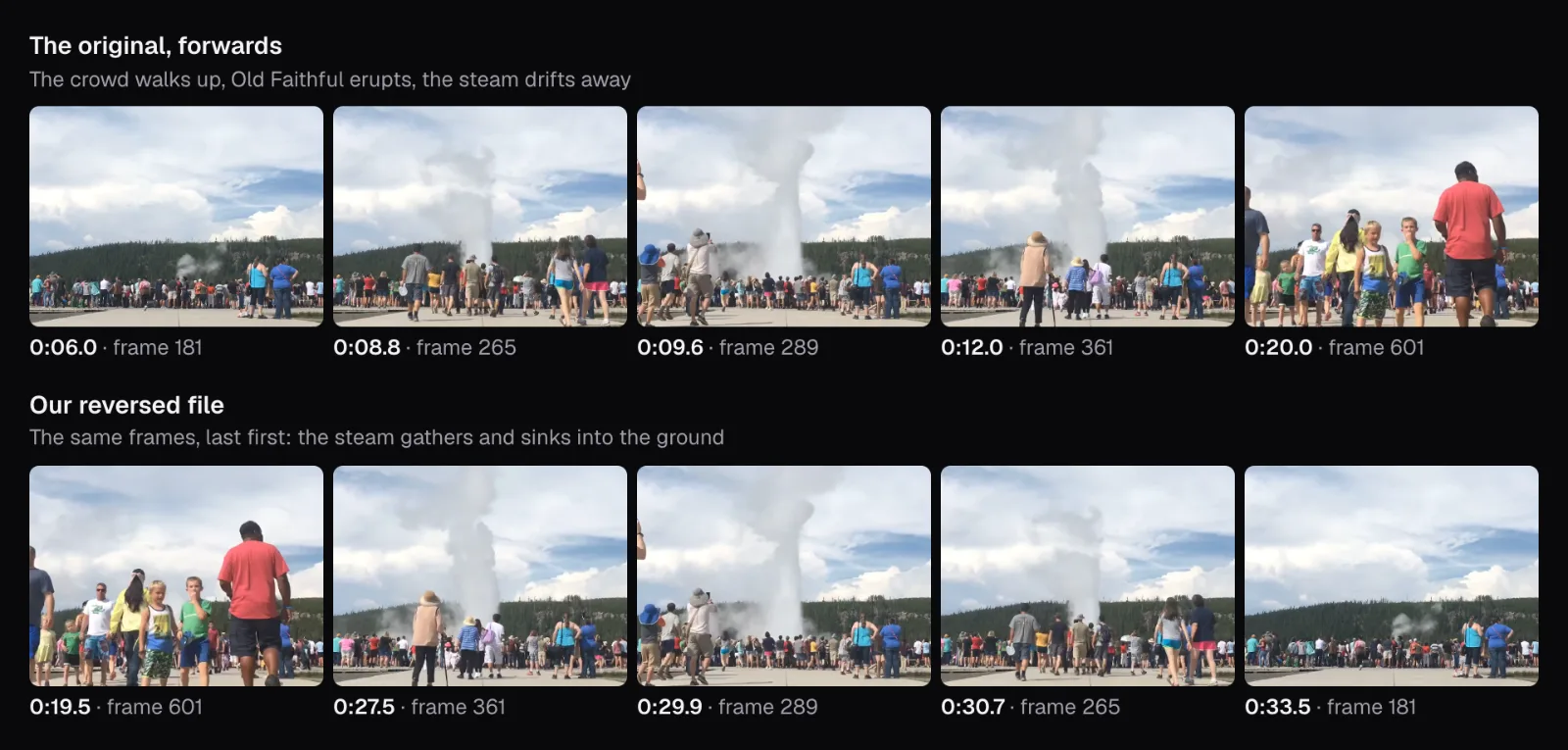
A boomerang wants the opposite. Half of every pass runs backwards, so the loop only holds if nobody can tell which half that is: a turn of the head, a toss and catch, a tail tilting in the swell. Motion with no direction of its own hides a reverse just as well. At Delaneys Falls the water gives the reverse away at once, climbing back up the rock, but the tree beside it, shaking in the wind, looks no different backwards. Before you open an editor, play the moment backwards in your head: if it looks wrong, reverse it; if it looks fine either way, bounce it.
No single frame shows the difference. Each frame of a reversed video is an ordinary frame of the original; only the order has changed. That is exactly what we found when we read our files back.
What Reverse Video did with every frame of Old Faithful
Jacob W. Frank of the National Park Service filmed the time-lapse on September 7, 2017. Our copy is a 57.1 MB WebM, 1920 × 1080 at 29.97 frames per second, 39.6 seconds long, with no sound track. The Park Service says an eruption of Old Faithful normally lasts 1½ to 5 minutes and reaches 106 to more than 180 feet (32 to 55 meters); the time-lapse squeezes the column's rise and fall into a few seconds of the file.
Reverse Video opened it on “Backwards” at 1×, with “Result: 0:39.5” under the speed buttons and no “Sound” section at all, since the file has nothing to play. Before Play works, the player shows “Getting the backwards preview ready” over the first frame of the result, and adds “You can already export.” The wait is a small reversed copy being made for the player; more on why below.
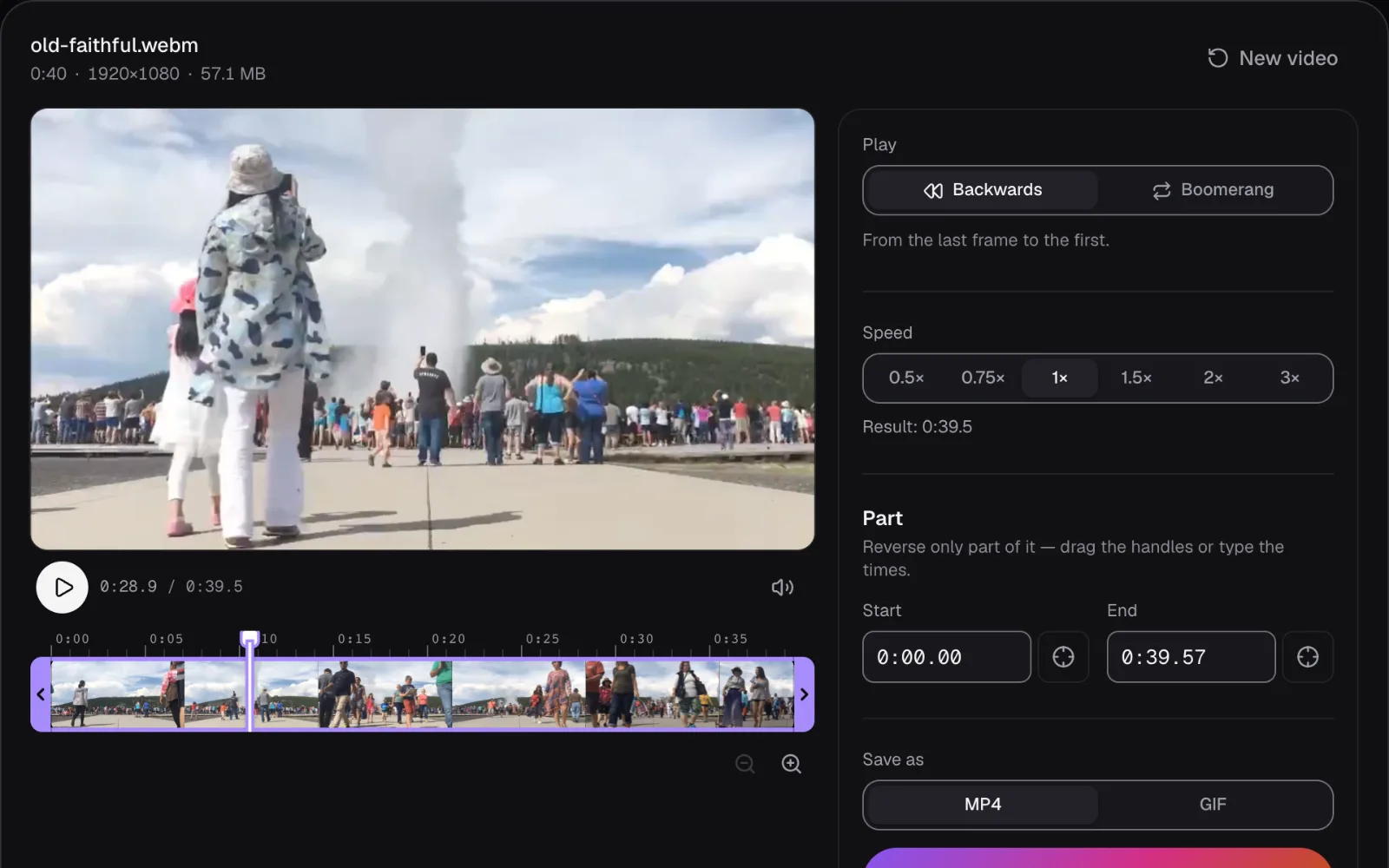
The export, titled “Your video plays backwards”, was a 70.9 MB MP4 with an H.264 picture, still 1920 × 1080 at 29.97 frames per second. We compared each of its 1,187 frames, shrunk to 160 × 90 in gray, with the frames of the original around the moment it should show, and took the closest. The result opened on the original's last frame, number 1,186, and from there every frame was the one before it: all 1,186 frames, once each, none dropped and none doubled. The one frame the result has over the original sits at the very end and repeats the original's first.
The waterfall came out the same way. Its frames don't come at an even rate: in 27 places the gap between two of them lasts two frames' time. The reversed MP4 runs at a steady 30 frames a second, and Reverse Video held the picture across those gaps instead of inventing new ones. All 1,203 frames of the original appeared, last first, and the order never once stepped forwards.
Why a video can't simply play backwards
Players run in one direction. MDN's documentation of the playback rate setting says a negative value “indicates that the media should be played backwards, but support for this is not yet widespread”. Part of the reason sits in the file. To save space, a video stores a whole picture only now and then, a key frame, which MDN describes as one that “does not rely on other frames for decoding”. Every frame in between is stored as changes from frames decoded before it. Our waterfall has a key frame about every 4.4 seconds, 128 frames apart, so to show the last frame of a stretch, a decoder starts at its key frame and works through the 127 frames before it.
So Reverse Video reads a file in stretches, from one key frame to the next, starting with the last. It decodes each stretch forwards, keeps the decoded frames in memory and hands them to the encoder last first. It holds at most 256 MiB, about 268 MB, of decoded frames at once; when a stretch needs more, it keeps the last frames that fit, hands those out, then decodes the stretch again from its key frame for the rest.
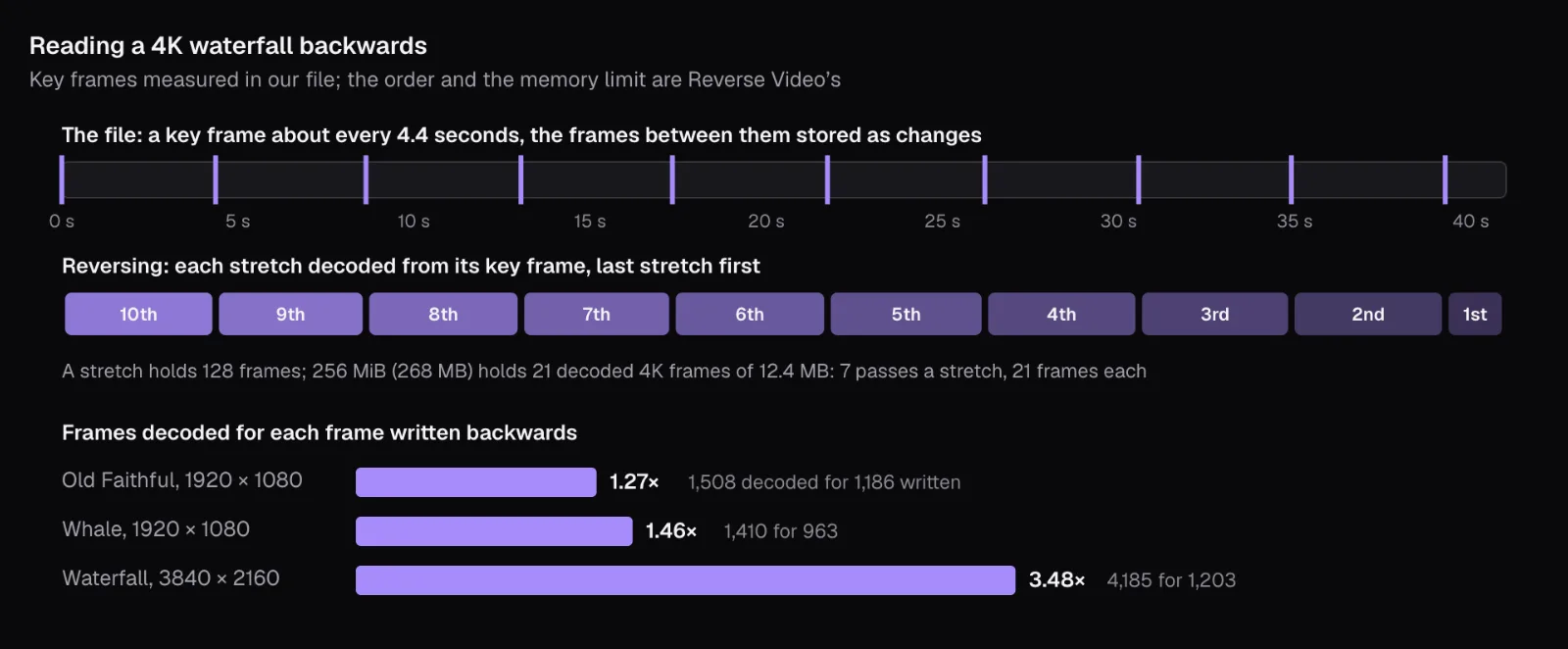
That limit is where resolution tells. In Chrome on our Mac, a decoded frame took 3.1 MB at 1920 × 1080 and 12.4 MB at 3840 × 2160. Worked out from each file's key frames by that rule, a 1080p stretch of 128 frames takes two passes, and reversing Old Faithful decodes 1,508 frames to write its 1,186. In 4K only 21 frames fit, so each full stretch of the waterfall is decoded from its key frame seven times, a little less far each time: 4,185 frames decoded to write its 1,203, or 3.48 for each one. That is the extra work behind a 4K reversal, and marking only the seconds you need cuts it down.
The preview has the same problem and gets the same answer. Since the player can only play forwards, the tool first makes a reversed copy of the video in memory, at most 854 × 480 and 30 frames a second, and plays that instead. For a video up to 2 minutes long the copy covers all of it; for a longer one, at most 2 minutes of the part you're working on. The file you download is made from the original, not from that copy.
Reversing re-encodes: what happens to size and picture
Frames in a new order can't be copied out of the old file, because each frame between key frames describes changes from a frame that now comes after it. So the whole picture is encoded again, as H.264 in an MP4, and Reverse Video encodes for high quality at the video's own frame size rather than matching the original's bitrate. What that costs depends on the footage:
| Film | Original | Reversed MP4 | Growth |
|---|---|---|---|
| Old Faithful, 1920 × 1080 | 57.1 MB, VP9 at 11.5 Mbit/s | 70.9 MB, H.264 at 14.3 Mbit/s | 1.24× |
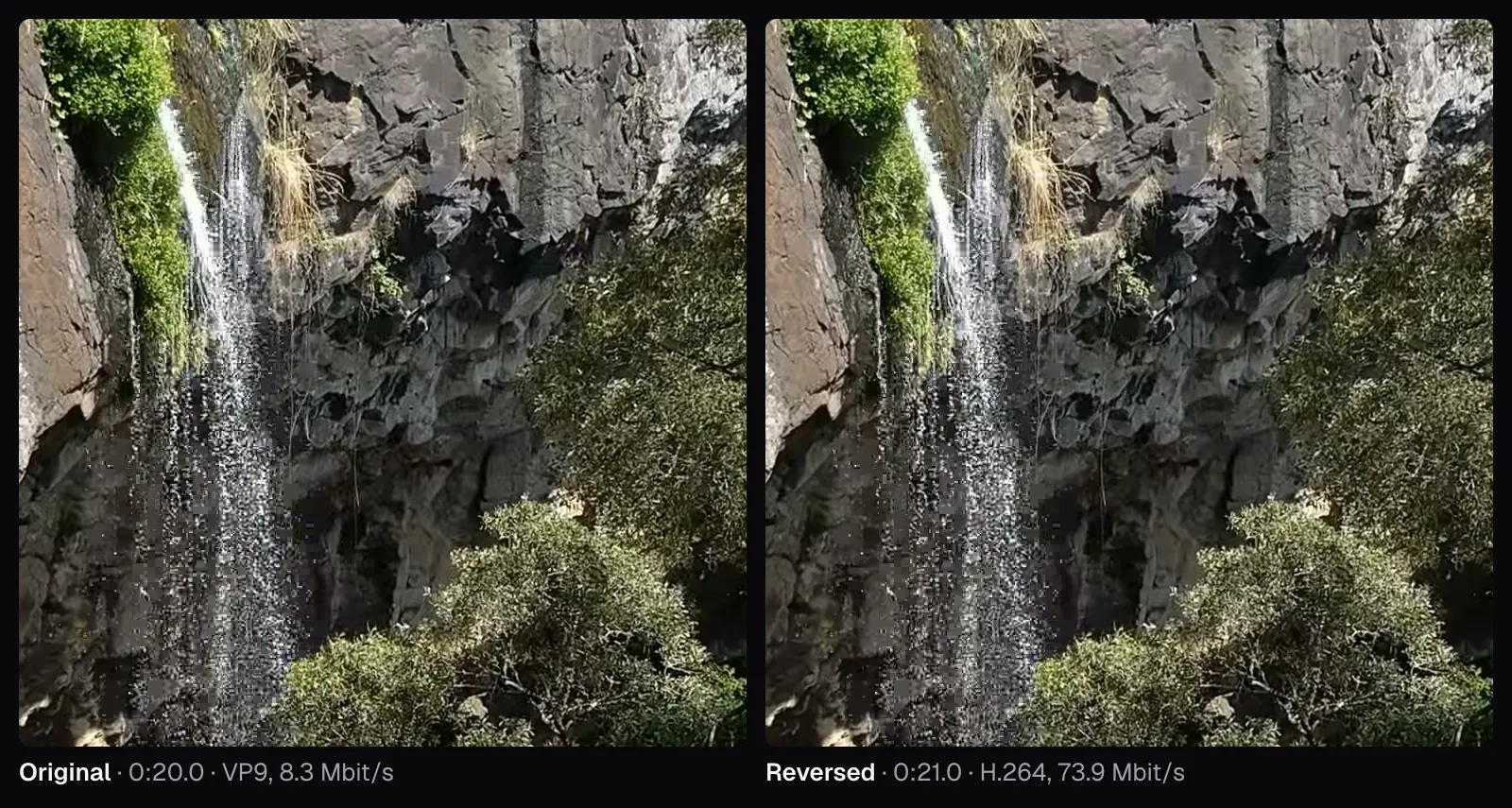
| Delaneys Falls, 3840 × 2160 | 43.0 MB, VP9 at 8.3 Mbit/s | 380.1 MB, H.264 at 73.9 Mbit/s | 8.84× |
The waterfall grew almost ninefold. Its frames are full of fine detail that changes from one frame to the next: spray glittering down the rock, thousands of leaves moving in the wind, sunlit grass. Detail that never holds still is what costs an encoder the most bits, and one aiming for quality pays for all of it. At actual pixels, the result is hard to tell from the original.
If the result is too big to send, run it through Compress Video once, as the last step, rather than shrinking the original first and losing quality twice. Our guide to bitrate and file size explains the trade. For long or 4K videos, reversing only the part you'll use helps twice over: less to decode, and a smaller file at the end.
What happens to the sound
A video with sound gets three choices under “Sound”. “Backwards”, the default, plays the sound in reverse with the picture, locked to it frame for frame. “As recorded” plays it forwards under the reversed picture. “No sound” leaves it out, the right start when music goes on top later with Add Music.
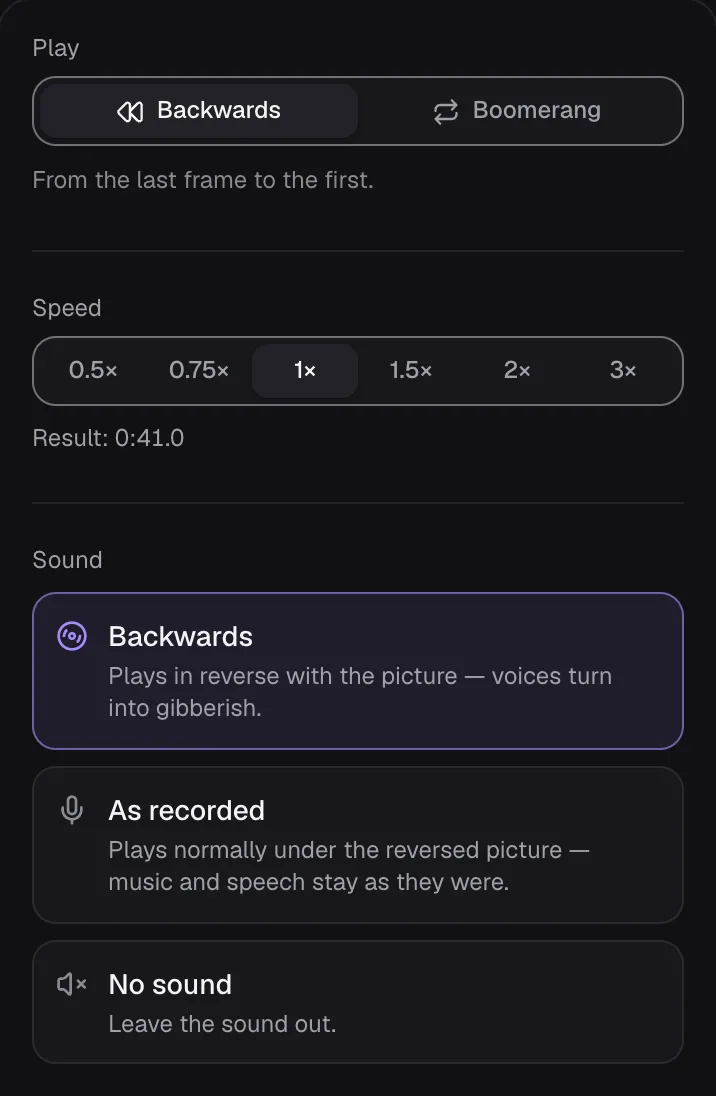
Which one fits depends on whether the sound has a direction, just like the picture. The tool's own description of “Backwards” warns that voices turn into gibberish: speech is full of sounds that start sharply and fade away, and reversed, they swell up and stop dead. Falling water is a steady rush with no shape in time. We left the waterfall's sound on “Backwards” and compared ten seconds of the reversed file with the same ten seconds of the original. Their spectra, the level at each pitch, never differed by more than 0.2 dB, from 50 Hz to 12.8 kHz.
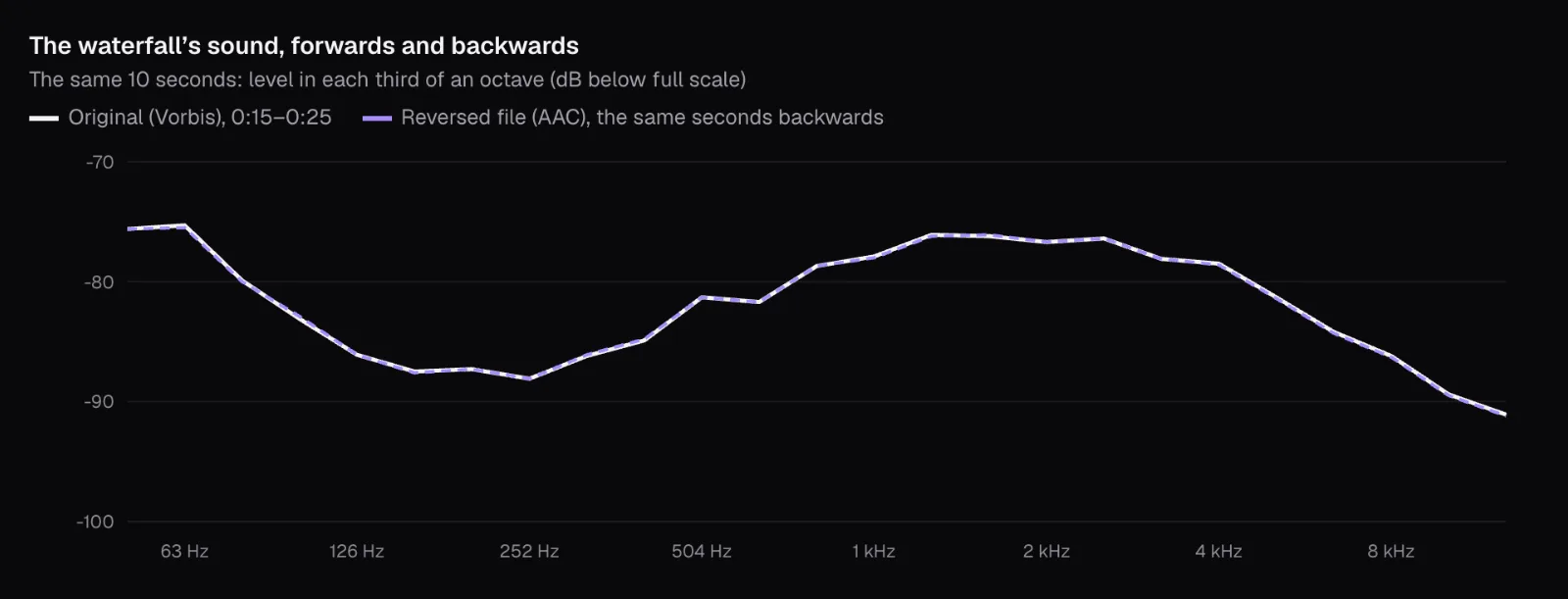
And the reversed track really was the original read backwards. We took two seconds of it and compared them sample by sample with the same two seconds of the original turned around: they correlated at 0.999, where 1 would be identical. Against the original played forwards, the figure was 0.04, which is no likeness at all. The waterfall's mono Vorbis sound was re-encoded as AAC in the MP4.
So a steady sound can stay on “Backwards”: our reversed waterfall still sounds like a waterfall. For words or a tune, choose “As recorded”: music and speech stay as they were, though they no longer match the lips or hands on screen. That's fine under narration or a song and glaring on a face talking to the camera, where “No sound” and a new soundtrack serve better.
Choosing a boomerang moment: a humpback's tail
NOAA's Hawaiian Islands Humpback Whale National Marine Sanctuary released our whale footage in March 2016, shot from a small drone. In its words, a mother and calf were “swimming and diving in the sanctuary off Maui's leeward coast”, and at one point “the mother appears to be doing a headstand and drifting with her tail out of the water”. Tail-sailing, the release adds, “has rarely been observed or documented among humpbacks”. Our file is 32.3 seconds of 1920 × 1080 at 29.82 frames per second, 12.2 MB.
The Boomerang Video Maker opened it on “Boomerang” at 1.5×, with “No sound” and “Times” at 1×. Over the whole file that came to 0:43.0, and the editor said what it thought of that: “Boomerangs look best with a short moment — 1 to 4 seconds. Drag the handles to pick one.” The tip appears whenever the marked part is longer than 6 seconds.
We typed 0:12.40 and 0:14.00 under “Part”: 1.6 seconds, 48 frames, in which the mother's flukes turn from edge-on, a thin white line of underside catching the sun, to flat and dark above the water. It is one movement with a clear start and end, and it looks just as natural undone: a tail tilting one way in the swell, then back. The drone drifts a little through the shot, and the boomerang turns that into a gentle sway.
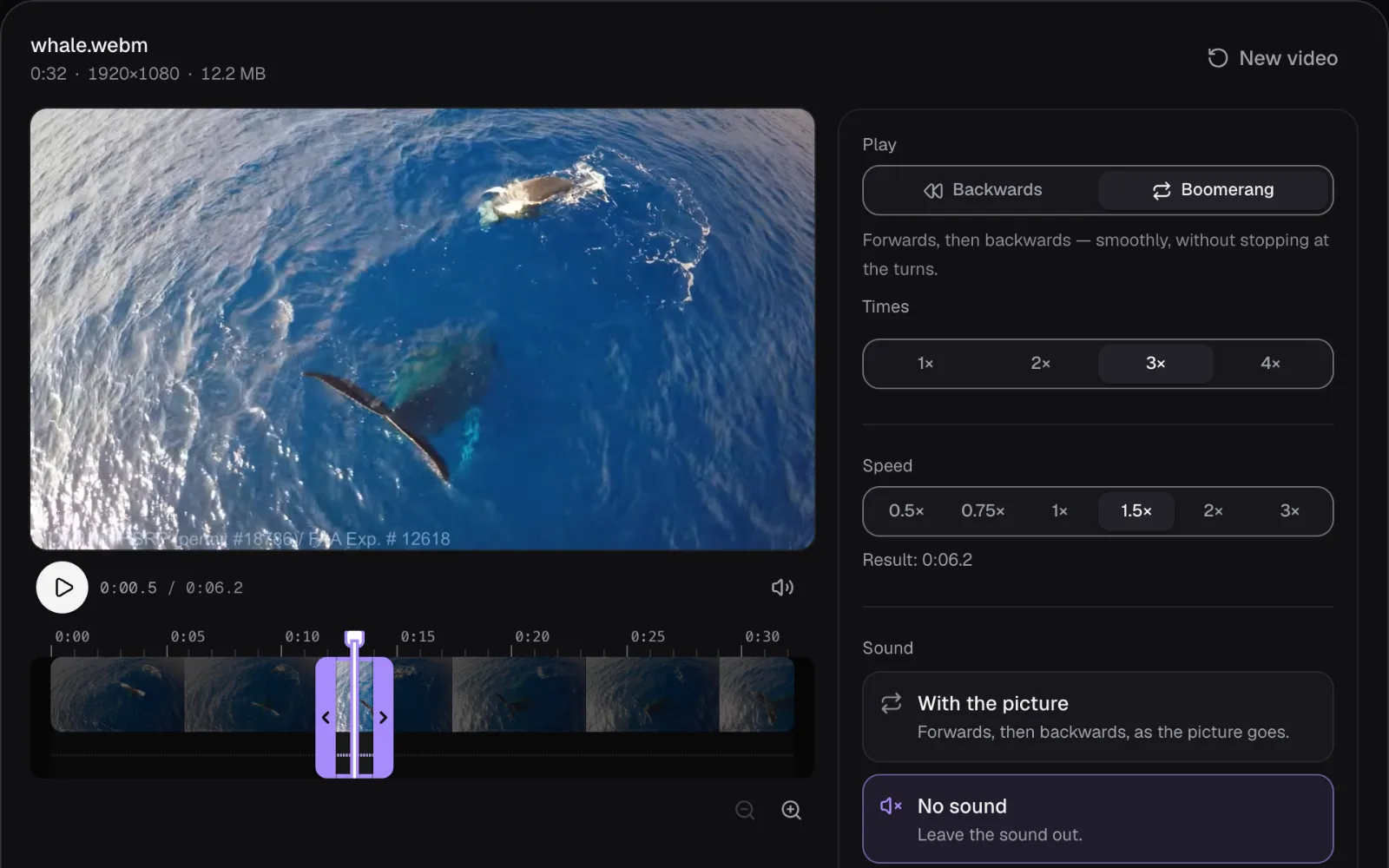
“Times” is set once, from the length of the whole file you open rather than the part you mark: 3× for a video up to 1.5 seconds long, 2× up to 4 seconds, and 1× for anything longer. Ours stayed at 1×, so we chose 3× ourselves. Cut the moment out first with Trim Video and the editor picks the passes for you.
The result's length shows under the speed buttons. One pass at 1× is the moment there and back, 3.1 seconds for ours; “Times” multiplies that and the speed divides it. We read it for every combination:
| Speed | Times 1× | 2× | 3× | 4× |
|---|---|---|---|---|
| 0.5× | 0:06.3 | 0:12.5 | 0:18.8 | 0:25.1 |
| 0.75× | 0:04.2 | 0:08.3 | 0:12.5 | 0:16.7 |
| 1× | 0:03.1 | 0:06.2 | 0:09.4 | 0:12.5 |
| 1.5× | 0:02.1 | 0:04.1 | 0:06.2 | 0:08.3 |
| 2× | 0:01.5 | 0:03.1 | 0:04.7 | 0:06.2 |
| 3× | 0:01.0 | 0:02.0 | 0:03.1 | 0:04.1 |
Three passes at 1.5× gave the turn three times in about six seconds, long enough to read and short enough to watch again. Four passes at 0.5× ran past 25 seconds for one flick of a tail. Slow speeds also cost smoothness, because the tool never paints pictures between the recorded ones: at 0.5× each frame stays on screen for two. Our slow-motion guide counts what that does to movement.
Where a boomerang turns
A boomerang lives or dies at its turns. If the last frame of the way there were also the first of the way back, the picture would stop for a frame at every turn. Reverse Video plans around that: the way back starts one frame before the end and stops one frame after the start, where the next way forward begins, and only the last way back goes all the way to the start.
We checked by matching all 283 frames of our three passes at 1× to the 48 frames of the moment. The file shows frames 1 to 48, then 47 down to 2, then 1 to 48 again, 47 to 2, 1 to 48 and finally 47 to 1. No picture appears twice in a row anywhere in it.
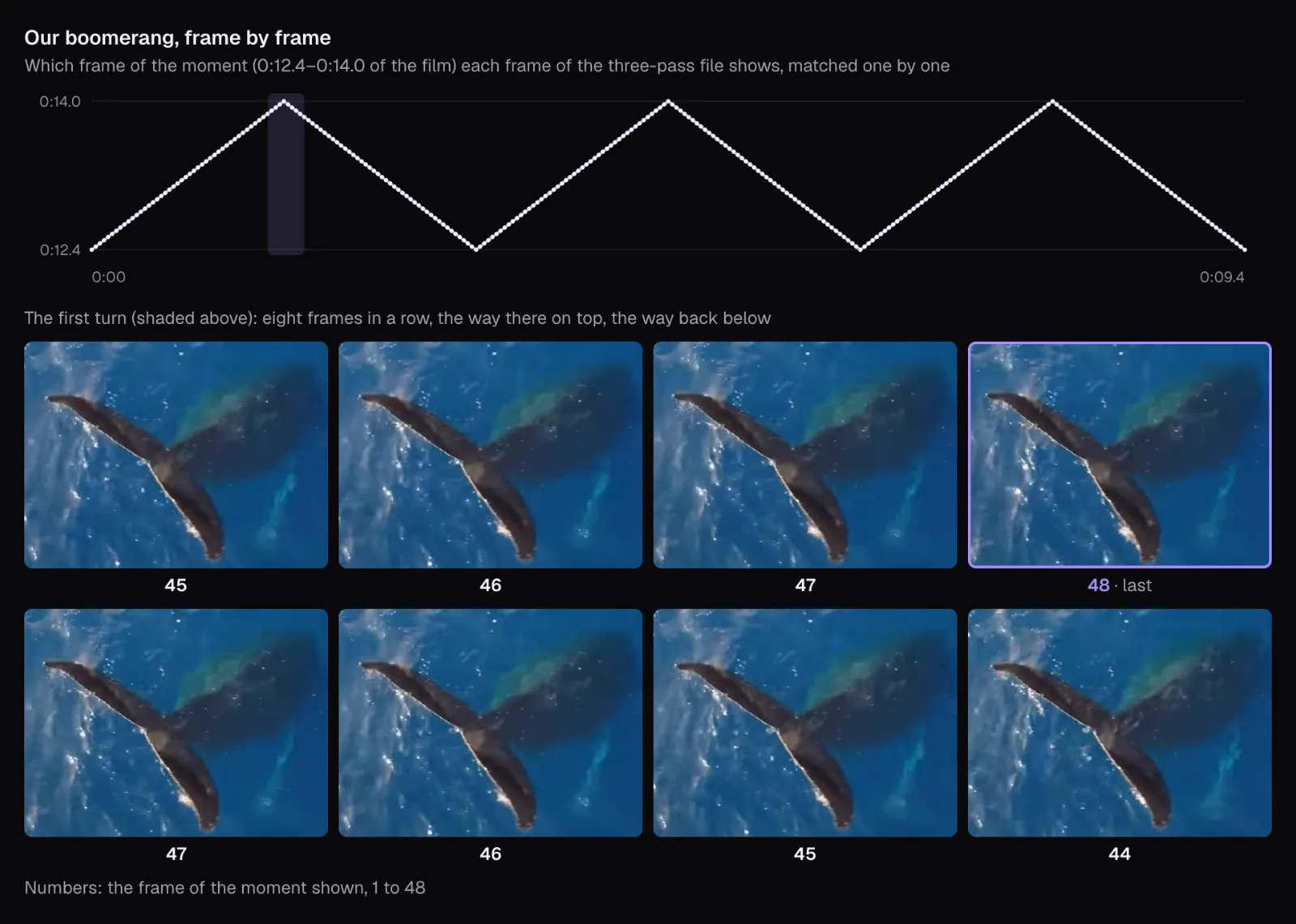
At 1.5×, frames can't line up one for one: each frame of the result moves the moment on by one and a half frames, so the way there shows frames 1, 3, 4, 6, 7 and so on. The turns at the far end stayed clean, but at the two turns back to the start, our 1.5× file showed the moment's second frame for two frames and then for three, a pause of a tenth of a second at most. For the smoothest loop, bounce at 1×.
Sound follows the same plan with “With the picture”: forwards, then backwards. At each turn the volume dips to silence and back within 12 milliseconds either side, so a cut waveform doesn't click. With sound on at any speed but 1×, a “Keep the pitch” switch appears, on by default; switched off, faster sounds higher and slower sounds deeper, like a tape.
GIF or MP4 for the loop
Under “Save as”, a video can become an MP4 or a GIF. Choose GIF and both “Times” and “Sound” disappear: a GIF has no sound track, and it loops by itself, so it holds a single pass. We saved the whale's moment at 1.5× three ways:
| Saved as | Picture | Plays | Size |
|---|---|---|---|
| MP4, 1 pass | 1920 × 1080, 29.97 fps | 2.1 s, then stops | 6.7 MB |
| MP4, 3 passes | 1920 × 1080, 29.97 fps | 6.3 s, then stops | 19.7 MB |
| GIF | 640 × 360, 25 fps | 2.12 s, loops forever | 6.7 MB |
Each frame of the GIF holds a ninth of the MP4's pixels, and the file weighs the same. The format explains it. The GIF89a specification times each frame in hundredths of a second and allows a color table of at most 256 entries. Cutlia builds one palette of up to 255 colors for the whole GIF, keeps the last entry for transparency, and dithers: it scatters pixels of nearby colors to fake the shades in between. A GIF can skip pixels that haven't changed since the frame before, but it can't follow movement the way H.264 does, and with the drone drifting over glittering water, much of every picture changes from one frame to the next.
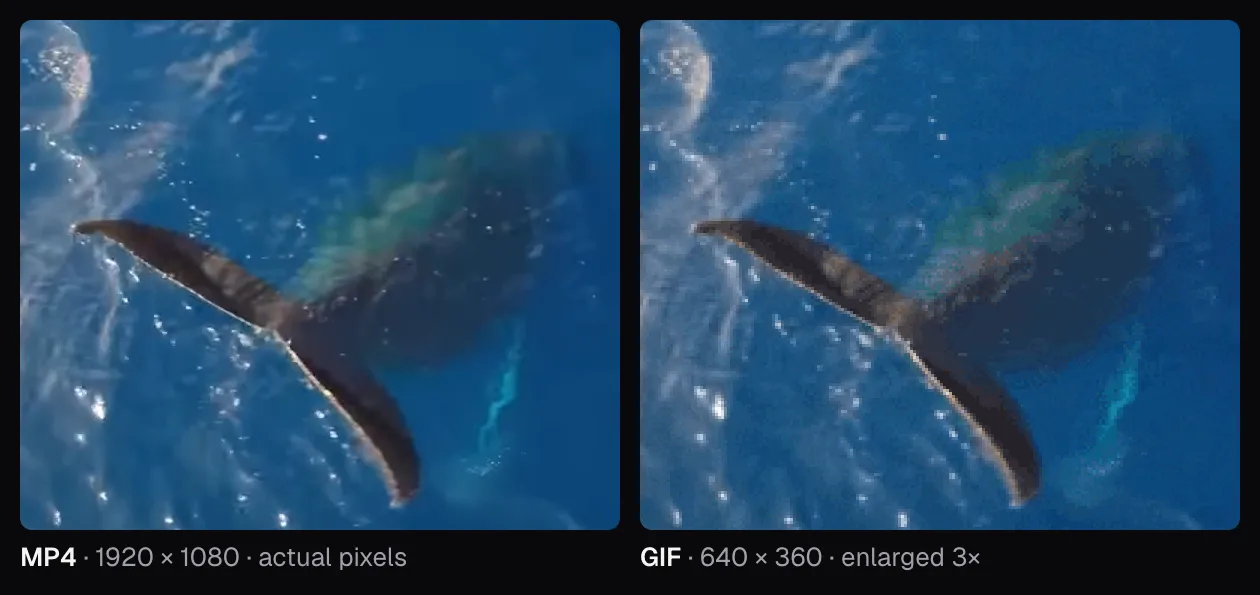
What the GIF has is the loop. Ours is marked to repeat forever, needs no player, and its way back stops one frame short of the start, so the first frame doesn't show twice when it begins again. Its last picture, the moment's second frame, stays up for 8 hundredths of a second and every other one for 4: a short hold at the turn, like the MP4's at 1.5×. Reverse Video's GIFs are at most 640 pixels on the longer side, 25 frames a second and 30 seconds long: Old Faithful whole was refused with “A GIF can be up to 30 seconds long — pick a shorter part or a higher speed.”, and at 1.5×, 0:26.3, it was allowed.
- A story, reel or TikTok: MP4 with three or four passes, full size. Our specs guide gives each app's frame size.
- A chat, forum or slide: GIF, which bounces forever without a video player.
- Your own website: MP4 again. Google's web.dev recommends replacing animated GIFs with video, and notes that a video element set to autoplay, loop, muted and playsinline plays by itself, loops endlessly and stays silent, like a GIF.
What to reverse, what to bounce: a quick guide
Put together, our three films come down to a handful of choices:
| Your footage | Effect | Settings |
|---|---|---|
| Falling or splashing water, a dive, a wave breaking | Reverse | 1×; keep the sound “Backwards” if it's a steady rush, like a waterfall |
| Steam, smoke, spilled flour, a geyser | Reverse | 1×, or 1.5× if it drags |
| People walking or cycling past | Reverse | 1×; “As recorded” or “No sound” if anyone speaks |
| A turn, a wave of the hand, a toss and catch, a tail in the swell | Boomerang | 1 to 4 seconds, 1× for the cleanest turns, three or four times, “No sound” |
| Someone talking to the camera | Neither, usually | If you must: reverse it with “No sound” and add a new soundtrack |
| A video of several shots, or 4K | Either | Mark one shot under “Part”: fewer frames to decode, a smaller file |
Then save it for where it's going: MP4 for anything with a player, GIF only for a loop that must play on its own. And if the moment is a few seconds inside a long recording, mark it first; the editor does the rest on your device, and the file never leaves it.
Questions people ask
Why does my reversed video look like a mistake?
Usually because it's someone talking, or because its motion has no direction viewers recognize. Reversed speech looks like a faulty file, while a swing or a flag in the wind looks the same either way, so the trick goes unnoticed. Pick motion that only ever runs one way: falling water, spreading steam, a splash, people walking. Our Old Faithful time-lapse worked because the steam visibly gathers and sinks into the ground while the crowd walks backwards.
Why is my reversed video so much bigger than the original?
Reversing can't copy frames, so it encodes the whole picture again, aiming for quality rather than the original's bitrate. Our 1080p Old Faithful grew from 57.1 MB to 70.9 MB, but our 4K waterfall, full of glittering spray and leaves, grew from 43.0 MB to 380.1 MB. Reverse only the part you need, and compress the finished file once if it's too big to send.
Can I reverse a video but keep the original sound?
Yes. In Reverse Video, choose “As recorded” under “Sound”: the picture plays backwards while the sound plays normally, which suits music and narration. “Backwards” reverses the sound with the picture, keeping them in sync but turning speech into gibberish; a steady sound like running water comes out sounding the same. A boomerang offers only “With the picture” or “No sound”.
How long should a boomerang be?
One movement of 1 to 4 seconds, as the editor suggests. Our 1.6-second whale tail made a 2.1-second pass at 1.5× and 6.3 seconds for three passes. Mark the moment under “Part”, start it after any cut in the footage, and set “Times” yourself: it's chosen from the length of the whole file, so a long video starts at 1×.
Should I save a boomerang as a GIF or an MP4?
MP4 for posting and for websites: one pass of our whale was 6.7 MB at 1920 × 1080. The GIF of the same pass weighed the same 6.7 MB at 640 × 360, with a single dithered palette. Choose GIF only where a loop must play forever without a video player, as in a chat or a slide, and needs no sound.
Why does reversing a 4K video take so long?
Video decodes only forwards from a key frame, so a reverse decodes each stretch between key frames and holds its frames in memory to hand them out last first. Reverse Video holds 256 MiB (about 268 MB) of decoded frames at a time, which is 21 frames of 4K. By that rule, each 128-frame stretch of our waterfall is decoded from its key frame seven times: 3.48 frames decoded for every frame written, against 1.27 for our 1080p Old Faithful.
Sources
Where the facts in this guide come from, besides our own tests:
- Old Faithful: frequently asked questions — National Park Service (Yellowstone National Park)
- Old Faithful eruption timelapse: the film's record — Wikimedia Commons (YellowstoneNPS)
- Humpback whale Tail Sailing behaviour: the film's record and NOAA's description — Wikimedia Commons (NOAA Sanctuaries)
- Delaneys Falls: the film's record — Wikimedia Commons
- HTMLMediaElement: playbackRate property — MDN Web Docs
- EncodedVideoChunk: type property — MDN Web Docs
- Graphics Interchange Format, Version 89a — CompuServe, hosted by W3C
- Replace animated GIFs with video for faster page loads — web.dev (Google)
Footage in this guide
The pictures were made with Cutlia's tools from this openly licensed footage, found on Wikimedia Commons:
- Old Faithful eruption timelapse (36948540241) — YellowstoneNPS, Public domain
- Delaneys Falls — Psypherium, CC0
- Humpback whale Tail Sailing behaviour — NOAA Sanctuaries, CC BY 3.0