Short video and social
What do TikTok, Instagram and YouTube say helps a short video get seen?
We read the three platforms’ own help and creator pages, cut NASA’s Artemis II launch and an astronaut’s answer the way they ask, and timed every shot of a short NASA made for phones.
By the Cutlia team · Published · 16 min read
The short version
- All three platforms measure whether people keep watching: TikTok counts what you “watch in full or skip” among the interactions it weighs most, Instagram predicts whether you’ll watch a reel all the way through, and YouTube reports how often viewers stay past a Short’s first seconds.
- Put the point of the video in its first three seconds: Instagram asks for a hook within 3 seconds, TikTok within 3 to 5, YouTube within “the first few”; NASA’s launch cut settles on the rocket leaving the pad only 10.8 seconds in.
- Fill the 9:16 screen instead of shrinking a wide video into a band: TikTok calls the blurry bars “the problem”, Instagram aims to make reels with borders less visible, and a band left our launch only 32% of the screen’s height.
- Put words on screen for people watching muted, but know that captions need speech: Auto Subtitles found one “word” in the launch’s roar and 72 in Christina Koch’s 19-second answer.
- Footage someone else filmed needs something new of yours: TikTok keeps reused material “without anything new” out of its For You feed, and Instagram calls borders, logos and same-language subtitles “minor or immaterial edits” but counts narration that adds information.
Advice about “the algorithm” is everywhere, but TikTok, Instagram and YouTube publish their own: help pages on what their recommendations pay attention to, creator articles on what to change in the edit, and rules for what they won't recommend. We read them again in November 2026 and quote them here as written. Where two of a platform's own pages disagree, we say so.
Then we did what they ask, with Cutlia's tools and three public-domain NASA videos. NASA's 44-second cut of the Artemis II launch, filmed wide, went through Resize & Crop. An answer by astronaut Christina Koch, recorded on the space station years before she flew on Artemis II, was made vertical the same way and captioned with Auto Subtitles. And a short NASA made for phones served as the reference: we decoded every frame to see how its makers handled the same advice. None of this promises views. It shows what the platforms say they look for, on real footage, with every number measured in Chrome on a MacBook Air with an Apple M5 chip.
What each platform says its feed is watching
| As of November 2026 | What it looks at | What it says counts most |
|---|---|---|
| TikTok, For You feed | Content you “like, share, comment on, and watch in full or skip”; sounds, hashtags, views | Your interactions, “which may include the time spent watching a video” |
| Instagram Reels | Your activity, your history with the account, the reel's audio and visuals, its popularity | How likely you are to reshare it, “watch a reel all the way through”, like it, open its audio page |
| YouTube, Shorts included | What viewers watch and don't watch, what they search for, likes, dislikes, “Not interested” | Watch time; for short videos, “relative watch time is more important”: how much of each video people watch |
The three lists differ in detail and agree on the main thing: a viewer staying or leaving. As of November 2026, YouTube's analytics for Shorts report “the percentage of times viewers stayed to watch past the initial seconds of a Short”. Since March 31, 2025 it has counted a view each time a Short “starts to play or replay”, and kept the old count, renamed engaged views, for viewers who chose to keep watching. TikTok's analytics show a retention rate for each post, and its own example of reading one is a sharp drop at 00:02, with the first question to ask: “Does your video open with a strong hook?”
Instagram describes how a reel spreads: among people who don't follow you, it's “initially shown to a small audience”, and the best performers then reach wider and wider groups. YouTube puts it the other way round: its system “doesn't promote videos to your audience but rather finds videos for your audience when they visit YouTube.” Either way, nothing on these pages names an editing trick. They describe people choosing to stay, and the edits below are about giving them a reason.
The first seconds: the advice all three give
As of November 2026, Instagram's creator site is the plainest: “hook your audience within the first 3 seconds of a reel”. TikTok gives two numbers on two pages: its article on the parts of a video suggests something that sparks interest “ideally within the first 5 seconds”, and its page on For You traffic says to “hook viewers in the first three seconds”, by asking a question, creating suspense or “using beautiful visuals”. YouTube's blog asks creators to “capture attention in the first few seconds” and lists three kinds of opening: “a question, a surprising fact, or a visually captivating moment.” Its help for making Shorts in the app mentions a “Get feedback” button, which gives “an analysis of your video's hook, pacing, and more.”
TikTok's article on a repeatable format turns this into an editing rule: “Open with the payoff, not the preamble.” Among its common mistakes is saving the best moment for the end, because “many viewers never reach it”. A launch video has an obvious payoff, the rocket going up, so we decoded every frame of NASA's 44-second cut of the Artemis II launch to see when it arrives.
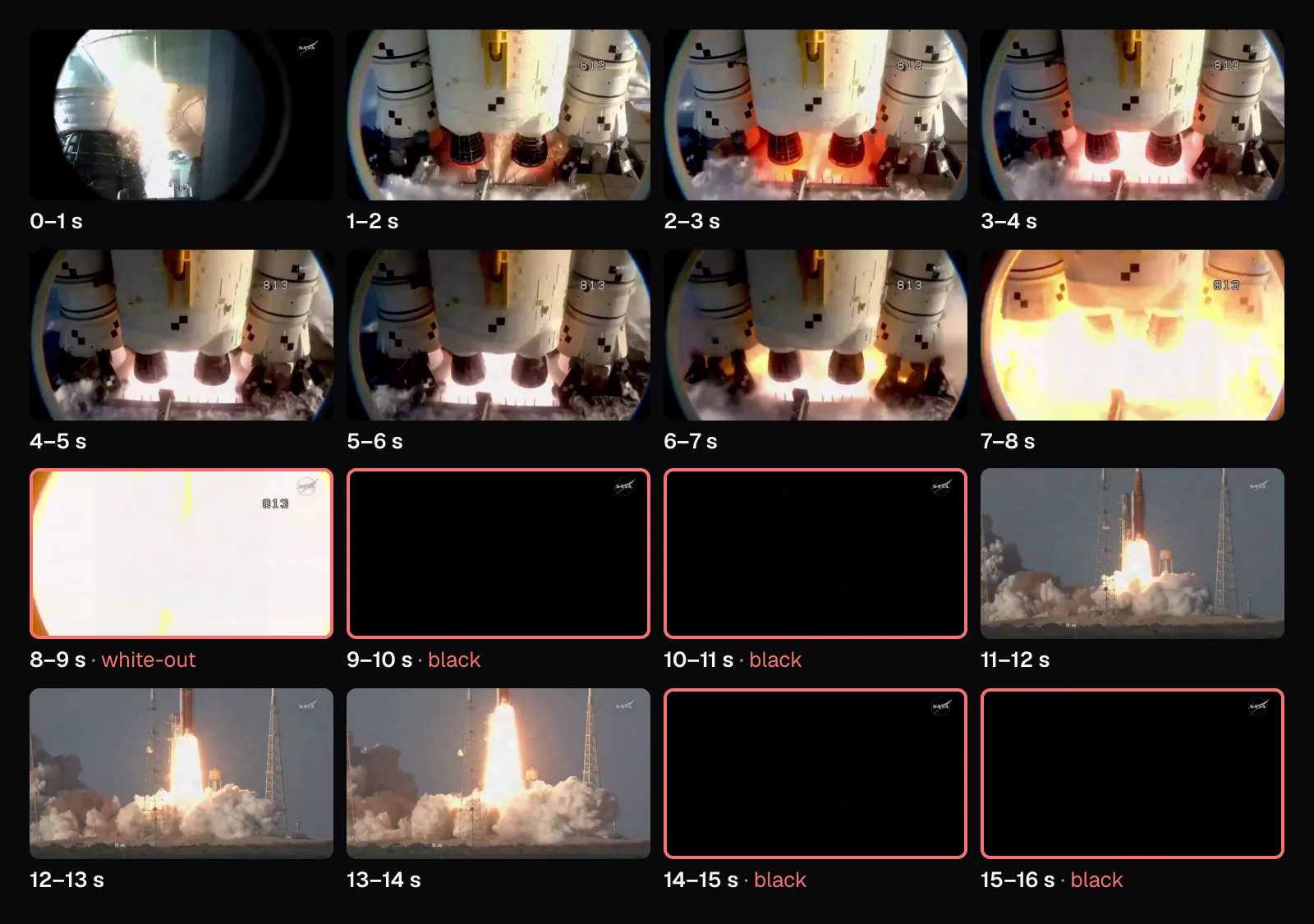
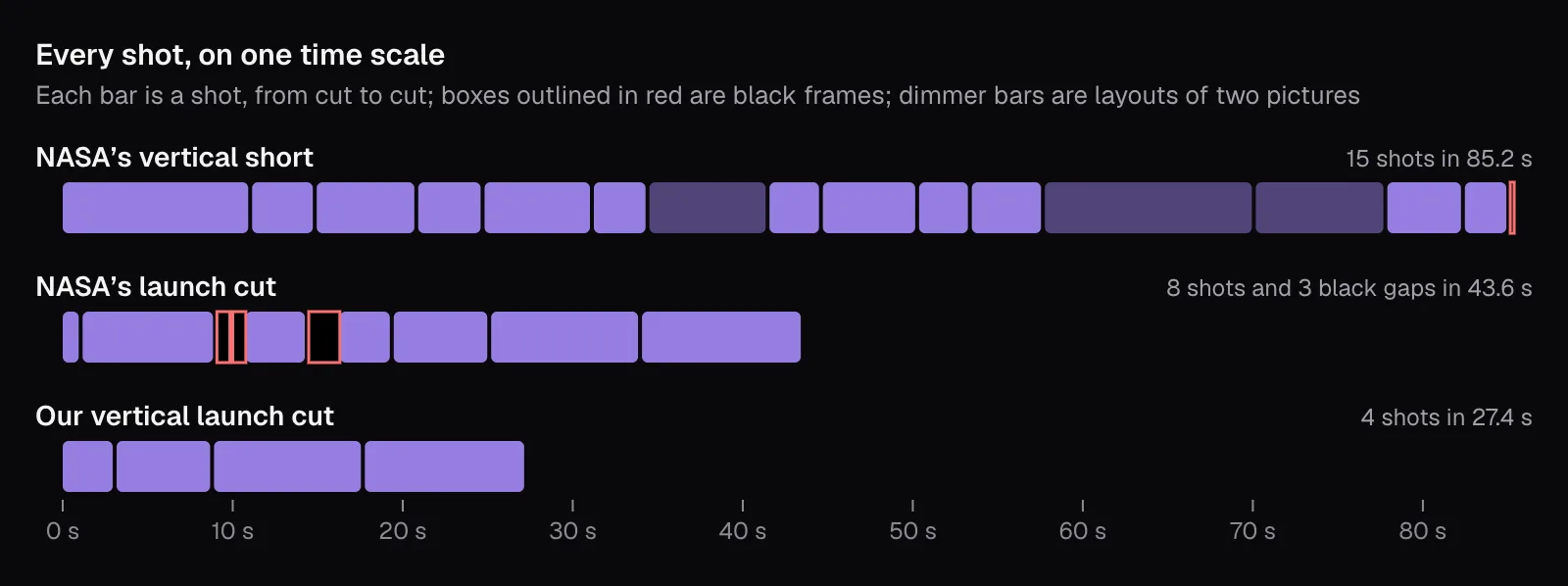
The first second already has fire in it: sparks in a fisheye camera's round view, then the engines lighting in close-up, the kind of “visually captivating moment” YouTube's blog suggests opening with. After that the opening loses time. From 7.8 to 9.1 seconds the picture washes out to white. Then come 0.8 seconds of black, a glimpse of the next shot, and 0.8 seconds more of black. Only at 10.8 seconds does the shot of the rocket leaving the pad stay on screen, and it ends in another black stretch, from 14.5 to 16.3 seconds. In all, 3.4 of the cut's first 16.3 seconds are black frames with only NASA's logo in the corner, and a black screen gives a scrolling viewer nothing to stay for.
Starting on the payoff: our cut of the launch
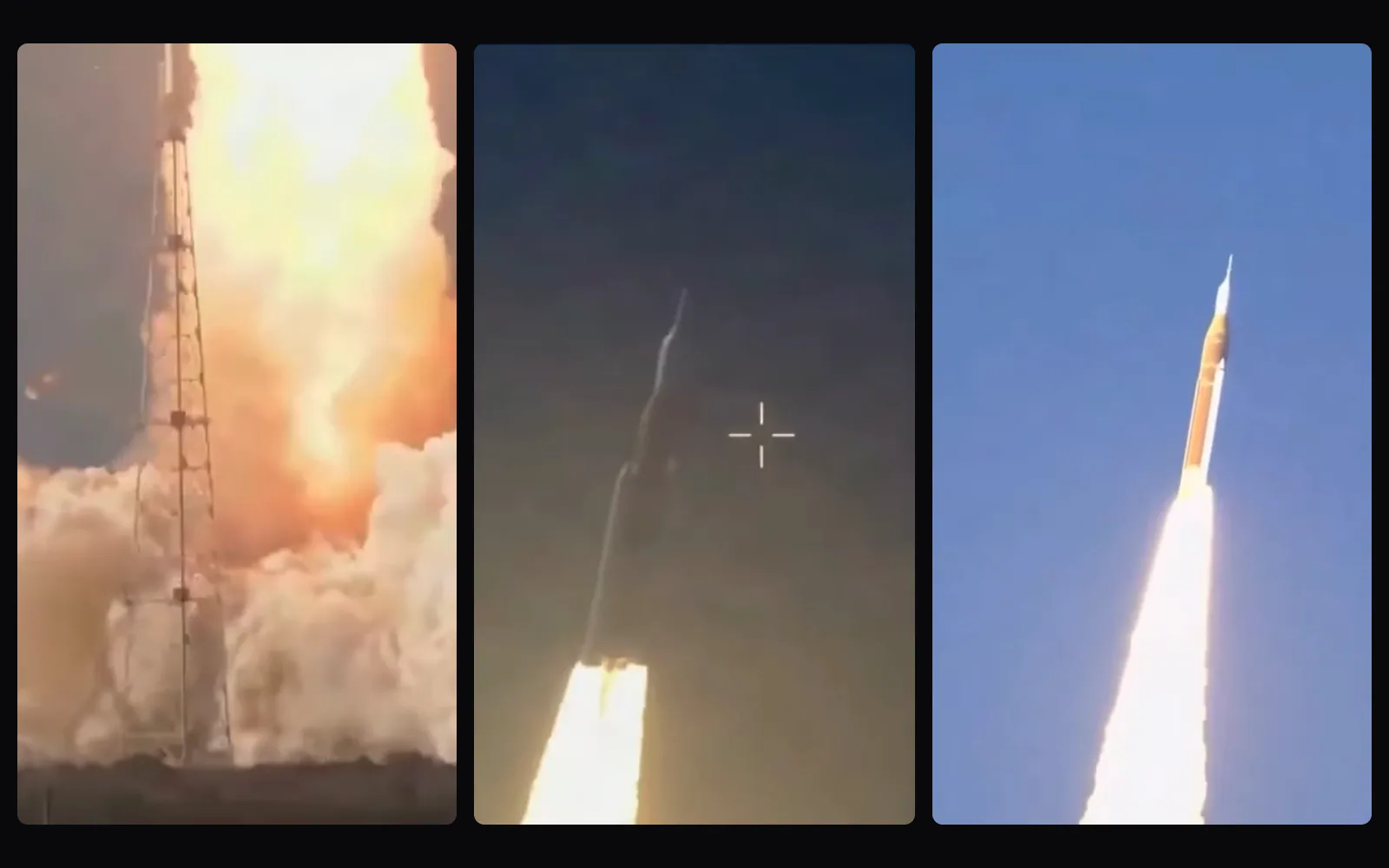
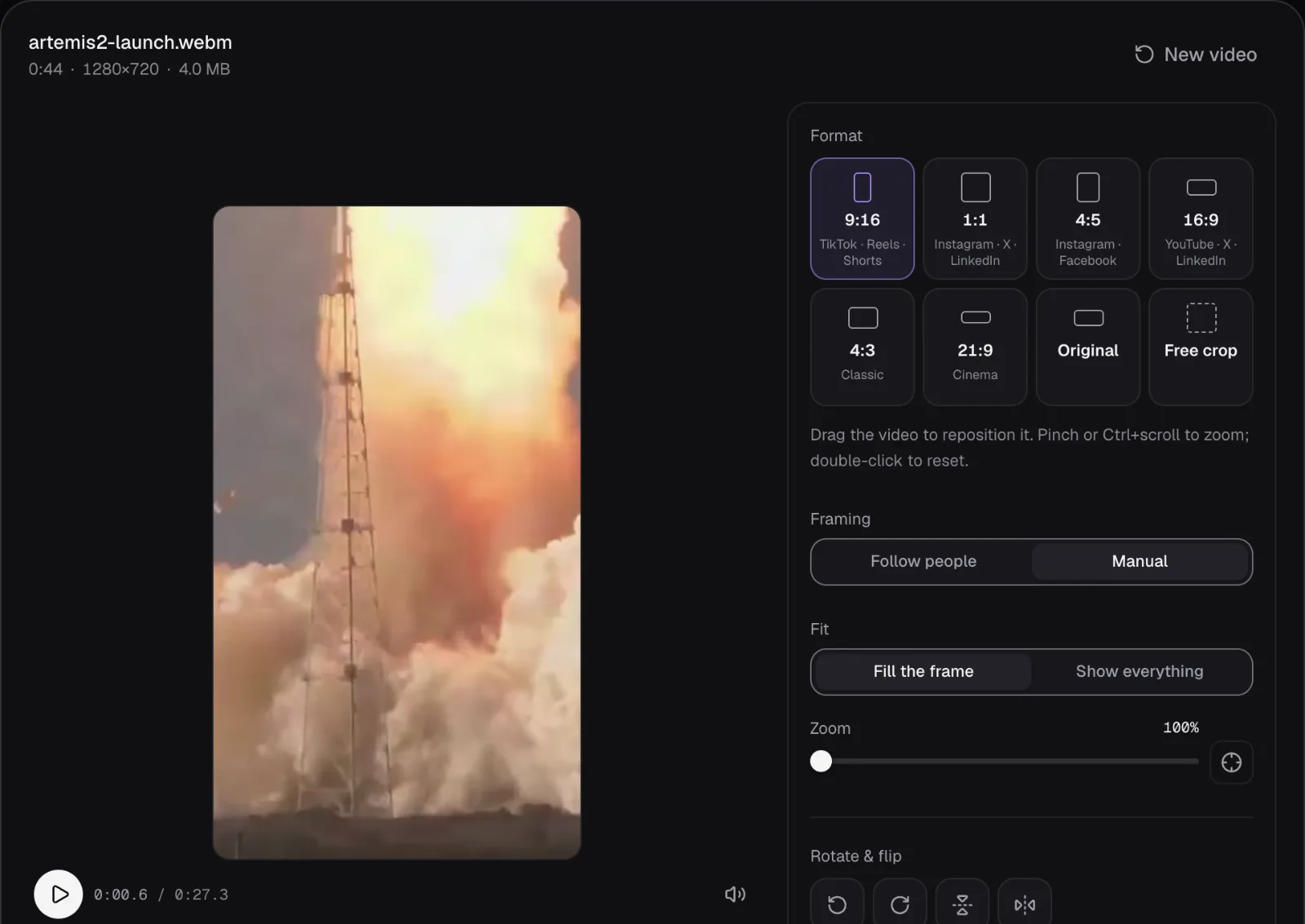
In Resize & Crop we typed 0:16.30 into the Start field and left the End at the file's last frame, 0:43.64. The kept part opens on the exhaust plume rising past a lattice tower, with the rocket already above the frame and its flame rising out of the top. The finished file is 27.4 seconds long and holds four shots. We decoded all 821 of its frames: none is black and none is washed out.
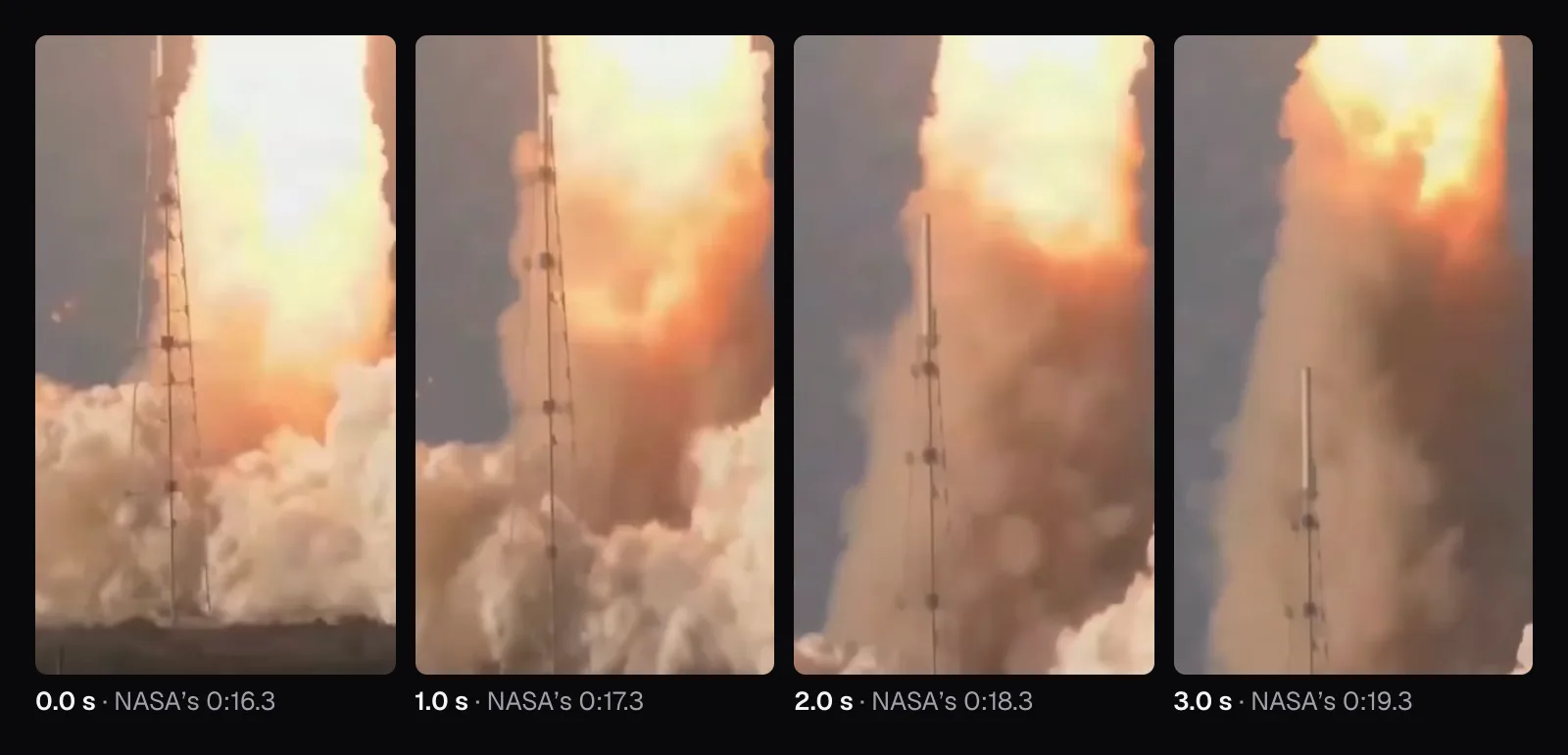
The price is real. NASA's best moments, the engines igniting in close-up and the rocket lifting off the pad, are gone, because Resize & Crop keeps one part and they sit before the last black stretch. Keeping them would have meant cutting the black gaps out first, with the “Remove parts” list in Trim Video, then making that file vertical. That works, but it encodes the picture twice, and TikTok's article on picture quality asks you to “avoid re-encoding the file along the way”. We chose one strong stretch with nothing dead in it over the whole sequence with its gaps.
TikTok's second rule, “Change something on screen every few seconds”, is harder to judge from cuts alone. Our shots last 3.2, 5.7, 8.9 and 9.6 seconds, and inside the long ones the rocket keeps climbing through the frame, far from the mistake the article names: “Holding one camera angle for 30 seconds straight”.
Fill the vertical screen: crop, don't shrink
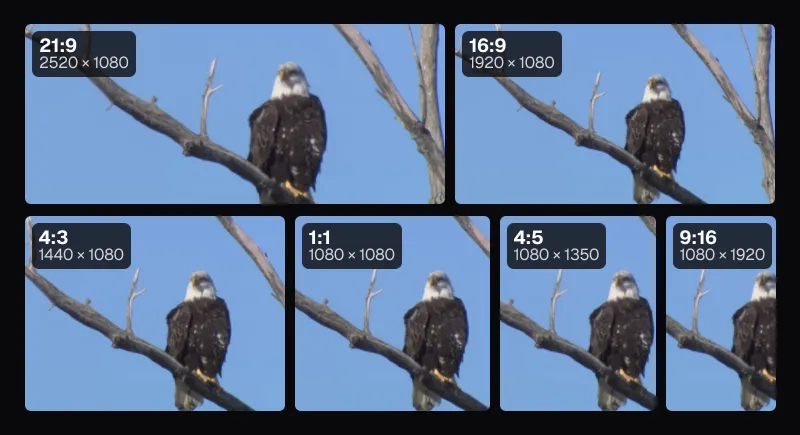
TikTok's article on filling the screen sums it up in three short sentences: “Vertical is good. Horizontal is good. The blurry bars are the problem — not the shape of your video.” Bars top and bottom “shrink your subject into a small box in the middle of the screen”, it says, and they're “the giveaway that the video came from another app.” Instagram's ranking explainer, published in May 2023 and still up in November 2026, lists reels “that are muted or contain borders” among those it aims to make less visible, and its creator blog asks for “9 x 16 vertical videos with no borders”. YouTube's blog says to film “in a 9:16 aspect ratio”, and as of November 2026 its help counts any square or vertical upload up to three minutes long as a Short.
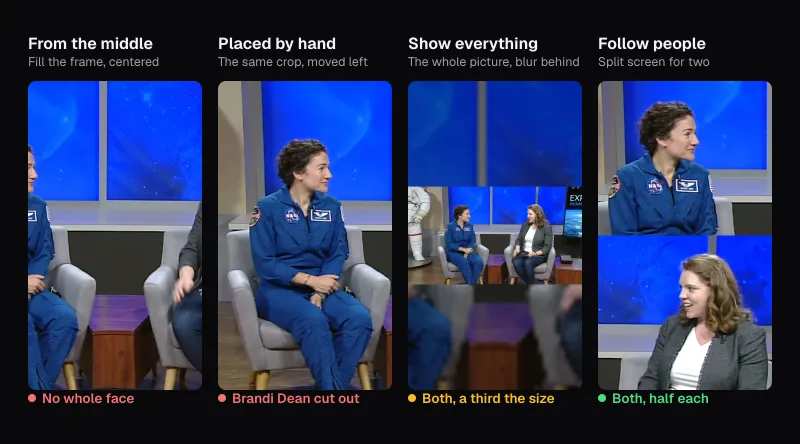
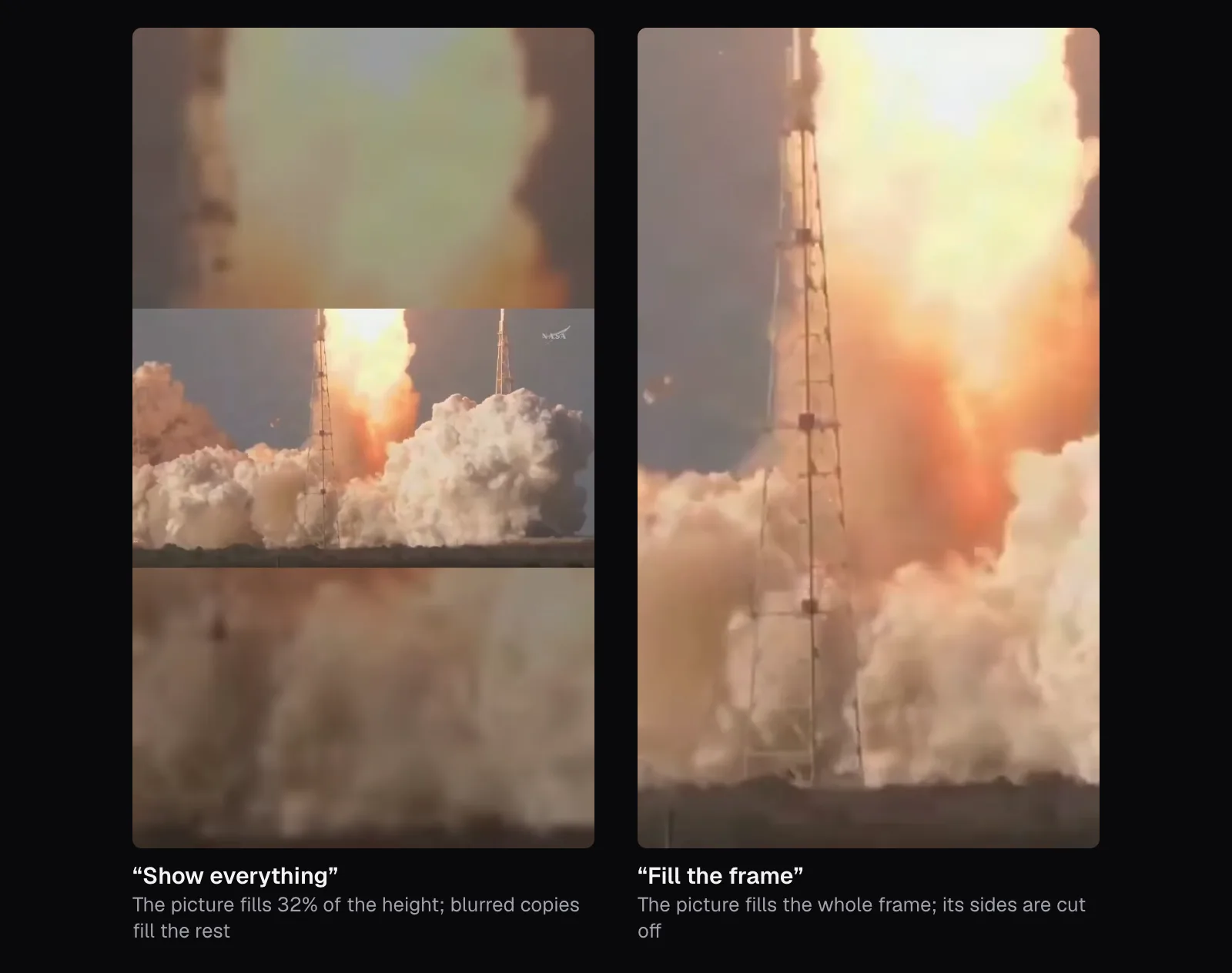
Resize & Crop does it both ways. “Fill the frame” crops the picture until it covers the 9:16 frame; “Show everything” fits the whole picture in and, by default, fills the rest with a blurred copy of it, which is exactly the band TikTok warns about. We exported the launch both ways and measured the second: the real picture covered 405 of the frame's 1,280 rows, 32% of its height.
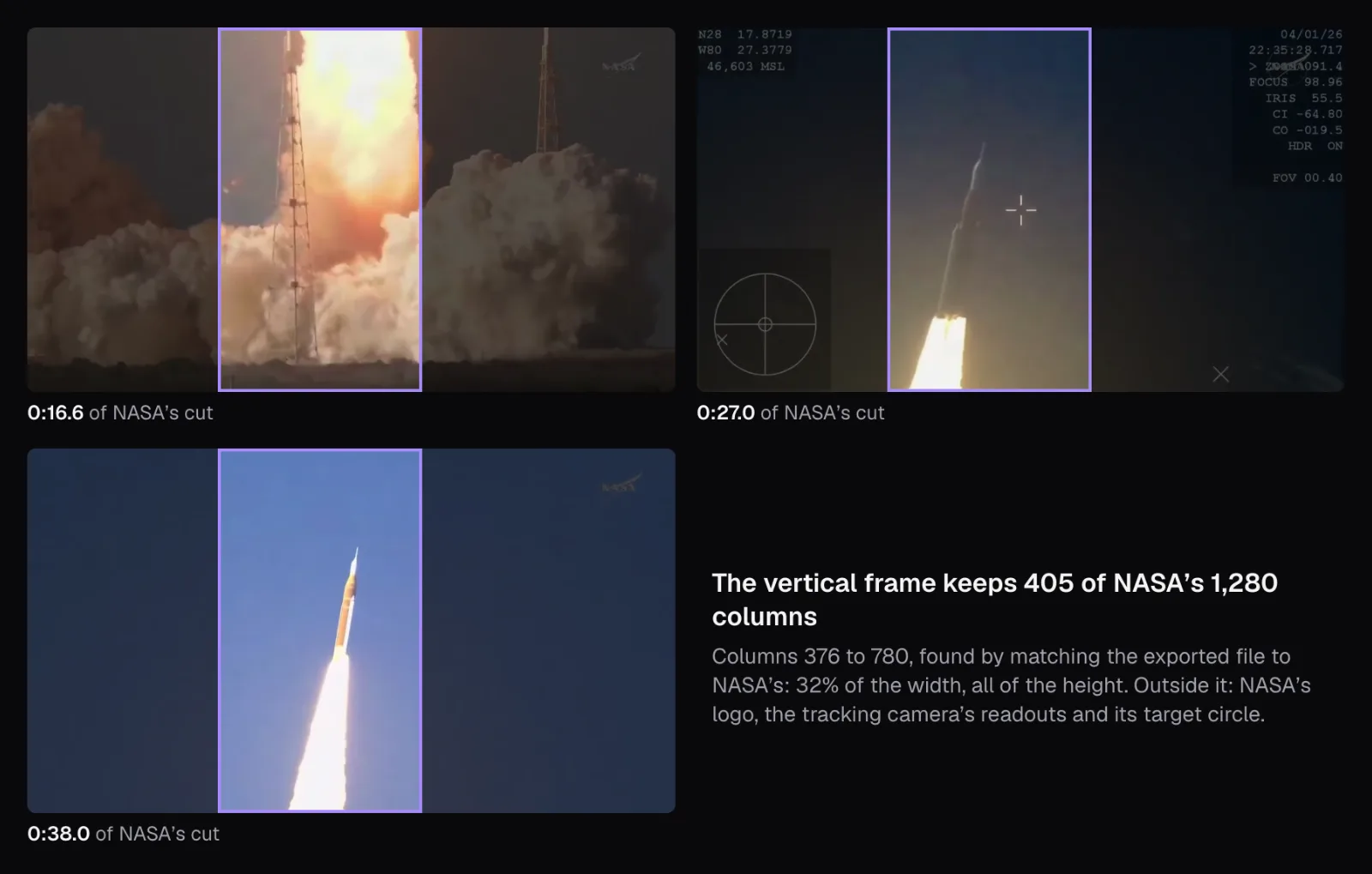
Filling has its own cost: a 9:16 frame as tall as a 16:9 picture is less than a third as wide. From NASA's 1,280 columns, our frame kept 405. Resize & Crop opens with the frame in the middle, and in the tracking shot that would have cut into the flame, which climbs left of center: over the shot's 264 frames, a middle frame keeps 78% of the flame's brightest pixels on average and 46% at worst. We focused the preview and pressed → three times, each press moving the picture by 5% of the frame. Matched against NASA's file, our frame starts at column 376, 62 columns left of the middle one, and it keeps at least 99% of the flame in every frame of that shot.
The narrow crop also costs detail. NASA's file is 1280 × 720, so the vertical frame holds 405 × 720 real pixels, and Resize & Crop offered 720p, already chosen, or 1080p. We kept 720 × 1280: the 1080p choice would have enlarged the same 405 columns further without adding anything to them. As of November 2026, that sits at Instagram's minimum, “a minimum resolution of 720p”, and under TikTok's advice to “export at 1080p or higher”. If you film for a vertical crop, film at 1080p or more, or film vertical. Our guide to going vertical covers following people through the crop and the cases where no crop works.
How NASA cut a short made for phones
NASA made “Our Home in Space”, a three-part series about the heliosphere, “the massive bubble created by our Sun”, as vertical video. Its page on NASA's Scientific Visualization Studio, released September 15, 2025, offers each episode as 1080 × 1920 files labeled YT and IG, and caption files in SRT and VTT. We used the pictures of part 2 only: its soundtrack includes licensed music, so we never played or measured its sound.
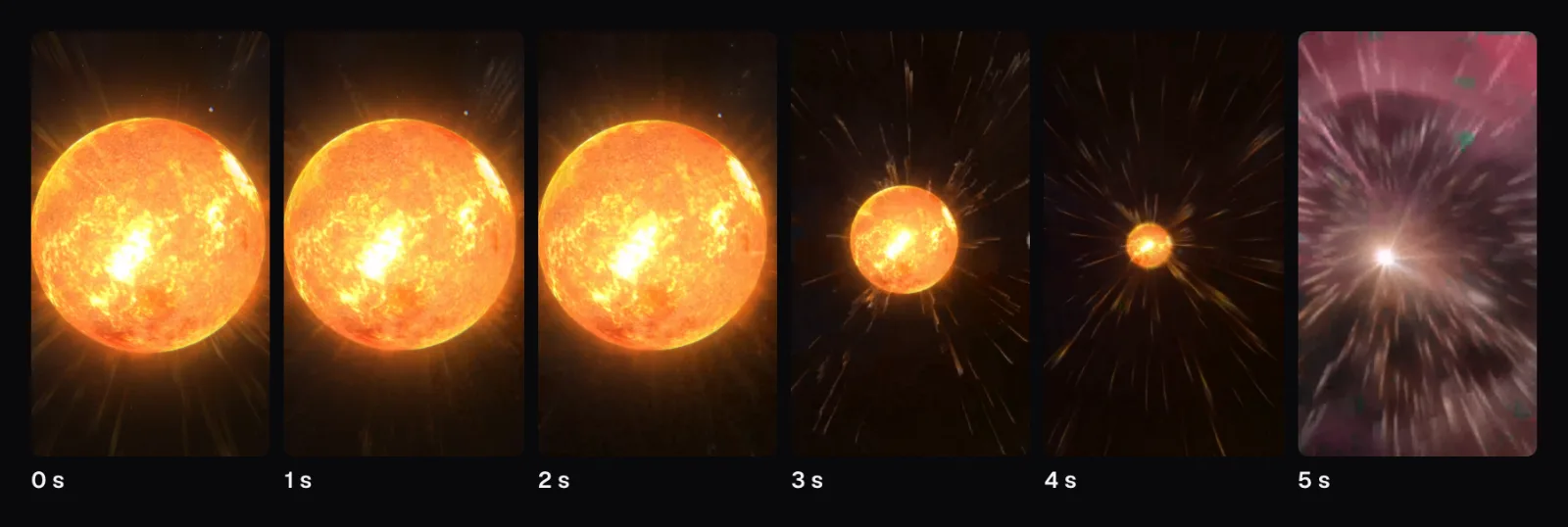
It does what the platforms ask without saying so. Frame one is the subject, filling the width of the screen. The 85.2 seconds hold 15 shots between hard cuts, one every 5.7 seconds on average, and even the opening shot, 11.1 seconds long, isn't still: it pulls back from the Sun and gives way to the next scene without a cut. Text is drawn into the picture where a viewer with the sound off needs it, as the comic-book title of one scene and the name of the NASA spacecraft the series introduces.
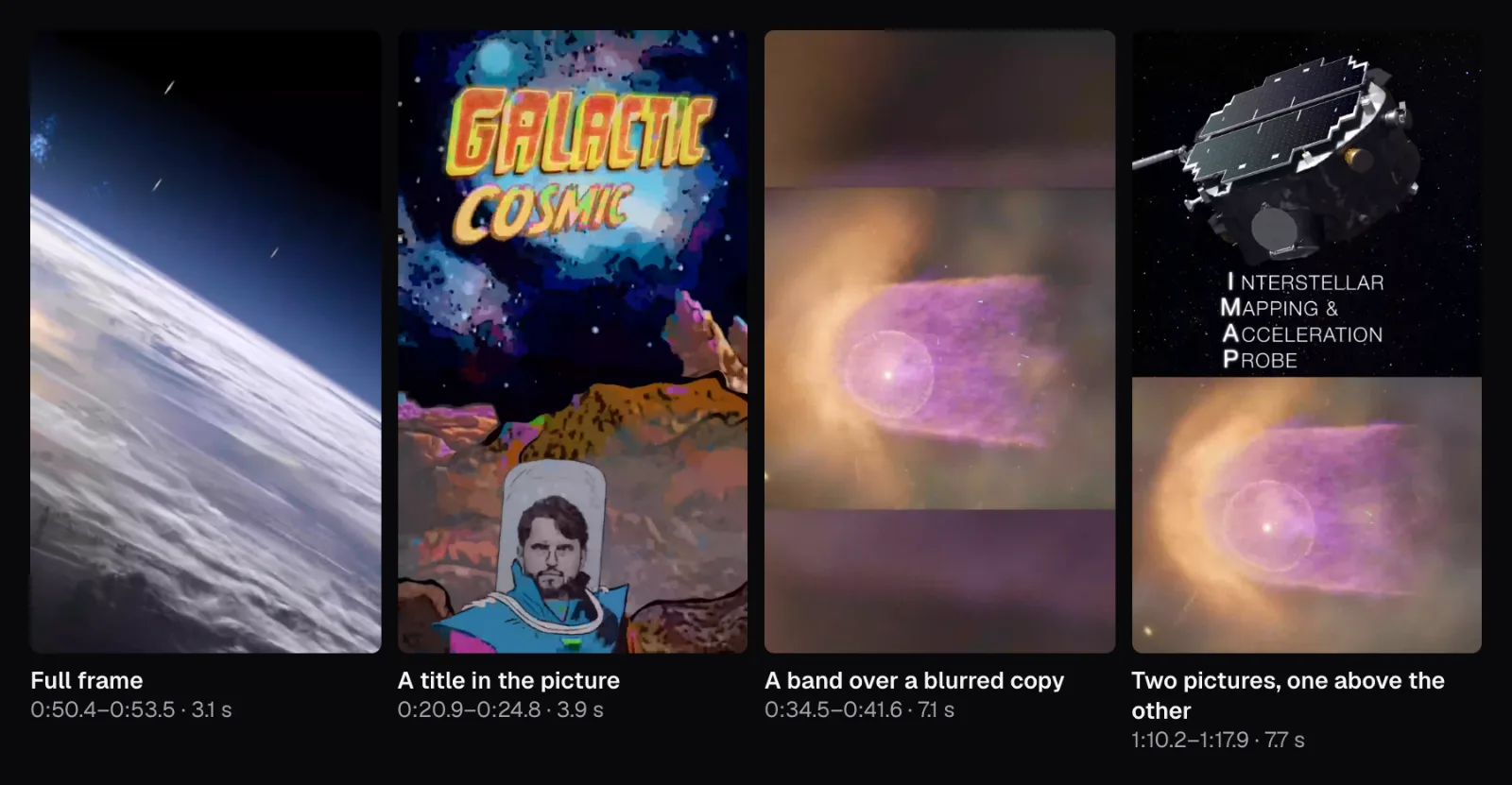
Its layouts are the interesting part. Most shots fill the frame, but for 7.1 seconds a wide picture of the heliosphere sits in a band over a blurred copy of itself, the layout TikTok warns about. Elsewhere it stacks two pictures: the spacecraft above the heliosphere for 7.7 seconds, and two charts for 12.4 seconds. TikTok suggests the same stacking for gaming, a podcast or a reaction: “Split the screen instead”, so “both halves stay full.” We found the seams by measuring, frame by frame, rows where nearly every pixel jumps in brightness from the row above.
Words on screen, for people watching with the sound off
As of November 2026, Instagram's advice is a single line: “Optimize for sound off. Use text and closed captioning whenever possible.” YouTube's blog says “Shorts are often watched without sound, so captions are essential.” TikTok's article on repurposing long videos tells you to “turn on auto-captions so people can watch sound-off”, and its article on the parts of a video adds headlines and intro cards to captions. YouTube's help gives the other reason: captions reach “deaf or hard-of-hearing viewers and viewers who speak another language.”
Captions need speech, though, and the launch has none. We opened our vertical cut in Auto Subtitles, which stopped to ask “Which language is spoken?” because it couldn't tell from the start of the file. After we picked English, it came back with one “word”: Music, held on screen from 1.2 to 14.0 seconds. Burning that in would tell a muted viewer nothing. A video like this needs written words instead: a title or a label, like the ones NASA drew into its short.
Christina Koch's answer has words. She spent 328 days in a row on the space station before flying on Artemis II, and in this NASA video she's asked from the ground how it feels to be staying in space for almost a year. Her reply opens with 11 seconds of preamble: hellos, a welcome on board, congratulations to Jessica Meir on her flight assignment, then “To get to your question, Brandi”. The answer itself, “it feels awesome”, comes at 0:44.9. We started our part at 0:44.75 and ended it at 1:03.60: 18.9 seconds in one shot. Resize & Crop's middle frame suited her, since she stands in the middle of the shot; the file came out 1080 × 1920. Auto Subtitles needed no help with the language and made 20 captions from 72 words, in its Bold look at 72% of the way down the frame.
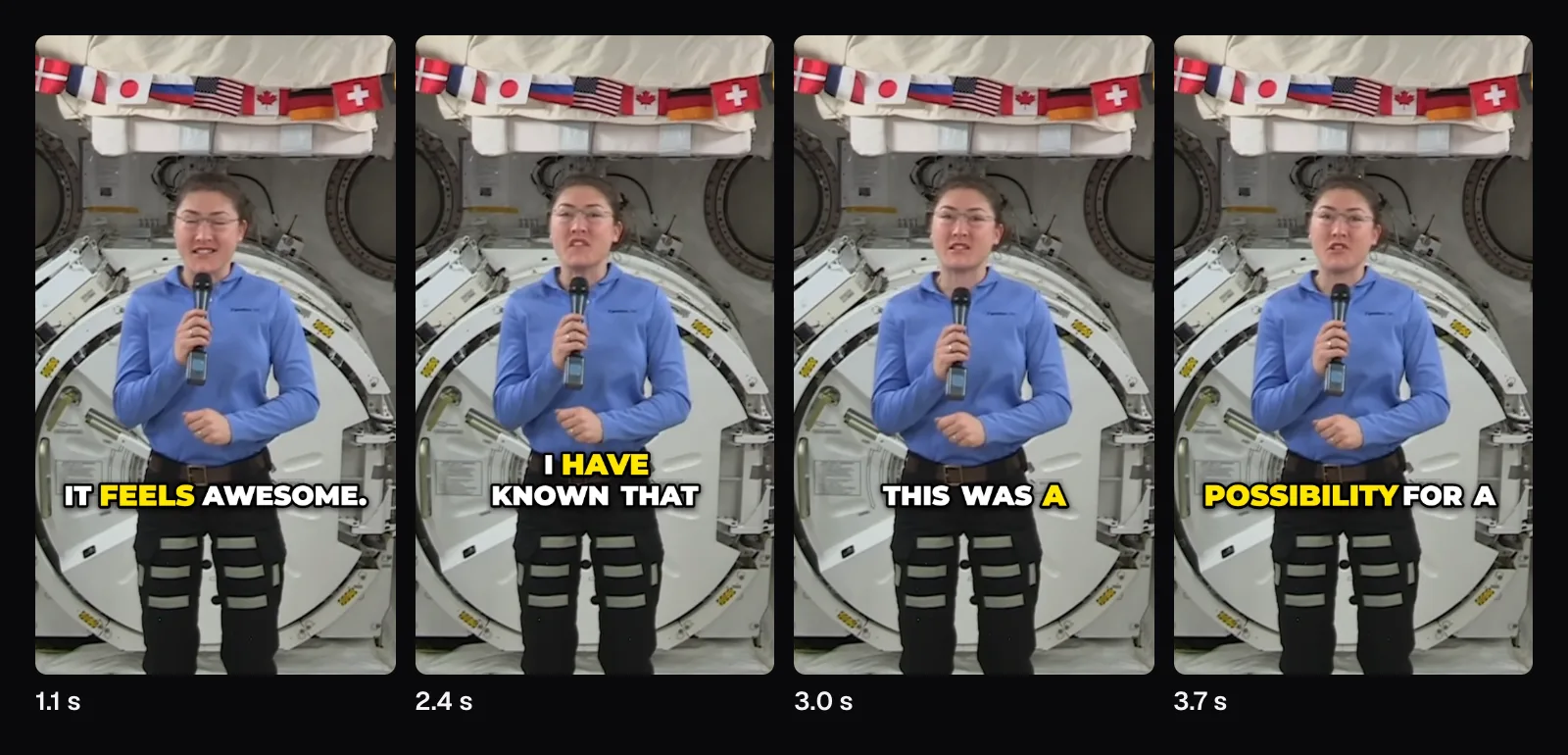
Three captions begin in the first three seconds: “It feels awesome.”, “I have known that”, “this was a”. A muted viewer gets the feeling, but not what it's about: the question ended 11 seconds before our clip begins. TikTok has a fix for exactly this, a clip pulled from the middle of a longer video: “a bold text overlay or quick voiceover in the first three seconds that tells viewers exactly what they're about to learn.” Auto Subtitles writes only what's said. The AI Clip Maker adds a title near the top of each clip's first 5 seconds by default, along with captions and a 9:16 frame that follows faces. For caption size, line length and where captions sit best, see our captions guide.
Someone else's footage: what the platforms count as new
Everything we cut here was filmed by NASA, and the platforms are specific about what that means. As of November 2026, TikTok's community guidelines keep out of the For You feed anything that “includes unoriginal or reused material without anything new.” Its originality page lists, as unoriginal, content “largely repurposed from another source without adding any creative edits” and content “with someone else's visible watermark or superimposed logo.” Instagram, when it finds identical copies, “only recommends the original.”
Instagram's help page on original content goes furthest. Content is unoriginal, it says, “when it is re-shared without a material edit”, and among the “minor or immaterial edits” it names “Subtitle transcripts in the same language as the audio language” and “Borders that change the aspect ratio or surround the content”. A crop adds no information either, so by Instagram's definition our two prepared clips are still NASA's. Our crop happened to leave NASA's logo outside the frame, and that changes nothing: Instagram lists logos, watermarks and “simply providing attribution” among the same minor edits.
Public-domain footage is a fine raw material, and none of these pages forbids using it. What they reward is the part you add: your explanation, your narration, your own shots around it.
What the platforms say holds a short back
- Another app's watermark. Instagram says third-party watermarks “may prevent them from being recommended to new audiences”, and TikTok counts someone else's visible watermark as unoriginal. Post the clean file from your editor, never a copy saved from another app. Cutlia adds no watermark of its own.
- A soft picture. As of November 2026, Instagram asks for a reel that's well lit, at least 720p and 30 frames per second. TikTok asks for 1080p, no re-encoding along the way, and its “Allow high-quality uploads” switch, because it “defaults to standard quality on upload.”
- Borders, silence or a wall of text. Instagram aims to make less visible the reels that are muted, have borders or are “majority text”, and reels already posted on Instagram.
- Length. As of November 2026, Instagram doesn't recommend reels over 3 minutes to people who don't follow you. YouTube blocks a Short over one minute worldwide while it has an active copyright claim.
- Bait. Instagram reduces the reach of engagement bait, TikTok keeps content that tries to manipulate people into “inflating likes or follows” out of the For You feed, and YouTube says titles that are “clickbaity or sensational” or in ALL CAPS can turn viewers away.
- Not every quiet post broke a rule. TikTok's For You standards, released in August 2026, say a video with few views “doesn't necessarily mean it broke a rule”, and its analytics show if a video was made ineligible. Instagram's Account Status shows whether your content can be recommended.
A checklist in the platforms' own terms
| Before posting | Who asks for it | How to do it |
|---|---|---|
| The payoff in the first 3 seconds | Instagram (3 s), TikTok (3 to 5 s), YouTube (“the first few”) | Resize & Crop's Start field (we started the launch at 0:16.30 and Koch at “It feels awesome”) |
| No black or dead seconds | TikTok (“change something on screen every few seconds”) | A part with no black frames; Trim Video's “Remove parts” for gaps inside it |
| A filled 9:16 frame | TikTok, Instagram, YouTube | Resize & Crop's “Fill the frame”, moved by dragging or with the arrow keys; a split screen where two pictures must share it |
| Words on screen | Instagram, TikTok, YouTube | Auto Subtitles for speech; a written title or label where there's none |
| Sharp enough | Instagram (720p, 30 fps), TikTok (1080p) | Footage of 1080p or more before a vertical crop |
| Something of your own | TikTok, Instagram | Your own narration or text that adds information to footage you didn't film |
For each platform's exact sizes, lengths and frame rates, see our guide to TikTok, Reels and Shorts specs; for turning a long recording into several of these, see our guide to the clip maker.
Questions people ask
Does the time I post change how many views a video gets?
As of November 2026, YouTube says publish time “is not known to impact a video’s long-term performance”, though posting when your audience is active can help early views. TikTok’s analytics show when your audience was most active over the last 7 days and suggest using that to plan when to post, then checking what works. The Instagram pages we read name no best time.
How many hashtags should I use on TikTok, Reels and Shorts?
As of November 2026, TikTok’s Creator Academy says “less is more” and suggests 2 to 3 relevant hashtags per video. Instagram says Search matches text, so keywords and hashtags belong in the caption, not the comments. YouTube’s blog says to use relevant hashtags, and its help calls video tags “Not important”, mainly a way to catch common misspellings. None of the three asks for a long list.
Can I post the same video to TikTok, Reels and Shorts?
None of the pages we read in November 2026 objects, as long as each platform gets the clean file from your editor rather than a copy saved from another app, whose watermark Instagram says may keep a reel from new audiences. Instagram also aims to show fewer people reels that were already posted on Instagram, so post each one there once. Check each platform’s length limit first.
Why does my short get almost no views?
Not necessarily because it broke a rule: TikTok’s For You standards, as of November 2026, say so in those words, and its analytics show whether a video was made ineligible. Look at the video’s retention rate next: TikTok’s own example is a sharp drop at two seconds, which points at the opening. Instagram’s Account Status shows whether your content can be recommended, and lets you appeal.
Should I burn captions in or use the app's automatic captions?
None of the pages we read in November 2026 prefers one. Instagram displays a video’s captions automatically when it plays with the sound off, and TikTok’s Creator Academy points to its auto-captions. Burned-in captions look the same in every app and stay with the file, but can’t be turned off. For footage you didn’t film, Instagram lists same-language subtitles among minor edits, so captions alone aren’t a material edit.
Does posting more often help a channel grow?
As of November 2026, the platforms disagree. TikTok’s page on For You traffic says “Post more often”, because each video gives the system another chance to place your content. YouTube says it found growth in views across uploads “is not correlated with time between uploads”, and that the length of a break shows no link to changes in views. Many creators, it adds, connect with their audience “through quality over quantity”.
Sources
Where the facts in this guide come from, besides our own tests:
- How TikTok recommends content — TikTok Support
- For You feed Eligibility Standards — TikTok Community Guidelines
- Integrity and Authenticity — TikTok Community Guidelines
- Elements of a TikTok video — TikTok Creator Academy
- Building a repeatable video format that holds viewers' attention — TikTok Creator Academy
- Create videos that fill the screen and look made for TikTok — TikTok Creator Academy
- Filming high-quality videos that keep viewers watching — TikTok Creator Academy
- Driving video traffic: The For You feed — TikTok Creator Academy
- Repurposing long videos into short-form TikToks — TikTok Creator Academy
- Using analytics as a tool to improve video performance — TikTok Creator Academy
- Understanding TikTok's Originality Policy — TikTok Creator Academy
- Creating content for the STEM feed — TikTok Creator Academy
- Instagram Ranking Explained — Instagram
- How to grow — Instagram for Creators
- Create engaging content — Instagram for Creators
- What creators need to know about Instagram recommendations — Instagram for Creators
- About original content on Instagram — Instagram Help Center
- YouTube performance FAQ & Troubleshooting — YouTube Help
- Get started creating YouTube Shorts — YouTube Help
- Understand your YouTube content performance — YouTube Help
- Understand three-minute YouTube Shorts — YouTube Help
- Add subtitles & captions — YouTube Help
- Your guide to getting started with YouTube Shorts — YouTube Official Blog
- From epic edits to quick clips: Transitioning your long-form content to YouTube Shorts — YouTube Official Blog
- Our Home In Space Series — NASA Scientific Visualization Studio
- Christina H. Koch, NASA astronaut biography — NASA
Footage in this guide
The pictures were made with Cutlia's tools from this openly licensed footage, found on Wikimedia Commons:
- Artemis II Launch 2026 — NASA, Public domain
- Astronauts Koch and Meir React to International Space Station Mission Updates — NASA, Public domain
- Our Home In Space Series (SVS14898 - 2 YT) — NASA's Scientific Visualization Studio, Public domain