Captions and transcripts
SRT, VTT or burned-in captions: which should you use?
We captioned one NASA interview three ways, opened every file, played the caption files in Chrome’s own player and read what the platforms you upload to accept.
By the Cutlia team · Published · 16 min read
The short version
- SRT and VTT are small text files of timed captions that a player draws over the video and viewers can switch off; burned-in captions are drawn into every frame, so they always show and can’t be resized, restyled or removed.
- Upload an SRT where a site takes caption files: YouTube, Vimeo, LinkedIn and Meta’s ad tools all accept one, and Meta wants it named like video.en_US.srt.
- Use VTT for a video on your own web page: Chrome read all 44 cues of our VTT through the HTML track element and refused our SRT, reading none of it.
- Burn the captions in for TikTok, Instagram Reels, YouTube Shorts and any file people will download and pass on: those apps offer their own captions made from the sound, and a separate caption file doesn’t travel with a forwarded video.
- When you can, publish both: burned-in for social apps, and a caption file wherever the player takes one, so viewers who need bigger or plainer text can get it.
The same captions can reach the screen in three forms. Two are text files, SRT and VTT, that sit beside the video and are drawn over it by whatever plays it. The third is no file at all: the words are painted into the picture itself, frame by frame, and become part of the video. Each form works in places where the others fail, and the wrong one either never appears or can never be taken off.
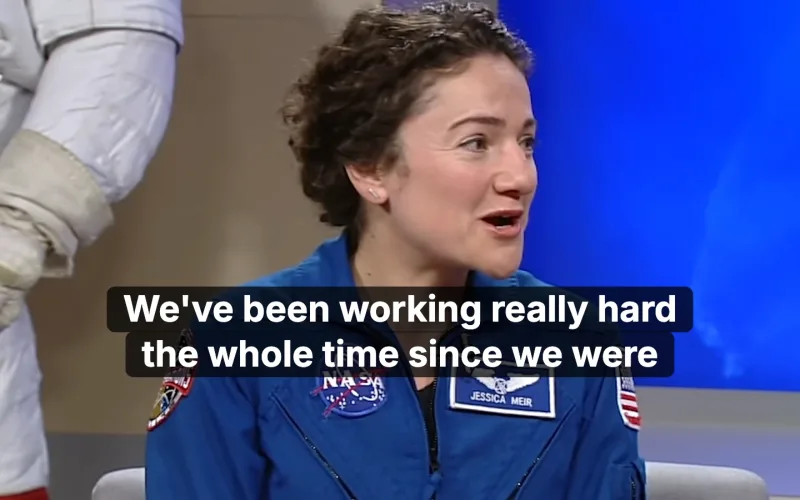
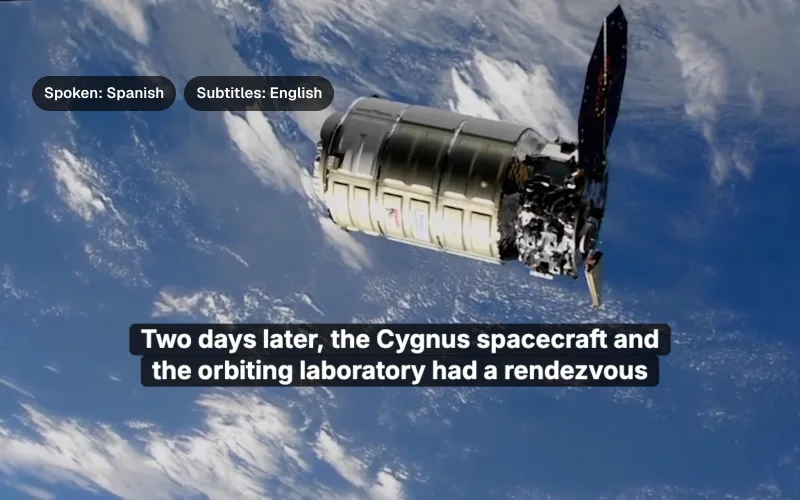
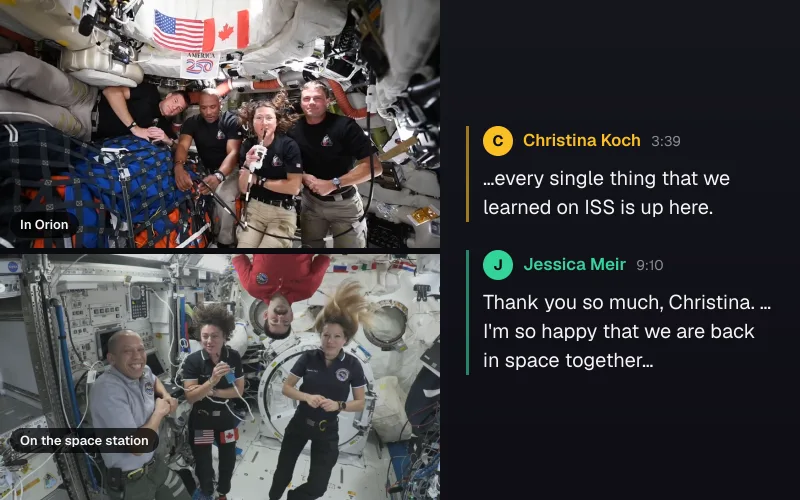
To see the differences rather than describe them, we took a NASA studio interview: host Brandi Dean talking with astronaut Jessica Meir in the studio and, from the space station, astronaut Christina Koch. It runs 1 minute 50 seconds at 1920 × 1080, with clear sound. We captioned it with Cutlia's Auto Subtitles and its Video to Text, downloaded the SRT, VTT and plain-text files, exported an MP4 with the captions burned in, then opened every file, played the caption files in Chrome's own video player, and read what YouTube, Vimeo, LinkedIn and Meta say they accept. We did all of it in Chrome on a MacBook Air with an Apple M5 chip, without the interview leaving the computer.
Closed or open: three ways to put the same words on screen
Captions come in two families. The W3C's accessibility requirements for media describe both: “Closed captions have been transmitted as data along with the video but were not visible until the user elected to turn them on”, while open captions “have always been visible; they had been merged with the video track and could not be turned off.” SRT and VTT files are closed captions. Burned-in captions are open ones.
- SRT (
.srt) is the format of SubRip, a program that read the picture subtitles of DVDs with character recognition and saved them as plain text. Its files are a numbered list of captions with start and end times. It was never formally specified: the Library of Congress's description notes the “lack of formal documentation for the format” and calls it “a very simple text format, but not well standardized.” - VTT (
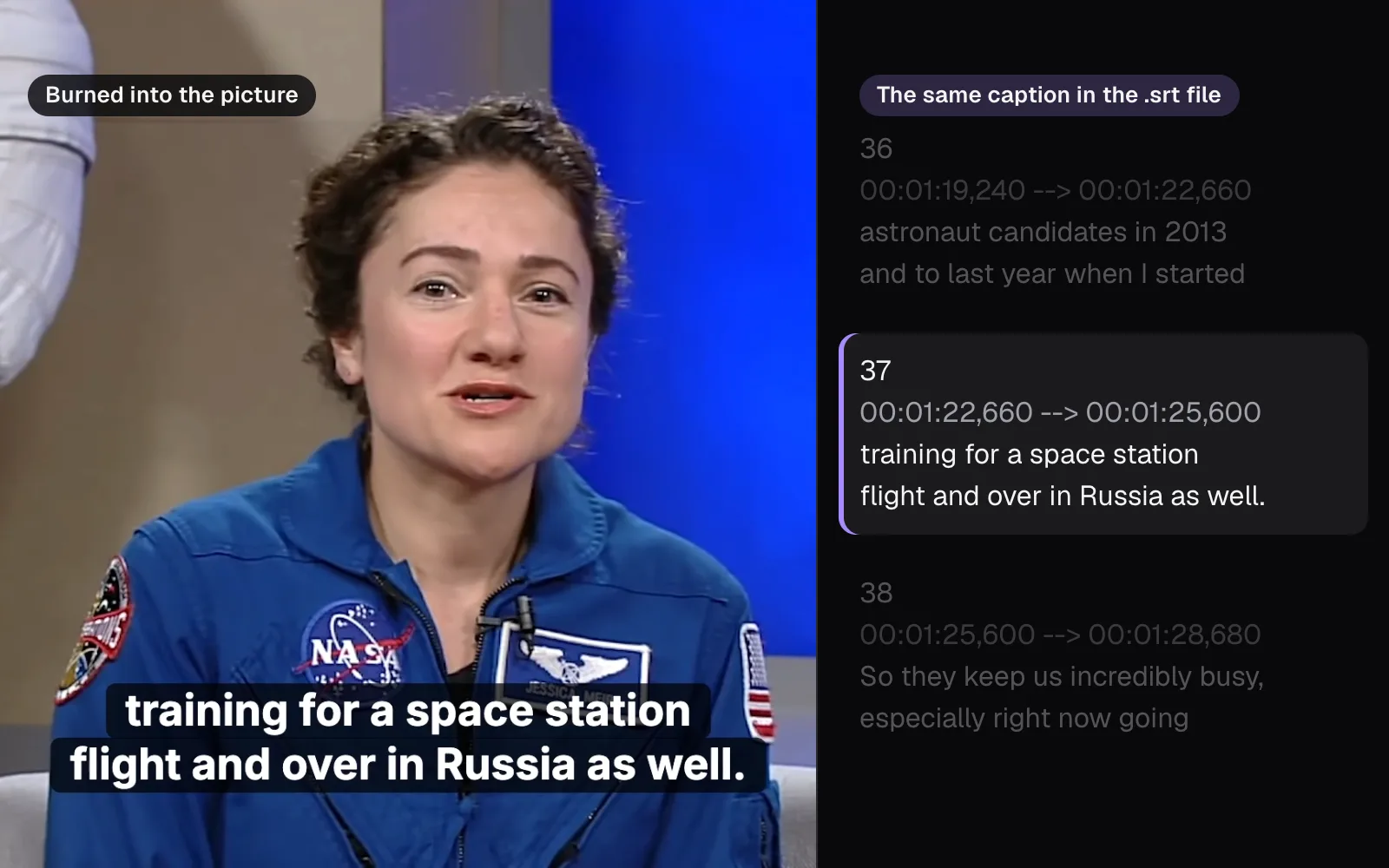
.vtt, WebVTT) is the web's caption format, first specified in the HTML standard and now a W3C specification, still a Candidate Recommendation Draft dated 20 May 2026. The specification thanks the SubRip community for the SRT format, which it says “was used as the basis for the WebVTT text track file format.” It reads almost the same, with a header and optional extras for position, styling and speakers. - Burned-in captions are drawn onto every frame, and the video is encoded again with them. Nothing beside the video is needed to show them, and nothing can hide them.
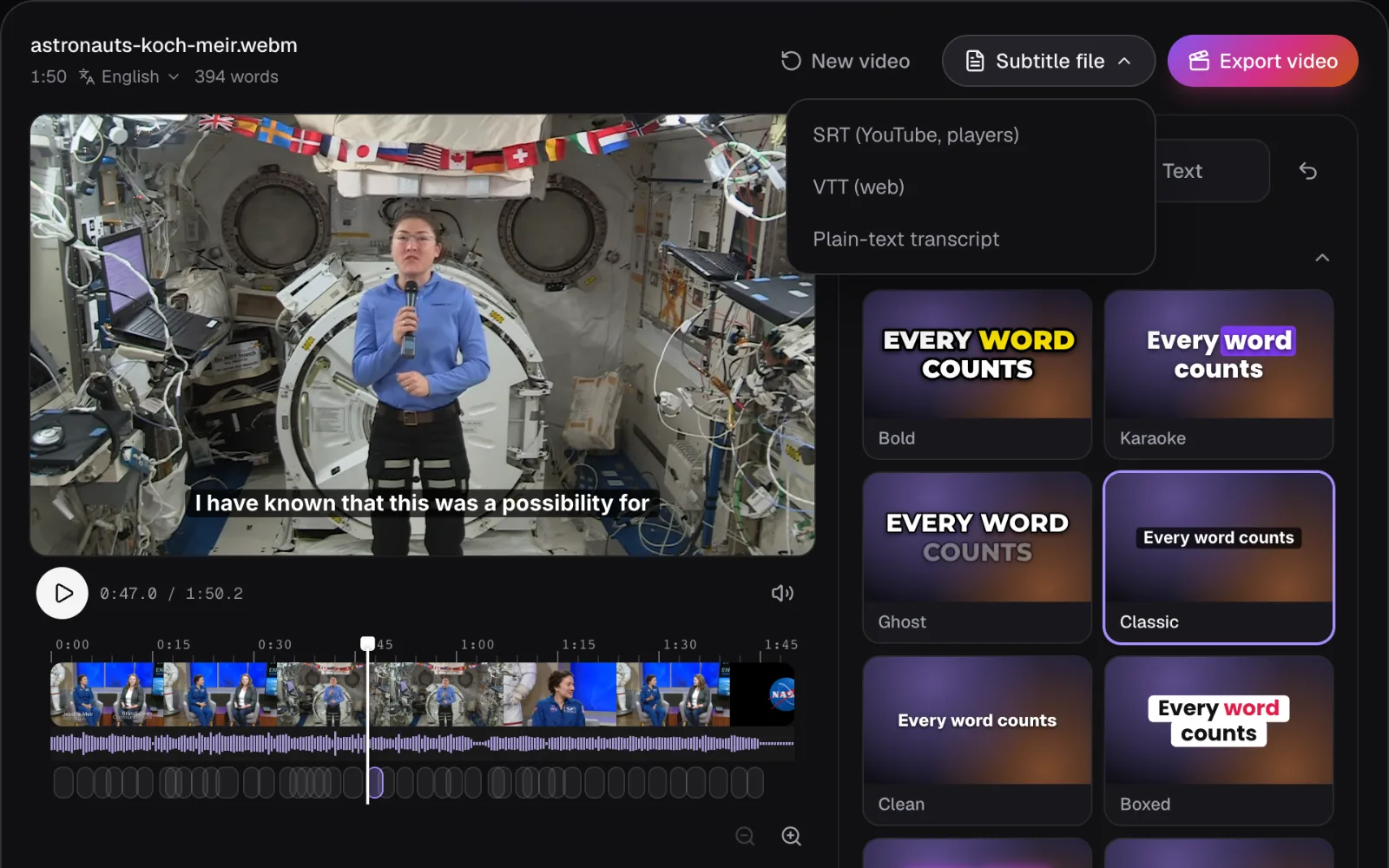
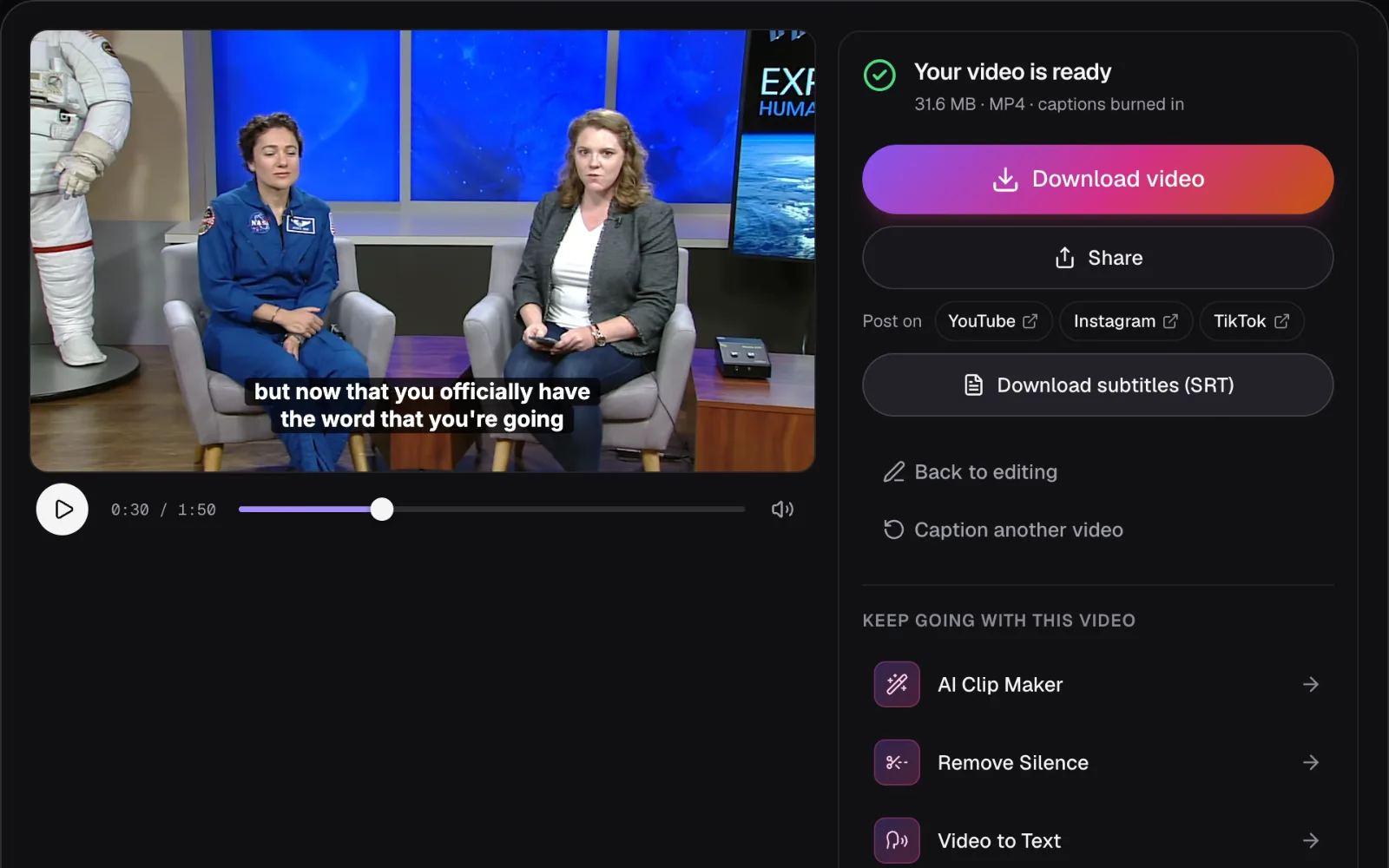
We made all three from the same edit. Auto Subtitles transcribed the interview's 394 words; the one fix we made was the host's name, spelled “Brandy” by the speech recognition and put right with “Find & replace” (2 replaced). We chose the “Classic” style, two-line subtitles on a dark band. Its “Subtitle file” menu then wrote each file straight away, without rendering the video, and “Export video” made the MP4.
Inside an SRT file: a number, two times and the words
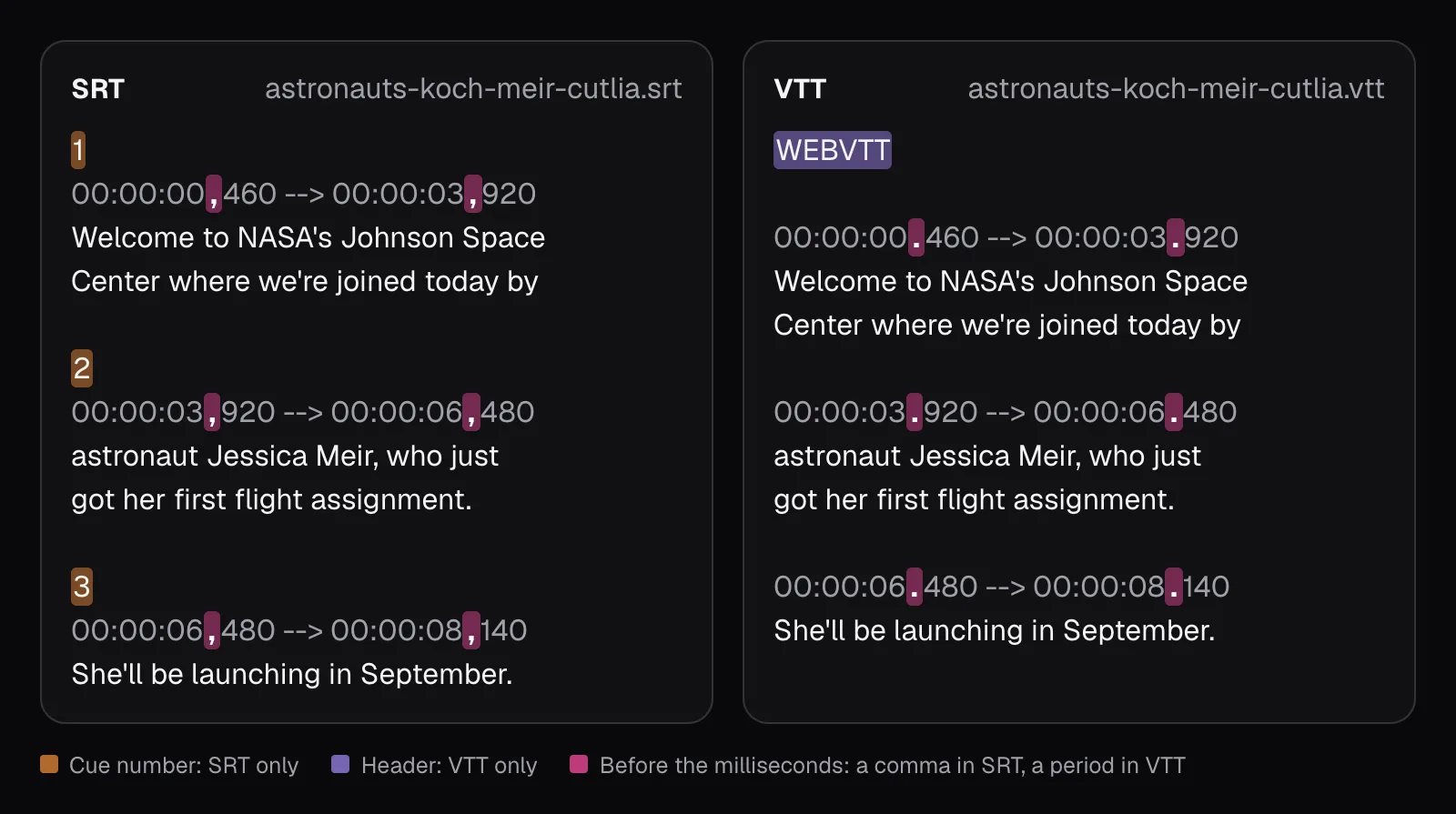
Open an SRT in any text editor and every caption, called a cue, is the same four parts: its number, a timing line, one or more lines of text, and a blank line before the next. Our file held 44 cues in 3,598 bytes. The first reads:
1, the cue's number, counting up from 1.00:00:00,460 --> 00:00:03,920: on from 0.46 seconds to 3.92 seconds, written as hours, minutes, seconds and, after a comma, milliseconds. Every SRT time has all four parts, even in a video shorter than a minute.- Two lines of text: “Welcome to NASA's Johnson Space / Center where we're joined today by”.
Where a caption breaks into lines is the file's decision, not the player's. Auto Subtitles' “Subtitles” format aims for lines of 42 characters unless you change its “Line length”: a caption longer than that is split at the space nearest its middle, so the two lines come out about even. Our longest line was exactly 42 characters, and 27 of the 44 cues took two lines.
What an SRT can't reliably say is how the words should look. The Library of Congress notes that SubRip itself supported “limited text formatting derived from HTML tags, including bold, italic, underline, and color”, and that their rendering “may be dependent on the video processing application.” YouTube is blunt about its support: for SubRip, “No style info (markup) is recognized. The file must be in plain UTF-8.” Treat an SRT as words and times only. The font, the color and the dark band of our Classic style exist nowhere in it.
What VTT changes, and what it can carry that SRT can’t
Our VTT held the same 44 cues with the same times and words, in 3,483 bytes. The differences are small but strict. The W3C specification requires the file to begin with the string WEBVTT and to be UTF-8 text. Timestamps use a period before the milliseconds, and the hours may be left out when they're zero. A cue may have an identifier above its timing line, but it's optional, and Cutlia's files leave it out. That's why the VTT came out 115 bytes smaller: 44 numbers gone, one header added.
The extras are what make VTT the bigger format. The specification defines three that SRT has no standard way to say:
- Cue settings after the end time:
line,position,size,align,verticalandregion. Alinesetting, for example, sets “the offset of the cue box from the video viewport's edge”; as a line number, 0 is the top line and −1 the bottom one. - Style blocks: CSS inside the file, after the header and before the first cue, in a block that starts with the line
STYLEand holds no blank lines. Rules use the::cuepseudo-element. - Voice spans:
<v Brandi Dean>before a caption's words says who speaks them, and a style rule such as::cue(v[voice="Esme"]), the specification's own example, can give each voice a color.
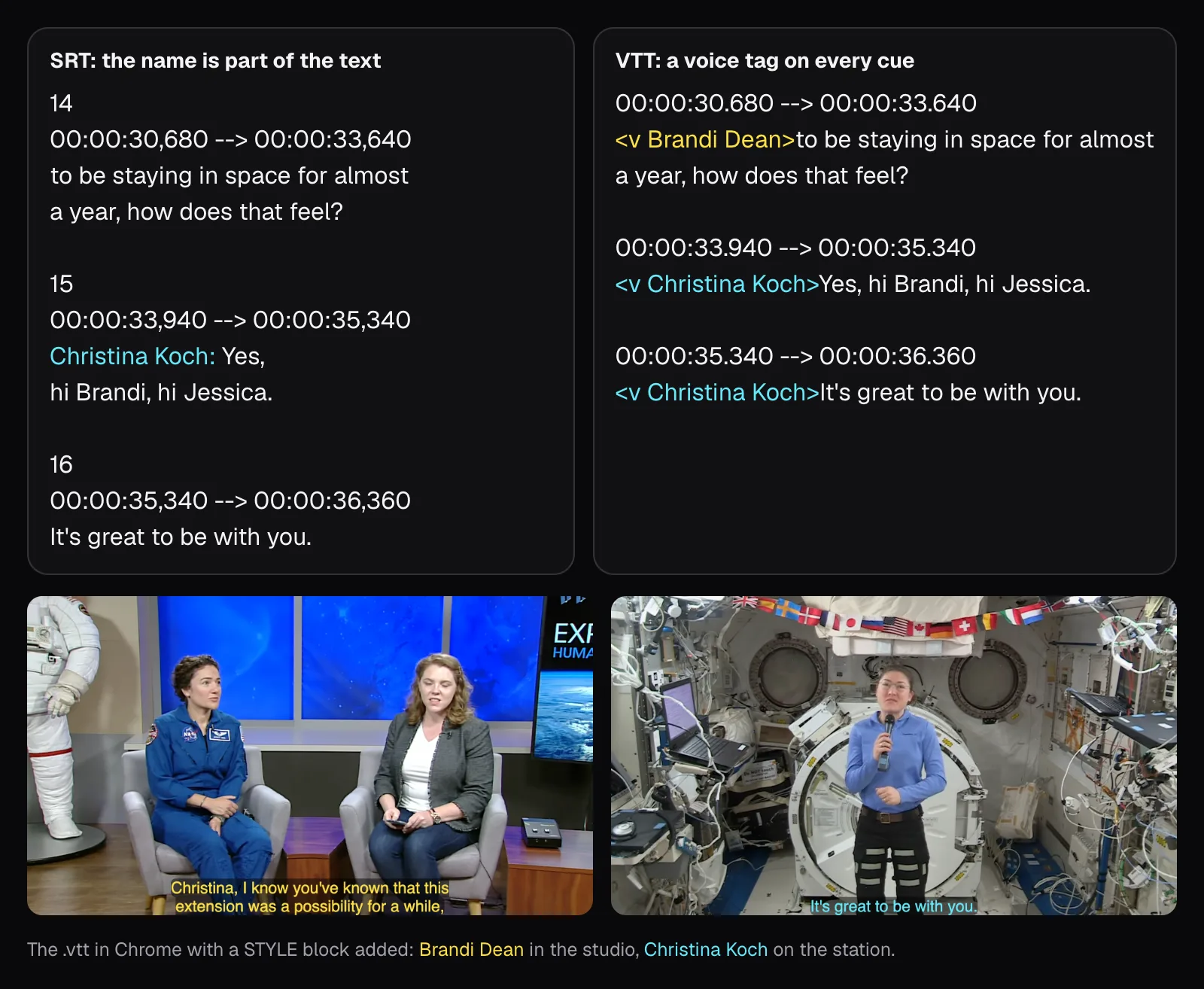
Auto Subtitles writes none of them: its VTT holds the same cues as its SRT and nothing more. Video to Text, which identifies who is speaking, uses the third. We let it find the speakers (it found three, for three people), named them as the interview's on-screen titles do, and downloaded both files. Its SRT has no field for a speaker, so it writes the name into the text at the start of each paragraph: 6 of its 44 cues begin with one, such as “Christina Koch: Yes, hi Brandi, hi Jessica.” The name made that caption longer than 42 characters, so it was split over two lines. Its VTT tags every cue with a voice instead, 44 tags in all, which made it 4,196 bytes against the SRT's 3,683.
Chrome doesn't display a voice's name: it draws only the words. To see what the tags are good for, we added a STYLE block of three rules to Video to Text's file, one color per voice, and played it. Chrome drew the host's captions in yellow and Koch's in cyan. Don't count on that elsewhere: YouTube says its WebVTT support takes positioning, but styling is “limited to <b>, <i>, <u>”.
For transcripts with speakers, and the other formats Video to Text downloads, see our guide to transcribing a video without uploading it.
What a web browser does with each file
A web page attaches a caption file to a video with the HTML <track> element. MDN's reference puts the format plainly: “The tracks are formatted in WebVTT format (.vtt files)”. The HTML standard defines a track's kind, too. Subtitles are for “when the sound is available but not understood”; captions also carry “sound effects, relevant musical cues, and other relevant audio information”, for when sound “is unavailable or not clearly audible”.
We put the original interview on a bare page in Chrome 157, gave it each file as its track in turn, and asked the player what it had read:
- The VTT loaded: 44 cues, and at 47 seconds it showed Koch's “I have known that this / was a possibility for” in its own style, white on a translucent black band, broken where the file breaks it.
- The SRT failed: the track fired an error and read 0 cues. Nothing appeared over the video, and nothing told a viewer why.
- The same SRT labeled as WebVTT (served as
text/vtt) failed the same way, with 0 cues. A label doesn't change what's inside: the WebVTT specification has a parser stop at a file that doesn't begin withWEBVTT, and an SRT doesn't.
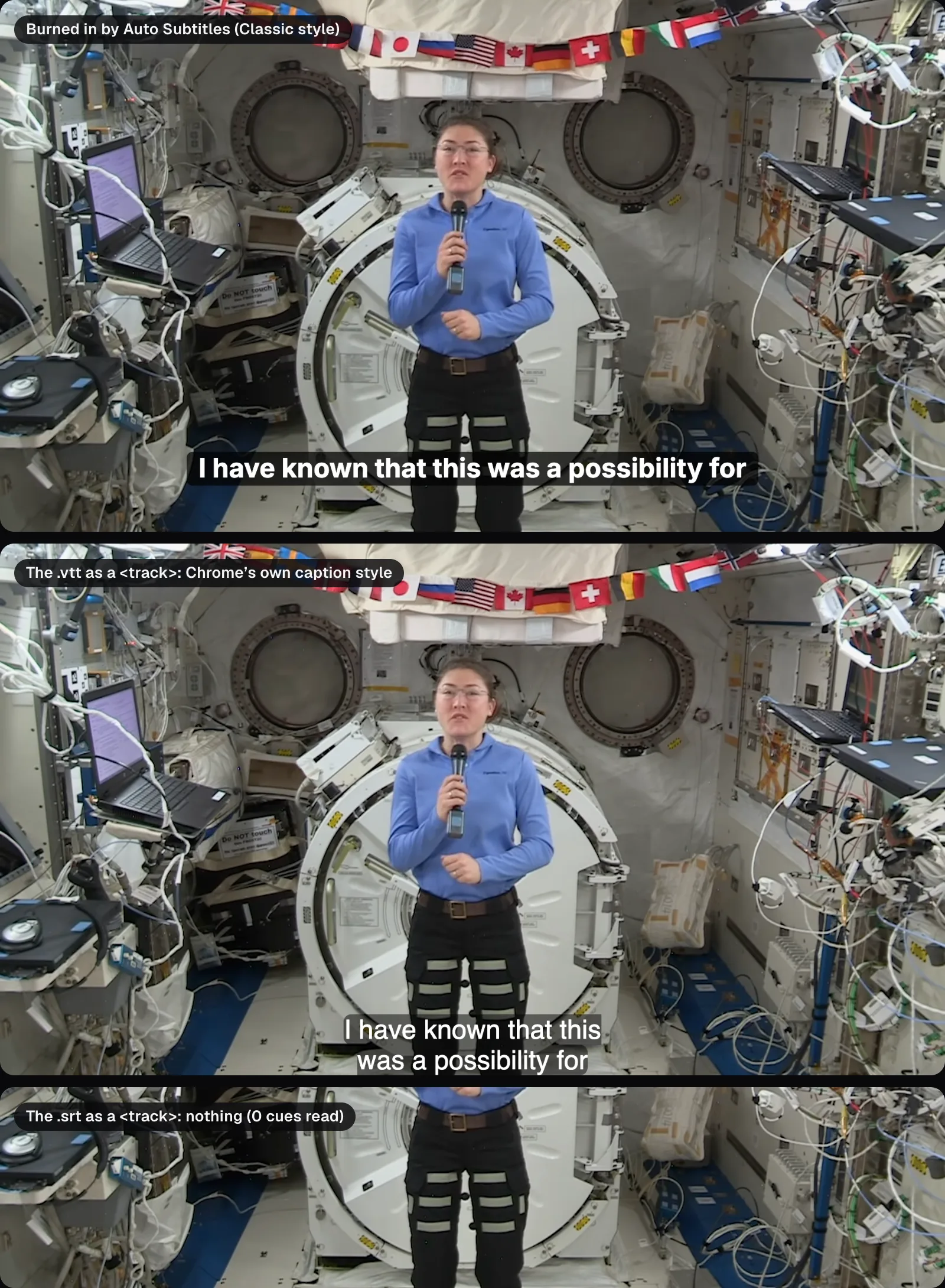
The two captions in that picture also wrap differently. A caption file fixes its line breaks, and a player keeps them. Auto Subtitles' burned-in captions wrap by their measured width on the frame, so a caption the file splits at 42 characters can fit on one line of a 1920-pixel picture, as Koch's did.
Where a caption file can go, as of November 2026
YouTube, Vimeo and LinkedIn take a caption file with a video and play it as closed captions, and Meta's tools for video ads take one too. What their own help pages say:
| Where | Takes | What its help says |
|---|---|---|
| YouTube | SRT, VTT and more | SRT is one of its “basic” formats: no markup, plain UTF-8. WebVTT is an “advanced” one: positioning works, styling only bold, italic and underline. |
| Vimeo | SRT, VTT | “We recommend using WebVTT.” Files must be UTF-8. |
| SRT | Added when you share a video “using the desktop experience”, through “Select Caption”. | |
| Facebook and Instagram ads | SRT | Named filename.[language code]_[country code].srt, such as ice_cream_ad.en_US.srt; a wrong name won't upload. Meta's developer documentation limits a caption file to 200K. |
| Your own web page | VTT | The <track> element; Chrome refused our SRT. |
Our SRT, at 3.6 kB for nearly two minutes of talk, is far inside that 200K limit. Its name needs changing, though: Cutlia names caption files after the video, as astronauts-koch-meir-cutlia.srt, and Meta's ad tools want the language in the name, so we'd rename it astronauts-koch-meir.en_US.srt before uploading. Vimeo asks for the language in a menu instead.
Two places in that list want SRT only, and one wants VTT only; Auto Subtitles' menu points the same way, with “SRT (YouTube, players)” and “VTT (web)”. If you only keep one, keep the SRT, and download the VTT when a web page needs it.
Why short videos need burned-in captions
TikTok, Instagram Reels and YouTube Shorts are built around a video you upload or record in the app, and their captions are their own, made from its sound. TikTok introduced auto captions in 2021: creators turn them on “in the editing page after they've uploaded or recorded a video” and can edit the text, and viewers can switch them off. Meta announced in 2022 that Instagram's feed videos get auto-generated captions, “turned on by default”. YouTube's help for Shorts made in YouTube Studio says: “Where available, the system automatically adds autocaptions to the Short.” None of the TikTok and Instagram pages we could read describes attaching your own caption file to a short video, and YouTube's help on uploading one doesn't mention Shorts.
Whatever an app does with captions, people save short videos, send them in chats and post them again elsewhere, and what travels each time is the video file. Our burned-in MP4 held exactly two tracks, picture and sound, with nothing else inside: the captions were in the picture, so anything that shows the picture shows them, in the words you checked and the style you chose.
Burning in has three costs, all measured on our export:
- Time. Every frame is decoded, drawn on and encoded again. Our 1:50 interview took 11.6 seconds, the middle of three runs; a caption file is written the moment you click.
- Size. The MP4 came out at 31.6 MB against the original's 20.3 MB. The picture was encoded again, from VP9 at 1.4 megabits a second into H.264 at 2.1, and the file's size follows the new encoding.
- Permanence. Nobody can turn them off, enlarge them or fix a typo later without the original video. Keep the original and the caption file next to the export.
How big, where and how long burned-in captions should be on a phone is the subject of our guide to captions people actually read, and the platforms' sizes and safe areas are in our guide to TikTok, Reels and Shorts video specs.
Accessibility: what closed captions do that burned-in ones can’t
The Web Content Accessibility Guidelines make captions a Level A requirement, the most basic level, in success criterion 1.2.2: “Captions are provided for all prerecorded audio content in synchronized media”, unless the media is itself an alternative for text and clearly labeled as such. WCAG 2.2 counts both kinds. Its glossary says “Closed Captions are equivalents that can be turned on and off with some players” and “Open Captions are any captions that cannot be turned off”, and the W3C lists open captions, its technique G93, among the sufficient ways to meet 1.2.2. Burned-in captions can meet the requirement.
The differences are in what the viewer can do, and in what the captions cover.
- Size and color. The W3C's media accessibility requirements ask players for “a range of font faces and sizes” and say that the user “should have final control over rendering styles like color and fonts”. A player can only apply those settings to text it draws. Burned-in captions arrive as pixels, at the size and contrast the editor chose.
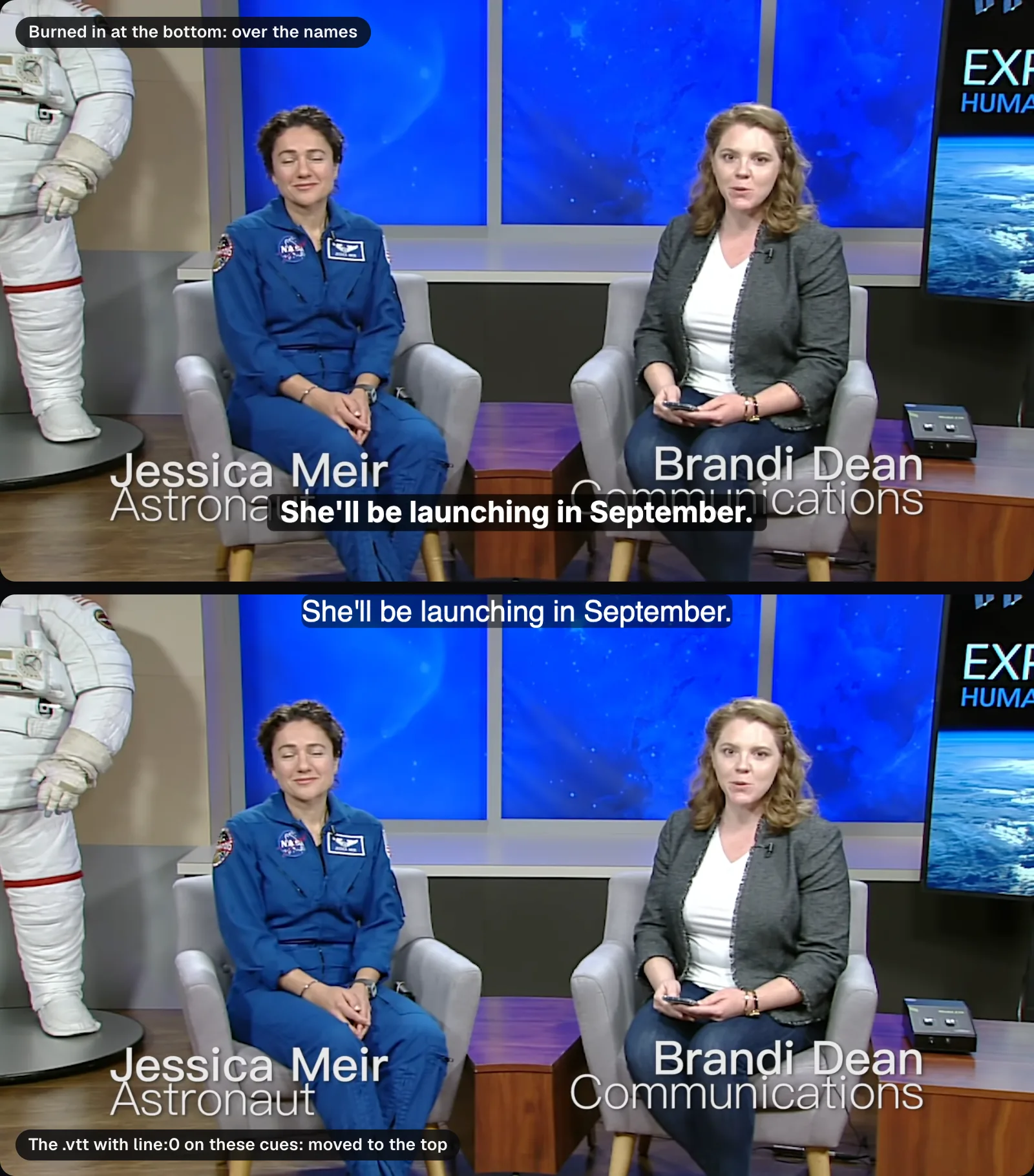
- What they cover. The glossary adds: “Captions should not obscure or obstruct relevant information in the video.” Our interview opens with its own titles naming each person at the bottom of the frame, and our burned-in captions, at the bottom where the Classic style puts them, ran right across them. Auto Subtitles' “Position” setting moves every caption of a video at once. VTT can move single cues: we added
line:0to the 6 cues shown while the titles are up, and Chrome drew those at the top of the picture. - More than words. WCAG's captions convey “sound effects, music, laughter, speaker identification and location”, where subtitles carry dialogue only. Cutlia's speech recognition leaves out the bracketed sound notes it sometimes hears, such as [Music] or (applause), so a transcript from it is subtitles until you type in the sounds that matter and say who's speaking. Video to Text's speaker labels cover the second.
Burned-in captions also leave nothing to copy, search or translate: the words exist only as pixels. A caption file is text, which can be searched, copied, corrected and translated. If your video needs a translation as well, see our guide to English subtitles for a foreign video.
Which to use, and how to get all three from one edit
Choose by where the video is going:
- YouTube, Vimeo, LinkedIn or a Facebook ad: upload the SRT as closed captions, renamed for Meta. Vimeo prefers the VTT.
- A video on your own website: the VTT, in a
<track>element. - TikTok, Reels, Shorts, or a file people will forward: burn the captions in.
- A transcript-like file with speakers: Video to Text's VTT, or its SRT with names in the text. MP4 to Text is the same tool for MP4 files.
- The most accessible result: both. A burned-in copy for the apps, and a caption file wherever the player takes one.
One thing to set before downloading a file: the caption format. The file follows the editor's “Captions show” setting, so the same words gave very different files. As “Short lines”, made for vertical video with one line of up to 18 characters, they came out as 139 cues of 0.72 seconds on average; as “Subtitles”, 44 cues of 2.27 seconds. Short lines suit burned-in captions on a phone. For a file a player will show over a wide video, download the “Subtitles” version.
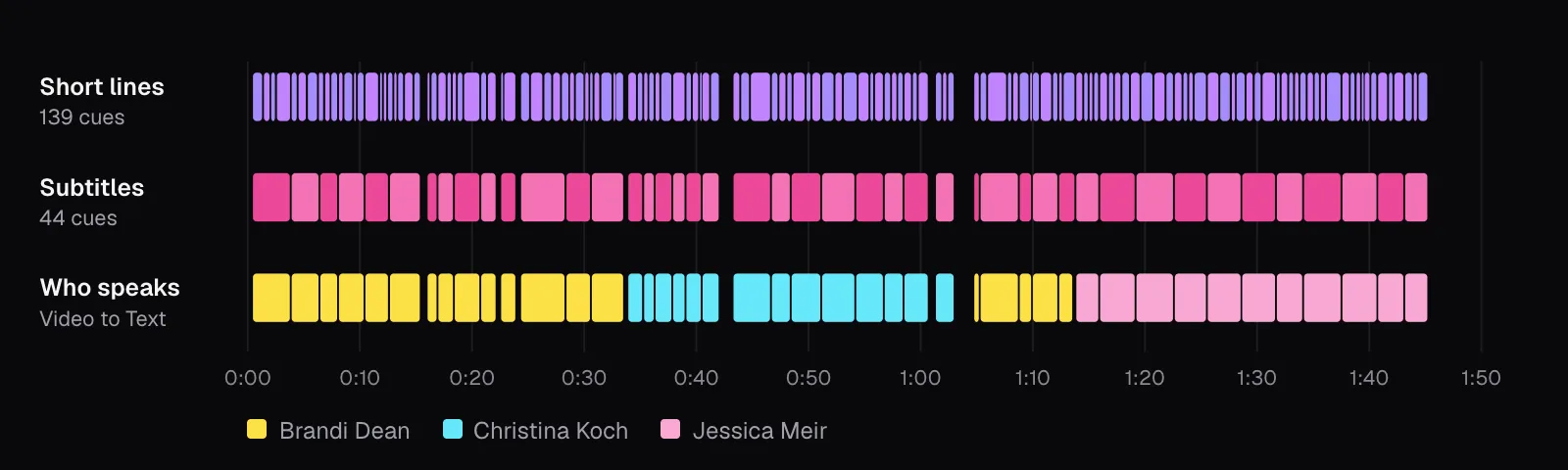
The files agreed with each other in every other way we checked. The SRT from the export's “Download subtitles (SRT)” was byte for byte the menu's. Video to Text's 44 cues had the same times as Auto Subtitles', except one: it ended the host's last question at 1:13.67, 0.21 seconds before Meir's answer, where Auto Subtitles holds a caption on screen until the next one starts when the gap is that short.
The steps in Cutlia:
- Open the video in Auto Subtitles and let it transcribe; read the captions in the “Text” tab with the video playing, and fix names with “Find & replace”.
- Choose a style and the “Captions show” format, then open “Subtitle file” for the SRT, the VTT or a plain-text transcript.
- Click “Export video” for the burned-in MP4. On the result, “Download subtitles (SRT)” gives the caption file as well.
The tools in this guide
Questions people ask
Should I upload SRT or VTT to YouTube?
Either works. YouTube lists SubRip (.srt) among its basic formats, with no style markup recognized, and WebVTT (.vtt) among its advanced ones, where positioning is supported and styling is limited to bold, italic and underline. If your file has no positions or styles, both carry the same captions: our two files held the same 44 cues, times and words. Pick SRT if you also post to LinkedIn or run Meta ads, which take only SRT.
How do I convert an SRT file to VTT?
Add the line WEBVTT and a blank line at the top, then change the comma before the milliseconds on each timing line to a period. Don’t replace every comma in the file: when we followed that shortcut from Vimeo’s help, 16 commas inside our captions’ text became periods too. The cue numbers can stay, because VTT treats them as identifiers. Auto Subtitles and Video to Text download both formats directly.
Why don’t my SRT subtitles show up in an HTML video?
The HTML track element expects WebVTT, which must begin with the word WEBVTT. In Chrome, our SRT made the track fire an error and read 0 cues, so nothing appeared over the video, even when we served it as text/vtt: the label doesn’t change the contents, and a WebVTT parser stops at a file that doesn’t begin with WEBVTT. Use the VTT version of the same captions, or convert the SRT by adding the header and changing the commas in its timestamps to periods.
Can burned-in captions be removed or turned off?
No. Burned-in captions are drawn into every frame of the picture and the video is encoded again with them, so there is no caption track to switch off or edit. WCAG calls them open captions: captions that cannot be turned off. If you might need a clean version, a correction or another language later, keep the original video and the SRT or VTT file next to the burned-in export.
Can I upload an SRT file to TikTok or Instagram Reels?
None of the TikTok and Instagram pages we could read describes uploading a caption file for a post. Both make automatic captions from the sound, which viewers can turn off. To show your own checked words in your own style, and keep them when the video is saved or shared elsewhere, burn them into the video before you post. Meta’s ad tools are the exception: ads accept SRT files.
Do burned-in captions meet WCAG accessibility guidelines?
They can. WCAG 2.2 counts open captions as captions, and the W3C lists providing open captions as a sufficient technique for success criterion 1.2.2. They still have to be complete, naming speakers and important sounds as well as words, and shouldn’t cover important parts of the picture. A closed caption file adds what open captions can’t: viewers can turn it off, and a player can draw it larger or in other colors when they ask.
Sources
Where the facts in this guide come from, besides our own tests:
- WebVTT: The Web Video Text Tracks Format (Candidate Recommendation Draft, 20 May 2026) — W3C
- Web Content Accessibility Guidelines (WCAG) 2.2 — W3C
- Understanding Success Criterion 1.2.2: Captions (Prerecorded) — W3C Web Accessibility Initiative
- G93: Providing open (always visible) captions — W3C Web Accessibility Initiative
- Media Accessibility User Requirements — W3C
- HTML Standard: the track element — WHATWG
- <track> HTML embed text track element — MDN
- SubRip Subtitle format (SRT) — Library of Congress, Sustainability of Digital Formats
- Supported subtitle and closed caption files — YouTube Help
- Add subtitles & captions — YouTube Help
- Video Clips & Shorts in YouTube Studio — YouTube Help
- How to add captions or subtitles to my video — Vimeo Help Center
- Troubleshooting: Caption and subtitle issues — Vimeo Help Center
- Add Closed Captions to Videos on LinkedIn — LinkedIn Help
- Add Captions to Your Video Ad on Facebook and Instagram — Meta Business Help Center
- Graph API: Video Captions — Meta for Developers
- Introducing auto captions — TikTok Newsroom
- Recognizing Global Accessibility Awareness Day — Meta Newsroom
Footage in this guide
The pictures were made with Cutlia's tools from this openly licensed footage, found on Wikimedia Commons:
- Astronauts Koch and Meir React to International Space Station Mission Updates — NASA, Public domain