Captions and transcripts
How to make English subtitles for a video in another language
We transcribed NASA’s Spanish space station news, translated it to English on the device, and checked every caption against NASA’s own Spanish and English caption files.
By the Cutlia team · Published · 15 min read
The short version
- Make the transcript in the spoken language first and correct it: it is your reference for checking the English, and the words it got wrong (a name, an acronym, technical terms) are where the English goes wrong too.
- Treat machine-translated subtitles as a draft: of the 46 English captions made for NASA's Spanish news, 21 said something wrong, mostly technical terms and names, and 5 more only needed polishing.
- In Cutlia the English is a second listen to the speech, not a translation of your corrected text, so a fix in one language never reaches the other: check and correct each version.
- Watch the video, not only the text: stretches already spoken in English, and on-screen text in the original language, need decisions that no translation pass makes for you.
- Burn one language into the video and give the other as a subtitle file: Auto Subtitles saves a separate SRT for each language, and YouTube takes subtitle files one language at a time.
English subtitles let English speakers follow a video in Spanish, Japanese or Croatian, and a browser can now make them: speech recognition writes down what is said, and a second pass turns it into English, both on your own computer. What comes out looks finished. It isn't, quite, and the useful question is where to look before you publish it.
To find out, we took NASA's weekly space station news in Spanish, Espacio a Tierra of November 11, 2022: 3 minutes 40 seconds presented by Ana Cristina Olvera, with a rocket launch, a cargo ship's arrival, a satellite project and a spacewalk plan. It is dense with what translation finds hard: names, dates, numbers, acronyms, a pun and two stretches where people speak English. NASA also published what makes it a fair test: its own Spanish caption file for the video, and the English episode of the same week, Space to Ground, with its caption file. We made Spanish captions and English subtitles in Cutlia's Auto Subtitles, checked the English line by line against both of NASA's files, fixed what was wrong, and exported the video in each language. It all ran in Chrome on a MacBook Air with an Apple M5 chip, and nothing was uploaded.
Start with a transcript in the language that's spoken
Even when English is all you need, the transcript in the language that's spoken is worth making well. It pays twice. You get captions for viewers who speak the language, and you get the reference you will check the English against, line by line.
Auto Subtitles found the language by itself from the first stretch of speech (it asks only when it is less than 75% sure, and it didn't ask here) and wrote 504 Spanish words in 47 captions of one or two lines. NASA's own Spanish caption file for the video has 443 words; 423 of them appeared in Cutlia's transcript, in the same order. Of the other 20, some were the same words written another way (23º for vigesimotercer, 7 for siete, Zimbabue for Zimbabwe), some were places where the file and the transcript word things differently (more on those below), and the rest were real mistakes:
- A name: “Josh Quesada”, a Spanish surname, for the astronaut Josh Cassada. Two minutes later, the same name came out right.
- An acronym: “airosas” for iROSAs, the station's roll-out solar arrays.
- Specialist words: “Estribol” for estribor, starboard, and “la camioneta espacial”, the space van, for la caminata espacial, the spacewalk.
A few differences can't be settled from the text alone. NASA's file says the cargo ship carried “más de 3,674 kilos de carga”; Cutlia's transcript says “más de 3.600 kilos”, and the English pass, which listened separately, wrote 3,600 too. NASA's file says “tres CubeSats”, three small satellites; neither pass has a number there, with “satélites CubeSat” in Spanish and “CubeSat satellites” in English. A published caption file may follow the script rather than the recording, and a presenter doesn't always read a script word for word. When the file and the recording disagree, the subtitle has to match the recording, so those are lines to check by ear.
We corrected the Spanish with six Find & replace fixes and deleted five captions (a later section explains why). If you would rather read a transcript as paragraphs, Video to Text makes the same transcript, and how that works without sending your file anywhere is the subject of our guide to transcribing privately.
How the English is made: a second listen, not a translation
Press “Translate to English” and Cutlia doesn't translate your Spanish captions. It listens to the speech again with an OpenAI Whisper model trained for that job, which turns speech in another language straight into English text, with a time for every word. On a computer with more than 4 GB of memory whose graphics chip runs WebGPU with 16-bit math, that model is Whisper medium, with 769 million parameters and a one-time download of about 517 MB, which the browser keeps; elsewhere, phones included, Cutlia uses the smaller Whisper small. The model Cutlia transcribes with on those computers, Whisper large-v3-turbo, can't translate: OpenAI's own documentation says “the turbo model is not trained for translation tasks” and points to the multilingual models instead. So translating is a second pass over the whole recording.
That design has three consequences you will meet.
- Fixes don't travel. Correcting “Quesada” in the Spanish changed nothing in the English, which had its own mistake, “Casada”. Each language keeps its own words, edits and undo; only the style, the caption format and the timing offset are shared. Beside the English, the editor says “Machine-translated”.
- The two passes fail separately, but in the same places. Each of the four words the Spanish misheard came out wrong in English too, in its own way: Cassada, iROSAs, starboard and spacewalk became “Casada”, “airbags”, “Stribor” and “Spacecraft”. A corrected transcript is a map of the risky lines.
- A second run can differ. The speech is decoded in stretches of up to 30 seconds, and when a stretch comes out broken (words placed after the audio ends, or a phrase repeating in a loop), Cutlia decodes it again with a little randomness, as OpenAI's reference decoder does. We translated the same file a second time, in Video to Text: the Spanish came out identical, word for word, while the English kept 405 of its 410 words in the same order and changed the other five, all between 0:39 and 1:04, where “a meeting” became “a close-up” and “supplying” became “refueling”.
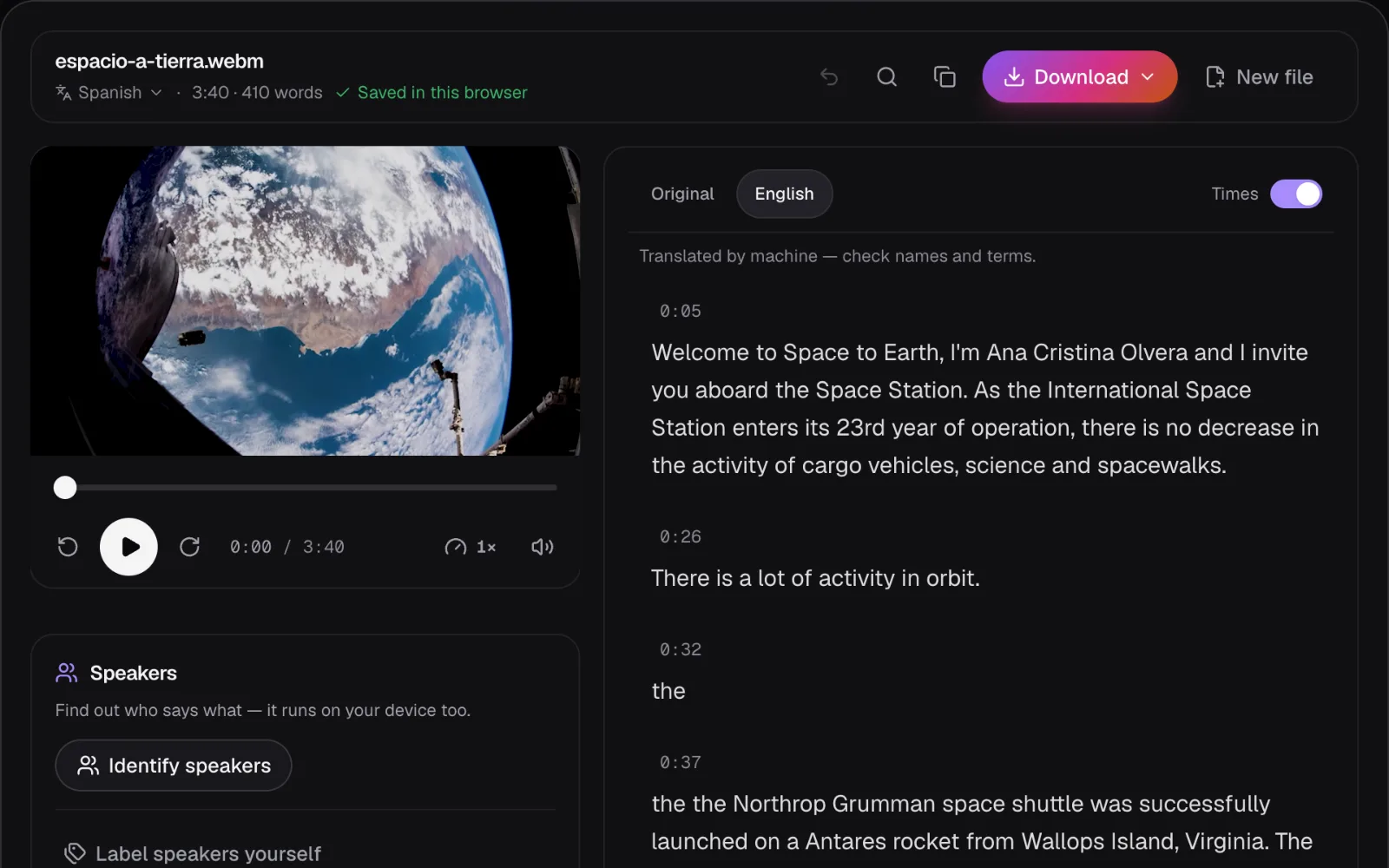
If you only need to understand a video, that is often enough: the Translate Video to English page starts the English by itself once the transcript is ready. Subtitles that others will read need the checking below.
What the machine English got wrong
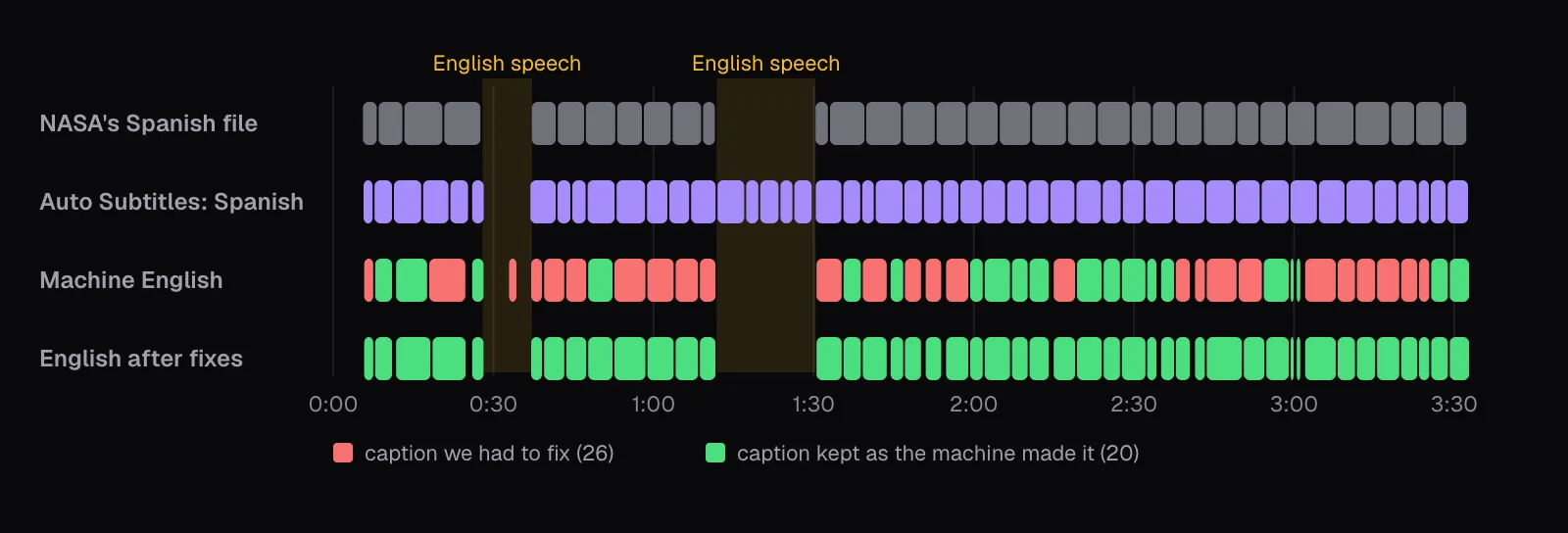
We went through all 46 English captions with the Spanish beside them and NASA's English episode for reference. 21 had something wrong in what they said, 5 more needed only their grammar or style fixed, and 20 we kept exactly as the machine made them. Counted by the caption, the faults were:
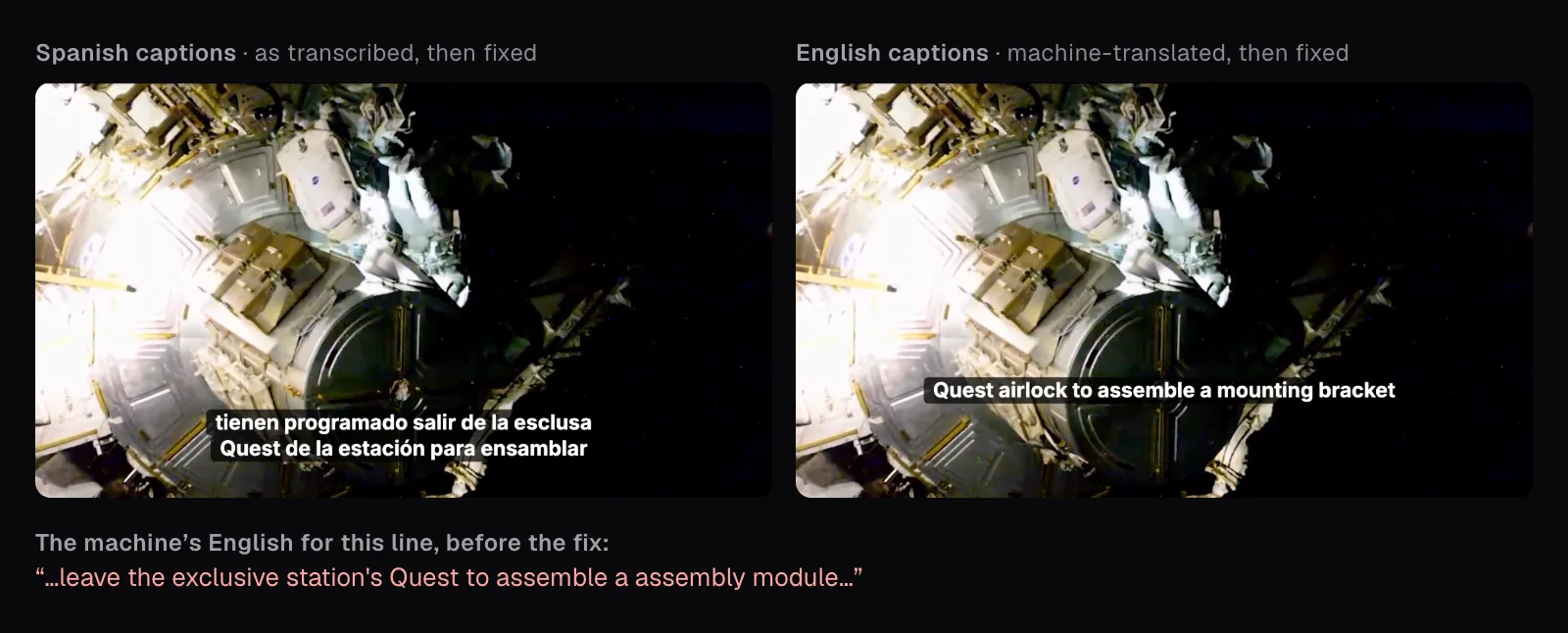
- Technical terms, 11 captions. “Nave espacial”, spacecraft, became “space shuttle” three times, the name of a different vehicle; where the presenter did say space shuttle (transbordador espacial), the English said “Space Transporter”. Carga útil, payload, became “useful cargo”, esclusa, airlock, became “exclusive”, and entramado, the station's truss, became “layout”.
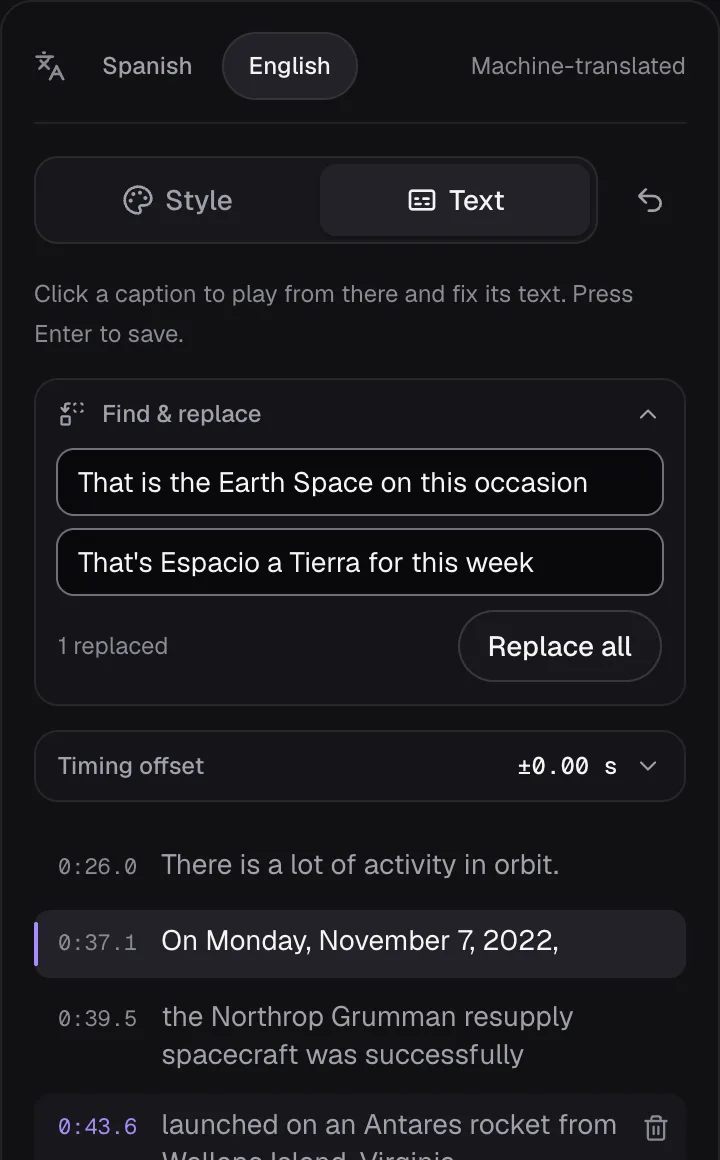
- Names, 6 captions. The show's own name came out as “Space to Earth” and then “the Earth Space”; the satellite project BIRDS-5 as “Birch 5” and, 20 seconds later, “BIRTHS 5”. The Spanish transcript had the words of both right.
- Grammar, 4 captions, such as “a series of spacewalks, American, to end the year”, and 2 of style, where we spelled out “seven hours” and wrote “8 a.m.”.
- One each for a dropped date, a lost pun, a dropped word (“upcoming” spacewalks) and a stray word.
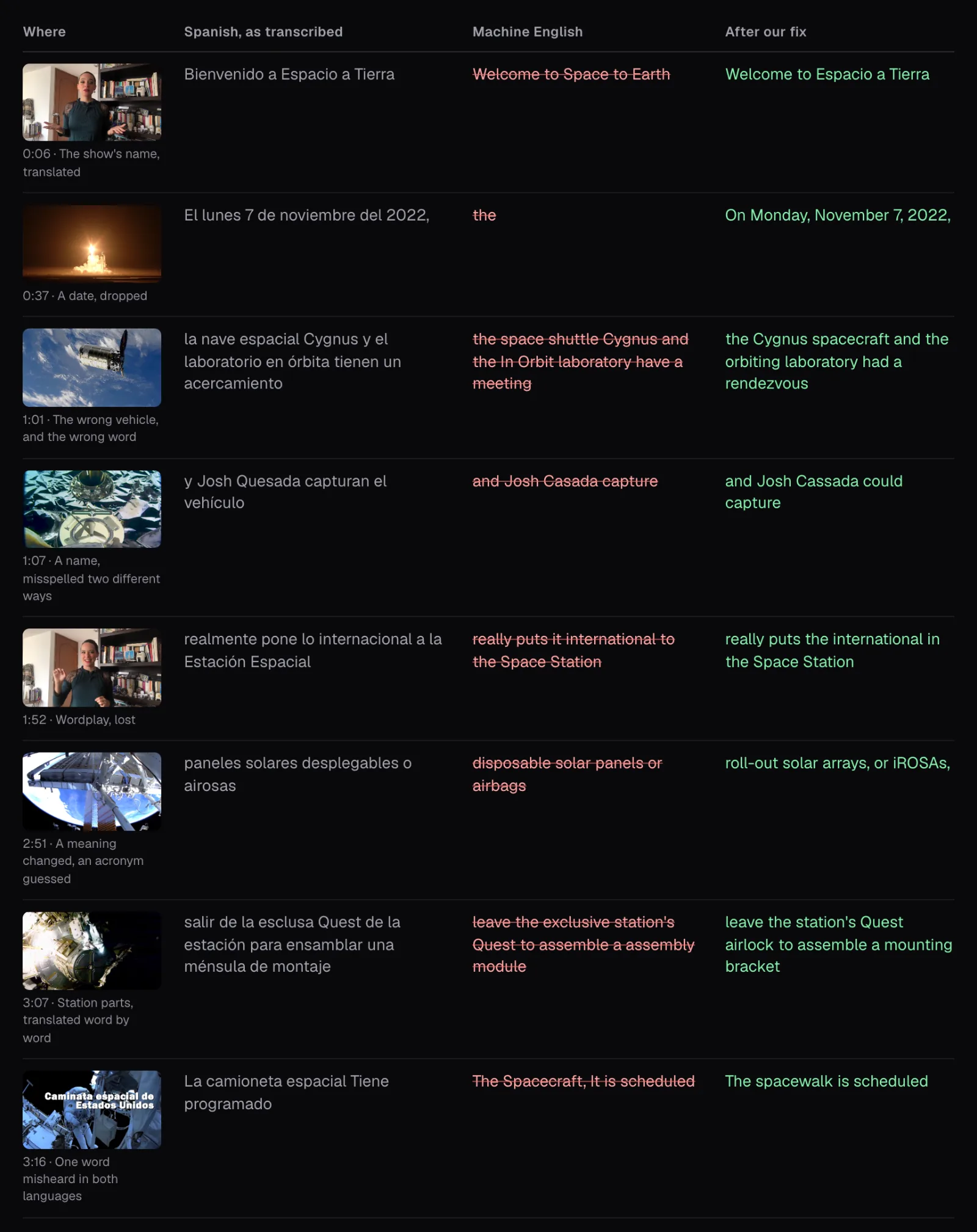
The pattern is a hurried bilingual listener's: common words where the field has its own. The meaning can change. Paneles solares desplegables are deployable solar panels; the English called them “disposable”, and turned the acronym after them into “airbags”. A pun went flat: NASA's English episode says one of the week's new payloads “really puts the international into ISS”, the Spanish kept the joke, and the machine wrote “really puts it international to the Space Station”.
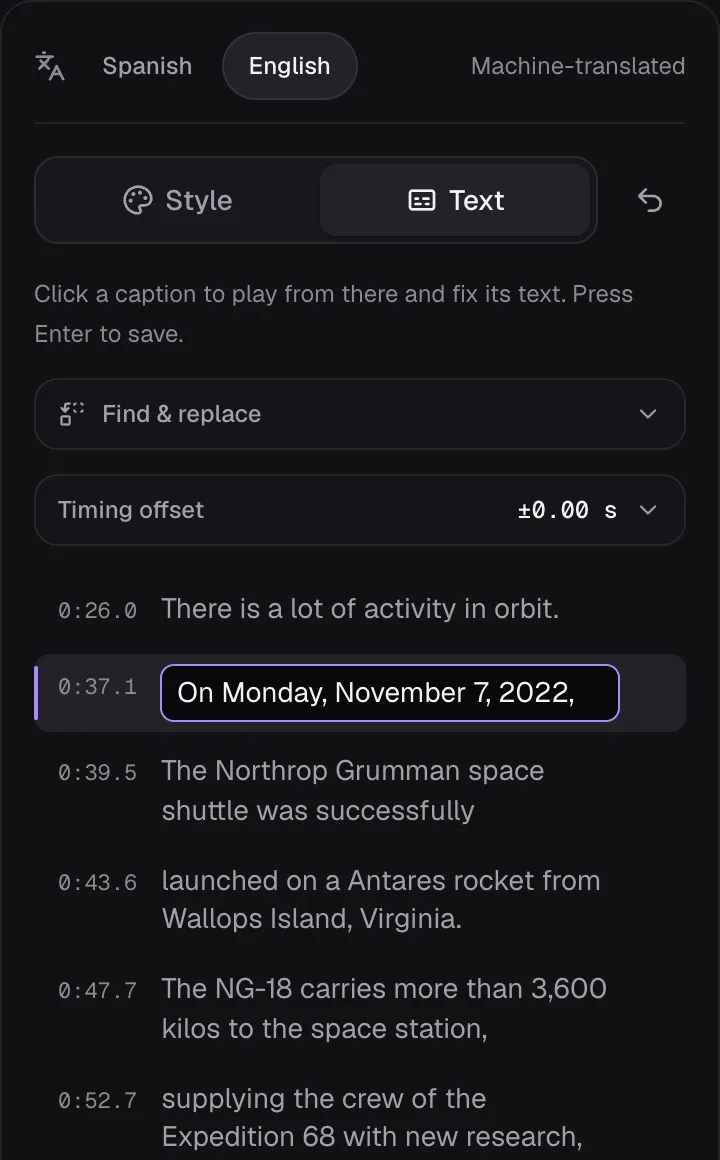
The quietest fault was the worst. At 0:37, over pictures of the launch, the Spanish transcript reads “El lunes 7 de noviembre del 2022”, Monday, November 7, 2022. The English for that whole stretch was one word: “the”. A lone “the” is easy to skim past; the date is simply missing, and only a comparison with the original shows it.
Names, numbers and terms: how to check them
Read the English against the original, not on its own: fluent English is exactly what hides a wrong vehicle or a missing date. Then go through the three things machine translation gets wrong most, in this order.
- Names. Spell people, missions and organizations as they spell themselves, and look at the picture: Ana Cristina Olvera's name card is on screen at 0:08, the Cygnus graphic reads “S.S. SALLY RIDE”, and “BIRDS-5” is written in the corner of the lab footage at 2:05. Netflix's style guide for English subtitles says: “Do not translate proper names unless Netflix provides approved translations.” A show's title is a name too. “Space to Earth” isn't what anyone calls this one; we kept Espacio a Tierra, and the other fair choice would be NASA's English edition, Space to Ground.
- Numbers and dates. Check that every number in the original has one in the English, then check how it is written. The Spanish transcript wrote 3.600, with a period, and the English correctly made it 3,600. Units are a choice: NASA's English episode gives the same cargo as “over 8,100 lbs”, while a subtitle can keep the speaker's kilos, as ours did. Netflix's guide spells out numbers up to ten, which is why “7 hours” became “seven hours”.
- Terms. Find the field's own English rather than a word-by-word version. NASA's English episode of the same week gave us Quest airlock, mounting bracket, starboard side of the truss and roll-out solar arrays. For other subjects, the organization's English pages or a field's glossary do the same job.
In the editor's “Text” tab, click a caption to play it and fix it in place; Enter saves. “Find & replace” changes a phrase everywhere at once, which suits a name that comes back. We made 22 fixes that way and two caption by caption.
When part of the video is already in English
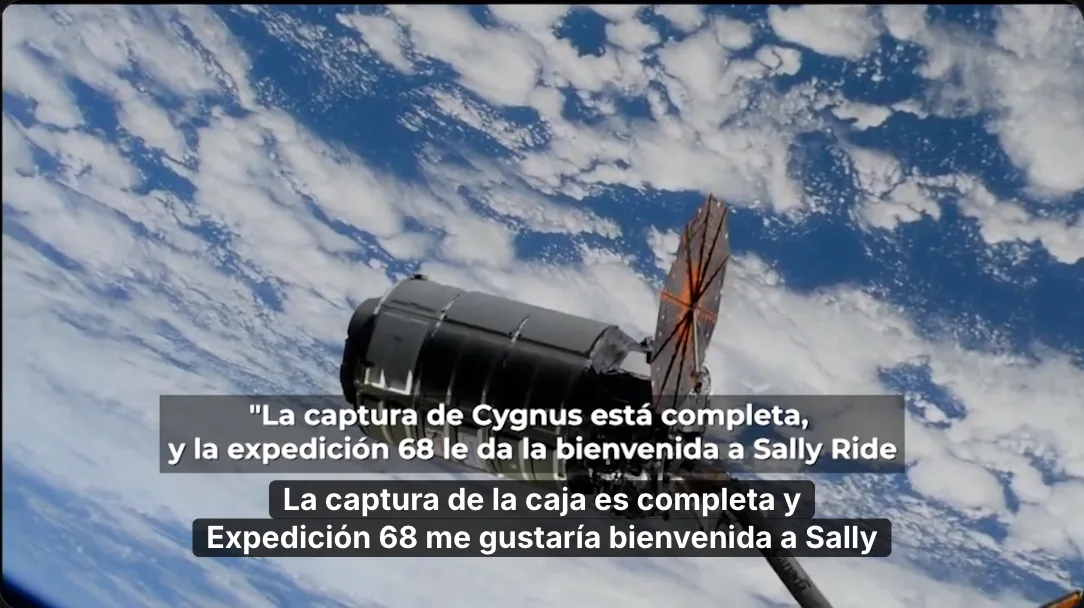
Two stretches of this Spanish video aren't in Spanish. Between 0:28 and 0:37 the launch commentator speaks English, and from 1:12 to 1:30 the station's crew welcomes the cargo ship in English, ending by agreeing with Sally Ride that from low Earth orbit “the stars do not look bigger, but they certainly look brighter.” NASA subtitled both in Spanish inside the picture and left them out of its Spanish caption file, which has no captions from 0:28 to 0:37 or from 1:12 to 1:30.
The two passes handled the crew's message in opposite ways. The Spanish pass, set to Spanish for the whole file, translated the crew's English into Spanish of its own: “La captura de la caja es completa”, the capture of the box is complete, for “Cygnus capture is complete”, and “de Leo” for LEO, low Earth orbit. Burned in, those five captions would have sat right under NASA's own Spanish subtitle, so we deleted them. The English pass wrote nothing at all there. Over the launch commentary, the Spanish pass wrote nothing and the English pass one stray “the”, which we deleted too.
Whether English speech needs English subtitles depends on who is watching. Viewers who can hear don't need them: Netflix's guide for English subtitles of non-English shows says not to include lines of English dialogue unless asked to. The W3C draws the line that matters here: subtitles are for people who hear the audio but don't know the language, while captions, the text of the speech and of the other sounds needed to follow it, are what deaf viewers need, and “Captions are needed for accessibility, whereas subtitles in other languages are not directly an accessibility accommodation.” If your English track should also serve deaf viewers, the English stretches need text too. Cutlia's editor fixes the captions it made and can't add one where it heard nothing, but the SRT file it saves is plain text, so a missing line can be typed into it.
The same thinking applies to text in the picture. At 3:15 a title reads “Caminata espacial de Estados Unidos”, with “Martes 15 de noviembre” under it from 3:17: U.S. spacewalk, Tuesday, November 15. Netflix's guide subtitles on-screen text only when it matters to the plot, and says such a subtitle must be deleted when the dialogue already covers it; the presenter had said the date at 2:59.
Timing: does the English keep up with the speech?
The English came out shorter than the Spanish, and that helps. Once both were corrected, and the five Spanish captions over the crew's English were gone, the English captions held 2,383 characters to the Spanish 2,656, about a tenth fewer, for the same narration. They needed a median of 13.4 characters a second (136 words a minute), against 14.8 for the corrected Spanish. The BBC recommends 160 to 180 words a minute, and Netflix allows English subtitles up to 20 characters a second for adults; one English caption went past 20, the presenter's quick opening line, which was even faster in Spanish. For the rest of the reading rules, see our guide to captions people actually read.
Sync held up because both versions come from the same speech. The BBC asks that a subtitle appear when the speech starts, not anticipate it by more than 1.5 seconds, and “never appear more than 2 seconds after the words were spoken”. We matched each of the 20 English sentences with the nearest Spanish sentence start: 17 began within half a second of it, and the furthest was 0.62 seconds away. The translation's word times are approximate, though, which shows most in styles that light up each word as it is spoken; a plain subtitle style such as Classic shows it far less.
One thing did look different. A pause of 0.6 seconds or more always starts a new caption, and the English placed pauses where the Spanish had none, so “On Tuesday,” showed on its own for 0.8 seconds, the one English caption under a second. Auto Subtitles has no handles for moving single captions; its “Timing offset” shifts every caption by up to 2 seconds either way, for a whole track that runs early or late. Ours didn't need it.
Placing English subtitles over a picture that has text of its own
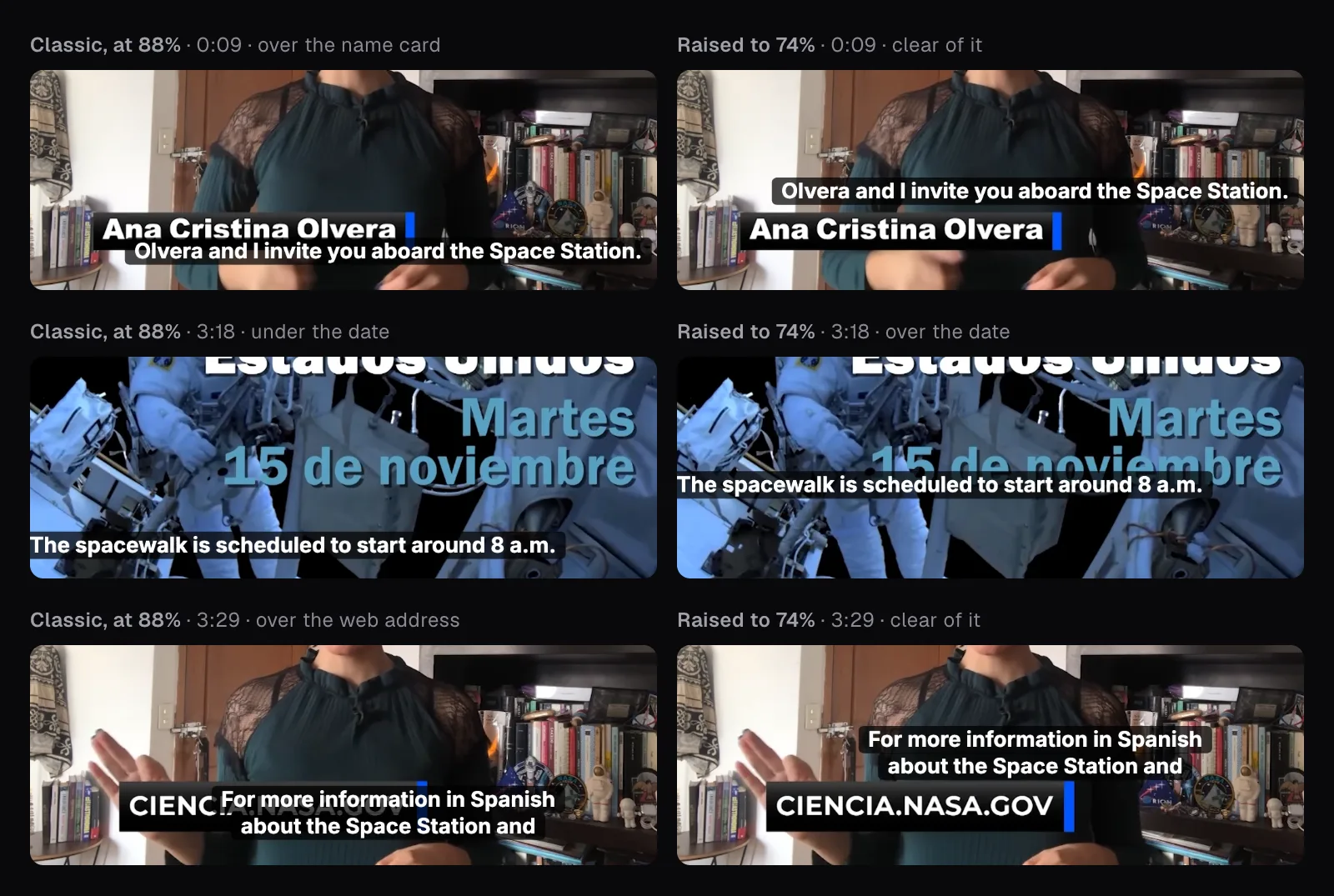
A foreign video comes with text in its own language: name cards, titles, a web address, sometimes subtitles of its own. Burned-in captions have one height for the whole video in Auto Subtitles, its “Position” setting, so every graphic has to share the screen with them. The BBC's answer is to move each subtitle as needed: “vertical displacement should be used to avoid obscuring important information (such as captions)”. With one height, you can only pick the least bad one.
Classic puts captions at 88% of the frame's height. At 0:09 that ran the English over the bottom of the presenter's name card, and at 3:29 over most of the card with NASA's web address. Raised to 74%, the captions cleared both cards, but at 3:18 they landed on the date in NASA's spacewalk title. Each height we tried covered something; 74% covered one graphic instead of two, and the date it touches had been said aloud at 2:59, so that is the export we would publish.
Exporting one language, or both
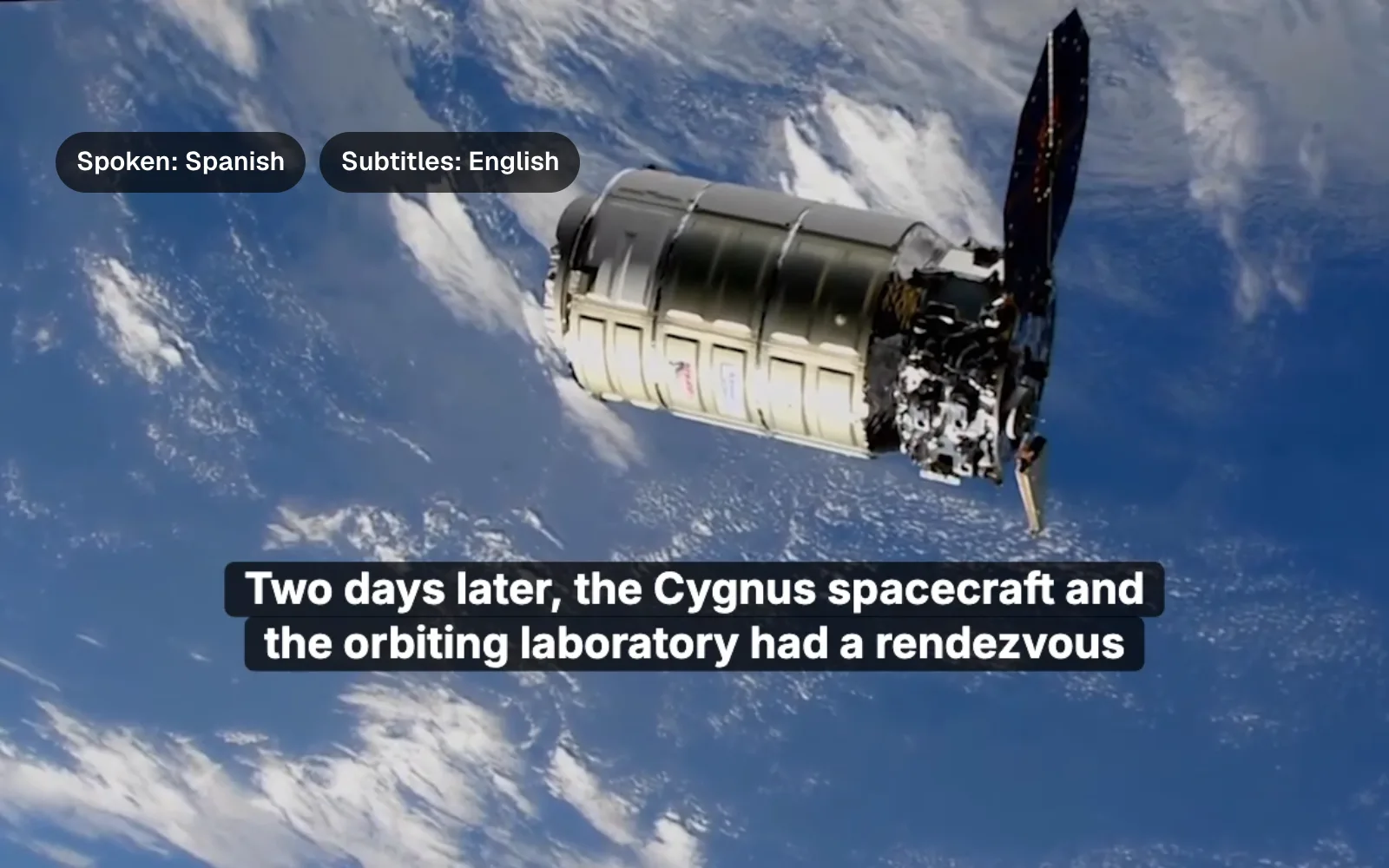
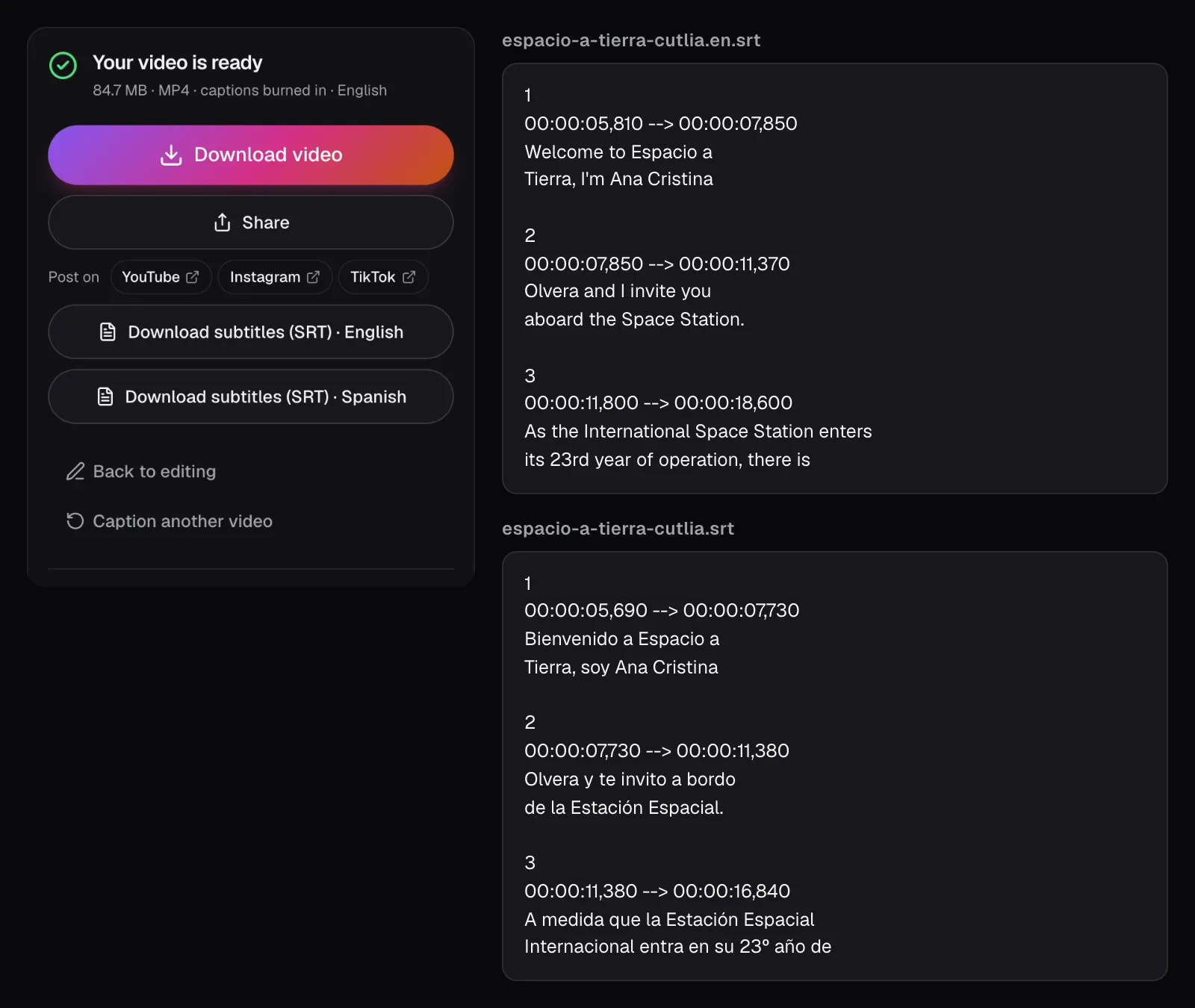
A video can carry one language burned into the picture, and Auto Subtitles says which: our English result read “84.7 MB · MP4 · captions burned in · English”. Every export, Spanish and English, came out as 1280 × 720 H.264 MP4 files of 3:40, with AAC sound. Showing both languages on screen at once isn't something Auto Subtitles does.
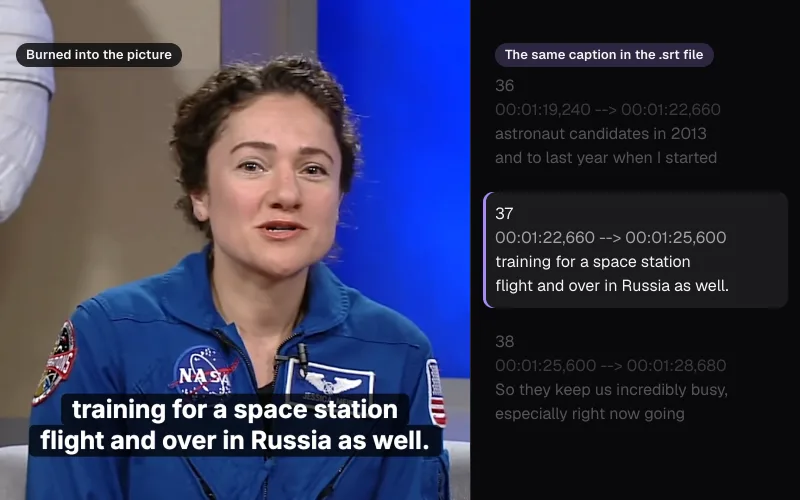
The other language goes out as a file. The result card offers “Download subtitles (SRT) · English” and “Download subtitles (SRT) · Spanish”, and the editor's “Subtitle file” menu has SRT, VTT and plain text in either language. Ours were named espacio-a-tierra-cutlia.srt and espacio-a-tierra-cutlia.en.srt. Where you post decides what to do with them:
- YouTube takes a file per language: in YouTube Studio's Subtitles page you “ADD LANGUAGE”, then upload a file “With timing”. Its help page also notes, as of November 2026, that automatic captions “will be in the video's default language only”.
- Your own website can offer both with HTML's
<track>element, one per file, markedkind="subtitles". Use the VTT downloads here: MDN notes that tracks are in the WebVTT format, and that subtitles need asrclang, the language of the file. - Anywhere you can't attach a subtitle file, the language has to be burned in, so make one video per language.
SRT, VTT and burned-in captions each suit different places, compared in our guide to caption formats.
Which way to go
- To understand a video yourself, use Video to Text's translation page and read the English with the original a click away. Fixing every line isn't worth it for your own eyes.
- To publish English subtitles, use Auto Subtitles: transcribe, correct the original, translate, then correct the English with the original beside it, names, numbers and terms first. Look at the frames where graphics appear, then export one video and both files.
- If you prefer to fix text as paragraphs, correct both versions in Video to Text, then use “Make captions”: it hands the transcript to Auto Subtitles, both languages and your fixes included, without transcribing again.
- When the stakes are high (a contract, a medical talk, a client's film), use the machine English as a draft for a human translator, not as the final text.
The tools in this guide
Auto Subtitles
AI captions in 100 languages, made on your device. Style them, burn them in, download.
Translate Video to English
Understand any video: an English transcript alongside the original.
Video to Text
Transcripts in 100 languages, with speakers and timestamps — made on your device, never uploaded.
Questions people ask
Can Cutlia translate subtitles into a language other than English?
No. Its translation is Whisper's own translate task, which turns speech in another language into English text and nothing else; OpenAI documents it as translating non-English speech into English. Captions in the spoken language work for every language Cutlia recognizes, so a Spanish video gets Spanish and English, but not French or German.
Why didn't my fixes to the original captions change the English?
Because the English isn't made from your text. Cutlia listens to the speech a second time with a model trained for translating, so the English has its own words, its own mistakes and its own undo. Correct the original first, then use it as a checklist: in our test, each word the Spanish misheard was also wrong in the English.
How accurate are machine-translated subtitles?
Good enough to follow a video, not to publish unchecked. Of 46 English captions made from NASA's Spanish news, 20 needed no change, 21 had a wrong term, name, date or meaning, and 5 needed only grammar or style fixes. Results vary with the language, the sound and the subject; in our test, technical terms and proper names suffered most.
Why are there no English subtitles where someone speaks English?
The translation pass turns foreign speech into English; when the speech already is English, it may write nothing. In our test it left a 1:12–1:30 English stretch empty. Viewers who can hear don't need subtitles there. For deaf viewers, type the missing lines into the downloaded SRT file, which is plain text.
Can I show Spanish and English subtitles at the same time?
Not burned in with Auto Subtitles: a video gets one language in its picture. Download the other language as an SRT file instead. Where subtitle files are accepted, YouTube for one, each language is added as a track of its own, so one video with both files serves both audiences without two languages competing on screen.
Sources
Where the facts in this guide come from, besides our own tests:
- BBC Subtitle Guidelines (version 1.2.5, March 2026) — BBC
- English (USA) Timed Text Style Guide — Netflix Partner Help Center
- Captions/Subtitles — W3C Web Accessibility Initiative
- Whisper (README) — OpenAI on GitHub
- Add subtitles & captions — YouTube Help
- <track>: The Embed Text Track element — MDN Web Docs
- Espacio a Tierra, November 11, 2022 (video and Spanish caption file) — NASA Image and Video Library
- Space to Ground: Spacewalk Season, 11/11/2022 (video and English caption file) — NASA Image and Video Library
Footage in this guide
The pictures were made with Cutlia's tools from this openly licensed footage, found on Wikimedia Commons: